Installing an SSL Decryption Certificate on a Client
This section describes how to install an SSL decryption certificate in the client protection scenario.
Installing the SSL Decryption Certificate in the Windows OS
Import the SSL decryption certificate from the backup copy of the certificate.
- Go to the directory where the backup copy is stored.
- Right-click Certificate and choose Install Certificate from the shortcut menu, or double-click the backup certificate. . The certificate import wizard is displayed.
Click Install Certificate and select Current User or Local Machine[H(1] as the storage location.
Click Next and select Place all certificates in the following store.
Click Browse, select Trusted Root Certification Authorities, and click OK. Click Next and then Finish.
- Import the SSL decryption certificate using Internet Explorer.
- Open Internet Explorer and choose .
- On the Content tab page, click Certificate. On the Personal tab page, click Import.
- In the Certificate Import Wizard dialog box, click Next.
- Click Browse, select the directory where the backup copy is stored, and click Next.
Select Place all certificates in the following store. Click Browse, select Trusted Root Certification Authorities, and click OK. Click Next and then Finish.
Installing the SSL Decryption Certificate in the MAC System
This section describes how to install the SSL decryption certificate in the MAC system.
Prerequisites
The SSL decryption certificate has been obtaind.
- In the task bar, click Finder, and choose Application > Keychain Access.
- Choose File > Import Items.
- Select the to-be-imported SSL decryption certificate, select System in Destination Keychain, and click Open.
- Enter the administrator login password when you import the certificate.
- Double-click the imported SSL decryption certificate.
- Click Trust, and set When using this certificate to Always Trust.
- After the setting is complete, close the current window. The certificate is successfully imported.
Installing the SSL Decryption Certificate in the Android System
This section describes how to install the SSL decryption certificate in the Android system.
Prerequisites
The SSL decryption certificate has been downloaded to the client.
- Power on the mobile phone, and choose Settings > Security.
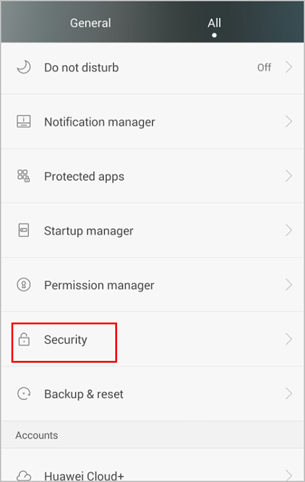
- Select Install from SD Card.
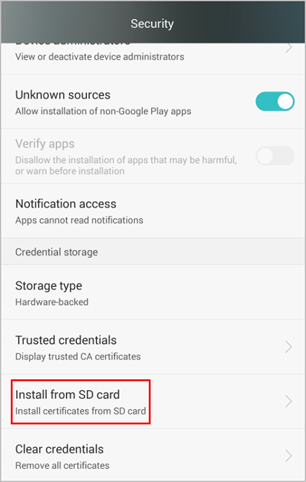
- Select Internal Storage.
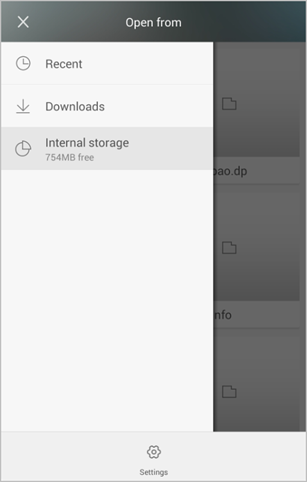
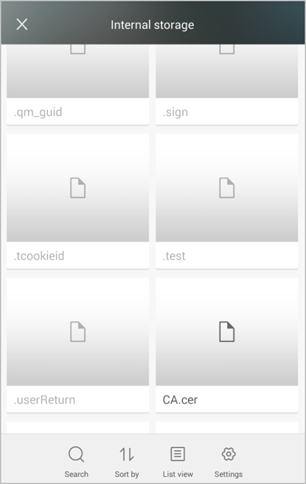
- Select the to-be-imported SSL decryption certificate named CA.cer (for example).
- Set the certificate name.
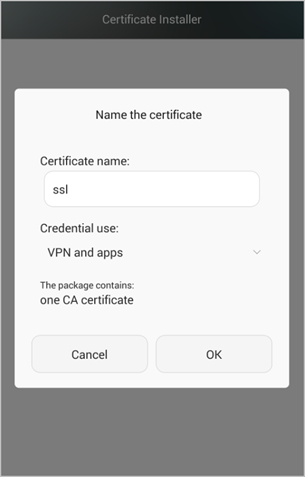
- Click OK.
Installing the SSL Decryption Certificate in the iOS System
This section describes how to install the SSL decryption certificate in the iOS system. In this example, the SSL decryption certificate file is saved in the mailbox as an attachment.
- Open the Safari browser and log in to the webmail.Double-click the attachment and click Install.
- Select Install.
Privately installing certificates cause certain risks, and the system prompts an alert. Therefore, ensure that the installed certificate is safe and reliable.
- Click Finish.
- Choose Settings > General > About > Certificate Trust Settings, find the installed certificate, and enable Trust for the certificate.
Distributing and Installing SSL Decryption Certificates Through an AD Domain Authentication System
Regardless of whether the SSL decryption certificate is issued by the built-in CA or imported, if the client does not trust the certificate, you must import the certificate to the client and require the client to trust it. Otherwise, when the client uses a browser to access HTTPS websites after the FW enables the SSL decryption function, an alarm will be generated indicating that the server certificate is not issued by a trusted CA. Some application programs may directly close the connection without generating any alarm.
Prerequisite
An AD domain has been deployed and an AD user has been created. SSL decryption certificates have been downloaded and saved to the AD domain server.
Context
In traditional certificate distribution mode (for example, certificates are distributed through emails or stored on the server for users to download), users need to download and install desired certificates, increasing the management cost of enterprise administrators.
In normal cases, the AD domain authentication system of an enterprise is used to implement automatic certificate distribution and installation. The enterprise administrator needs to configure SSL decryption certificate distribution on an AD domain server, while terminal users are not aware of the operation.

Windows Server 2008 (AD domain server) and Windows 7 (terminal user) are used as an example.
Procedure
- Choose Administrative ToolS > Group Policy Management.
- On the Group Policy Management page, choose Forest: example.com > Domains > example.com. In Default Domain Policy, right-click and choose Edit from the shortcut menu.
- On the Group Policy Management Editor page, choose Computer Configuration > PolicieS > Windows SettingS > Security SettingS > Public key PolicieS. In Trusted Root Certification Authorities, right-click and choose Import from the shortcut menu.
- On the page from importing certificates, import the SSL decryption certificate, and click Next until certificate import succeeds.
Configuration Verification
Log in with the test account. No prompt message is displayed. Use Internet Explorer 8 as an example. Perform the following steps to check whether the SSL decryption certificate is installed successfully.
- Open Internet Explorer 8 and choose ToolS > Internet OptionS.
- On the Content tab, click CertificateS.
- On the Trusted Root Certification AuthoritieS tab, you can view that the SSL decryption certificate has been installed successfully.
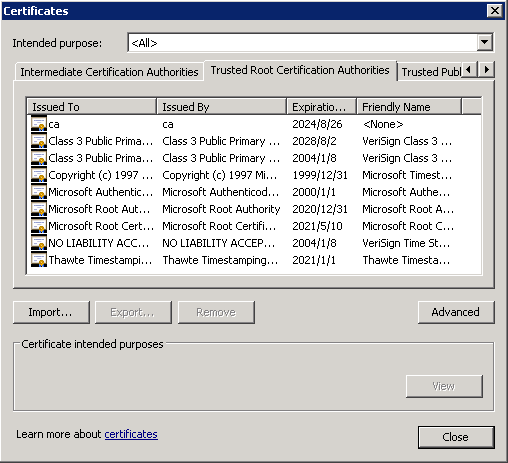
- When a user accesses an HTTPS website, no certificate-related alarm is displayed.