Setting the System Time Using the Web UI
This section describes how to configure the system time on the web UI.
Manually Setting the Time
The administrator can manually set the system time of the device.
- Choose .
- Select Manually Set the Time in Configuration Mode.Set Time Zone,System Time,System Time,and click Apply.
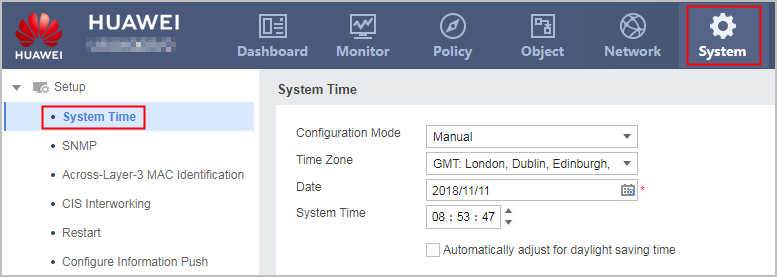
The date is in YYYY/MM/DD (year/month/date) format. To change a date, select the date item (such as the year) and enter a new value. Alternatively, click
 and select a date from the calendar that is displayed.
The system time is in HH:MM:SS (hour:minute:second) format.To change the system time, select the time item (such as the hour) and enter a new value. Alternatively, click
 /
/ on the right.
Synchronizing the Time with the Local System Time
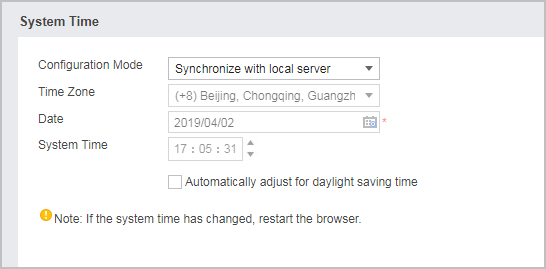
The administrator can synchronize the time of the terminal device (that is, the PC used for logging in to the device on the web UI) as the device system time.
- Choose .
- Select Synchronize the Time with the Local System Time in Configuration Mode,click Apply.
Synchronizing the Time with the NTP Server
The administrator can synchronize the time of the NTP server as the device system time.
- Choose .
- Select Synchronize the Time with the NTP Server in Configuration Mode. Set Time Zone, Date, and System Time in sequence. Set NTP Server IP:Port. Select Outbound Interface. Click Apply
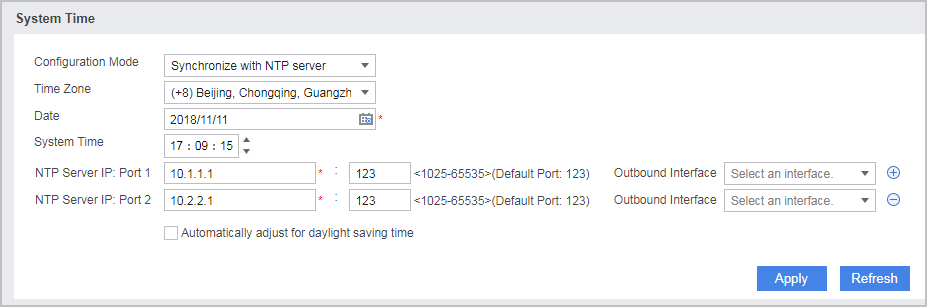
Configure the date and system time. When the NTP server works abnormally, the device uses the date and system time that are manually specified.
You can configure multiple NTP Server IP:Port values as required.
Enabling the DST
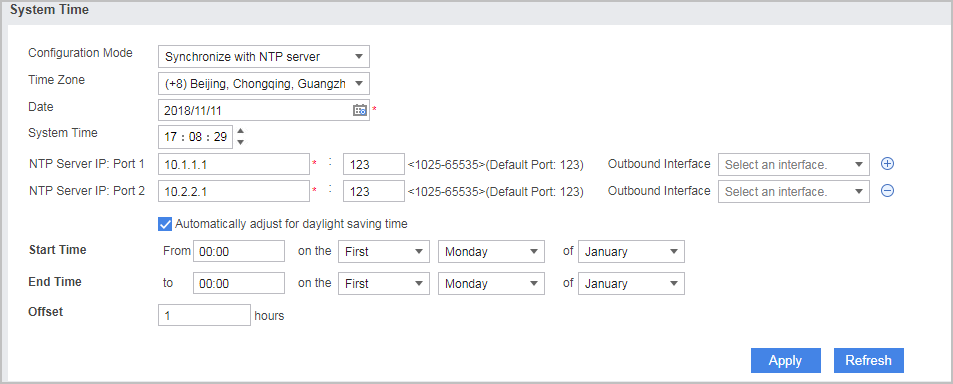
Before enable DST, configure the system time first.
- Choose .
- Select Automatically adjust clock for daylight saving time (DST).
- Select Automatically adjust clock for daylight saving time (DST),set parameters as follows and click Apply.
Parameter
Description
Start Time
Start time of the DST.
End Time
End time of the DST.
Offset Time
Offset time during the DST period.
For example, set the Start Time to 08:00 on the first Monday in April, End Time to 10:00 on the first Monday in November, and Offset Time to 01:00. After the settings are complete, the system time is automatically set to 09:00 at 08:00 on the first Monday in April, and to 09:00 at 10:00 on the first Monday in November.