Intelligent UDP Traffic Analysis
UDP is a connectionless transport layer protocol with poor reliability. However, UDP is simple and features fewer control options, less latency, and higher data transmission efficiency. Therefore, UDP is suitable for applications that do not require high reliability or that can ensure reliability by themselves, for example, DNS, TFTP, and SNMP. UDP is widely used on data center networks. The intelligent traffic analysis function for UDP flows enables the device to match the received UDP packets based on ACL rules and send the matched packets to the TAP for analysis. The TAP then sends the analysis result to the TDA for further analysis and graphical display.
Basic Concepts
UDP is a connectionless transport layer protocol that provides a simple and unreliable message service for transaction-oriented services. UDP does not provide any fragmentation, reassembly, or sorting mechanism for data packets. For this reason, after a packet is sent, UDP cannot guarantee that the packet arrives at the destination securely or completely. Figure 1 shows the format of a UDP packet. The UDP packet is very simple, which gives UDP the advantages of low resource consumption and fast processing. Such advantages make UDP an ideal choice for applications (such as audio and multimedia applications) that have high requirements on transmission efficiency but not data integrity. UDP packets are encapsulated in IP packets during transmission on the network.
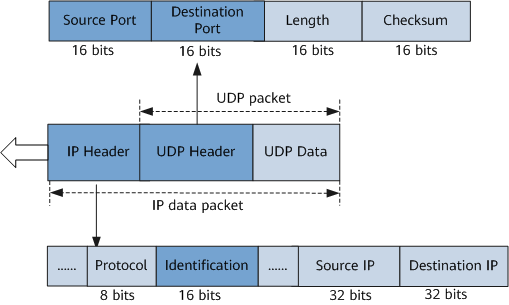
The main fields in a UDP packet are described as follows:
- A UDP packet consists of a UDP header and UDP data. The UDP header consists of four fields, each of which is 2 bytes:
- Source Port and Destination Port: identify the sender port and receiver port, respectively.
- Length field: specifies the length in bytes of the UDP packet. The minimum length is 8 bytes, which is the length of the UDP header.
- Checksum field: is used to check errors during UDP packet transmission. A UDP packet is discarded if an error is found.
- An IP header is encapsulated in the front of the UDP packet:
- Protocol field: specifies the number of a protocol used in the data part of an IP packet, so that the IP layer of the destination host can know the process to which the packet is to be sent (different protocols are processed by different processes). The numbers of different protocols are as follows: TCP: 6; UDP: 17; ICMP: 1; IGMP: 2.
- Identification field: uniquely identifies an IP packet sent by a host. The value is typically incremented by 1 each time a packet is sent. An IP packet may be fragmented if the length of the packet exceeds the maximum transmission unit (MTU) value allowed by the transmission network. The Identification value is replicated to the Identification field of each fragment. In this way, the destination assembles fragments with the same Identification value into the original IP packet. For a UDP flow, the Identification value representing the sequence number of a UDP packet is incremented by 1 each time a host sends a UDP packet. The size of the Identification field is 16 bits. Therefore, the sequence numbers of UDP packets in a UDP flow are in the range from 0 to 65535.
UDP Flow Matching
Flow Matching on the TDE
When the intelligent traffic analysis module collects UDP traffic on inbound interfaces of a device, the device matches the received UDP traffic against the delivered ACL rules. The device mirrors and sends the matched UDP packets to the TAP. The ACL rules that are not supported cannot be delivered, preventing the TAP from receiving corresponding service flows.
Flow Matching on the TAP
After intelligent traffic analysis for UDP flows is enabled, the TAP creates flow tables for received service flows and analyzes the flows. If the TAP cannot process the packets sent by the TDE, for example, the TAP does not support the packet type or the number of received packets exceeds the processing capability of the TAP, the TAP discards the packets.
UDP Flow Analysis
The intelligent traffic analysis system for UDP flows creates and analyzes UDP flows at the block granularity. The Identification field determines the sequence number of a UDP packet. Based on these sequence numbers, UDP packets in a UDP flow are grouped into multiple blocks. By default, the intelligent traffic analysis module divides a UDP flow into 256 blocks. The sequence number of a UDP packet ranges from 0 to 65535. Therefore, a UDP packet with a sequence number ranging from 0 to 255 belongs to the first block, as shown in Figure 2.
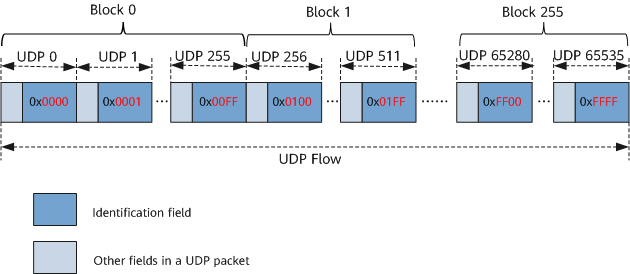
After receiving a matched UDP flow, the TAP analyzes all UDP packets in the first UDP block and creates a flow table based on key values, such as 5-tuple information, in the packets. The TAP then collects statistics on some key fields in the flow table based on UDP packets in subsequent blocks sent from the TDE, and analyzes the statistical results to obtain characteristics of the flow.
5-tuple-based Flow Table Creation
Intelligent traffic analysis for UDP flows supports flow table creation based on 5-tuple information in UDP packets. The 5-tuple information uniquely identifies a UDP session. Table 1 lists the five keys in 5-tuple information for creating a UDP flow table.
Flow Table Characteristics
After creating an intelligent traffic analysis flow table based on the first UDP block, the TAP collects statistics on fields in the flow table based on UDP packets in subsequent blocks and analyzes the characteristics of the flow. Note that intelligent traffic analysis for UDP flows does not require packets to be sent and received along the same path. The UDP flow table created by the TAP contains only unidirectional information of the UDP flow. Characteristics of the sent and received packets in the UDP flow can be obtained after the TDA summarizes all the received flow analysis results.
Table 2 lists the main characteristics that can be analyzed by the TAP.
Table 2 UDP traffic characteristics that can be analyzed by the TAP Feature Information
Description
Number of packets
The TAP counts the number of UDP packets in each block. The TDA summarizes packet quantity statistics and compares the number of UDP packets in each block of the same UDP flow to determine whether packet loss occurs.
Packet size
The TAP counts the number of bytes of UDP packets in a block.
Timestamp
The TAP collects statistics on timestamps of blocks. After the TDA summarizes timestamp statistics, it can obtain the latency of the UDP flow.
Path
The TAP can collect statistics on inbound interfaces of UDP packets and sends the statistics to the TDA. After intelligent traffic analysis for UDP flows is configured on the entire network, you can view the actual path of the UDP flow on the TDA.
NOTE:The intelligent traffic analysis function for UDP flows must be configured on the entire network to monitor the paths of UDP flows on the network.
Time when a flow is created
The TAP records the time when a UDP flow is created in the flow table.
UDP Flow Export
After creating a flow table based on UDP packets sent from the TDE, the TAP exports the flow table that contains the flow analysis result to the specified TDA that will process and graphically display the flow information. Currently, the TDA supports only FabricInsight. FabricInsight is classified into the FabricInsight collector and FabricInsight analyzer.
As shown in Table 2, the flow table that contains intelligent traffic analysis results is first stored in the cache of the device. When the intelligent traffic analysis flow table in the cache meets the aging conditions, the device exports the flow table in the cache to the FabricInsight collector. The FabricInsight collector then summarizes and sends the content to the FabricInsight analyzer to process and display the flow characteristics.
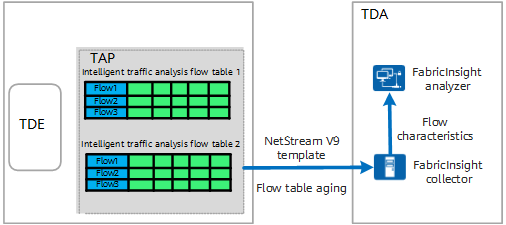
An intelligent traffic analysis flow table is exported to the FabricInsight collector only when the flow table meets aging conditions or its aging period expires. The device supports the following aging modes for UDP flows. When multiple aging modes are configured on the device, a flow ages out as soon as it meets any aging condition.
Active aging
After the first packet of a flow is sampled, the flow can always be sampled within a specified period. Once this specified period elapsed, the device exports analysis information about the flow to the TDA. This aging mode is enabled by default and suitable for analyzing flows that span a relatively long period of time.
Inactive aging
UDP flow analysis results are periodically sent to the TDA on a per-block basis when a UDP flow is continuously received. The details are as follows:- Since the flow table is created based on the first UDP block, the flow analysis result of the first UDP block is not immediately sent to the TDA. Instead, the TAP continues to analyze the second UDP block.
- When receiving the third UDP block, the TAP sends the flow analysis result of the first UDP block to the TDA.
- When receiving the fourth block, the TAP sends the flow analysis result of the second UDP block to the TDA.
The TAP repeats this process until inactive aging of the flow table is triggered as follows: When the inactive time (the time from when the last UDP packet is received to the current time) of the UDP flow exceeds the configured inactive aging period, the device considers that the UDP flow is inactive (the flow is interrupted). In this case, the device forcibly sends the current flow table to the TDA and deletes it. This process is called inactive aging.
Inactive aging clears unnecessary entries so that the device can fully leverage statistics entries. This aging mode is suitable for analyzing flows that span a relatively short period of time. The device exports flow statistics as soon as the flow stops, saving memory.
In practice, the TAP uses the NetStream V9 template to define the statistical fields in an intelligent traffic analysis flow table. When a flow table meets aging conditions, instead of directly exporting the flow table to the FabricInsight collector, the TAP adds the statistical fields in the flow table to the NetStream V9 template for encapsulation. The forwarding chip then sends the encapsulated packets to the FabricInsight collector based on routing entries.
Figure 4 shows the format of an exported packet in the intelligent traffic analysis system. Such a packet, encapsulated using UDP, includes the NetStream packet header in the NetStream V9 format and one or more intelligent traffic analysis results. In addition, because intelligent traffic analysis for UDP flows needs to be used together with the Layer 3 remote flow mirroring function, the source IP address of the exported packets in the intelligent traffic analysis system must be set to the IP address of the mirrored device in Layer 3 remote flow mirroring.
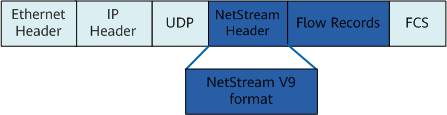
After receiving the exported packets from the intelligent traffic analysis system, the FabricInsight collector summarizes the characteristics of service flows based on packet information such as source addresses, and sends the characteristics to the FabricInsight analyzer for graphical display.
Specifically, for UDP packets sent and received along different paths, FabricInsight summarizes the characteristics in the flow tables containing unidirectional packet information (unidirectional flow table for short) based on the exported packets, and finally obtains complete characteristics of the UDP flow.