Example for Configuring Export of UDP Flow Analysis Results
Networking Requirements
As shown in Figure 1, the client with IP address 10.3.0.10 sends UDP packets to the server with IP address 10.2.0.10 and destination port number 3300. You can configure intelligent traffic analysis for UDP flows on FW_A through which the UDP flows pass, and configure FW_A to send the obtained flow analysis result to the FabricInsight analyzer.
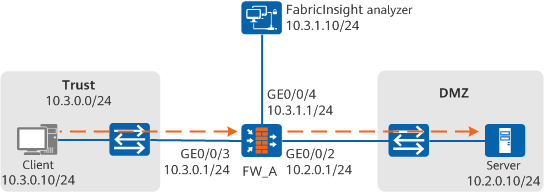
Procedure
- Configure an advanced ACL rule.
# Configure an advanced ACL rule to match the UDP flow transmitted from the client with IP address 10.3.0.10 to the server with IP address 10.2.0.10 and port number 3300.
<sysname> system-view
[sysname] sysname FW_A
[FW_A] acl number 3055
[FW_A-acl-adv-3055] rule 4 permit udp source 10.3.0.10 0.0.0.0 destination 10.2.0.10 0.0.0.0 destination-port eq 3300
[FW_A-acl-adv-3055] quit
- Enable intelligent traffic analysis for UDP flows.
# Enable intelligent traffic analysis for UDP flows matching ACL rule 3055 on FW_A.
[FW_A] traffic-analysis acl 3055# Set the number of blocks in the UDP flow to be intelligently analyzed to 128 on FW_A.
[FW_A] traffic-analysis udp identification block 128 - Configure UDP flow aging.
# Set the aging time for inactive flows to 120 seconds.
[FW_A] traffic-analysis udp timeout inactive 120 - Configure the device to export UDP flow analysis results.
# Set the source IP address to 10.3.1.1, destination IP address to 10.3.1.10, and destination port number to 6000 for the exported packets carrying UDP flow analysis results.
[FW_A] traffic-analysis udp export source ip 10.3.1.1
[FW_A] traffic-analysis udp export host ip 10.3.1.10 6000
# Set the interval at which the template for exporting packets carrying UDP flow analysis results is delivered to 15 minutes.
[FW_A] traffic-analysis udp export template timeout-rate 15
Verification
# Display detailed information about intelligent traffic analysis results of UDP flows.
[FW_A] display traffic-analysis configuration
========================================================================
                   Traffic Analysis Configuration
========================================================================
ACL number: 3055                      Block number: 128
Flow inactive time(s): 120            Template export interval(min): 15
------------------------------------------------------------------------
Source IP Address       : 10.3.1.1
Destination IP Address  : 10.3.1.10
Source IPv6 Address     :
Destination IPv6 Address:
Destination VPN         : public
Port number             : 6000
------------------------------------------------------------------------
# Display detailed information about intelligent traffic analysis results of UDP flows.
<FW_A> display traffic-analysis udp cache
 Traffic analysis UDP cache information:
 Current total flow numbers: 1
-----------------------------------------------------------------------------------------
 Source IP              Source Port            Destination IP         Destination Port
 Interface              Receive Packets        Receive Bytes          Block Timestamp(ms)
-----------------------------------------------------------------------------------------
 10.3.0.10              1024                   10.2.0.10               3300
 GigabitEthernet0/0/3   9                      198                    44707496
-----------------------------------------------------------------------------------------
Configuration File
#
sysname FW_A
#
acl number 3055
 rule 4 permit udp source 10.3.0.10 0.0.0.0 destination 10.2.0.10 0.0.0.0 destination-port eq 3300
#
traffic-analysis acl 3055
#
traffic-analysis udp identification block 128
#
traffic-analysis udp timeout inactive 120
#
traffic-analysis udp export source ip 10.3.1.1
#
traffic-analysis udp export host ip 10.3.1.10 6000
#