CLI: Example for Configuring TWAMP Light Measurement
This section provides an example for configuring TWAMP Light measurement.
Networking Requirements
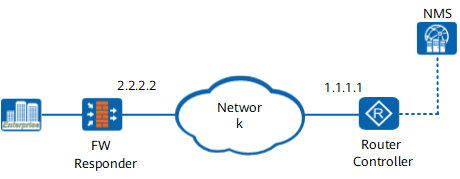
On the IP network shown in Figure 1, the router serves as the controller, and the FW serves as the responder.
- Router: sends and receives measurement session packets; collects and calculates performance data and reports the results to the NMS.
- FW: reflects measurement session packets.
Configuration Roadmap
- Configure an IP address and a routing protocol for each device so that all devices can communicate at the network layer.
- FW:
- Configure the TWAMP Light responder.
- Configure a security policy to permit measurement packets.
- Router: Configure the TWAMP Light controller.
Data Planning
Device |
Item |
Data |
|---|---|---|
FW (Responder) |
IP address |
2.2.2.2 |
UDP port number |
2010 |
|
Interface |
GigabitEthernet 0/0/1 |
|
Security zone |
untrust |
|
Router (Controller) |
IP address |
1.1.1.1 |
UDP port number |
2001 |
Procedure
- Configure an IP address and a routing protocol for each device so that all devices can communicate at the network layer. The configuration details are not provided here.
- Configure the FW as the TWAMP Light responder.
<FW> system-view
[FW] nqa twamp-light
[FW-twamp-light] responder
[FW-twamp-light-responder] test-session 1 local-ip 2.2.2.2 remote-ip 1.1.1.1 local-port 2010 remote-port 2001
[FW-twamp-light-responder] quit
[FW-twamp-light] quit
- Configure a security policy on the FW to permit measurement packets.
- Configure the router as the TWAMP Light controller.
Configure a client at the controller end.
<Router> system-view
[Router] nqa twamp-light
[Router-twamp-light] client
[Router-twamp-light-client] test-session 1 sender-ip 1.1.1.1 reflector-ip 2.2.2.2 sender-port 2001 reflector-port 2010
- Configure a sender at the controller end and enable proactive measurement.
[Router-twamp-light-client] sender
[Router-twamp-light-sender] test start-continual test-session 1
- Verify the configuration.
Controller:
<Router> display twamp-light test-session 1
Session ID                       : 1
State                            : active
Type                             : continual
Sender IP                        : 1.1.1.1
Sender Port                      : 2001
Reflector IP                     : 2.2.2.2
Reflector Port                   : 2010
Mode                             : unauthenticated
DSCP                             : 0
Padding Length                   : 128
VPN Instance                     :
Last Start Time                  : 2014-08-05 16:41:05-08:00
Last Stop Time                   : never
Period Time(in millisecond)      : 100
Time Out(in second)              : 5
Duration Time(in second)         : -
Packet Counts                    : -
Sequence Number                  : 0
Test Tx Number                   : 0
Test Rx Number                   : 0
Test Discard Number              : 0
Responder:
<FW> display twamp-light responder test-session 1Session ID : 1 Local IP : 2.2.2.2 Local Port : 2010 Remote IP : 1.1.1.1 Remote Port : 2001 Mode : unauthenticated VPN Instance : Description : -
Configuration Scripts

Proactive or on-demand measurement can be started only after a TWAMP Light test session is established. You can configure the FW and then the router.
Configuration script of the FW
#
firewall zone untrust
 set priority 5
 add interface GigabitEthernet 0/0/1
#
security-policy
 rule name twamp
  source-zone untrust
  destination-zone local
  source-address 1.1.1.1 mask 255.255.255.255
  destination-address 2.2.2.2 mask 255.255.255.255
  action permit
#
nqa twamp-light
 responder
  test-session 1 local-ip 2.2.2.2 remote-ip 1.1.1.1 local-port 2010 remote-port 2001
#
Configuration file of the router
#
nqa twamp-light
 client
  test-session 1 sender-ip 1.1.1.1 reflector-ip 2.2.2.2 sender-port 2001 reflector-port 2010
 sender
  test start-continual test-session 1
#