CLI Example for Configuring UDP Helper
Networking Requirements
As shown in Figure 1, the IP address of GigabitEthernet 0/0/1 on the FW is 10.1.1.1/24, and the IP address of the NetBIOS-NS server is 10.2.1.1/24. The FW and NetBIOS-NS server are on different network segments, and a reachable route exists between them. The PCs need to access each other using host names.
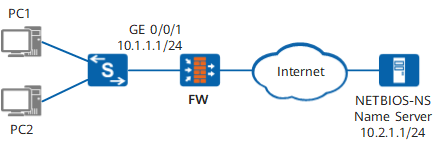
Configuration Roadmap
Relay the UDP packets with destination port 137 and destination address 255.255.255.255 and the UDP packets with destination address 10.1.255.255 to the specified NetBIOS-NS server.
When the FW receives a broadcast NetBIOS-NS Register packet, it changes the destination IP address in the IP header of the broadcast packet to the IP address of the NetBIOS-NS server and forwards the packet to the NetBIOS-NS server.

After UDP helper is enabled on the FW, the FW relays the broadcast packets with UDP destination port 137 by default. The UDP port number, therefore, does not need to be configured in this example.
Procedure
- Enable UDP helper.
<FW> system-view
[FW] udp-helper enable
- Configure a destination server.
[FW] interface GigabitEthernet 0/0/1
[FW-GigabitEthernet0/0/1] ip address 10.1.1.1 24
[FW-GigabitEthernet0/0/1] udp-helper server 10.2.1.1
[FW-GigabitEthernet0/0/1] quit
[FW] quit
- Verify the configuration.
The destination server configured on GigabitEthernet0/0/1 is the NetBIOS-NS server.
<FW> display udp-helper server interface GigabitEthernet0/0/1
interface               Server-Ip        packet-num
GigabitEthernet0/0/1    10.2.1.1         0