Patch Management
You can install patches to improve system functions.
Patch Overview
Currently, the FW has the following types of patches:
- System patch
During the operation of the device, you need to revise the system software sometimes such as remove the system defects or add new functions for service requirements. We used to upgrade the software after shutting down the system. This static upgrade affects the service on the device and does not improve the communication. If we load a patch to the system software, we can upgrade it online without interrupting the operation of the device. This dynamic upgrade does not affect the service and can improve the communication.
- SSL VPN client patch
After loading the SSL VPN client patch on the FW, you can upgrade SSL VPN client components, namely, the independent client installation package, management program installation package, IE control, and certificate filtering control. After upgrade, when the client accesses the virtual gateway, the virtual gateway will instruct the client to upgrade related components if necessary.
Patch States
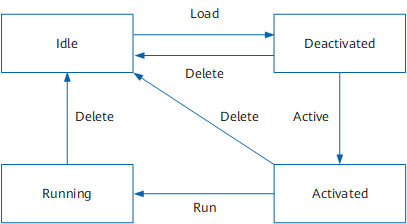
Patch status can be idle, deactivated, activated, and running. For details, see Table 1,
State |
Description |
States Conversion |
|---|---|---|
Idle |
The patch file is not loaded to the patch area in the memory. d |
When the patch is loaded to the patch area, the patch status is set to deactivated. |
Deactivated |
The patch is loaded to the patch area but disabled. |
The patch in the deactivated state can be as follows:
|
Activated |
The patch is loaded to the patch area and enabled temporarily. If the board is reset, the active patch on that board turns to the deactivated state. |
The patch in the activated state can be as follows:
|
Running |
The patch is loaded to the patch area and enabled permanently. If the board is reset, the patch on the board keeps in the running state. |
The patch in the running state can be uninstalled and deleted from the patch area. |
Figure 1 shows the conversion between patch states.