Overview of User and User Authentication
This section provides an overview of user and user authentication, including their definitions and objective.
User
Users are the objects of user management. A user is a person who is authorized to access network resources. Two types of users are available on the FW.
Internet access user
An Internet access user is an employee who accesses Internet resources or intranet resources from inside the intranet through a FW.
Remote access user
A remote access user is an employee who connects to a FW in SSL VPN, L2TP VPN, IPSec VPN, or PPPoE mode to access intranet resources.
User Authentication
The FW authenticates user identities. The authentication modes are as follows:
Local authentication
User information is saved on a FW. If a user accesses the portal authentication page and sends the user name and password to the FW, the FW implements authentication on the user.
Server authentication
User information is not saved on a FW. If a user accesses the portal authentication page and sends the user name and password to the FW, the FW forwards the user information to a third-party authentication server for identity authentication.
Single Sign-On (SSO)
A user sends the user name and password to a third-party authentication server. After authenticating the user, the third-party authentication server sends the user information to a FW. The FW records the user information.
The FW authenticates Internet access users when they access Internet resources or intranet resources. The FW authenticates remote access users when they connect to the FW and performs a second authentication of them when necessary.
Objective
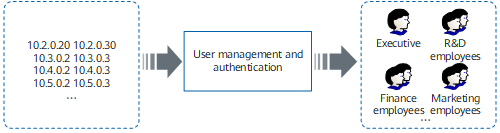
As shown in Figure 1, user management and authentication are configured on the FW, which enable the FW to identify network traffic of users based on IP addresses control network behaviors and permissions by user as follows:
- Enables intuitive policy customization for users and user groups.
- Provides visibility into and statistics on threats and traffic to audit network behaviors of users.
- Maps users to dynamic IP addresses and implements policy control based on users.