Remote Access Users Access Intranet Resources Using IPSec VPN
This section describes user management and authentication mechanisms when remote access users connect to a FW using IPSec VPN to access intranet resources.

The description in this section also applies to the scenario where remote access users connect to a FW using GRE VPN to access intranet resources.
A FW serves as the VPN access gateway of an enterprise. Remote access users connect to the FW using IPSec VPN and access intranet resources. The entire process involves the following phases:
Connection phase
Two FWs negotiate the establishment of an IPSec VPN tunnel. User authentication is required only in EAP-based IPSec VPNs, but not other IPSec VPN access modes.
Resource access phase
The user accesses intranet resources. The FW can control the accessible network resources based on the users.
Complete the following tasks to implement user-specific network behavior management:
Save user and user group information on a FW to ensure that the information can be referenced by security policies, policy-based routing, traffic policies, quota control policies, ssl-encrypted traffic detection policies, and audit policies.
Authenticate the user in the connection (for mobile user access) or resource access (for gateway access) phase to obtain the mapping between the user and IP address.
The authentication process differs depending on the IPSec set up mode.
IPSec VPN Tunnel Between Gateways
As shown in Figure 1, an IPSec tunnel is established between a branch office and the headquarters. The tunnel setup phase does not require user authentication. After the tunnel is set up, the FW needs to implement user-specific access control. Users at the branch office must be authenticated before accessing resources at the headquarters. The FW records the mappings between the users and IP addresses after successful authentication. The FW controls user permissions and behaviors based on the policies specified for the remote access users or their groups.
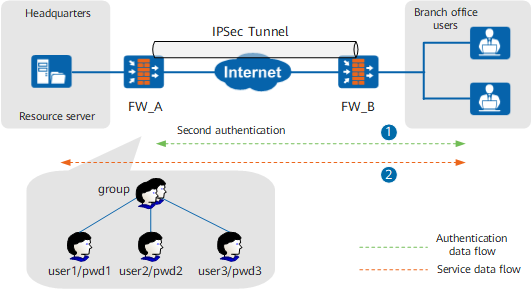
The following provides an example of local authentication in which users and user groups are created and passwords are specified on a FW, and the FW verifies user identities. The implementation of server authentication is the same except that users are authenticated by an authentication server instead of the FW.
IPSec VPN Tunnel Between Mobile Users and Gateways
As shown in Figure 2, a wireless access point (AP) sets up an IKEv2 IPSec VPN tunnel with the FW using EAP authentication. During the tunnel setup phase, the RADIUS server authenticates the AP. After the AP is authenticated, the FW allocates a private IP address to it and records the mapping between the AP ID and the private IP address.
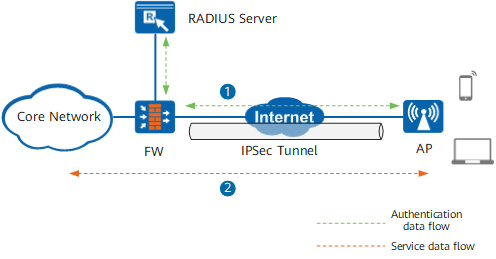
Mobile users can also use a Windows 7 client to set up an IPSec VPN tunnel with the gateway. In this case, the client uses a certificate for authentication, and user name/password authentication does not need to be deployed on the FW.