User Organizational Structure
A FW controls network behaviors and access permissions by the granularity of user.
The user organizational structure on the FW is a reflection of real organizational structures in enterprises and is the basis of user-specific permission control. As shown in Figure 1, a user organizational structure can be a tree-shaped structure that divides users by department or divides users cross departments in the horizontal dimension.
- Authentication domain: The authentication domain is a container of the user organizational structure, similar to the domain in the Microsoft Active Directory (AD) server. The FW provides a default authentication domain. You can create authentication domains as required.
- User group/User: Users and the departments to which they belong are the basic units of an enterprise. The administrator can divide users into user groups based on their departments to form a tree-shaped organizational structure for the intranet. The tree-shaped organizational structure is commonly used, and allows users or user groups to be easily searched and located.
- Security group: A security group is a cross-department group in the horizontal organizational structure. You can create cross-department security groups if you need to manage users in a dimension other than by department. For example, you can create a group between multiple departments. In addition, the server provides similar horizontal groups when enterprises use third-party authentication servers to store organizational structures. To configure policies based on cross-department security groups, you need to keep the security groups created on the FW consistent with the organizational structures on the servers.
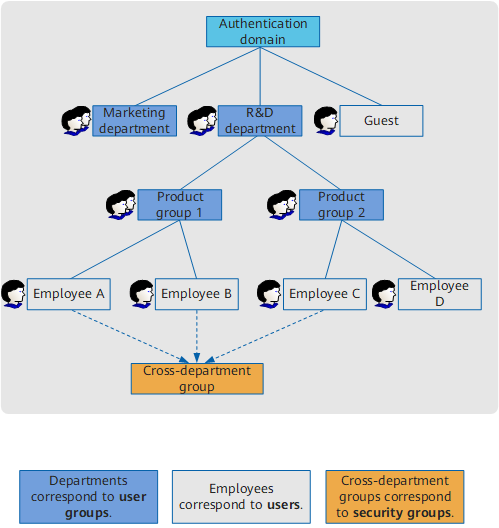
This section describes the rules of the preceding organizational structures.
Tree-shaped Organizational Structure
The top node of the tree-shaped organizational structure is "Authentication domain", which is also considered the root group. The subordinates of an authentication domain can be user groups or users. The default authentication domain equals the /default root group.
In most cases, only the default authentication domain is used. If users have different authentication modes are used, or domain names must be consistent with those on servers, you need to plan other authentication domains.
If new authentication domains are required, the FW provides the following modes for user organizational structure planning:
Each authentication domain has independent user accounts.
Each authentication domain is an independent tree-shaped organizational structure, similar to the domain structure on an AD or LDAP authentication server. Each authentication domain has independent user accounts. Different authentication domains can have the same account.
All authentication domains share user accounts of the default authentication domain.
There is only one tree-shaped organizational structure: default authentication domain. Other authentication domains share accounts with the default authentication domain. In this mode, a new authentication domain determines the authentication mode of its users, and the authentication domain is not the top node of the user organizational structure.

The first mode is recommended for you to plan the user organizational structure, corresponding to the server organizational structure. The second mode applies when one user account needs to use different authentication modes or earlier version-compatible. The authentication domain configuration determines the deployment mode.
A tree-shaped organizational structure complies with the following rules:
- The default authentication domain cannot be deleted or renamed.
- A FW supports an organizational structure with a maximum of twenty layers, including the authentication domain and users. That is, the FW supports a maximum of eighteen layers between the authentication domain and users.
- A user group can contain multiple users and child user groups, but each user group can belong only to one parent group.
- Each user belongs to one group only.
- User groups can have identical names, but must each have a unique full path in the organizational structure.
- Users and user groups can be referenced by policies. If a user group is referenced by a policy, all the users in this group inherit this policy.
Security Group-based Horizontal Organizational Structure
User groups (departments) reflect the vertical organizational structure of users, whereas security groups reflect the horizontal organizational structure. You can add users from different departments to one security group for management. After you configure a policy for a security group, the policy takes effect on all users in this security group, which makes user management easier and more flexible.
You can also configure security groups in the scenarios in which the FW functions with a third-party authentication server. When AD, AD LDAP, and Sun ONE LDAP servers are deployed on a network, the AD, AD LDAP, and Sun ONE LDAP servers have other types of organizational structures except organizational units (OU). For example, the AD and AD LDAP servers have security groups, and the Sun ONE LDAP server has static and dynamic groups. To enable the FW to manage users based on the security groups on the AD and AD LDAP servers and static and dynamic groups on the Sun ONE LDAP server, use the security groups on the FW.
The security groups on the AD servers and static and dynamic groups on the Sun ONE LDAP server are usually used to control and manage user access to resources and objects in network sharing locations, files, directories, and printers. User groups on the FW correspond to the OUs on the AD, AD LDAP, and Sun ONE LDAP servers, and the security groups on the FW correspond to the security groups on the AD and AD LDAP servers and static and dynamic groups on the Sun ONE LDAP server. For details on the security groups or static and dynamic groups, refer to the documents of AD and AD LDAP servers or the Sun ONE LDAP server.
Static
In static security groups, the member users and user groups are fixed. Source of static security groups: You can manually create a static security group, import security groups from AD and AD LDAP servers, or import static security groups from the Sun ONE LDAP server.
Dynamic
In dynamic security groups, the member users are dynamically generated on the basis of specific filtering conditions. Source of dynamic security groups: You can manually create AD and Sun ONE LDAP dynamic security groups and import dynamic security groups from the Sun ONE LDAP server.
In the portal authentication scenario, during user authentication, the FW looks up the authentication server based on local dynamic security group filtering conditions for each user. If a match is found, the user is authenticated as a temporary user of the security group.
- A security group can belong to no parent security group or belong to a maximum of 40 parent security groups.
- A user can belong to no parent security group or belong to a maximum of 40 parent security groups.
- The parent security group of a user can be a security group in any authentication domain, but a security group and its parent security group must belong to the same authentication domain.
- Security groups support a maximum of three layers, namely, parent security group, security group, and child security group.
- Security groups can contain other security groups. For example, security group B can contain security group A, security group C can contain security group B, and security group A can contain security group C. The organizational structure of security groups is a net structure.
- Dynamic security groups cannot be the parent groups of any security group, but can be members of static security groups.
- Security groups can be referenced by policies. If a security group is referenced by a policy, the policy applies to all users of the security group, but not to the users of the sub-security groups.
Creating Users, User Groups and Security Groups
You can create users, user groups and security groups on a FW as follows:
As users, user groups or security groups are referenced in policies to control user permissions, the users for which server authentication is used must also have the corresponding user groups, security groups, or users on the FW, at least they should have the corresponding user groups and security groups.
Manual creation
You can manually create users, user groups and security groups and configure user attributes. For example, you can create user groups based on the vertical organizational structure, create security groups based on the horizontal organizational structure, and then add users to each group.
This method is recommended if no third-party authentication server is deployed or user information cannot be imported to the FW from a third-party authentication server.
Import from a CSV file
You can write user information into a CSV file and import the CSV file to a FW. You can also import a previously exported CSV file to a FW to create users and user groups in batches.
You can write security group information into a CSV file and import the CSV file to a FW. You can also import a previously exported CSV file to a FW to create security groups in batches.
This method is recommended if no third-party authentication server is deployed or user information cannot be imported to the FW from a third-party authentication server. Compared with manual creation, importing a CSV file simplifies system configuration.
Import from a server
If an identity authentication mechanism is set up and user information is stored on a third-party authentication server, you can use an import policy to import users, user groups and security groups from the third-party authentication server to a FW.
Currently, only AD, LDAP, and Agile Controller servers can be used to import users and user groups to a FW, and only AD and Sun ONE LDAP servers can be used to import security groups to a FW If other third-party authentication servers are deployed, manually create users, user groups and security groups, import users, user groups and security groups from a CSV file, or configure the FW to automatically discover and create users, user groups and security groups.
User Attribute
Table 1 lists major user attributes.
Attribute |
Description |
|---|---|
Login Name |
User name used for authentication |
Display Name |
User name displayed on a FW as a user identification The user field in logs and reports is generally displayed as Login Name (Display Name). |
Description |
User description, which helps administrators identify users and maintain user information |
Parent Group |
Parent group to which a user belongs Each user can belong to a maximum of three parent groups. |
Parent Security Group |
Parent security group to which a user belongs Each user can belong to no parent security group or belong to a maximum of 40 parent security groups. |
Password |
User password If local authentication is used, you must configure a password on a FW. If server authentication is used, you must configure a password on a third-party authentication server. |
Expiration Date |
Expiration date of an account |
Allow Users to Share This Account to Log In |
If you select this item, multiple users are allowed to share the same login name to log in from multiple PCs. |
IP/MAC Binding |
You can bind a user to an IP address or a MAC address so that the user can use only the IP address or MAC address to log in. |
Online User
An online user is a user who goes online after passing the authentication and attribute check. If the user using an IP address is authenticated, the FW checks the user attributes, including the user status, account expiration date, IP/MAC binding, and account sharing setting.
The online user list on the FW records the mapping between IP addresses and online users and users can use only the mapping IP addresses. If you apply a policy to a user, the policy also takes effect with the mapping IP address.
If a user does not initiate any service traffic during the validity period (30 minutes by default) of a connection, the online user monitoring table of the user will be deleted. This user needs to be authenticated again when initiating a service request next time.
Online User Information Synchronization
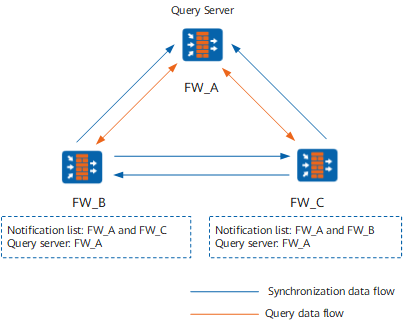
If you deploy FWs on different locations of a network and require user login information on one FW to be synchronized to other FWs for user permission control, you can use the online user information synchronization function to allow users to log in to multiple FWs at the same time.
In this deployment mode, there are two operations: synchronize and query, as shown in Figure 2. The configuration on FW_B is used as an example.
Synchronize
When a user logs in to or out from FW_B through built-in portal authentication and AD/Agile Controller/RADIUS SSO, FW_B sends this information to the devices in the notification list, so that the user can simultaneously log in to or out of FW_A and FW_C.
In addition, when the user initiates traffic and remaining time of the user is updated, FW_B synchronizes the update to other devices every five minutes. This prevents entries of other devices from expiring.
Query
If traffic passing FW_B does not match any online user entries, FW_B can initiate a query to the query server FW_A. If FW_A has the required user entry, it will send the entry to FW_B.
Generally, a device with frequent user traffic, such as an egress firewall, is selected as the query server because entries on such a device are not easy to expire.