User Permission Control
User authentication aims at user-specific permission control. The FW references users in policies as matching conditions to implement permission control on authenticated users.
User Permission Control and Authentication Method
The prerequisites of user permission control are as follows:
- After a user is authenticated, the user is in the online user list on the FW.
- The FW has local users and user groups or security groups to be referenced in policies.
- Service traffic initiated by users must match an authentication policy.
The permission control varies depending on the authentication method, as shown in Table 1
Authentication Mode |
User Storage Method on the FW | Policy Configuration Method |
Processing of New User Option |
|---|---|---|---|
Local authentication |
Users, user groups, and security groups exist on the FW. |
You can configure user-specific, user group-specific, and security group-specific policies. |
N/A |
Server authentication/SSO |
The user data volume is huge on the server. Import only the user groups or security groups, but not user details from the server into the FW. |
You can configure user group- or security group-specific policies, but not user-specific policies. |
The FW does not store user information. Therefore, all users are new to the FW. Set the new user option to Use It as a Temporary One and Do Not Add It to the Local User List. |
Import all organizational structure on the server into the FW. |
You can configure user-specific, user group-specific, and security group-specific policies. |
New user as temporary user, Set the new user option to Use It as a Temporary One and Do Not Add It to the Local User List. |

Only AD, LDAP, and Agile Controller servers support user import. If other servers are used, you need to manually create users or import users from a CSV file.
Isolation of the Authentication Server and Import Server
In certain scenarios, the authentication server is for authentication only, and the FW controls user permissions through the organizational structure on another server. The FW satisfies this scenario by specifying the import policy of another server in the new user option of the authentication domain.
For users that are authenticated by the authentication server but do not exist on the FW, the FW determines the user groups and security groups to which the users belong based on the new user option. The following processing methods involve specifying the import policy. If the server corresponding to the import policy is different from the authentication server, the authentication server is isolated from the import server.
Serving as temporary users and specifying the import policy
After the users are authenticated by the authentication server, the FW obtains users' organizational structure on the import server based on the import policy. Users temporarily log on in the user groups and security groups corresponding to the import server on the FW.
This method has a prerequisite. That is, you need to import the organizational structure to the FW in advance. Otherwise, users cannot log on in the user groups and security groups corresponding to the import server.
For the support of separated deployment of the authentication server and import server, see Table 2.
Authentication Mode |
Authentication Server Type |
Import Server Type |
|---|---|---|
Portal authentication |
AD |
AD |
AD |
Sun ONE LDAP |
|
Sun ONE LDAP |
Sun ONE LDAP |
|
SSO |
AD |
AD |
AD |
Sun ONE LDAP |
|
Agile Controller |
AD |
|
Agile Controller |
Sun ONE LDAP |
|
RADIUS |
AD |
|
RADIUS |
Sun ONE LDAP |
Matching Between Users and Policies
Users, user groups, and security groups can be referenced in policy-based routing, security, bandwidth, ssl-encrypted traffic detection, quota control, and audit policies. Users inherit all permissions from their owning user groups and security groups. If a policy references a user group or security group, the users in the group inherit policies as follows:
- User group: All users in the user group and its child groups inherit the policies of this user group.
- Security group: Only users directly under the security group, but not those in its child groups, inherit the security group's policies.
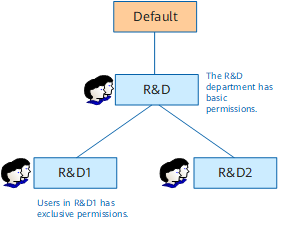
However, policies are matched in a top-down sequence in the policy list, and the matching ends when a match is found. If extra policies apart from inherited policies are configured for a user or user group, policies are not inherited according to the tree organizational structure. As shown in the tree organizational structure in Figure 1, all R&D employees use the same basic permissions. Besides, R&D1 employees use exclusive permissions. In this case, configure policies as follows.
Name |
Department |
permission |
|---|---|---|
policy1 |
R&D1 |
Basic permission+exclusive permissions |
policy2 |
R&D |
Basic permissions |
Note the following points:
- Configure policy1 for R&D1 prior to policy2 for R&D. Otherwise, users in R&D1 will match policy2 and do not continue to match policy1.
- policy1 for R&D1 must specify both basic and exclusive permissions. After matching the exclusive policy, users in R&D1 do not continue to match policy2, that is the policy of the parent group.