Web: Example for Configuring Local Authentication on Remote Access Users Using L2TP/L2TP over IPSec VPN
This section provides an example for configuring local authentication on remote access users using L2TP/L2TP over IPSec VPN when a FW works as a VPN access gateway.
Networking Requirements
As shown in Figure 1, FWs are deployed at the network borders of the headquarters and branch office of an enterprise. FW_A at the headquarters works as an LNS, and FW_B at the branch office works as a LAC. Branch office users enter their user names and passwords to trigger the establishment of an L2TP tunnel between the LAC and the LNS and access intranet resources at the headquarters. Employees on the move use VPN clients to set up L2TP tunnels with the LNS to access intranet resources at the headquarters.
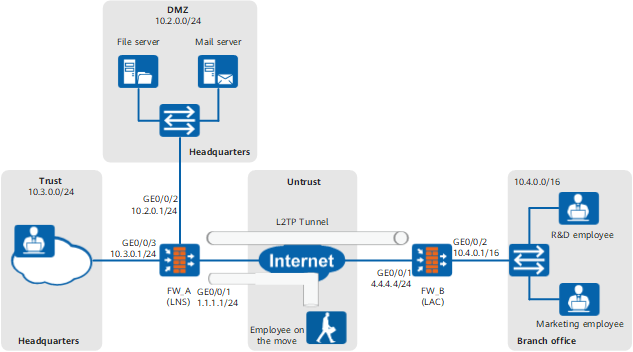
The user management and authentication mechanisms of FW_A must allow branch office users and users on the move to connect to the headquarters and identify users based on their IP addresses to implement user-specific behavior control and permission assignment. Requirements are as follows:
- Information about users and departments is saved on the FW_A (the LNS) and can be referenced by policies and L2TP VPNs.
- After connecting to the LNS through an L2TP tunnel, branch office users and users on the move can access intranet resources. User names entered for dial-up identify the branch office users. FW_A controls user permissions and behaviors based on the remote access users or their groups.
Configuration Roadmap

This example describes only how to configure user management and authentication.
User authentication configuration is the same for the L2TP VPN and L2TP over IPSec VPN. This section uses L2TP VPN as an example.
- Create user group objects and user objects and set passwords for the user objects on FW_A.
- Configure a default authentication domain on FW_A to implement authentication on branch office users during L2TP tunnel establishment.
Data Planning
| Item | Data | Description |
|---|---|---|
R&D employee at the branch office |
Group
User
|
Add the R&D employee at the branch office to group research. You can repeat the operations in this example to configure multiple user accounts. |
Marketing employee at the branch office |
Group
User
|
Add the marketing employee at the branch office to group marketing. You can repeat the operations in this example to configure multiple user accounts. |
Authentication domain |
|
The default authentication domain is used during authentication. No authentication domain is required in the entered user names of the employees. |
Employee on the move |
Group
User
|
Add the employee on the move to group travel. You can repeat the operations in this example to configure multiple user accounts. |
Procedure
- Choose , set IP addresses for interfaces and assign the interfaces to security zones.
The following example describes how to configure interface GigabitEthernet 0/0/3. You can configure other interfaces based on the networking diagram.
Zone
trust
IP Address
10.3.0.1/24
- Choose , configure local authentication.
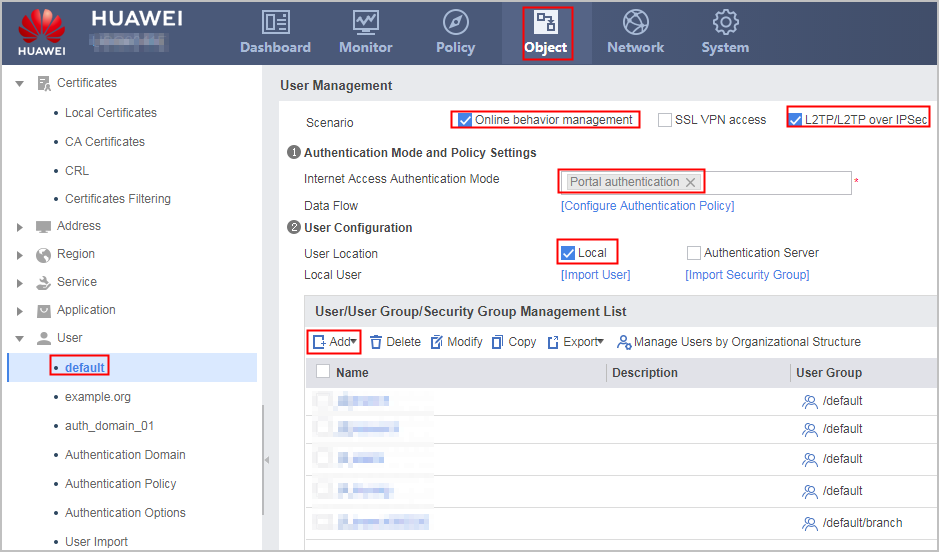
To implement user name-based policy control on VPN access users, the Online behavior management parameter must be specified.
Click Add and create user groups and users.
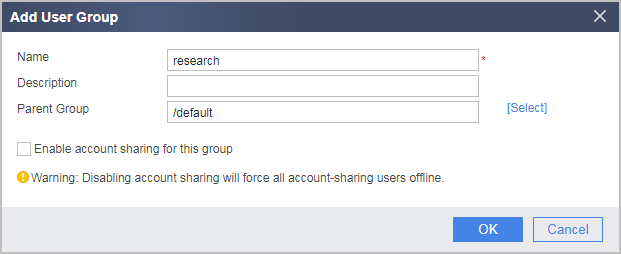
- Choose Add Group, create a user group object for an R&D employee.
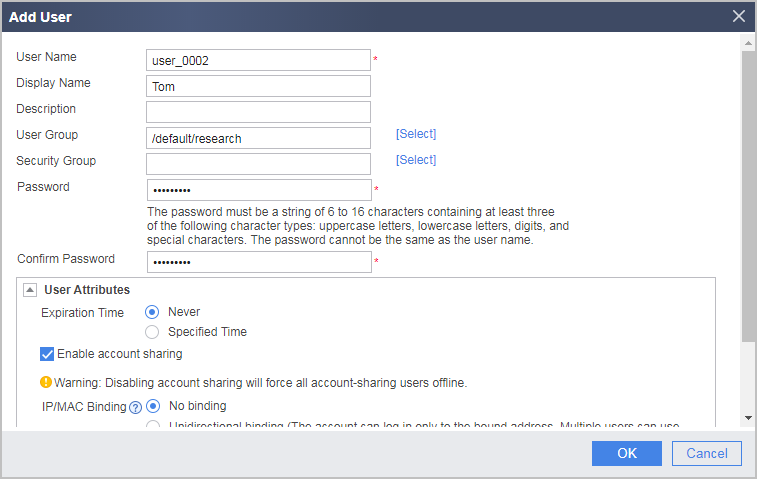
- Choose Add a User, create a user object for an R&D employee.
- Choose Add Group, create a user group object for an R&D employee.
- Choose , click Add to create an authentication policy.
Name
auth_policy_service
Source Address/Region
10.2.0.2-10.2.0.15
Action
Authentication exemption
To configure user-specific policies for VPN access users, you need to configure authentication policies for private IP addresses after VPN decapsulation. For example, addresses in the L2TP address pool are 10.2.0.2-10.2.0.15.
- After the configuration is complete, you can configure security policies, PBR policies, bandwidth policies, quota control policies, proxy policies, and audit policies that reference the user and user group objects.
Verification
- An R&D employee at the branch office enters user name user_0002 and password Admin@123 in the dial-up client to trigger the establishment of an L2TP tunnel between the LAC and the LNS. After the L2TP tunnel is established, the employee can access intranet resources at the headquarters.
- A marketing employee at the branch office enters user name user_0003 and password Admin@123 in the dial-up client to trigger the establishment of an L2TP tunnel between the LAC and the LNS. After the L2TP tunnel is established, the employee can access intranet resources at the headquarters.
- An employee on the move enters user name user_0005 and password Admin@123 in the dial-up client to trigger the establishment of an L2TP tunnel between the client and the LNS. After the L2TP tunnel is established, the employee can access intranet resources at the headquarters.
- On the FW, choose to see information about online users.
Configuration Scripts
#
 sysname FW_A
#
interface GigabitEthernet0/0/1
 ip address 1.1.1.1 255.255.255.0
#
interface GigabitEthernet0/0/2
 ip address 10.2.0.1 255.255.255.0
#
interface GigabitEthernet0/0/3
 ip address 10.3.0.1 255.255.255.0
#
firewall zone trust
 add interface GigabitEthernet0/0/3
#
firewall zone untrust
  add interface GigabitEthernet0/0/1
#
firewall zone dmz
 add interface GigabitEthernet0/0/2
#
aaa
 #
 domain default
  service-type internetaccess l2tp
 #
#
auth-policy
 rule name auth_policy_service
  source-address range 10.2.0.2 10.2.0.15
  action exempt-auth

# The following user/group creation configuration is stored in the database, but not in the configuration profile.
user-manage group /default/research
user-manage group /default/marketing
user-manage group /default/travel
user-manage user user_0002
 alias Tom
 parent-group /default/research
 password *********
 undo multi-ip online enable
user-manage user user_0003
 alias Jack
 parent-group /default/marketing
 password *********
 undo multi-ip online enable
user-manage user user_0005
 alias John
 parent-group /default/travel
 password *********
 undo multi-ip online enable