CLI: Example for Implementing Permission Control on Users Who Access the Internet Through an HTTP Proxy Server
This section provides an example for implementing permission control on users who access the Internet through an HTTP proxy server. When a user sends a packet to access the Internet through an HTTP proxy server, the FW parses the X-Forwarded-For field in the HTTP packet to obtain the user identity and controls the permission of the user.
Networking Requirements
An enterprise has deployed a FW as the egress gateway to connect the intranet to the Internet, as shown in Figure 1.
- The AD identity authentication mechanism is enabled on the intranet, and information about users and user group is saved on an AD server.
- Employees access the Internet through an HTTP proxy server.
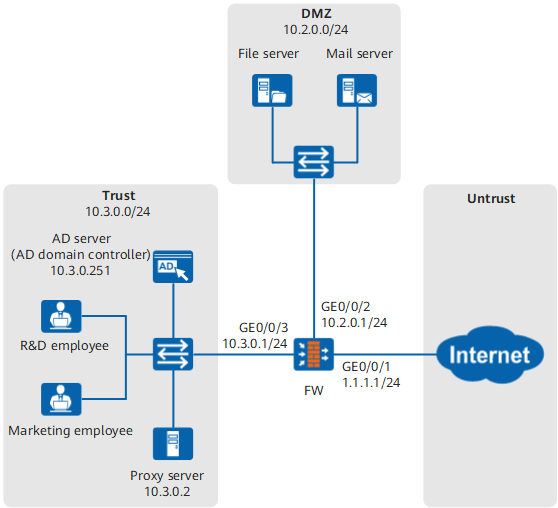
The user management and authentication mechanisms of the FW must identify IP addresses on the intranet as users to implement user-specific behavior control and permission assignment. Requirements are as follows:
- Information about users and departments is saved on the FW and can be referenced by policies.
- Employees use domain accounts to log in to AD domains and access network resources. Employees are identified by the user names they use to log in to AD domains.
Configuration Roadmap

In this example, only the procedure for configuring the FW to implement permission control on users whose access the Internet through an HTTP proxy server. For details on how to configure AD SSO to enable users to go online from the FW, see the configuration examples of AD SSO.
If the HTTP proxy server does not support the addition of X-Forwarded-For field in HTTP packet, the FW cannot obtain the real IP addresses of users. As a result, the FW cannot implement user-based security control.
Configure AD SSO.
To implement permission control on users who access the Internet through an HTTP proxy server, ensure that the FW has obtained user identities before the users go online. In this example, when users log in to the AD domain, the FW has obtained user identities through the AD SSO function, namely, the users go online from the FW.
- Enable XFF proxy-based user control so that the FW can parse the X-Forwarded-For field in an HTTP packet to obtain the real IP address of the user. Then the device can obtain the user name corresponding to the IP address.
- Configure an authentication policy for not authenticating the traffic whose source IP address is a proxy server address.
- Configure a security policy.
Procedure
- Configure AD SSO. For details, see:
- Enable XFF proxy-based user control and specify the proxy server IP address.
<FW> system-view
[FW] user-manage xff-parse proxy-ip 10.3.0.2
- Configure an authentication policy.
If the proxy server and users are on the same network segment, configure an authentication policy on the proxy server and then configure a user authentication policy.
- After the configuration is complete, you can configure security policies, PBR policies, bandwidth policies, quota control policies, proxy policies, and audit policies that reference the user and user group objects.
Configure the security policy that references users prior to configuring the security policy that references the proxy server IP address. After the FW identifies the user identity after receiving a packet, the FW only adds the user name as the user identity. The source IP address of the packet is still the IP address of the proxy server. If you configure the security policy that references the proxy server IP address prior to configuring the security policy that references users, traffic matches the security policy that references the proxy server IP address but not the security policy that references users.
- Configure a security policy for permitting the proxy server to access the Internet.
[FW-policy-security] rule name policy_sec_proxy
[FW-policy-security-rule-policy_sec_proxy] source-zone trust
[FW-policy-security-rule-policy_sec_proxy] source-address 10.3.0.2 32
[FW-policy-security-rule-policy_sec_proxy] destination-zone untrust
[FW-policy-security-rule-policy_sec_proxy] action permit
[FW-policy-security-rule-policy_sec_proxy] quit
Verification
- Run the display user-manage online-user command on the FW to display information about online users.
<FW> display user-manage online-user verbose Current Total Number: 1 -------------------------------------------------------------------------------- IP Address: 10.3.0.2 Login Time: 2016-01-21 14:58:36 Online Time: 00:00:49 State: Active TTL: 00:30:00 Left Time: 00:29:59 Access Type: local Authentication Mode: Single Sign-on Access Device Type: unknown <--packets: 0 bytes: 0 -->packets: 0 bytes: 0 Build ID: 0 User Name: user_0001@cce.com Parent User Group: /cce.com/research -------------------------------------------------------------------------------- - Employees can properly access network resources.
- Run the command for checking policies, such as the display security-policy rule command, on the FW. You can find that the policy referencing users is matched.
Configuration Scripts
#
 sysname FW
#
 user-manage xff-parse proxy-ip 10.3.0.2
#
security-policy
  rule name policy_sec_proxy
  source-zone trust
  source-address 10.3.0.2 32
  destination-zone untrust
  action permit
#
auth-policy
 rule name auth_policy_user
  source-zone trust
  source-address 10.3.0.0 24
  action exempt-auth
 rule name auth_policy_proxy
  source-zone trust
  source-address 10.3.0.2 32
  action none
#