Web: Example for Configuring WeChat Authentication on Internet Access Users
Networking Requirements
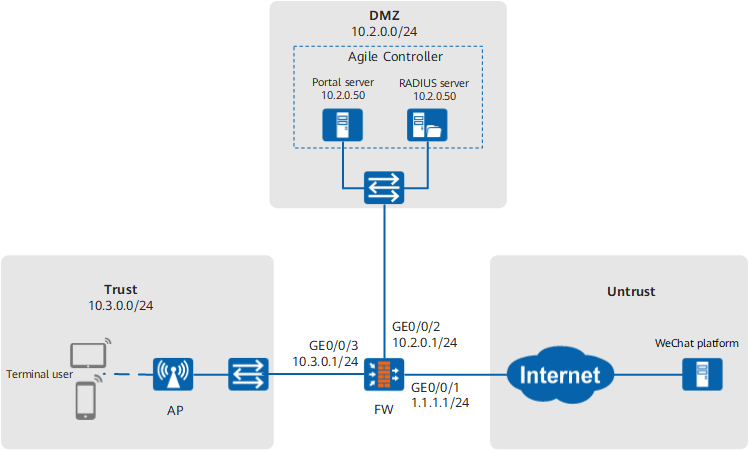
A shopping mall has a FW deployed as the egress gateway at the network border to connect the intranet to the Internet, as shown in Figure 1. To attract customers, the mall has Wi-Fi deployed so that the customers can enjoy free Internet access after they enable the Wi-Fi function and pass the one-click authentication.
Free Internet access through one-click authentication is implemented by combining the one-click authentication function for Wi-Fi access through WeChat provided by the Agile Controller with the user-defined portal authentication function of the FW and by integrating with the WeChat platform.
Configuration Roadmap
To implement the function of free Internet access through one-click authentication, you need to perform configurations on the WeChat platform, Agile Controller, and FW. The configuration procedure is as follows:
- Configure relevant services on the WeChat platform.
- Use the applied WeChat official account to log in to the WeChat
platform and add the plug-ins for Wi-Fi access through WeChat and
for shop management.
Only an enterprise but not individual can apply for shop management.
- Add a shop and set its location and name.
Ensure the accuracy of the shop location so that users can properly obtain Wi-Fi information.
- Add a device and bind a WeChat account as the administrator for
the function of Wi-Fi access through WeChat in this shop.
The device refers to the AP device corresponding to the SSID associated with this function. This step associates the shop name, Wi-Fi SSID, and Wi-Fi password. Configure the device as one authenticated through password.
- Activate the function of Wi-Fi access through the WeChat official account.
- View the AppID and AppSecret of the WeChat official account.
The preceding descriptions cover basic steps of configurations on the WeChat platform. For operation details, contact WeChat technical support.
- Use the applied WeChat official account to log in to the WeChat
platform and add the plug-ins for Wi-Fi access through WeChat and
for shop management.
- Configure the Agile Controller.
- Configure a third-party application and specify the parameters for interconnecting the Agile Controller with the WeChat platform.
- Configure the authentication page pushed by the Agile Controller to users.
- Configure the policy for pushing the portal authentication page to users.
- Configure the portal server and RADIUS server for them to properly interwork with the FW.
-
- Configure interfaces and assign them to security zones.
- Configure a NAT policy.
- Configure the DHCP function.
- Configure security policies.
- Configure authentication, accounting, and authorization information of the RADIUS server.
- Configure an authentication domain.
- Configure Portal2.0 authentication.
- Configure a domain name group.
- Configure authentication policies.
Data Planning
| Item | Data | Description |
|---|---|---|
Agile Controller |
The parameters for interconnecting with the WeChat platform include the Token, AppID, and AppSecret. |
The values shall be consistent with those on the WeChat platform. When the Agile Controller communicates with the WeChat platform, the WeChat platform needs to verify these values. |
Device IP address range of users: 10.3.0.0/24 |
If the device IP address of a user falls in the range of 10.3.0.0/24, the Agile Controller pushes the customized portal authentication page to the user. |
|
RADIUS parameters:
|
RADIUS parameters set on the Agile Controller shall be consistent with those on the FW. |
|
Portal parameters:
|
Portal authentication parameters set on the Agile Controller shall be consistent with those on the FW. |
|
| FW | RADIUS server:
|
RADIUS server parameters set on the FW shall be consistent with those on the Agile Controller. |
Portal server:
|
Portal server parameters set on the FW shall be consistent with those on the Agile Controller. |
|
FW listening port: 2000 |
This port is used by the FW to listen to portal server messages. You need also to configure this port on the Agile Controller. |
Procedure
- Configure relevant information on the Agile Controller.
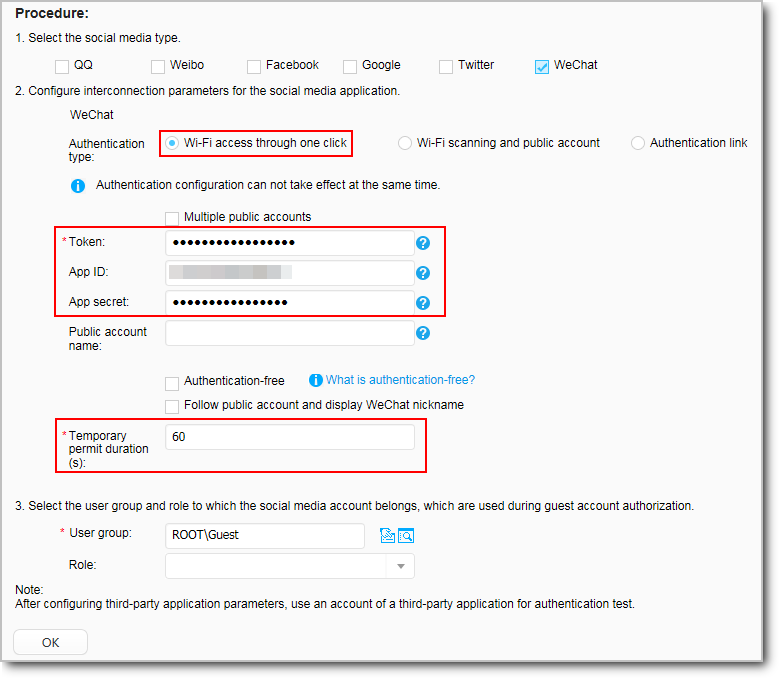
- Choose , set the parameters for interconnecting
the Agile Controller with the WeChat platform, and keep default values
for other parameters.
Ensure that the Agile Controller can communicate with the WeChat platform. In this step, the Agile Controller connects to the WeChat platform for verification. The configuration completes only after the verification succeeds.
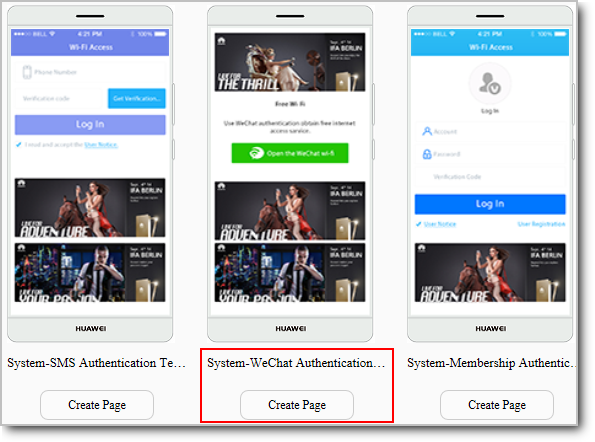
- Choose , select a
WeChat authentication template, and click the button below to start
customizing the authentication page.
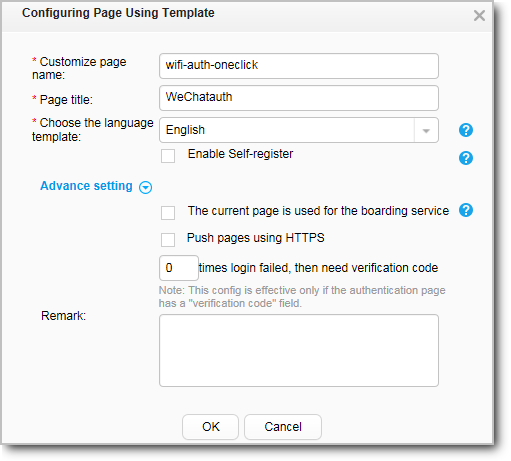
- Set parameters of the WeChat authentication page template
as follows and then click OK.
- Edit the authentication page as required. After that,
click Release in the lower-left corner.
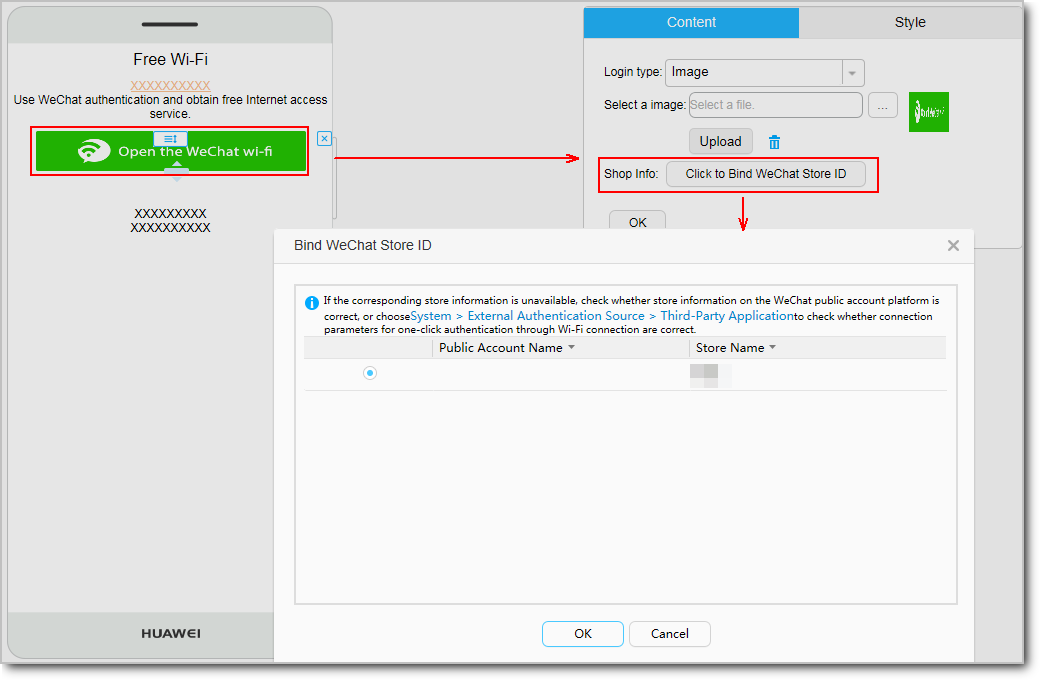
As shown in the following figure, click the red box on the left for the content and style editing page to be displayed on the right. Click the button in the line of Shop Info and select the shop bound to this authentication page. Edit other information as required or keep the default configurations.
Ensure that the Agile Controller can communicate with the WeChat platform. In this step, the Agile Controller connects to the WeChat platform and reads information about the added shop from the platform. The read shop information is shown in the following figure.
Till now, you have completed customizing the authentication page.
- Choose and perform
configurations as shown in the following figure. Keep default values
for other information.
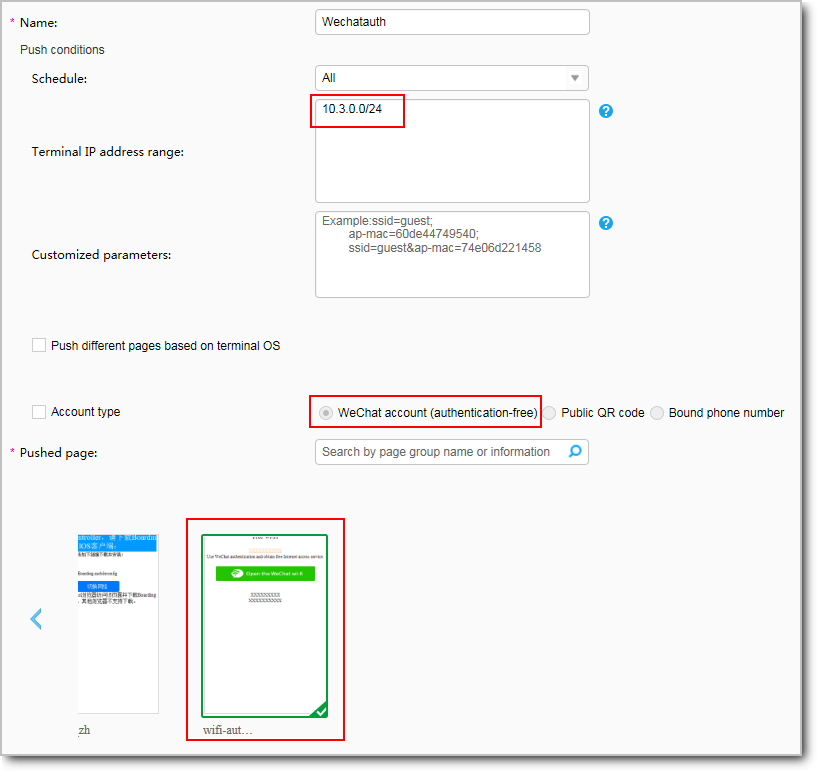
If the device IP address of a user falls in the range of 10.3.0.0/24, the Agile Controller pushes the customized portal authentication page to the user.
- Choose , add a device, and configure the portal and RADIUS
servers.
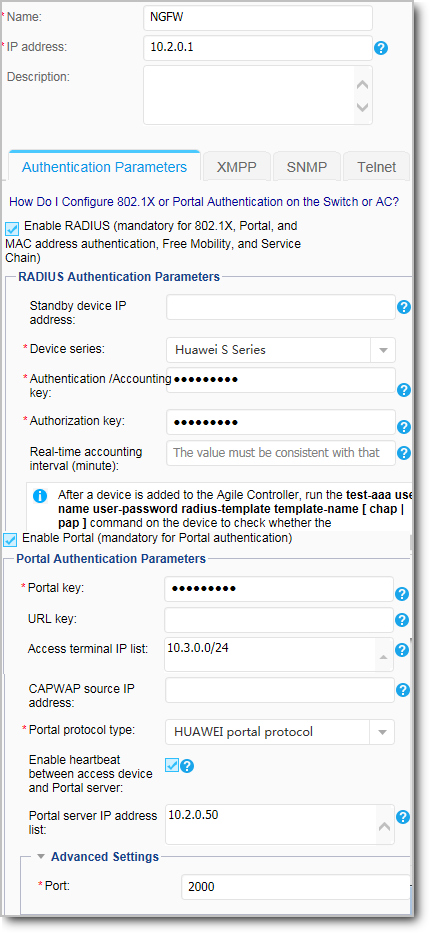
Parameter
Description
IP address
The Agile Controller and this interface address on the FW must be reachable to each other.
RADIUS parameters
Authentication and accounting key
Must be consistent with the shared key for the FW to interact with the authentication and accounting server set on the 6.
Authorization key
Must be consistent with the shared key for the FW to interact with the authorization server set on the 6.
Realtime account period
Optional.
Device series
Keep the default value.
Portal parameters
Portal key
Must be consistent with the shared key set on the 8.
Port
Must be consistent with the listening port set on the 8.
- Choose , set the parameters for interconnecting
the Agile Controller with the WeChat platform, and keep default values
for other parameters.
- Choose , configure an IP address for
the interface, and assign the interface to a security zone.
After completing the preceding configurations on the Agile Controller, perform the following configurations on the FW.
The following example describes how to configure interface GigabitEthernet 0/0/3. You can configure other interfaces based on the networking diagram.
Zone
trust
IP Address
10.3.0.1/24
- Choose and click Add to configure a NAT policy.
Configure the NAT policy so that the FW can replace the source IP address for accessing extranet packets with the public address of the extranet interface.
Name
policy_nat1
NAT Type
NAT
NAT Mode
Source address translation
Source Zone
trust, dmz
Destination Type
Outbound Interface GigabitEthernet 0/0/1
Source Address Translated To
Outbound Interface
- Choose and click Add to configure the DHCP function.
After that, the FW can allocate IP addresses to users after their devices connect to the SSID.
Interface Name
GigabitEthernet 0/0/3
Type
IPv4
Service Type
Server
IP Addresses Range
10.3.0.2 to 10.3.0.254
Subnet Mask
255.255.255.0
DNS Server
9.9.9.9
- Choose and click Add to configure a
security policy.
- Configure a security policy for the Trust (where users
reside) -> DMZ (where the portal server resides) interzone for users
to access the portal authentication page of the portal server.
Name
sec_policy_tsm
Source Zone
trust
Destination Zone
dmz
Source Address
10.3.0.0/24
Destination Address
10.2.0.0/24
Action
Permit

If the URL of the authentication page is a domain name and a DNS server for resolving the domain name is deployed in the DMZ, you need to enable the DNS server from the Trust zone to the DMZ.
- Configure a security policy for the Trust (where users
reside) -> DMZ (where the portal server resides) interzone for users
to access the portal authentication page of the portal server.
- Configure authentication, accounting, and
authorization information of the RADIUS server.
- Choose and click Add to configure the
RADIUS server.
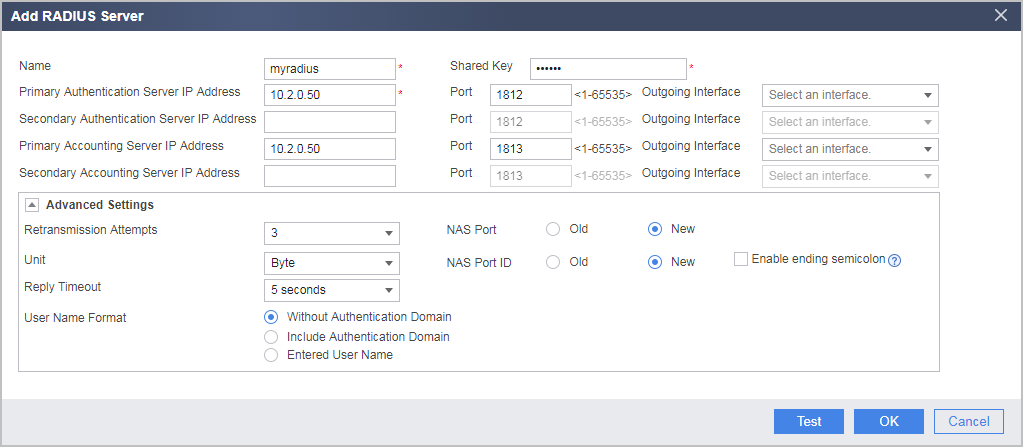
Configure the IP address and port of the RADIUS authentication and accounting server and the shared key for the FW to interact with the authentication and accounting server. The parameters must be consistent with those on the RADIUS server.
- Choose and click Add to configure the
RADIUS server.
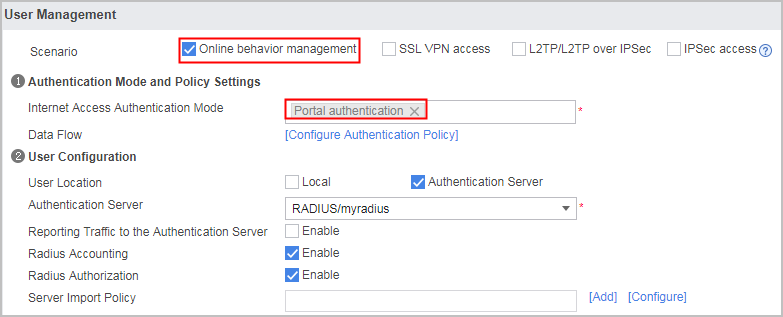
- Configure an authentication domain.
- Choose .
- Set the parameters as follows.
- Configure Portal2.0 authentication.
- Set the parameters as follows.
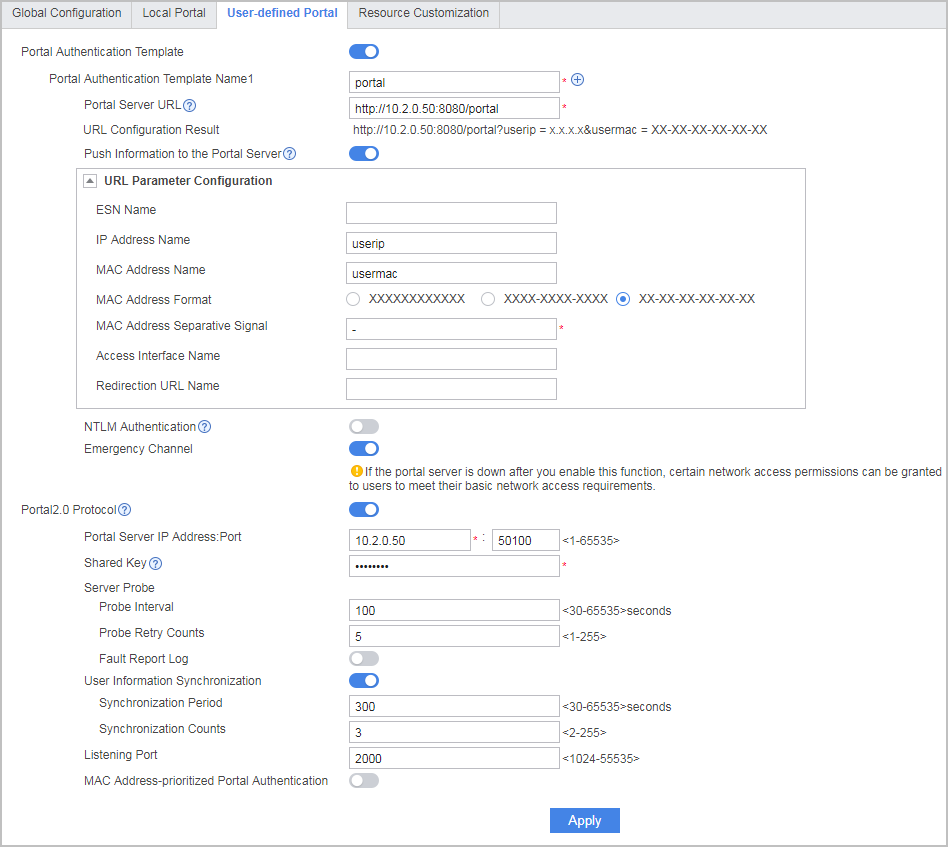
- Set the parameters as follows.
- Choose and click Add to create a domain name group.
Add wifi.weixin.qq.com to the created domain name group for it to be used by the authentication policy.
Name
weixin
Domain
wifi.weixin.qq.com
- Choose and click Add to configure an
authentication policy.
Verification
- Enable Wi-Fi on a mobile phone and connect to the SSID of the shop.
- Use a browser to access extranet resources through HTTP.
- The user request is redirected to the customized authentication page.
- Operate as prompted on the authentication page.
- The mobile phone automatically opens the local WeChat App.
- The mobile phone displays the page for Wi-Fi access through WeChat.
- Operate as prompted on the page for Wi-Fi access through WeChat and click Finish. The user can access the Internet through Wi-Fi.
Configuration Scripts
sysname FW
#
authentication-profile name portal_authen_default
 portal-access-profile default
#
 user-manage portal-template portal
 https enable
 portal-url push information
 portal-url parameter user-ip userip user-mac usermac
 portal-url parameter mac-address format delimiter - normal
 portal-url http://10.2.0.50:8080/portal
 server-detect web-auth-server default
#
security-policy
 rule name sec_policy_tsm
  source-zone trust
  destination-zone dmz
  source-address 10.3.0.0 24
  destination-address 10.2.0.0 24
  action permit
 rule name local_policy_01
  source-zone local
  destination-zone dmz
  action permit
 rule name local_policy_02
  source-zone dmz
  destination-zone local
  action permit
 rule name policy_02
  source-zone dmz
  destination-zone untrust
  source-address 10.2.0.0 24
  action permit
 rule name policy_03
  source-zone trust
  destination-zone untrust
  source-address 10.3.0.0 24
  action permit
rule name policy_04
  source-zone untrust
  destination-zone dmz
  destination-address 10.2.0.0 24
  action permit
#
nat-policy
  rule name policy_nat1
  source-zone trust
  source-zone dmz
  egress-interface GigabitEthernet0/0/1
  action source-nat easy-ip
#
radius-server template auth_server_radius
 radius-server shared-key cipher %^%#H**3(i3_k%ugc;,fvZG!,-:|*=(A5(y4Q_2t'3P%^%
#
 radius-server authentication 10.2.0.50 1812 weight 80
 radius-server accounting 10.2.0.50 1813 weight 80
 radius-server group-filter class
radius-server authorization 10.2.0.50 shared-key cipher %^%#K}(^&0opP~Q%fMUr3k*(
59%N:,+H$*!(Vs%%^%#
#
web-auth-server default
 server-ip 10.2.0.50
 port 50100
 shared-key cipher %^%#/.6y+B[H{Q'wPG"lpVK,bx*Yg9C*5VEC;'-K7~Z%^%#
 server-detect interval 100 max-times 5 action log
 user-sync max-times 5
#
portal-access-profile name default
 web-auth-server default
#
aaa
 authentication-scheme radius
  authentication-mode radius
 authorization-scheme radius
  authorization-mode radius
 accounting-scheme radius
  accounting-mode radius
 domain default
  authentication-scheme radius
  accounting-scheme radius
  authorization-scheme radius
  radius-server auth_server_radius
  service-type internetaccess
  internet-access mode password
#
domain-set name weixin
add domain wifi.weixin.qq.com
#
dhcp enable
#
interface GigabitEthernet0/0/3
 undo shutdown
 ip address 10.3.0.1 255.255.255.0
 dhcp select interface
 dhcp server ip-range 10.3.0.2 10.3.0.254
 dhcp server dns-list 9.9.9.9
#
interface LoopBack0
 authentication-profile portal_authen_default
#
firewall zone trust
 set priority 85
 add interface GigabitEthernet0/0/3
#
firewall zone untrust
 set priority 5
 add interface GigabitEthernet0/0/1
#
firewall zone dmz
 set priority 50
 add interface GigabitEthernet0/0/2
#
auth-policy
 rule name auth_policy_tsm
  source-zone trust
  destination-zone dmz
  source-address 10.3.0.0 mask 255.255.255.0
  destination-address 10.2.0.50 mask 255.255.255.255
  action none
  rule name auth_policy_01
  source-zone dmz
  destination-zone untrust
  source-address 10.2.0.0 mask 255.255.255.0
  action none
 rule name auth_policy_02
  source-zone trust
  destination-zone untrust
  source-address 10.3.0.0 mask 255.255.255.0
  destination-address domain-set weixin
  action none
rule name auth_policy_03
  source-zone untrust
  destination-zone dmz
  destination-address 10.2.0.0 mask 255.255.255.0
  action none
 rule name auth_policy_service
  source-zone trust
  destination-zone untrust
  source-address 10.3.0.0 mask 255.255.255.0
  action auth portal-template portal
#
return