Web Example: Internet Access User + Agile Controller as a Portal Server (the FW Participates in User Authentication) + MAC Address-prioritized Portal Authentication
This example describes how to configure the FW that serves as the egress gateway of an enterprise to work with the Agile Controller to perform portal authentication and MAC address-prioritized portal authentication on users.
Networking Requirements
As shown in Figure 1, an enterprise has deployed the FW as the egress gateway at the network border to connect the intranet and Internet.
- The network between the user and FW is a Layer 2 network, and the interface connecting the FW to the zone where the user resides is a Layer 2 interface.
- The intranet portal server (a component of the Agile Controller) provides a portal authentication page. The FW redirects users' HTTP requests to the authentication page of the portal server.
- The intranet RADIUS server (a component of the Agile Controller) stores user information and completes user authentication and MAC address-prioritized portal authentication.
- Intranet users include R&D employees and marketing employees.
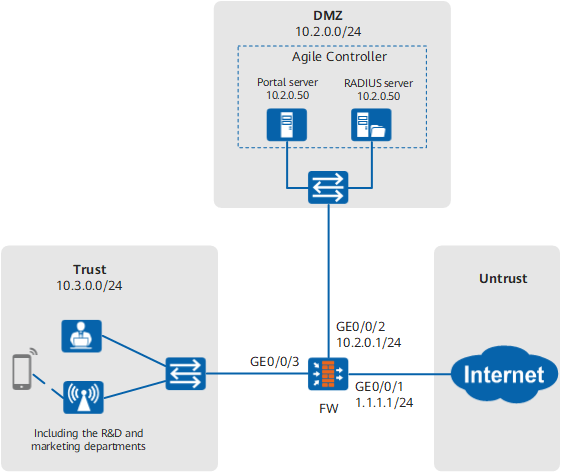
An enterprise network administrator hopes to use the user management and authentication mechanism provided by the FW to identify IP addresses on the enterprise network as users. Specific requirements are as follows:
- R&D employees and marketing employees can access HTTP services without proactively accessing the portal authentication page of the portal server, because their HTTP requests will be automatically redirected to the portal authentication page of the portal server.
- R&D employees and marketing employees can access network resources only after they pass portal authentication.
- After they pass portal authentication, if their device IP addresses change, the FW can perform MAC authentication on the users within a given time range. During MAC authentication, users are not required to enter authentication information and therefore are unaware of the authentication, facilitating their access to network resources. After they pass MAC authentication, they can directly access network resources.
- The FW saves security group information, not user information. The permissions of authenticated users are controlled on the basis of the groups they belong to.
Configuration Roadmap

This example describes only the user configuration related to authentication.
- On the Agile Controller, configure the user, authorization, portal server, and RADIUS server information, so that the Agile Controller can interwork with the FW.
- Configure interfaces and security policies on the FW.
- Configure the RADIUS server.
- Configure the authentication, charging, and authorization information about the RADIUS server.
- Configure an authentication domain.
- Configure the security group to which the Internet access user belongs.
- Configure portal 2.0 authentication and MAC address-prioritized portal authentication.
- Enable the function of detecting the MAC addresses of online users.
- Configure an authentication policy.
Data Planning
Item |
Data |
Description |
|---|---|---|
Agile Controller |
R&D user information:
Marketing user information:
|
When a user is redirected to the portal authentication page of the portal server, the user needs to enter the account and password for authentication. |
RADIUS parameters:
|
The RADIUS parameters configured on the Agile Controller must be consistent with those on the FW. |
|
Portal authentication parameters:
|
The Portal parameters configured on the Agile Controller must be consistent with those on the FW. |
|
|
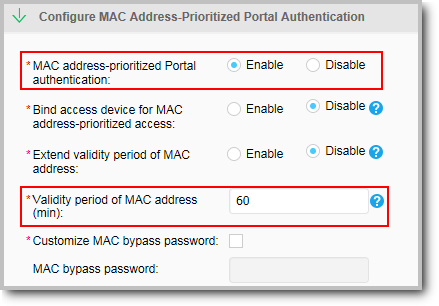
The MAC address validity period is 60 minutes, indicating that the Agile Controller can authenticate a user's MAC address in the 60 minutes since it receives the user's MAC address. |
|
FW |
RADIUS server:
|
The RADIUS server parameters configured on the FW must be consistent with those on the Agile Controller. |
Portal server:
|
The portal server parameters configured on the FW must be consistent with those on the Agile Controller. |
|
FW listening port: 2000 |
The port must be set on both the Agile Controller and FW. The port is the one for Portal authentication on the Agile Controller. |
|
MAC address-prioritized portal authentication:
|
To use MAC address-prioritized portal authentication, you need to enable online user MAC address check. If the FW detects that the mapping between the IP address and MAC address changes, it forces the user out and re-initiates MAC address-prioritized portal authentication. |
Procedure
- On the Agile Controller, configure the user, authorization, portal server, and RADIUS server information.
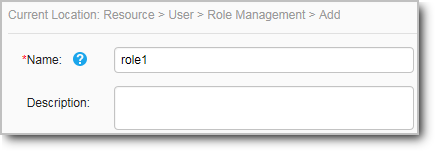
- Choose to create a role.
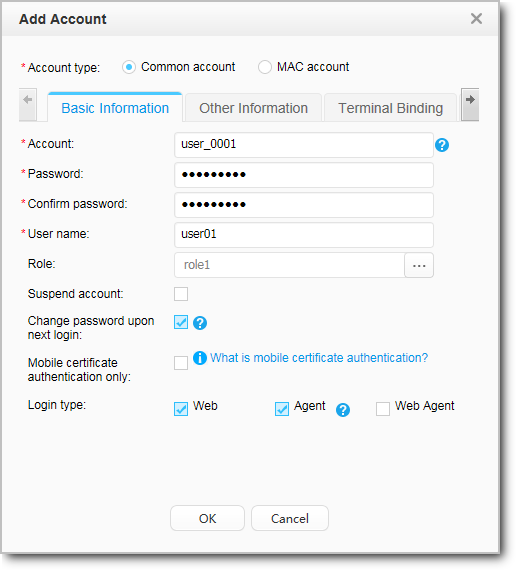
- Choose to create a user and associate the user with the role.
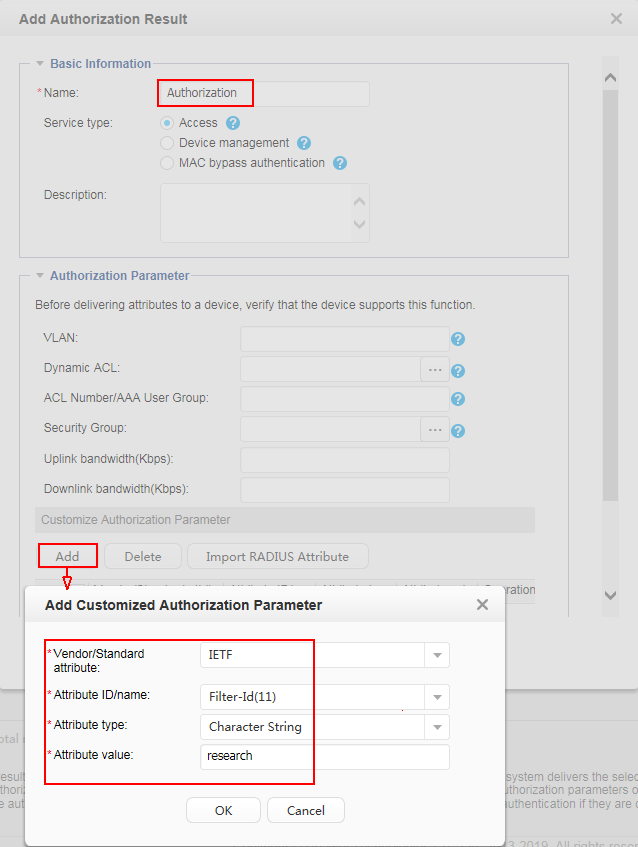
- Choose to configure the authorization result. The attribute value research is the security group of the user and must the same as that on the 6.
- Choose to configure an authorization rule. Reference the authorization result and role in the rule and associate the authorization result and role.
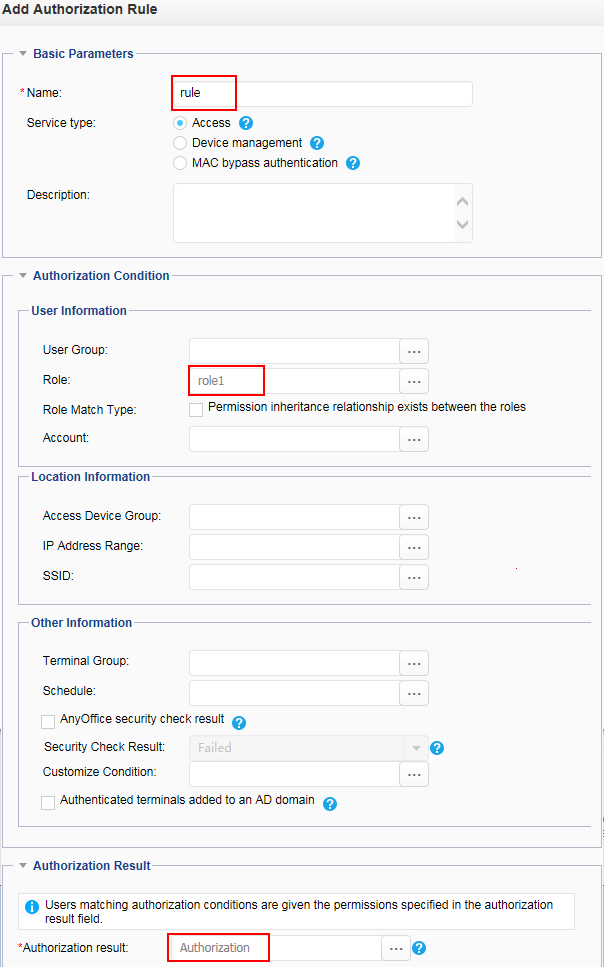
The preceding step describes the process for creating user and authorization information for the R&D department. Create such information for the marketing department by referring to this step.
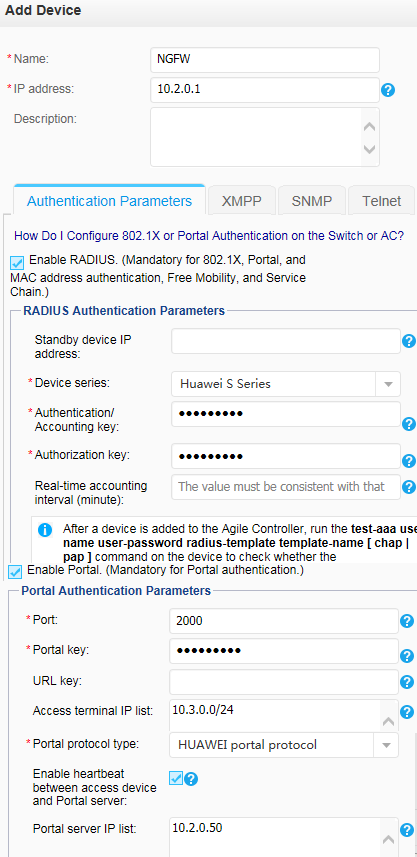
- Choose to add a device and configure the Portal server and RADIUS server.
Parameter
Description
IP Address
The interface on the FW must be able to communicate with the Agile Controller.
RADIUS Parameters
Authentication and Charging Key
The key must be consistent with the shared key for the FW to communicate with the authentication and charging servers configured in 4.
Authorization Key
The key must be consistent with the shared key for the FW to communicate with the authorization server configured in 4.
Real-Time Charging Period
This parameter can be left unconfigured.
Device Series
Use the default value.
Portal Authentication Parameters
Port
The port number must be the same as the listening port number set in 7.
Portal Key
The key must be the shared key configured on the 7.
- Choose to enable MAC address-prioritized portal authentication and set the validity period of the MAC address.
- Choose to create a role.
- Choose to configure an interface IP address and add the interface to a security zone.
After completing the preceding configurations on the Agile Controller, perform the following configurations on the FW.
- Choose and click Add to configure a security policy.
- Configure a security policy for access from the Trust zone (intranet users) and DMZ (portal server), so that users can access the portal authentication page on the portal server.
Name
sec_policy_tsm
Source zone
trust
Destination zone
dmz
Source address
10.3.0.0/24
Destination address
10.2.0.0/24
Action
Permit
If the URL of the authentication page is a domain name and a DNS server for resolving the URL is deployed in the DMZ, enable the DNS server from the Trust zone to DMZ.
- Configure a security policy for access from the Trust zone (intranet users) and DMZ (portal server), so that users can access the portal authentication page on the portal server.
- Configure the authentication, charging, and authorization information about the RADIUS server.
- Choose and click Add to configure the RADIUS server.
Configure the RADIUS authentication server, charging server's IP address, port number, and shared key used by the FW to communicate with the authentication server and charging server. The parameters must be consistent with those on the RADIUS server.
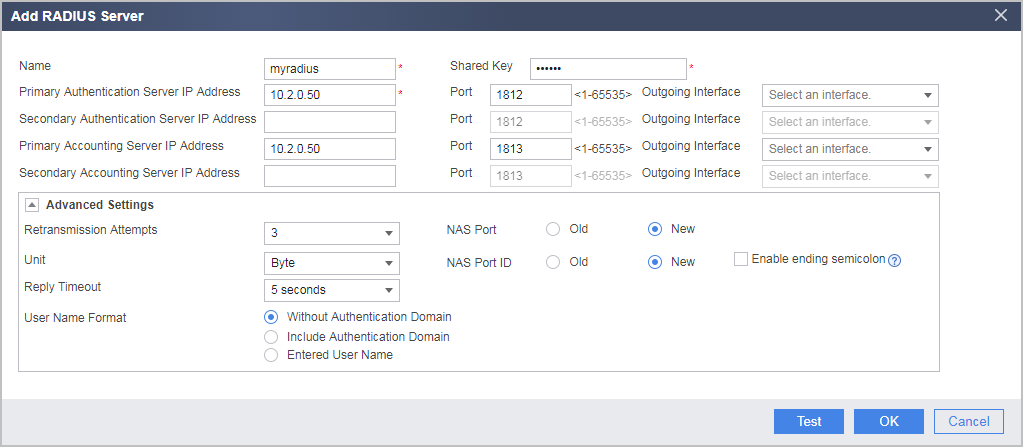
- Choose and click Add to configure the RADIUS server.
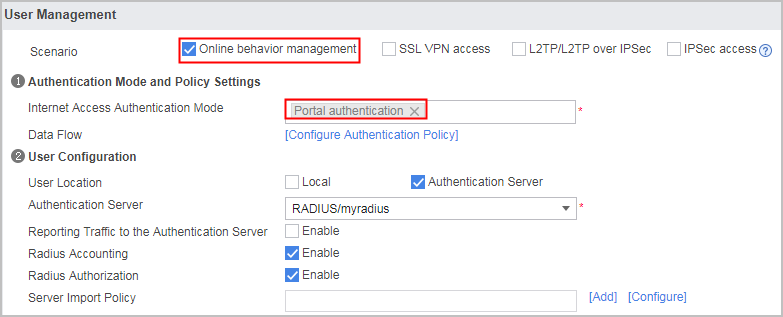
- Configure an authentication domain.
- Choose .
- Set the following parameters.
- Configure the security group to which the Internet access user belongs.
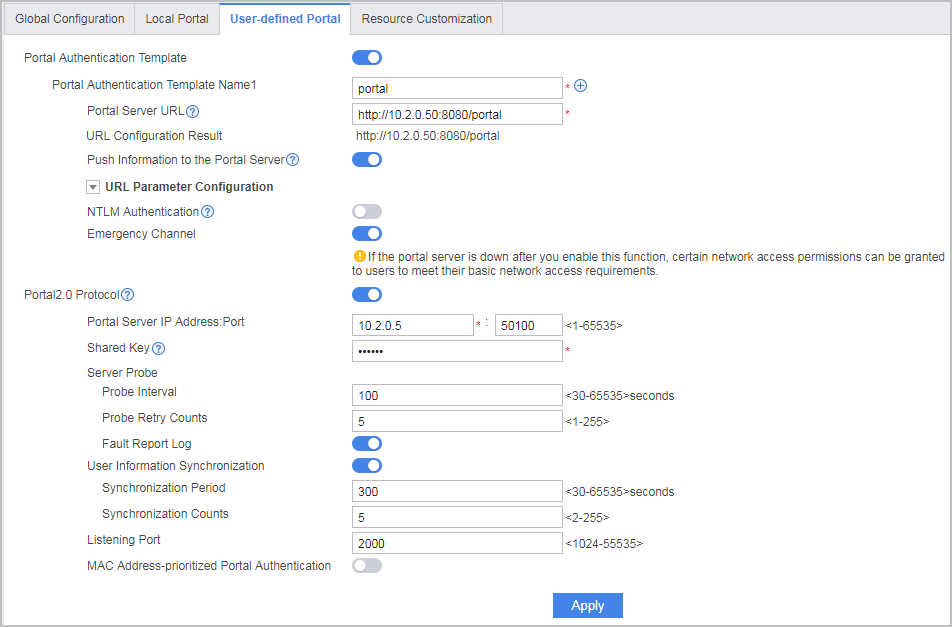
- Configure portal 2.0 authentication.
- Choose .
- Set the following portal 2.0 authentication parameters.
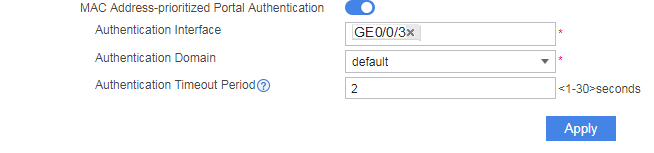
- Set the following MAC address-prioritized portal authentication parameters.
- Enable the function of detecting the MAC addresses of online users.
- Choose .
- Enable Online User MAC Address Detection.
- Choose and click Add to configure an authentication policy.
- After the configuration is complete, reference this security group when configuring the security policy, policy-based routing, traffic policy, proxy policy, audit policy, and quota control policy.
Verification
- When a user in the R&D or marketing department accesses the Internet for the first time, the request is redirected to the portal authentication page. After the user account and password configured on the Agile Controller are used to log in, the user can access network resources.
- If the IP address of the user changes, the user can still access network resources within 60 minutes after portal authentication succeeds (the FW performs MAC address authentication on the user, but the user is unaware of the authentication).
- On the FW, choose to view online user information.
Configuration Scripts
sysname FW
#
vlan batch 20

#
authentication-profile name portal_authen_default
 portal-access-profile default
authentication-profile name portal_authen_mac
 mac-access-profile mac_access_profile
#
 user-manage portal-template portal
 portal-url push information
 portal-url http://10.2.0.50:8080/portal
 server-detect web-auth-server default
#
security-policy
 rule name sec_policy_tsm
  source-zone trust
  destination-zone dmz
  source-address 10.3.0.0 24
  destination-address 10.2.0.0 24
  action permit
 rule name local_policy_01
  source-zone local
  destination-zone dmz
  action permit
 rule name local_policy_02
  source-zone dmz
  destination-zone local
  action permit
#
radius-server template auth_server_radius
 radius-server shared-key cipher %^%#H**3(i3_k%ugc;,fvZG!,-:|*=(A5(y4Q_2t'3P%^%
#
 radius-server authentication 10.2.0.50 1812 weight 80
 radius-server accounting 10.2.0.50 1813 weight 80
 radius-server group-filter class
radius-server authorization 10.2.0.50 shared-key cipher %^%#K}(^&0opP~Q%fMUr3k*(
59%N:,+H$*!(Vs%%^%#
#
web-auth-server default
 server-ip 10.2.0.50
 port 50100
 shared-key cipher %^%#/.6y+B[H{Q'wPG"lpVK,bx*Yg9C*5VEC;'-K7~Z%^%#
 server-detect interval 100 max-times 5 action log
 user-sync max-times 5
#
portal-access-profile name default
 web-auth-server default
#
mac-access-profile name mac_access_profile
#
user-manage mac-access enable
user-manage mac-access aging-time 1
user-manage mac-access no-ack-time 2
#
user-manage online-user mac-address check enable
#
aaa
 authentication-scheme radius
  authentication-mode radius
 authorization-scheme radius
  authorization-mode radius
 accounting-scheme radius
  accounting-mode radius
 domain default
  authentication-scheme radius
  accounting-scheme radius
  authorization-scheme radius
  radius-server auth_server_radius
  service-type internetaccess
  internet-access mode password
#
interface Vlanif20
 ip address 10.3.0.1 255.255.255.0
#
interface GigabitEthernet0/0/3
 portswitch
 port link-type access
 port default vlan 20
 authentication-profile portal_authen_mac
interface GigabitEthernet0/0/2
 undo shutdown
 ip address 10.2.0.1 24
#
interface LoopBack0
 authentication-profile portal_authen_default
#
firewall zone trust
 set priority 85
 add interface Vlanif20
#
firewall zone untrust
 set priority 5
 add interface GigabitEthernet0/0/1
#
firewall zone dmz
 set priority 50
 add interface GigabitEthernet0/0/2
#
auth-policy
 rule name auth_policy_tsm
  source-zone trust
  destination-zone dmz
  source-address 10.3.0.0 mask 255.255.255.0
  destination-address 10.2.0.50 mask 255.255.255.255
  action none
 rule name auth_policy_service
  source-zone trust
  destination-zone untrust
  source-address 10.3.0.0 mask 255.255.255.0
  action auth portal-template portal
#
return