Application Scenarios for VPN
This section describes VPN application scenarios and compares different VPN implementations for your reference.
Site-to-site VPN
A site-to-site VPN has a VPN tunnel established between two LANs.
As shown in Figure 1, network 1 and network 2 reside on different areas across the Internet and are connected to gateway 1 and gateway 2 respectively to access the Internet. The two networks exchange confidential data over the Internet. A VPN tunnel is established between gateway 1 and gateway 2 to protect the data.
In a site-to-site VPN, networks at two ends use fixed gateways to access the Internet and the network topology is fixed. Both network 1 and network 2 can initiate access to each other. Site-to-site VPNs are suitable for chain supermarkets, governmental organizations, and banks.

To establish a site-to-site VPN, you can use IPSec, L2TP, L2TP over IPSec, or GRE over IPSec.
- IPSec: If two networks exchange confidential data frequently, all users need to access their peer networks without authentication, use an IPSec VPN.
- L2TP: If users on one network access the other network and must be authenticated, use an L2TP VPN.
- L2TP over IPSec: If users on one network access the other network to transmit confidential data, and the users must be authenticated, use an L2TP over IPSec VPN.
- Both GRE over IPSec and IPSec over GRE tunnels secure data transmission. Their difference lies on the data encapsulation sequence. In GRE over IPSec, GRE encapsulation is performed prior to IPSec encapsulation. In IPSec over GRE, IPSec encapsulation is performed first. As IPSec cannot encapsulate multicast packets, IPSec over GRE tunnels cannot transmit multicast data. To transmit multicast data through a tunnel, use GRE over IPSec. For example, networks 1 and 2 use RIP routes. As RIP routing data is multicast data, you must use GRE over IPSec to send RIP routes to the peer.
See IPSec, L2TP VPN, and GRE for more VPN information and VPN configurations. Table 1 lists features of site-to-site VPNs.
Item |
IPSec |
L2TP |
L2TP over IPSec |
GRE over IPSec |
IPSec over GRE |
|---|---|---|---|---|---|
Data encryption |
Supported. The data needs to be encrypted within the tunnel is encrypted. Multiple symmetric encryption methods and their combinations are supported. |
Not supported. |
IPSec encryption is supported. |
IPSec encryption is supported. |
IPSec encryption is supported. |
User authentication |
supported. |
Local authentication and remote authentication (for example, using a RADIUS server) are supported. Supported. Both the LAC and LNS authenticate users, and only the authenticated users can access intranet servers. |
Supported. L2TP is used to authenticate users. |
Not supported. |
Not supported. |
Requirements on the client |
None. |
PPP dial-up software |
PPP dial-up software |
None. |
None. |
Support for intermediate NAT devices |
Supported. |
Supported. |
Supported. |
Supported. |
Not supported. |
Client-to-site VPN
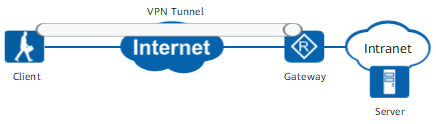
A client-to-site VPN has a VPN tunnel established between a client and an intranet.
As shown in Figure 2, an employee on the move uses a client to access the intranet and transmit data to the headquarters over the Internet. A VPN tunnel is established between the client and the gateway to secure data transmission.
In a client-to-site VPN, the client uses a dynamic address, and access is always initiated from clients to the server. Client-to-site VPNs are suitable for the scenarios where employees on the move use smartphones or laptops to access the headquarters.
To establish a client-to-site VPN, you can use SSL, IPSec (IKEv2), L2TP, or L2TP over IPSec.
- SSL: If there is no special requirements on the client, and the server to be accessed must use different policies to provide different services for users, use an SSL VPN.
- L2TP over IPSec: If employees on the move frequently access some intranet servers at the headquarters, and all server functions are open to VPN users, use an L2TP over IPSec VPN.
See SSL VPN, IPSec and L2TP VPN for more VPN information and VPN configurations.
Table 2 lists functions provided by SSL, IPSec (IKEv2), L2TP, and L2TP over IPSec VPNs.
Item |
SSL |
IPSec (IKEv2) |
L2TP |
L2TP over IPSec |
|---|---|---|---|---|
Data encryption |
Supported. Only the application-layer data is encrypted. |
Supported. All data within the tunnel is encrypted. Multiple symmetric encryption methods and their combinations are supported. |
Not supported. |
IPSec encryption is supported. |
User authentication |
Local authentication, RADIUS server authentication, and LDAP server authentication are supported. |
EAP authentication is supported. You must install a third-party authentication server, for example, a RADIUS server. |
Local authentication and remote authentication (for example, using a RADIUS server) are supported. |
Supported. L2TP is used to authenticate users. |
Requirements on the client |
Browsers (for example, the Internet Explorer) that support SSL must be installed on PCs. No configuration on the client is required. You can enter the IP address of the virtual gateway or the domain name in a browser to access the login page. |
IPSec software that supports IKEv2 and EAP authentication (for example, Windows 7 IPSec client) must be installed. |
L2TP dial-up software (for example, VPN client) must be installed. |
L2TP dial-up software (for example, VPN client) that supports IPSec must be installed. |
Support for intermediate NAT devices |
Supported. |
Supported. |
Supported. |
Supported. |
BGP/MPLS IP VPN
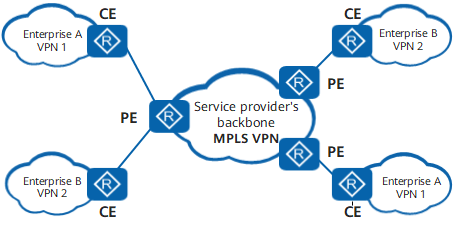
BGP/MPLS IP VPNs interconnect enterprises across regions. Nowadays, a lot of enterprise networks span across countries and regions. To securely connect the geographically dispersed networks over the huge and complex Internet and control user access, service providers must configure BGP/MPLS IP VPN on their backbones.
BGP/MPLS IP VPNs are full-mesh VPNs that are established between each provider edge (PE) router and each other PE router. All PE routers on the backbone network must support BGP/MPLS IP VPNs.
Figure 3 shows the basic networking diagram.