Configuring Virtual System Services
This section describes how to configure services for a virtual system.
Context
As shown in Figure 1, each virtual system has independent resources, such as interfaces, security zones, and users quota, and acts as a separate device. Configuring services for virtual system is the same as configuring service for the public system. However, certain functions may be restricted due to the limit of resources for the virtual system and permissions of virtual system administrators.
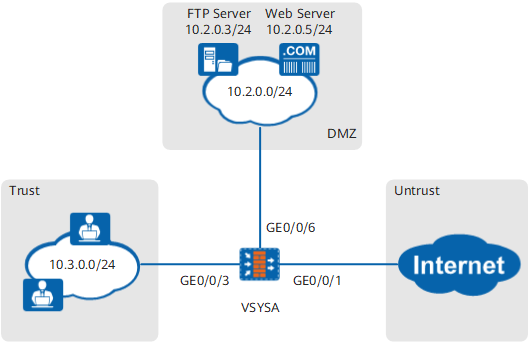
The following procedure covers only the key points and precautions in configuring virtual system services. For details, see corresponding sections in the administrator guide.
Procedure
- Access the configuration page of the virtual system.
Virtual system services can be configured by the public system or virtual system administrator. The public system and virtual system administrators access the virtual system in different ways.
- For the public system administrator
- If the Web UI is used
Select a virtual system from the Virtual System drop-down list at the upper right corner, or
- If the CLI is used
Run the switch vsys vsys-name command in the system view.
- If the Web UI is used
- To log in to the virtual system as a virtual system administrator, log in to the Web UI of the virtual system using a browser or to the CLI using a remote login tool.
- For the public system administrator
- Configure the service interface.
The key step in the configuration of a service interface is to add the configured interface to a proper security zone. After interfaces are assigned into proper security zones, the networks connected to these interfaces are divided. Then, you can configure services specific to security zones. By default, security zones Trust, Untrust, DMZ, and Local are created on each virtual system. Plan the security zones on a virtual system by following the same rules that apply to the public system.

The public system administrator has already completed the configuration of the interface before assigning them to virtual systems. Therefore, these interfaces are not configurable on the virtual system.
- Configure a security policy.
In common cases, security policies are required for following types of traffic:
- Traffic destined from intranet users to the Internet in the Untrust zone
- Traffic destined from intranet users in the Trust zone to the intranet server in the DMZ zone
- Traffic destined from Internet users in the Untrust zone to the intranet server in the DMZ zone
Each security policy can reference different content security profiles to implement content security functions, such as antivirus, intrusion prevention, URL filtering, file blocking, content filtering, application behavior control, and anti-spam.
- Configure the NAT policy.
If the number of public IP addresses is insufficient, you can configure NAT policies to support Internet access of intranet users. You can also use NAT policies to hide network topology.
For example, you can configure a NAT policy for the virtual system in Figure 1 as follows:
- Configure a source NAT policy in the Trust->Untrust interzone so that intranet users can access the Internet by sharing a few public IP addresses.
- Configure the NAT Server in the Untrust->DMZ interzone so that public network users can access the server on the intranet.
- Configure users and authentication
To implement user-specific access and permission control, create users and add them to different groups. Then, configure authentication policies for user groups.
For example, as shown in Figure 1, you can add the senior executives to one group and common employees to another user groups and configure different authentication policies for the user groups. The configurations give senior executives full Internet access without being authenticated, whereas common employees must be authenticated before obtaining Internet access.
- Configure other security functions as required.
The function availability for virtual systems, as shown in Function Availability for Virtual Systems.