Configuring Communication Between Two Virtual Systems Across the Public System Based on a Traffic Diversion Table
Networking Requirements
As shown in Figure 1, the device is deployed between network A and network B. Virtual systems vsysa and vsysb function as network A's gateway and network B's gateway respectively to isolate and protect their respective network. The device connects to the Internet through the WAN interface GE0/0/1 of the public system.
You need to configure communication between vsysa and vsysb across the public system based on a traffic diversion table so that networks A and B can communicate with each other. In addition, you need to configure communication between the public system and vsysa and the public system and vsysb based on a traffic diversion table so that networks A and B can access the Internet.
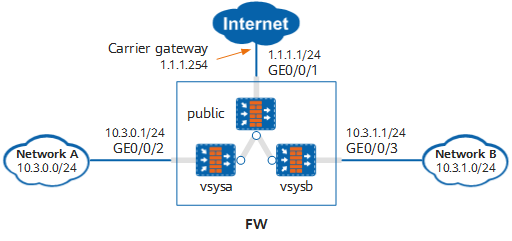
Configuration Roadmap
- Enable the virtual system function, create virtual systems vsysa and vsysb, and allocate resources to them.
- Configure interfaces for the public system, vsysa, and vsysb, and add the interfaces to security zones.
- Configure a traffic diversion table in the public system to divert traffic between network A and network B and traffic for networks A and B to access the Internet.
- Configure routes in the public system, vsysa, and vsysb to divert traffic sent from the device to network A, network B, and the Internet.
- Configure security policies in the public system, vsysa, and vsysb to permit the traffic between network A and network B and the traffic for networks A and B to access the Internet.
Procedure
- Enable the virtual system function.
<FW> system-view
[FW] vsys enable
- Create virtual systems and allocate resources to them.
# Create virtual system vsysa and allocate an interface to it.
[FW] vsys name vsysa
[FW-vsys-vsysa] assign interface GigabitEthernet 0/0/2
[FW-vsys-vsysa] quit
# Create virtual system vsysb and allocate an interface to it.
[FW] vsys name vsysb
[FW-vsys-vsysb] assign interface GigabitEthernet 0/0/3
[FW-vsys-vsysb] quit
- Configure interfaces for the public system and add the interfaces to security zones.
[FW] interface GigabitEthernet 0/0/1
[FW-GE0/0/1] ip address 1.1.1.1 24
[FW-GE0/0/1] quit
[FW] interface Virtual-if 0
[FW-Virtual-if0] ip address 172.16.0.1 24
[FW-Virtual-if0] quit
[FW] firewall zone trust
[FW-zone-trust] add interface Virtual-if 0
[FW-zone-trust] quit
[FW] firewall zone untrust
[FW-zone-untrust] add interface GigabitEthernet 0/0/1
[FW-zone-untrust] quit
- Configure traffic diversion tables.
# Configure a traffic diversion table for diverting the forward traffic for network B to access network A or the return traffic for network A to access network B or the Internet to vsysa.
[FW] firewall import-flow public 10.3.0.0 10.3.0.255 vpn-instance vsysa
 Warning: The destination of this IP range should be in this vsys network, otherwise it may cause flow loop! Continue?[Y/N]: Y
# Configure a traffic diversion table for diverting the forward traffic for network A to access network B or the return traffic for network B to access network A or the Internet to vsysb.
[FW] firewall import-flow public 10.3.1.0 10.3.1.255 vpn-instance vsysb Warning: The destination of this IP range should be in this vsys network, otherwise it may cause flow loop! Continue?[Y/N]: Y - Configure a route in the public system.
Configure a route from the public system to the Internet to divert the forward traffic for networks A and B to access the Internet to the Internet. 1.1.1.1.254 is the next-hop address of the route from the public system to the Internet.
[FW] ip route-static 0.0.0.0 0.0.0.0 1.1.1.254 - Switch to the system view of vsysa.
[FW] switch vsys vsysa
<FW-vsysa> system-view
- Configure interfaces for vsysa and add the interfaces to security zones.
[FW-vsysa] interface GigabitEthernet 0/0/2
[FW-vsysa-GigabitEthernet0/0/2] ip address 10.3.0.1 24
[FW-vsysa-GigabitEthernet0/0/2] quit
[FW-vsysa] firewall zone trust
[FW-vsysa-zone-trust] add interface GigabitEthernet 0/0/2
[FW-vsysa-zone-trust] quit
[FW-vsysa] firewall zone untrust
[FW-vsysa-zone-untrust] add interface Virtual-if 1
[FW-vsysa-zone-untrust] quit
- Configure routes in vsysa.
# Configure a route from vsysa to the public system to divert the forward traffic for network A to access network B or the Internet to the public system.
[FW-vsysa] ip route-static 0.0.0.0 0.0.0.0 public# Configure a route from vsysa to network A to divert the forward traffic for network B to access network A and the return traffic for network A to access network B to network A. 10.3.0.254 is the next-hop address of the route from vsysa to network A.
[FW-vsysa] ip route-static 10.3.0.0 255.255.255.0 10.3.0.254 - Configure security policies in vsysa.
# Configure a security policy for traffic from the Trust zone to the Untrust zone to permit traffic from network A to network B or the Internet.
[FW-vsysa] security-policy
[FW-vsysa-policy-security] rule name vsysa_trust_to_untrust
[FW-vsysa-policy-security-rule-vsysa_trust_to_untrust] source-zone trust
[FW-vsysa-policy-security-rule-vsysa_trust_to_untrust] destination-zone untrust
[FW-vsysa-policy-security-rule-vsysa_trust_to_untrust] source-address 10.3.0.0 24
[FW-vsysa-policy-security-rule-vsysa_trust_to_untrust] action permit
[FW-vsysa-policy-security-rule-vsysa_trust_to_untrust] quit
# Configure a security policy for traffic from the Untrust zone to the Trust zone to permit traffic from network B to network A.
[FW-vsysa-policy-security] rule name vsysa_untrust_to_trust
[FW-vsysa-policy-security-rule-vsysa_untrust_to_trust] source-zone untrust
[FW-vsysa-policy-security-rule-vsysa_untrust_to_trust] destination-zone trust
[FW-vsysa-policy-security-rule-vsysa_untrust_to_trust] source-address 10.3.1.0 24
[FW-vsysa-policy-security-rule-vsysa_untrust_to_trust] destination-address 10.3.0.0 24
[FW-vsysa-policy-security-rule-vsysa_untrust_to_trust] action permit
[FW-vsysa-policy-security-rule-vsysa_untrust_to_trust] quit
[FW-vsysa-policy-security] quit
- Switch to the system view of vsysb.
[FW-vsysa] quit
<FW-vsysa> quit
[FW] switch vsys vsysb
<FW-vsysb> system-view
- Configure interfaces for vsysb and add the interfaces to security zones.
[FW-vsysb] interface GigabitEthernet 0/0/3
[FW-vsysb-GigabitEthernet0/0/3] ip address 10.3.1.1 24
[FW-vsysb-GigabitEthernet0/0/3] quit
[FW-vsysb] interface Virtual-if 2
[FW-vsysb-Virtual-if2] ip address 172.16.2.1 24
[FW-vsysb-Virtual-if2] quit
[FW-vsysb] firewall zone trust
[FW-vsysb-zone-trust] add interface GigabitEthernet 0/0/3
[FW-vsysb-zone-trust] quit
[FW-vsysb] firewall zone untrust
[FW-vsysb-zone-untrust] add interface Virtual-if 2
[FW-vsysb-zone-untrust] quit
- Configure routes in vsysb.
# Configure a route from vsysb to the public system to divert the forward traffic for network B to access network A or the Internet to the public system.
[FW-vsysb] ip route-static 0.0.0.0 0.0.0.0 public# Configure a route from vsysb to network B to divert the forward traffic for network A to access network B and the return traffic for network B to access network A to network B. 10.3.1.254 is the next-hop address of the route from vsysb to network B.
[FW-vsysb] ip route-static 10.3.1.0 255.255.255.0 10.3.1.254 - Configure security policies in vsysb.
# Configure a security policy for traffic from the Trust zone to the Untrust zone to permit traffic from network B to network A or the Internet.
[FW-vsysb] security-policy
[FW-vsysb-policy-security] rule name vsysb_trust_to_untrust
[FW-vsysb-policy-security-rule-vsysb_trust_to_untrust] source-zone trust
[FW-vsysb-policy-security-rule-vsysb_trust_to_untrust] destination-zone untrust
[FW-vsysb-policy-security-rule-vsysb_trust_to_untrust] source-address 10.3.1.0 24
[FW-vsysb-policy-security-rule-vsysb_trust_to_untrust] action permit
[FW-vsysb-policy-security-rule-vsysb_trust_to_untrust] quit
# Configure a security policy for traffic from the Untrust zone to the Trust zone to permit traffic from network A to network B.
[FW-vsysb-policy-security] rule name vsysb_untrust_to_trust
[FW-vsysb-policy-security-rule-vsysb_untrust_to_trust] source-zone untrust
[FW-vsysb-policy-security-rule-vsysb_untrust_to_trust] destination-zone trust
[FW-vsysb-policy-security-rule-vsysb_untrust_to_trust] source-address 10.3.0.0 24
[FW-vsysb-policy-security-rule-vsysb_untrust_to_trust] destination-address 10.3.1.0 24
[FW-vsysb-policy-security-rule-vsysb_untrust_to_trust] action permit
[FW-vsysb-policy-security-rule-vsysb_untrust_to_trust] quit
[FW-vsysb-policy-security] quit
Verifying the Configuration
- A user on network A can access network B and the Internet. In addition, the following sessions are created in vsysa and vsysb and no session is created in the public system.

10.3.1.3 is the IP address of the server on network B accessed by the user on network A. 3.3.3.3 is the IP address of the server on the Internet accessed by the user on network A. 10.3.0.2 is the IP address of the user host on network A.
Sessions in vsysa:
<FW> display firewall session table verbose vsys vsysa
 Current Total Sessions : 2
 icmp  VPN: vsysa --> vsysb  ID: xxxxxxxxxxxxxxxxxxxxxx
 Zone: trust --> untrust  TTL: xx:xx:xx  Left: xx:xx:xx
 Recv Interface: GigabitEthernet 0/0/2
 Interface: Virtual-if1  NextHop: 0.0.0.0
 <--packets: xxx bytes: xxx --> packets: xxx bytes: xxx
 10.3.0.2:43999 --> 10.3.1.3:2048 PolicyName: vsysa_trust_to_untrust

 icmp  VPN: vsysa --> public  ID: xxxxxxxxxxxxxxxxxxxxxx
 Zone: trust --> untrust  TTL: xx:xx:xx  Left: xx:xx:xx
 Recv Interface: GigabitEthernet 0/0/2
 Interface: Virtual-if1  NextHop: 0.0.0.0
 <--packets: xxx bytes: xxx --> packets: xxx bytes: xxx
 10.3.0.2:43999 --> 3.3.3.3:2048 PolicyName: vsysa_trust_to_untrust
Sessions in vsysb:
<FW> display firewall session table verbose vsys vsysb destination global 10.3.1.3 Current Total Sessions : 1 icmp VPN: vsysb --> vsysb ID: xxxxxxxxxxxxxxxxxxxxxx Zone: untrust --> trust TTL: xx:xx:xx Left: xx:xx:xx Recv Interface: Virtual-if2 Interface: GigabitEthernet 0/0/3 NextHop: 10.3.1.254 MAC: xxxx-xxxx-xxxx <--packets: xxx bytes: xxx --> packets: xxx bytes: xxx 10.3.0.2:43999 --> 10.3.1.3:2048 PolicyName: vsysb_untrust_to_trust - A user on network B can access network A and the Internet. In addition, the following sessions are created in vsysa and vsysb and no session is created in the public system.
10.3.0.3 is the IP address of the server on network A accessed by the user on network B. 3.3.3.3 is the IP address of the server on the Internet accessed by the user on network A. 10.3.1.2 is the IP address of the user host on network B.
Sessions in vsysa:
<FW> display firewall session table verbose vsys vsysa destination global 10.3.0.3
 Current Total Sessions : 1
 icmp  VPN: vsysa --> vsysa  ID: xxxxxxxxxxxxxxxxxxxxxx
 Zone: untrust --> trust  TTL: xx:xx:xx  Left: xx:xx:xx
 Recv Interface: Virtual-if1
 Interface: GigabitEthernet 0/0/2  NextHop: 10.3.0.254  MAC: xxxx-xxxx-xxxx
 <--packets: xxx bytes: xxx --> packets: xxx bytes: xxx
 10.3.1.2:43999 --> 10.3.0.3:2048 PolicyName: vsysa_untrust_to_trust
Sessions in vsysb:
<FW> display firewall session table verbose vsys vsysb Current Total Sessions : 2 icmp VPN: vsysb --> vsysa ID: xxxxxxxxxxxxxxxxxxxxxx Zone: trust --> untrust TTL: xx:xx:xx Left: xx:xx:xx Recv Interface: GigabitEthernet 0/0/3 Interface: Virtual-if2 NextHop: 0.0.0.0 <--packets: xxx bytes: xxx --> packets: xxx bytes: xxx 10.3.1.2:43999 --> 10.3.0.3:2048 PolicyName: vsysb_trust_to_untrust icmp VPN: vsysb --> public ID: xxxxxxxxxxxxxxxxxxxxxx Zone: trust --> untrust TTL: xx:xx:xx Left: xx:xx:xx Recv Interface: GigabitEthernet 0/0/3 Interface: Virtual-if2 NextHop: 0.0.0.0 <--packets: xxx bytes: xxx --> packets: xxx bytes: xxx 10.3.1.2:43999 --> 3.3.3.3:2048 PolicyName: vsysb_trust_to_untrust - On the device, you can view the traffic diversion table configuration of virtual systems or the traffic diversion table of a specified IP address on networks.
View the traffic diversion table configuration of vsysa or the traffic diversion table of a specified IP address on network A.
<FW> display firewall import-flow public vpn-instance vsysa Import Flow Tables: firewall import-flow public 10.3.0.0 10.3.0.255 vpn-instance vsysa -------------------------------------------------------------------- Total:1<FW> display firewall import-flow public 10.3.0.1 Import Flow Tables: Source Instance Destination Address Destination Instance -------------------------------------------------------------------------------------------------- public 10.3.0.1 vsysa -------------------------------------------------------------------------------------------------- Total:1View the traffic diversion table configuration of vsysb or the traffic diversion table of a specified IP address on network B.
<FW> display firewall import-flow public vpn-instance vsysb Import Flow Tables: firewall import-flow public 10.3.1.0 10.3.1.255 vpn-instance vsysb -------------------------------------------------------------------- Total:1<FW> display firewall import-flow public 10.3.1.1 Import Flow Tables: Source Instance Destination Address Destination Instance -------------------------------------------------------------------------------------------------- public 10.3.1.1 vsysb -------------------------------------------------------------------------------------------------- Total:1
Configuration Scripts
- Public system (public)
# sysname FW # vsys enable # vsys name vsysa 1 assign interface GigabitEthernet0/0/2 # vsys name vsysb 2 assign interface GigabitEthernet0/0/3 # interface GigabitEthernet0/0/1 undo shutdown ip address 1.1.1.1 24 # interface Virtual-if 0 ip address 172.16.0.1 255.255.255.0 # firewall zone trust set priority 85 add interface Virtual-if0 # firewall zone untrust set priority 5 add interface GigabitEthernet0/0/1 # firewall import-flow public 10.3.0.0 10.3.0.255 vpn-instance vsysa firewall import-flow public 10.3.1.0 10.3.1.255 vpn-instance vsysb # ip route-static 0.0.0.0 0.0.0.0 1.1.1.254 # return - Virtual system (vsysa)
#
interface GigabitEthernet0/0/2
 ip address 10.3.0.1 255.255.255.0
#
interface Virtual-if 1
 ip address 172.16.1.1 255.255.255.0
#
firewall zone trust
 set priority 85
 add interface GigabitEthernet0/0/2
#
firewall zone untrust
set priority 5
 add interface Virtual-if1
#
 ip route-static 0.0.0.0 0.0.0.0 public
 ip route-static 10.3.0.0 255.255.255.0 10.3.0.254
#
security-policy
 rule name vsysa_trust_to_untrust
  source-zone trust
  destination-zone untrust
  source-address 10.3.0.0 mask 255.255.255.0
  action permit
 rule name vsysa_untrust_to_trust
  source-zone untrust
  destination-zone trust
  source-address 10.3.1.0 mask 255.255.255.0
  destination-address 10.3.0.0 mask 255.255.255.0
  action permit
#
return
- Virtual system (vsysb)
#
interface GigabitEthernet0/0/3
 ip address 10.3.1.1 255.255.255.0
#
interface Virtual-if 2
 ip address 172.16.2.1 255.255.255.0
#
firewall zone trust
 set priority 85
 add interface GigabitEthernet0/0/3
#
firewall zone untrust
set priority 5
 add interface Virtual-if2
#
 ip route-static 0.0.0.0 0.0.0.0 public
 ip route-static 10.3.1.0 255.255.255.0 10.3.1.254
#
security-policy
 rule name vsysb_trust_to_untrust
  source-zone trust
  destination-zone untrust
  source-address 10.3.1.0 mask 255.255.255.0
  action permit
 rule name vsysb_untrust_to_trust
  source-zone untrust
  destination-zone trust
  source-address 10.3.0.0 mask 255.255.255.0
  destination-address 10.3.1.0 mask 255.255.255.0
  action permit
#
return