CLI: Example for Configuring Dynamic Even Distribution to Equally Distribute Bandwidth Resources to Users
This section provides an example for configuring dynamic even distribution to equally and dynamically assign bandwidth resources to each user based on the number of online users.
Networking Requirements
As shown in Figure 1, the number of online users of department A in an enterprise is not fixed. To prevent some employees from exclusively occupying the limited bandwidth resources, the enterprise requires to enable the bandwidth management function on the FW to evenly and dynamically distribute the bandwidth resources to the online users. Specific requirements are as follows:
- The maximum downstream bandwidth of department A cannot exceed 60 Mbit/s.
- The bandwidth resources (60 Mbit/s) of department A must be equally and dynamically assigned to each user in department A based on the number of online users.
- When a large number of users access the Internet simultaneously, each user has only a small amount of available bandwidth which is insufficient for their basic network access. In this case, the Internet access of all online users is compromised. Therefore, you need to set a secure value for the FW to assign bandwidth based on the secure value when each user is assigned too small amount of bandwidth. In this case, the Internet access of only a small number of online users is compromised.
- If each online user requires only a small amount (far less than the assigned peak value) of bandwidth resources available for him/her, the excess bandwidth resources are wasted. You can adjust the bandwidth resources after even distribution to assign these idle bandwidth resources to other users, through which bandwidth multiplexing is implemented.
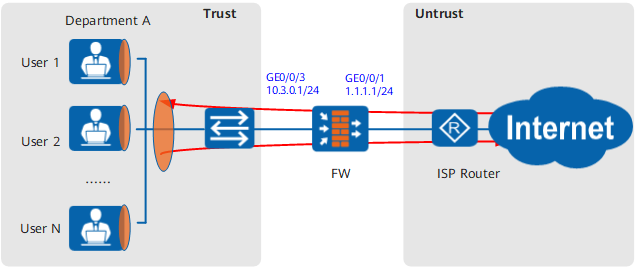
Configuration Roadmap
- Set interface IP addresses and assign the interfaces to security zones.
- Configure a traffic profile for department A, set the overall
maximum downstream bandwidth to 60 Mbit/s, select dynamic even distribution
for the per-user traffic limiting mode, set the even distribution
mode to manual, and fine-tune the minimum bandwidth and even distribution
multiplier as required.
- Minimum bandwidth: 1000
- Even distribution multiplier: 2
- Configure a traffic policy for department A and reference the traffic profile configured for department A.

- Upstream and downstream depend on the direction of FW bandwidth policy. For simplicity, upstream refers to the direction from Trust to Untrust, and downstream refers to Untrust to DMZ in this section.
- Assuming that the security zones, routers, and security policies have been configured, this section introduces only how to configure bandwidth management.
Procedure
- Set interface IP addresses and assign the interfaces to
security zones.
- Configure a traffic profile for department A.
[FW] traffic-policy
[FW-policy-traffic] profile profile_dep_a
[FW-policy-traffic-profile-profile_dep_a] bandwidth maximum-bandwidth whole downstream 60000
[FW-policy-traffic-profile-profile_dep_a] bandwidth average per-user manual multiplier 2 minimum 1000
[FW-policy-traffic-profile-profile_dep_a] quit
- Configure bandwidth management for department A.
In the example, user authentication configuration for department A has been completed.
[FW-policy-traffic] rule name policy_dep_a
[FW-policy-traffic-rule-policy_dep_a] source-zone trust
[FW-policy-traffic-rule-policy_dep_a] destination-zone untrust
[FW-policy-traffic-rule-policy_dep_a] user user-group /default/dep_a
[FW-policy-traffic-rule-policy_dep_a] action qos profile profile_dep_a
[FW-policy-traffic-rule-policy_dep_a] quit
Configuration Scripts
This section provides only the script related to the example.
#
sysname FW
#
interface GigabitEthernet0/0/1
 undo shutdown
 ip address 1.1.1.1 255.255.255.0
#
interface GigabitEthernet0/0/3
 undo shutdown
 ip address 10.3.0.1 255.255.255.0
#
firewall zone trust
 set priority 85
 add interface GigabitEthernet0/0/3
#
firewall zone untrust
 set priority 5
 add interface GigabitEthernet0/0/1
#
traffic-policy
 profile profile_dep_a
  bandwidth maximum-bandwidth whole downstream 60000
  bandwidth average per-user manual multiplier 2 minimum 1000
 rule name policy_dep_a
  source-zone trust
  destination-zone untrust
  user user-group /default/dep_a
  action qos profile profile_dep_a

# The following user/group creation configuration is stored in the database, but not in the configuration profile.
user-manage group /default/dep_a