< Home

Web: Example for Enabling a Private IPv4 User to Traverse the Carrier Network for Accessing an IPv4 Internet Server

This section provides an example for configuring NAT444.

Networking Requirements

Public IPv4 addresses of carrier A are insufficient. Therefore, private IPv4 addresses are allocated to users, and users also use private IP addresses. To enable these users to access the Internet, the users' private IP addresses need to be converted to the carrier's private IP addresses and then to public IP addresses, as shown in Figure 1.
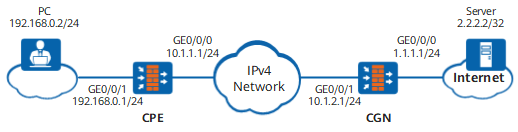
Figure 1 NAT444 networking diagram

Data Planning

Item

Data

CPE

GE0/0/1

Security zone: Trust

GE0/0/0

Security zone: Untrust

NAT

Translation mode: Easy IP

Outbound interface: GE0/0/0

CGN

GE0/0/1

Security zone: Trust

GE0/0/0

Security zone: Untrust

NAT

Translation mode: NAPT

Address pool: 1.1.1.11-1.1.1.20

Configuration Roadmap

  1. Complete basic configurations on the CPE, including setting interface IP addresses and adding the interfaces to security zones.
  2. Configure the NAT policy on the CPE, translating a private user address to a private carrier address.
  3. Complete basic configurations on the CGN device, including setting interface IP addresses and adding the interfaces to security zones.
  4. Configure the NAT policy on the CGN device, translating a private carrier address to a public address and enabling a private user to access the Internet.

Procedure

  • Configure the CPE.
    1. Configure interface addresses and add the interfaces to security zones.

      1. Choose Network > Interface.

      2. In Interface List, click of GigabitEthernet 0/0/0 and set the following parameters.

        Zone

        untrust

        IPv4

        IP Address

        10.1.1.1/24

      3. In Interface List, click on the line of GE0/0/1 and set the following parameters.

        Zone

        trust

        IPv4

        IP Address

        192.168.0.1/24

      4. Click OK.

    2. Configure a security policy.

      1. Choose Policy > Security Policy > Security Policy.

      2. In Security Policy List, click Add, select Add Security Policy, and configure a security policy based on the following parameter values.

        Name

        security_policy

        Source Zone

        trust

        Destination Zone

        untrust

        Source Address/Region

        192.168.0.0/24

        Action

        Permit

      3. Click OK.

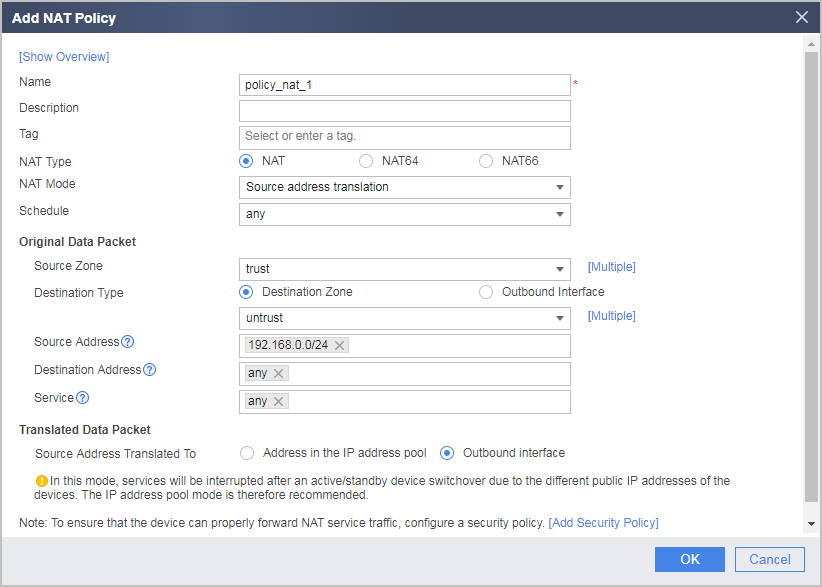
    3. Configure an outbound source NAT policy to translate a private user address to the CPE GE0/0/0 address.

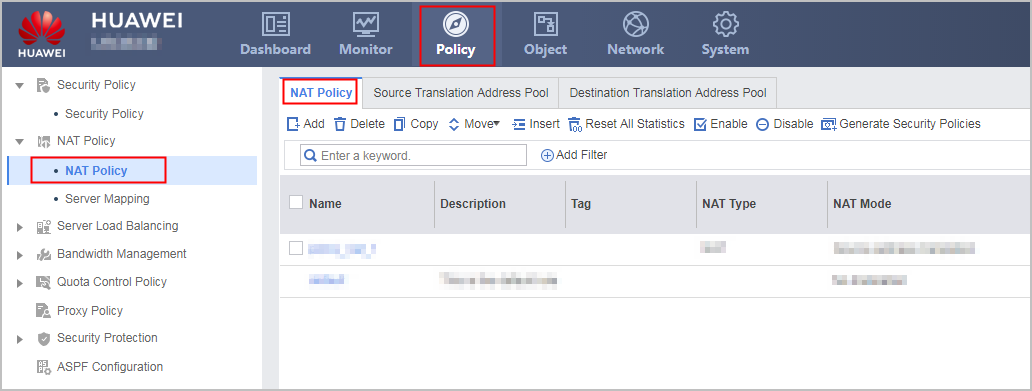
      1. Choose Policy > NAT Policy > NAT Policy > NAT Policy.

      2. In NAT Policy List, click Add and configure a NAT address pool based on the following parameter values.

      3. Click OK.

    4. Configure a default route. In this example, the next-hop address of the CPE to the carrier MAN is 10.1.1.2.

      Choose Network > Route > Static Route, click Add, and set the parameters as follows:

      Destination Address/Mask

      0.0.0.0/0.0.0.0

      Next Hop

      10.1.1.2

  • Configure the CGN.
    1. Configure interface addresses and add the interfaces to security zones.

      1. Choose Network > Interface.

      2. In Interface List, click on the line of GigabitEthernet 0/0/0 and set the following parameters.

        Zone

        untrust

        IPv4

        IP Address

        1.1.1.1/24

      3. In Interface List, click on the line of GE0/0/1 and set the following parameters.

        Zone

        trust

        IPv4

        IP Address

        10.1.2.1/24

      4. Click OK.

    2. Configure a security policy.

      1. Choose Policy > Security Policy > Security Policy.

      2. In Security Policy List, click Add, select Add Security Policy, and configure a security policy based on the following parameter values.

        Name

        security_policy

        Source Zone

        trust

        Destination Zone

        untrust

        Source Address/Region

        10.1.1.0/24

        This source IP address is the NAT-translated IP address segment of the outbound interface on the CPE side.

        Action

        Permit

      3. Click OK.

    3. Configure a source NAT policy to translate a private carrier address to a public address, enabling a private user to access the Internet.

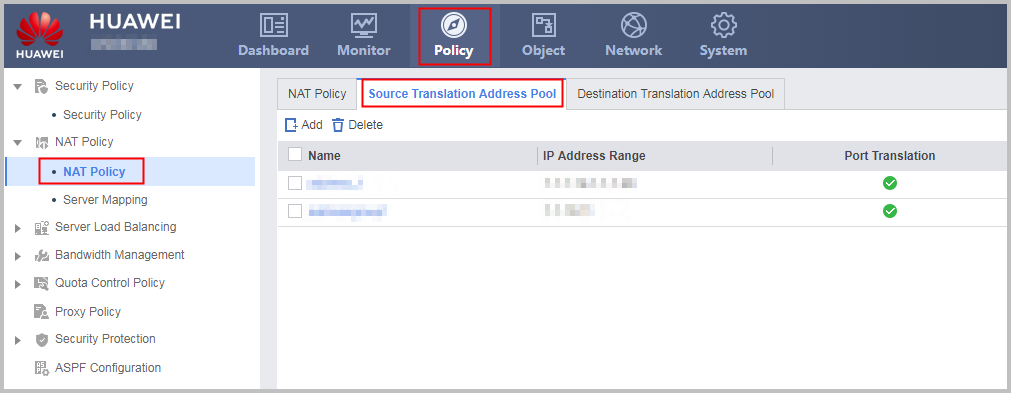
      1. Choose Policy > NAT Policy > NAT Policy > Source Translation Address Pool.

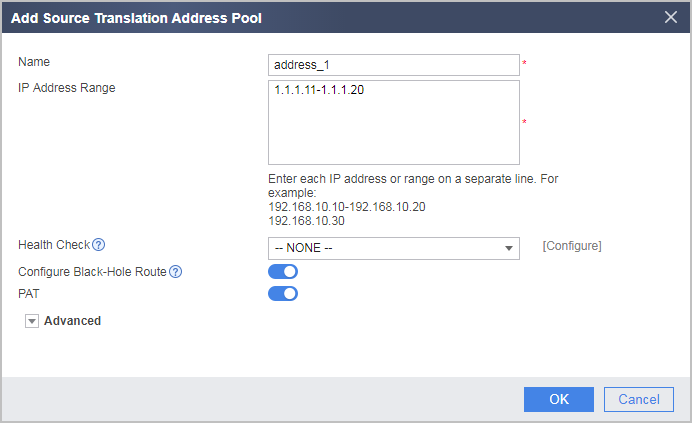
      2. In Source Translation Address Pool List, click Add and configure a NAT address pool based on the following parameter values.

      3. Click OK.

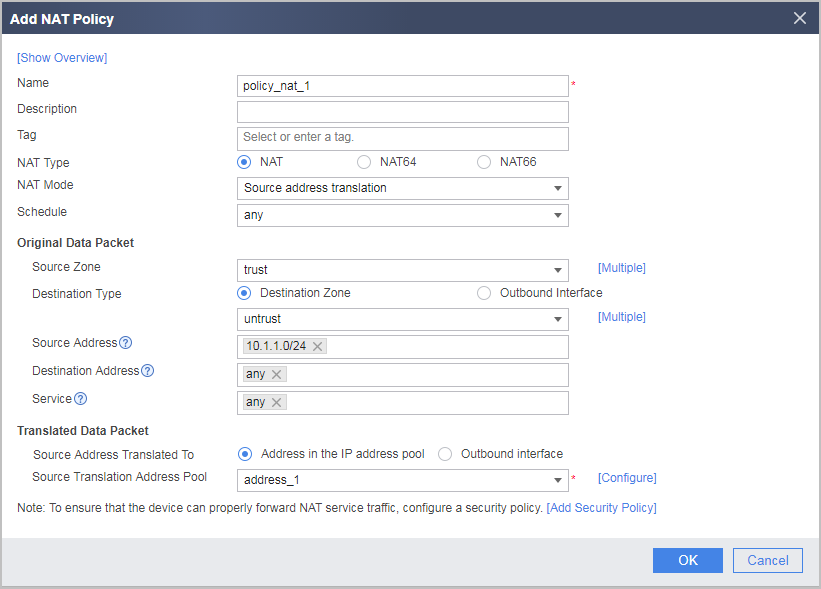
      4. Choose Policy > NAT Policy > NAT Policy > NAT Policy.
      5. In NAT Policy List, click Add and configure a NAT policy based on the following parameter values.

      6. Click OK.

    4. Configure route.

      In this example, the next hop address of the CGN to the Internet is 1.1.1.2.

      Choose Network > Route > Static Route, click Add, and set the parameters as follows:

      Destination Address/Mask

      0.0.0.0/0.0.0.0

      Next Hop

      1.1.1.2

      In this example, the next hop address of the CGN to the CPE is 10.1.2.2.

      Choose Network > Route > Static Route, click Add, and set the parameters as follows:

      Destination Address/Mask

      10.1.1.1/255.255.255.255

      Next Hop

      10.1.2.2

  • Configure the server.

    • Set the IP address of the server to 2.2.2.2/32.
    • The route to addresses in the address pool of the CGN must be configured on the server.

  • Configure the PC.

    Configure the PC address and specify a gateway. The configuration methods of PC addresses and routes vary with the PC operating systems. Therefore, the configuration methods are not described here.

Verification

  1. Use a PC to access the server.
  2. View the matching times of the NAT policy on the CPE side. If the following information is displayed, the NAT policy configuration is successful.

    Choose Policy > NAT Policy > NAT Policy and check Matching Count.


  3. View the session table on the CPE side. If the following information is displayed, NAT is successful.

    Choose Monitor > Session Table.


  4. View the matching times of the NAT policy on the CGN side. If the following information is displayed, the NAT policy configuration is successful.

    Choose Policy > NAT Policy > NAT Policy and check Matching Count.


  5. View the session table on the CGN side. If the following information is displayed, NAT is successful.

    Choose Monitor > Session Table.


Configuration Scripts

  • The CPE configuration script is as follows:

    #                                                                               
     sysname CPE                                      
    #                                                                               
    interface GigabitEthernet0/0/0                                                  
     ip address 10.1.1.1 255.255.255.0                                               
    #                                                                               
    interface GigabitEthernet 0/0/1                                                  
     ip address 192.168.0.1 255.255.255.0                                              
    #                                                                               
    firewall zone trust                                                             
     set priority 85                                                                
     add interface GigabitEthernet 0/0/1                                             
    #                                                                               
    firewall zone untrust                                                           
     set priority 5                                                                 
     add interface GigabitEthernet0/0/0                                             
    #                                                                                
     ip route-static 0.0.0.0 0.0.0.0 10.1.1.2                                       
    #                                                                               
    security-policy                                                                 
      rule name policy_sec_1                                                        
        source-zone trust                                                           
        destination-zone untrust                                                    
        source-address 192.168.0.0 24                                                  
        action permit                                                               
    #                                                                                
    nat-policy                                                                      
      rule name policy_nat_1                                                        
        source-zone trust                                                           
        destination-zone untrust                                                    
        source-address 192.168.0.0 24                                                  
        action source-nat easy-ip                                           
    #                                                                                
    return
  • The CGN configuration script is as follows:

    #                                                                               
     sysname CGN                                      
    #                                                                               
    interface GigabitEthernet0/0/0                                                  
     ip address 1.1.1.1 255.255.255.0                                               
    #                                                                               
    interface GigabitEthernet 0/0/1                                                  
     ip address 10.1.2.1 255.255.255.0                                              
    #                                                                               
    firewall zone trust                                                             
     set priority 85                                                                
     add interface GigabitEthernet 0/0/1                                             
    #                                                                               
    firewall zone untrust                                                           
     set priority 5                                                                 
     add interface GigabitEthernet0/0/0                                             
    #                                                                                
     ip route-static 0.0.0.0 0.0.0.0 1.1.1.2                                       
     ip route-static 10.1.1.1 255.255.255.255 10.1.2.2                                
    #                                                                                
    nat address-group address_1                                                 
     mode pat                                                                        
     route enable                                                                    
     section 0 1.1.1.11 1.1.1.20                                                  
    #                                                                               
    security-policy                                                                 
      rule name policy_sec_1                                                        
        source-zone trust                                                           
        destination-zone untrust                                                    
        source-address 10.1.1.0 24                                                  
        action permit                                                               
    #                                                                                
    nat-policy                                                                      
      rule name policy_nat_1                                                        
        source-zone trust                                                           
        destination-zone untrust                                                    
        source-address 10.1.1.0 24                                                  
        action source-nat address-group address_1                                          
    #                                                                                
    return
Copyright © Huawei Technologies Co., Ltd.
Next topic >