CLI: Example for Configuring a Public IPv4 Network User to Access a Private IPv6 Network Server (Access from the Public System to a Virtual System)
Networking Requirements
As shown in Figure 1, a virtual system supports IPv4/IPv6 dual stack and connects to IPv6 and IPv4 networks. It is required that a PC on the public IPv4 network be able to directly access a server on the private IPv6 network across the public system and virtual system. The address of the IPv6 network server mapped to the IPv4 network is 1.1.1.10.
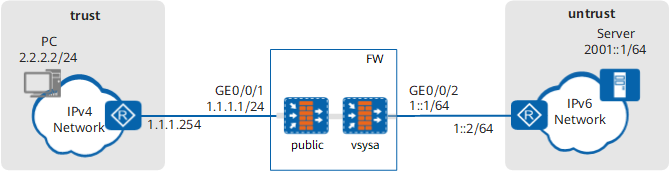
Procedure
- Configure IP addresses, routes, and security policies on the public system.
On the public system, set IP addresses for the interfaces and assign the interfaces to security zones. The IP address of Virtual-if0 can be any value as long as it is not in conflict with the IP address on any other interface.
[FW] interface GigabitEthernet 0/0/1
[FW-GigabitEthernet0/0/1] ip address 1.1.1.1 24
[FW-GigabitEthernet0/0/1] quit
[FW] interface Virtual-if 0
[FW-virtual-if0] ip address 172.16.0.1 24
[FW-virtual-if0] quit
[FW] firewall zone trust
[FW-zone-trust] add interface Virtual-if 0
[FW-zone-trust] add interface GigabitEthernet0/0/1
[FW-zone-trust] quit
# Configure the traffic diversion table for diverting traffic to vsysa.
[FW] firewall import-flow public 1.1.1.10 1.1.1.10 vpn-instance vsysa
 Warning: The destination of this IP range should be in this vsys network, otherwise it may cause flow loop! Continue?[Y/N]: Y
# Configure a route to the IPv4 network.
[FW] ip route-static 2.2.2.0 24 1.1.1.254# Configure a security policy.
[FW-vsysa] security-policy
[FW-vsysa-policy-security] rule name policy_sec_1
[FW-vsysa-policy-security-rule-policy_sec_1] source-zone trust
[FW-vsysa-policy-security-rule-policy_sec_1] destination-zone trust
[FW-vsysa-policy-security-rule-policy_sec_1] source-address 2.2.2.2 24
[FW-vsysa-policy-security-rule-policy_sec_1] action permit
[FW-vsysa-policy-security-rule-policy_sec_1] quit
[FW-vsysa-policy-security] quit
- Create virtual system vsysa and assign an interface to it.
# Enable the virtual system function.
<FW> system-view
[FW] vsys enable
# Create a virtual system and assign an interface and a public address to it. The public address is used in the NAT address pool.
[FW] vsys name vsysa
[FW-vsys-vsysa] assign interface GigabitEthernet 0/0/2
[FW-vsys-vsysa] assign global-ip 1.1.1.10 1.1.1.10 exclusive
[FW-vsys-vsysa] quit
- Configure IP addresses, routes, and security policies on the virtual system.
# Enable IPv6.
[FW] ipv6# Configure a static route to the IPv6 network.
[FW] ipv6 route-static vpn-instance vsysa 2001:: 64 1::2# Access the virtual system configuration view.
[FW] switch vsys vsysa# Set an IP address for an interface and assign the interface to a security zone.
The IP address of Virtual-if1 can be any value as long as it is not in conflict with the IP address on any other interface.
The IDs of Virtual-if interfaces are randomly assigned from available IDs in the system. Therefore, in the actual configuration, the interface may not be Virtual-if1.
<FW-vsysa> system-view
[FW-vsysa] interface GigabitEthernet 0/0/2
[FW-vsysa-GigabitEthernet0/0/2] ipv6 enable
[FW-vsysa-GigabitEthernet0/0/2] ipv6 address 1::1 64
[FW-vsysa-GigabitEthernet0/0/2] quit
[FW-vsysa] interface Virtual-if 1
[FW-vsysa-Virtual-if1] ip address 172.16.1.1 24
[FW-vsysa-Virtual-if1] quit
[FW-vsysa] firewall zone trust
[FW-vsysa-zone-trust] add interface Virtual-if 1
[FW-vsysa-zone-trust] quit
[FW-vsysa] firewall zone untrust
[FW-vsysa-zone-untrust] add interface GigabitEthernet 0/0/2
[FW-vsysa-zone-untrust] quit
# Configure a security policy.
[FW-vsysa] security-policy
[FW-vsysa-policy-security] rule name policy_sec_2
[FW-vsysa-policy-security-rule-policy_sec_2] source-zone trust
[FW-vsysa-policy-security-rule-policy_sec_2] destination-zone untrust
[FW-vsysa-policy-security-rule-policy_sec_2] destination-address 2001::1 64
[FW-vsysa-policy-security-rule-policy_sec_2] action permit
[FW-vsysa-policy-security-rule-policy_sec_2] quit
[FW-vsysa-policy-security] quit
- Configure NAT64.
# Enable the NAT64 function on the IPv6 network interface.
[FW-vsysa] interface GigabitEthernet 0/0/2
[FW-vsysa-GigabitEthernet0/0/2] nat64 enable
[FW-vsysa-GigabitEthernet0/0/2] quit
# Configure a NAT64 prefix. The source address used to transmit the packet for the PC to access the server over the IPv6 network is composed of the NAT64 prefix and the PC's IPv4 address.
[FW-vsysa] nat64 prefix 3001:: 96 In this example, the NAT64 prefix is 3001:: 96. If the prefix is left unconfigured, a well-known prefix is used by default.
# Configure a static NAT64 mapping to translate the server's IPv6 address 2001::1 into IPv4 address 1.1.1.10.
[FW-vsysa] nat64 static 2001::1 1.1.1.10 unr-route - Configure the IPv4 address and route of the PC. (The method of setting the IPv4 address is determined by the operating system of the PC. The setting method is not described here.)
# Set the IPv4 address of the PC to 2.2.2.2/24.
# Configure a route from the PC to 1.1.1.10. The next hop of the route is the address of the IPv4 network egress router.
- Configure the IPv6 address and route of the server. (The configuration methods of IPv6 addresses and routes vary with the operating systems of the servers. The configuration methods are not described here.)
# Set the IPv6 address of the server to 2001::1/64.
# Configure a route from the server to the network segment 3001::/96 and set the next hop to the address of the IPv6 network egress router.
Verification
After the configurations are complete, run the ping 1.1.1.10 command on the PC.
Check NAT64 session table information.
<FW> display firewall ipv6 session table verbose vsys vsysa
 Current Total IPv6 Sessions : 1
 NAT64: icmpv6  VPN: vsysa --> vsysa  ID: a48f34fda44b01b9957100c6d
 Zone: trust --> untrust TTL: 00:00:45  Left: 00:00:45
 Interface: GigabitEthernet0/0/2 NextHop: 1::2 MAC: 643e-8c48-f14c
 <--packets: 50 bytes: 5,200 --> packets: 50 bytes: 5,200
 3001::202:202.44026[2.2.2.2:44026] --> 2001::1.2048[1.1.1.10:2048] PolicyName: policy_sec_1
Configuration Scripts
Configuration script of the public system:
#
 ipv6
#
vsys enable
#
vsys name vsysa 1
 assign interface GigabitEthernet0/0/2
 assign global-ip 1.1.1.10 1.1.1.10 exclusive
#
interface GigabitEthernet0/0/1
 ip address 1.1.1.1 255.255.255.0
#
interface Virtual-if 0
 ip address 172.16.0.1 24
#
firewall zone trust
 set priority 85
 add interface Virtual-if 0
 add interface GigabitEthernet0/0/1
#
 firewall import-flow public 1.1.1.10 1.1.1.10 vpn-instance vsysa
#
 ip route-static 2.2.2.0 24 1.1.1.254
 ipv6 route-static vpn-instance vsysa 2001:: 64 1::2
#
security-policy
  rule name policy_sec_1
    source-zone trust
    destination-zone trust
    source-address 2.2.2.2 24
    action permit
#
return
Configuration script of vsysa:
#
switch vsys vsysa
#
interface GigabitEthernet0/0/2
 ipv6 enable
 ipv6 address 1::1 64
 nat64 enable
#
interface Virtual-if 1
 ip address 172.16.1.1 24
#
firewall zone untrust
 set priority 5
 add interface GigabitEthernet0/0/2
#
firewall zone trust
 set priority 85
 add interface virtual-if 1
#
 nat64 prefix 3001:: 96
 nat64 static 2001::1 1.1.1.10 unr-route
#
security-policy
  rule name policy_sec_2
    source-zone untrust
    destination-zone untrust
    destination-address 2001::1 64
    action permit
#
return