CLI: Example for Configuring Dynamic Traffic Limiting for Traffic Attacks
This section provides an example for configuring dynamic traffic limiting for traffic attacks on the CLI.
Networking Requirements
As shown in Figure 1, the FW is deployed on the egress of an enterprise network; a DNS server is deployed in the enterprise network. It is detected that the DNS server often experiences traffic attacks. Sessions can be established for attack traffic. There are a few attack traffic flows, but the rate of each flow is great.
To ensure normal running of the DNS server and reduce adverse impacts of attacks on services, enable the dynamic traffic limiting function for traffic attacks on the FW.
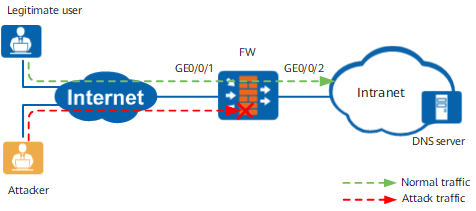
Configuration Roadmap

It is assumed that basic network configurations have been completed. This example describes only the configuration of dynamic traffic limiting for traffic attacks.
Enable the dynamic traffic limiting function for traffic attacks.
Configure the dynamic traffic limiting function for session-based traffic attacks.
- Optional:
Set the aging time for dynamic rules that are automatically delivered.
The default aging time (30 minutes) is recommended. If the actual duration of attack traffic is longer than 30 minutes, set the aging time longer than the attack traffic duration.
Procedure
- Enable the dynamic traffic limiting function for traffic attacks.
<FW> system-view
[FW] anti-ddos auto-defend traffic-policy enable
- Set the CAR to 50,000 pps for traffic attacks.
Observe the rate of normal service traffic in a period of time. Then, set the CAR for attack traffic.
[FW] anti-ddos auto-defend car 50000 - Enable the dynamic traffic limiting function
for session-based traffic attacks and set the alarm threshold and
maximum threshold for the rate of session packets.
Observe the maximum traffic rate during peak hours. The recommended maximum threshold for dynamic traffic limiting is 2 to 3 times of the maximum traffic rate.
Using the default alarm threshold and maximum threshold is recommended. The default alarm threshold is 100000 pps; the default maximum threshold is 200000 pps. The default values can meet the requirements of most application scenarios.
[FW] anti-ddos auto-defend base-session enable
[FW] anti-ddos auto-defend base-session alert-rate 100000 max-rate 200000
- Optional: Set the aging
time for dynamic rules that are automatically delivered.
In most cases, using the default aging time (30 minutes) is recommended. If the attack traffic duration is too long, set the aging time a bit longer than the attack traffic duration to prevent dynamic rules are aged before attacks stop.
[FW] anti-ddos auto-defend rule aging-time 30
Verification
If an attack occurs and the attack traffic rate reaches the configured maximum threshold:
- In the diagnose view, run the display anti-ddos auto-defend car-information command. The dynamic rules that are automatically delivered are displayed.
- View logs. The dynamic traffic limiting log "FWD/4/DDOSCARBEGIN" is displayed.
Configuration Scripts
The following lists the related script of this configuration example.
#
 sysname FW
#
anti-ddos auto-defend traffic-policy enable
anti-ddos auto-defend car 50000
anti-ddos auto-defend base-session enable
anti-ddos auto-defend base-session alert-rate 100000 max-rate 200000
#
return