CLI: Example for Configuring L2TP VPN (LDAP Authentication) in the Client-Initiated Scenario
This section provides an example for configuring L2TP VPN in the client-initiated scenario. In the client-initiated scenario, the LNS works with the LDAP server to perform identity authentication for mobile users.
Networking Requirements
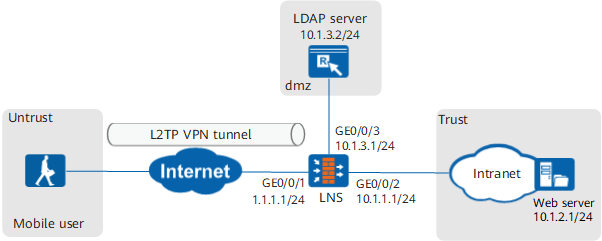
Data Planning
Item |
Data |
|
|---|---|---|
LNS |
Interface |
Interface ID: GigabitEthernet 0/0/1 IP address: 1.1.1.1/24 Security zone: Untrust Interface ID: GigabitEthernet 0/0/2 IP address: 10.1.1.1/24 Security zone: Trust Interface ID: GigabitEthernet 0/0/3 IP address: 10.1.3.1/24 Security zone: DMZ |
L2TP configuration |
User name: user0001 Password: Password123 Peer tunnel name: client Tunnel authentication password: Hello123 Address pool: 172.16.1.2 to 172.16.1.100 NOTE:
If the intranet server IP address and address pool addresses are on different network segments, configure a route on the intranet server to an address in the address pool. |
|
Parameters for interconnection with the LDAP server |
LDAP server address: 10.1.3.2/24 Administrator DN: uid=manager_user Password: Admin123 |
|
Mobile user |
- |
User name: user0001 Password: Password123 Tunnel name: client Tunnel authentication password: Hello123 |
Procedure
- Configure the LNS.
- Configure L2TP access users and an authentication policy on the LNS.
- Configure parameters for interconnection with the LDAP server.
[LNS] ldap-server template ldap_server
[LNS-ldap-ldap_server] ldap-server authentication 10.1.3.2 389 no-ssl
[LNS-ldap-ldap_server] ldap-server authentication base-dn dc=cce,dc=com
[LNS-ldap-ldap_server] ldap-server authentication manager uid=manager_user Admin123 Admin123
[LNS-ldap-ldap_server] ldap-server group-filter ou
[LNS-ldap-ldap_server] ldap-server authentication-filter (objectclass=*)
[LNS-ldap-ldap_server] ldap-server user-filter uid
[LNS-ldap-ldap_server] ldap-server server-type sun-one
[LNS-ldap-ldap_server] undo ldap-server authentication manager-with-base-dn enable
If you are not familiar with parameters of the LDAP server, such as the filter field, use the LDAP Browser/Editor software to connect to the LDAP server to view specific attributes. The LDAP Browser is used as an example. The LDAP server attributes and mappings between the server attributes and parameters on the LNS are as follows.
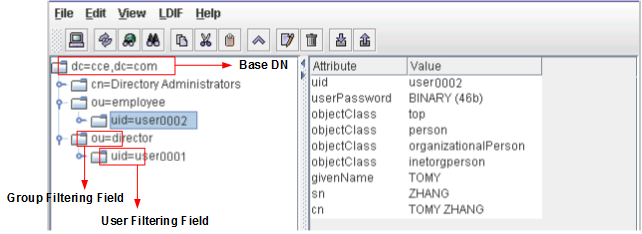 # Test the connectivity of the link between the LNS and LDAP server. The user name and password used for the test must be the same as those on the LDAP server.
[LNS-ldap-ldap_server] ldap-server test user user0001 Password123 Info: Server detection succeeded. [LNS-ldap-ldap_server] quit
- Use the LDAP server for user identity authentication.
[LNS] aaa
[LNS-aaa] authentication-scheme ldap
[LNS-aaa-authen-ldap] authentication-mode ldap
[LNS-aaa-authen-ldap] quit
- Configure an address pool.
If the actual address pool addresses and headquarters addresses reside on the same network segment, you must enable the proxy ARP function on the LNS interface connecting to the headquarters to ensure that the LNS can respond to the ARP requests from the servers at the headquarters.
[LNS] ip pool pool
[LNS-ip-pool-pool] section 1 172.16.1.2 172.16.1.100
[LNS-ip-pool-pool] quit
- Configure the service scheme used by access users.
[LNS] aaa
[LNS-aaa] service-scheme l2tp
[LNS-aaa-service-l2tp] ip-pool pool
[LNS-aaa-service-l2tp] quit
- Configure an authentication domain and apply the LDAP server template and authentication scheme.
[LNS-aaa] domain cce.com
[LNS-aaa-domain-cce.com] service-type l2tp
[LNS-aaa-domain-cce.com] authentication-scheme ldap
[LNS-aaa-domain-cce.com] ldap-server ldap_server

To implement user name-based policy control on VPN access users, you must specify the internetaccess parameter.
- Configure parameters for interconnection with the LDAP server.
- Configure L2TP access users and an authentication policy on the LNS.
- Configure the SecoClient at the mobile user side.
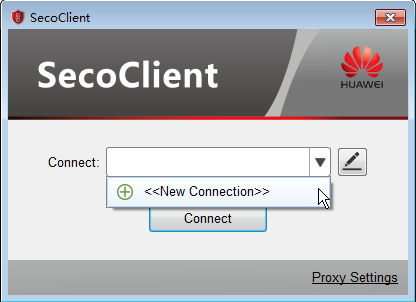
- Open the SecoClient and access the home page.
Select New Connection from the Connect drop-down list.
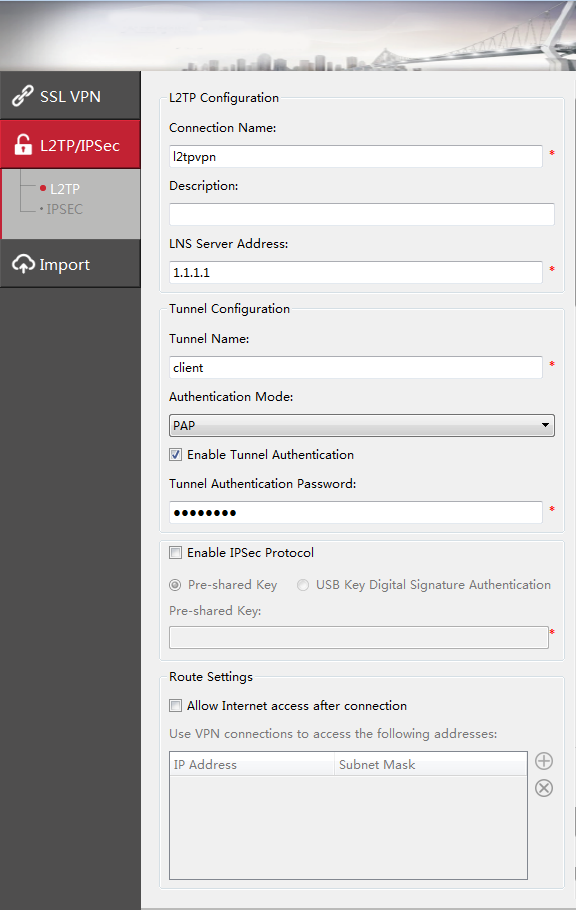
- Set L2TP VPN connection parameters.
In the New Connection navigation tree, select L2TP/IPSec. Set connection parameters and click OK.
The tunnel authentication password is Hello123.
- Log in to the L2TP VPN gateway.
- Select the created L2TP VPN connection from the Connect drop-down list and click Connect.
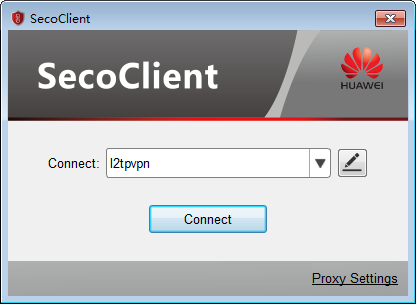
- On the login page, enter the user name and password.
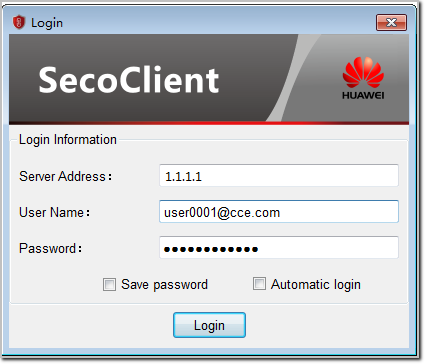
- Click Login to initiate a VPN connection request.
A message on a VPN access success will be displayed on the web UI.
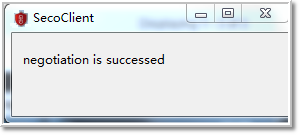
After the connection is established, mobile users can access intranet resources as intranet users.
- Select the created L2TP VPN connection from the Connect drop-down list and click Connect.
- Open the SecoClient and access the home page.
Verification
- Mobile users can properly access intranet servers of the headquarters.
Check the L2TP tunnel establishment on the LNS.
- Run the display l2tp tunnel command to check L2TP tunnel information. According to the command output, an L2TP tunnel is established successfully.
[LNS] display l2tp tunnel
L2TP::Total Tunnel: 1

 LocalTID RemoteTID RemoteAddress    Port   Sessions RemoteName  VpnInstance
 ------------------------------------------------------------------------------
 2        1         2.2.2.2          61535   1         client
 ------------------------------------------------------------------------------
  Total 1, 1 printed
Run the display l2tp session command to check L2TP session information. According to the command output, an L2TP session is established successfully.
[LNS] display l2tp session
L2TP::Total Session: 1

  LocalSID  RemoteSID  LocalTID   RemoteTID  UserID  UserName    VpnInstance
 ------------------------------------------------------------------------------
  119       32         2           1         9689    user0001
 ------------------------------------------------------------------------------
  Total 1, 1 printed
- Run the display l2tp tunnel command to check L2TP tunnel information. According to the command output, an L2TP tunnel is established successfully.
Configuration Scripts
#
sysname LNS
#
 l2tp enable
 undo l2tp sendaccm enable
 l2tp domain suffix-separator @
#
ldap-server template ldap_server
 ldap-server authentication 10.1.3.2 389 no-ssl
 ldap-server authentication manager uid=manager_user %^%#J~Mt<pLyG8m^"c%z_s9J35]4Y`d$JY95bB1M+>B#%^%#
 ldap-server authentication base-dn dc=cce,dc=com
 ldap-server server-type sun-one
 ldap-server group-filter ou
 ldap-server authentication-filter (objectclass=*)
 ldap-server user-filter uid
 undo ldap-server authentication manager-with-base-dn enable
#
ip pool pool
 section 0 172.16.1.2 172.16.1.100
#
aaa
 authentication-scheme ldap
  authentication-mode ldap
 service-scheme l2tp
  ip-pool pool
 domain cce.com
  authentication-scheme ldap
  ldap-server ldap_server
  service-type l2tp
#
l2tp-group 1
 tunnel password cipher %$%$(%J>Y.2ajQIcq@N6)$04859Z%$%$
 allow l2tp virtual-template 1 remote client domain cce.com
#
interface Virtual-Template1
 ppp authentication-mode pap
 remote service-scheme l2tp
 ip address 172.16.1.1 255.255.255.0
#
interface GigabitEthernet 0/0/1
 undo shutdown
 ip address 1.1.1.1 255.255.255.0
#
interface GigabitEthernet 0/0/2
 undo shutdown
 ip address 10.1.1.1 255.255.255.0
#
interface GigabitEthernet 0/0/3
 undo shutdown
 ip address 10.1.3.1 255.255.255.0
#
firewall zone trust
 set priority 85
 add interface GigabitEthernet 0/0/2
#
firewall zone untrust
 set priority 5
 add interface GigabitEthernet 0/0/1
#
firewall zone dmz
 set priority 50
 add interface GigabitEthernet 0/0/3
 add interface Virtual-Template1
#
ip route-static 0.0.0.0 0.0.0.0 1.1.1.2
#
security-policy
 rule name service_td
  source-zone trust
  destination-zone dmz
  source-address 10.1.2.0 mask 255.255.255.0
  destination-address 172.16.1.0 mask 255.255.255.0
  action permit
 rule name service_dt
  source-zone dmz
  destination-zone trust
  source-address 172.16.1.0 mask 255.255.255.0
  destination-address 10.1.2.0 mask 255.255.255.0
  action permit
 rule name l2tp_ul
  source-zone untrust
  destination-zone local
  destination-address 1.1.1.0 mask 255.255.255.0
  action permit
 rule name ldap_ld
  source-zone local
  destination-zone dmz
  source-address 10.1.3.0 mask 255.255.255.0
  action permit