CLI: Example for Accessing the Internet Using DHCP
This section provides an example for configuring a FW as a DHCP client that applies for an IPv4 address to access the Internet.
Networking Requirements
Figure 1 shows that a FW functions as an egress gateway and connect PCs in an intranet to the Internet. The network plan is as follows:
- An administrator manually specifies an IPv4 address for each PC on the network segment 10.3.0.0/24.
- An interface with a static IPv4 address connects the FW to the intranet.
- Another interface on the FW that functions as a DHCP client applies for a client IPv4 address and a DNS server IP address from a DHCP server and connects the intranet to the Internet.
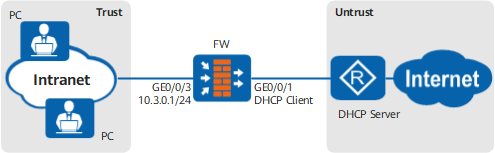
Configuration Roadmap
The configuration roadmap is as follows:
- Enable the DHCP client function on GigabitEthernet 0/0/1 of the FW to obtain a client IPv4 address and a DNS server address from a DHCP server.
- Specify a static IPv4 address on GigabitEthernet 0/0/3 that connects the FW to the intranet.
- Configure a security policy and a NAT policy (easy-IP) on the FW.
- Set the IP addresses of the PCs' gateway and a DNS server to 10.3.0.1. This example provides the configuration procedure on the FW. The configuration procedure for the PCs is not provided.

After the FW obtains an IPv4 address from a DHCP server, the DHCP server issues a default route to the FW that function as a DHCP client. The next hop of the default route is a carrier's device. Therefore, there is no need to configure a default route.
Procedure
- Configure the IP address of the interface and assign the interfaces to the security zones.
<FW> system-view
[FW] interface GigabitEthernet 0/0/3
[FW-GigabitEthernet0/0/3] ip address 10.3.0.1 24
[FW-GigabitEthernet0/0/3] quit
[FW] firewall zone trust
[FW-zone-trust] add interface GigabitEthernet 0/0/3
[FW] firewall zone untrust
[FW-zone-untrust] add interface GigabitEthernet 0/0/1
[FW-zone-untrust] quit
- Configure the DNS proxy function.
[FW] dns proxy enable
[FW] dns resolve
[FW] dns server unnumbered interface GigabitEthernet0/0/1
- Configure GigabitEthernet 0/0/1 as a DHCP client.
[FW] interface GigabitEthernet 0/0/1
[FW-GigabitEthernet0/0/1] ip address dhcp-alloc
[FW-GigabitEthernet0/0/1] quit
- Configure a security policy to allow the PCs to access the Internet.
[FW] security-policy
[FW-security-policy] rule name policy_sec_1
[FW-security-policy-sec_policy_1] source-address 10.3.0.0 mask 255.255.255.0
[FW-security-policy-sec_policy_1] source-zone trust
[FW-security-policy-sec_policy_1] destination-zone untrust
[FW-security-policy-sec_policy_1] action permit
[FW-security-policy-sec_policy_1] quit
[FW-security-policy] quit
[FW-security-policy] rule name policy_sec_2
[FW-security-policy-sec_policy_2] source-address 10.3.0.0 mask 255.255.255.0
[FW-security-policy-sec_policy_2] source-zone trust
[FW-security-policy-sec_policy_2] destination-zone local
[FW-security-policy-sec_policy_2] action permit
[FW-security-policy-sec_policy_2] quit
[FW-security-policy] quit
[FW-security-policy] rule name policy_sec_3
[FW-security-policy-sec_policy_3] source-address 10.3.0.0 mask 255.255.255.0
[FW-security-policy-sec_policy_3] source-zone local
[FW-security-policy-sec_policy_3] destination-zone untrust
[FW-security-policy-sec_policy_3] action permit
[FW-security-policy-sec_policy_3] quit
[FW-security-policy] quit
- Configure a NAT policy to translate private network IP addresses into public network IP addresses before PCs access the Internet.
[FW] nat-policy
[FW-policy-nat] rule name policy_nat_1
[FW-policy-nat-rule-policy_nat_1] source-address 10.3.0.0 mask 255.255.255.0
[FW-policy-nat-rule-policy_nat_1] source-zone trust
[FW-policy-nat-rule-policy_nat_1] egress-interface GigabitEthernet 0/0/1
[FW-policy-nat-rule-policy_nat_1] action source-nat easy-ip
[FW-policy-nat-rule-policy_nat_1] quit
[FW-policy-nat] quit
Configuration Script
#
 dns resolve
 dns server unnumbered interface GigabitEthernet0/0/1
#
 dns proxy enable
#
interface GigabitEthernet0/0/1
 undo shutdown
 ip address dhcp-alloc
#
interface GigabitEthernet0/0/3
 ip address 10.3.0.1 255.255.255.0
#
firewall zone trust
 set priority 85
 add interface GigabitEthernet0/0/3
#
firewall zone untrust
 set priority 5
 add interface GigabitEthernet0/0/1
#
security-policy
  rule name policy_sec_1
    source-zone trust
    destination-zone untrust
    source-address 10.3.0.0 24
    action permit
#
security-policy
  rule name policy_sec_2
    source-zone trust
    destination-zone local
    source-address 10.3.0.0 24
    action permit
#
security-policy
  rule name policy_sec_3
    source-zone local
    destination-zone untrust
    source-address 10.3.0.0 24
    action permit
#
nat-policy
  rule name policy_nat_1
    source-zone trust
    egress-interface GigabitEthernet0/0/1
    source-address 10.3.0.0 24
    action source-nat easy-ip
#
return