Web: Example for Configuring Security Policies Based on IP Addresses and Ports
This section provides an example for configuring security policies to perform access control by IP address, time range, and service (port).
Networking Requirements
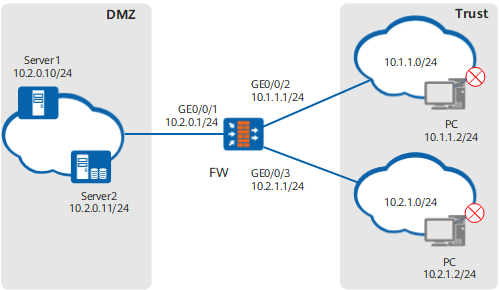
As shown in Figure 1, two servers are deployed in an enterprise. Server1 provides services externally using TCP port 8888, whereas Server 2 provides services using UDP port 6666. The FW is employed to perform access control. The PCs at 10.1.1.2 and 10.2.1.2 are prohibited from accessing these two servers that provide services for Internet users during working hours (8:00-17:00). Other PCs can access these two servers at any time.
Data Planning
Item |
Data |
Description |
|---|---|---|
GigabitEthernet 0/0/1 |
IP address: 10.2.0.1/24 Security zone: dmz |
- |
GigabitEthernet 0/0/2 |
IP address: 10.1.1.1/24 Security zone: trust |
- |
GigabitEthernet 0/0/3 |
IP address: 10.2.1.1/24 Security zone: trust |
- |
Server 1 |
IP address: 10.2.0.10/24 Port: TCP 8888 |
It uses an ephemeral port to provide services. |
Server 2 |
IP address: 10.2.0.11/24 Port: UDP 6666 |
It uses an ephemeral port to provide services. |
Configuration Roadmap
You need to set the address set, service sets, and time range and then reference these conditions in a security policy.
Configure a source IP address set and add denied IP addresses to it.
During security policy configurations, you can specify multiple IP addresses or address segments. You are advised to configure scattered and non-contiguous IP addresses as an address set for centralized management and multiplexing by other policies.

When you configure security policies, enter the destination IP address for its uniqueness.
Configure two user-defined service sets and add ephemeral ports on two servers to them.
In this example, servers use ephemeral ports to provide services. Therefore, add the ephemeral ports to user-defined service sets and reference these service sets in security policies.
If services use well-known ports (such as HTTP port 80) to provide services, reference predefined service sets (such as HTTP or FTP service set) directly during security policy configurations.
- Set a working time range (8:00-17:00).
Configure two security policies to separately restrict the access of PCs at 10.1.1.2 and 10.2.1.2 to the two servers.
Configure a security policy to allow the access from the trust zone to the dmz.
In this example, only two PCs are prohibited from accessing the servers during working hours. Therefore, you need to first configure security policies to restrict the access of the two PCs and then enable the access from the trust zone to the dmz.
The system has a default security policy (all conditions are any, and all actions are deny). If only the PCs at specified IP addresses are allowed to access servers, keep the default security policy and configure security policies to allow the access of such IP addresses.
Security policies are matched by the configuration sequence. For example, to ensure that all IP addresses except for certain IP addresses at network segment 10.1.1.0/24 are reachable, configure a strict security policy that denies special IP addresses and a loose security policy that allows all packets to pass through the entire network segment.
Procedure
- Set basic interface parameters for interfaces.
- In Interface List, click
 for the GigabitEthernet 0/0/1.
Set parameters of GigabitEthernet 0/0/1 as follows. Keep default values for other parameters.
Zone
dmz
Mode
Routing
IPv4
Connection Type
Static IP
IP Address
10.2.0.1/255.255.255.0
- In Interface List, click
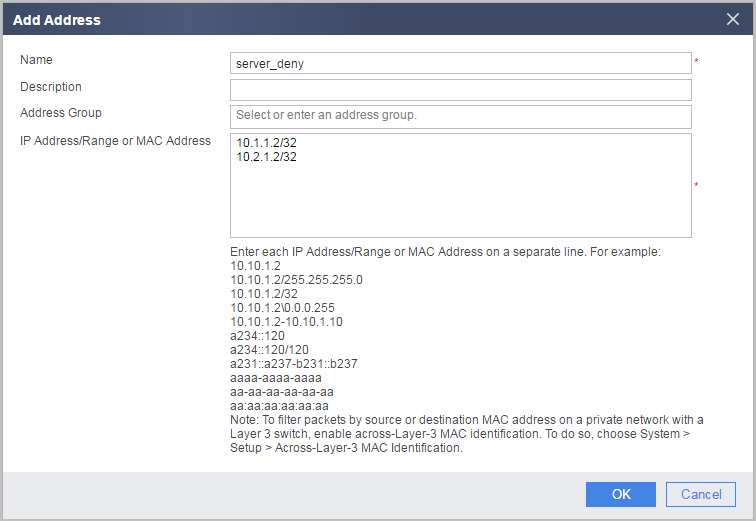
- Configure address set server_deny and add denied IP addresses to it.
- Choose .
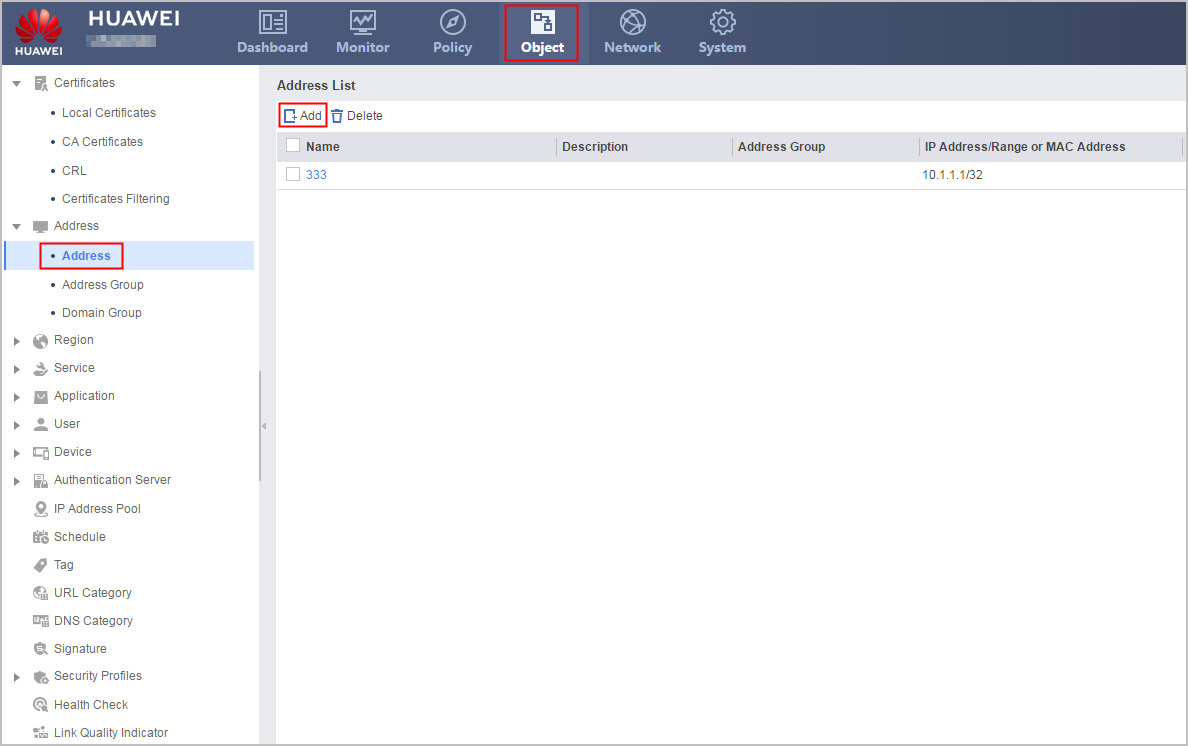
- Click Add to configure an address set and click OK.
- Choose .
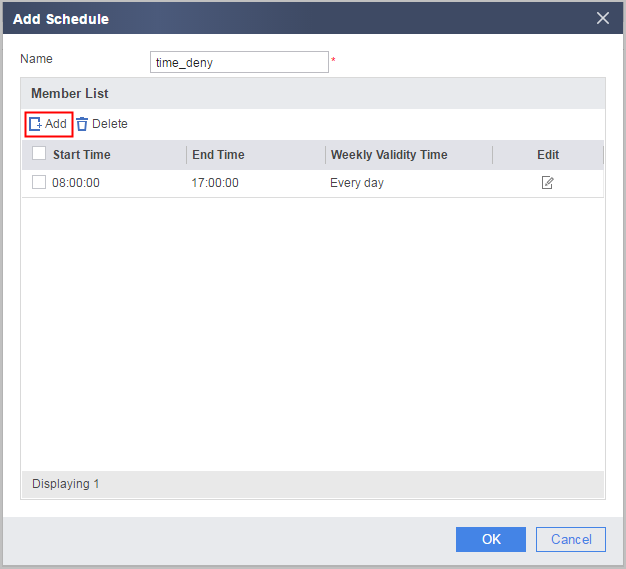
- Configure time range time_deny to specify a time segment during which servers are unreachable.
- Choose .
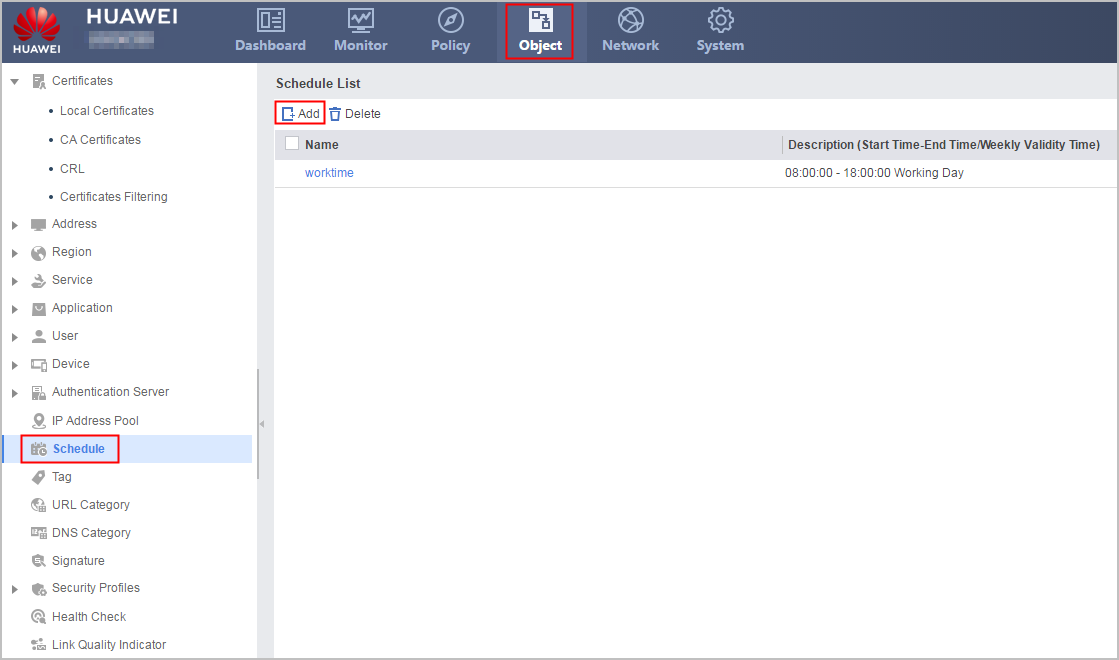
- Click Add in Schedule List to configure a time range.
- Choose .
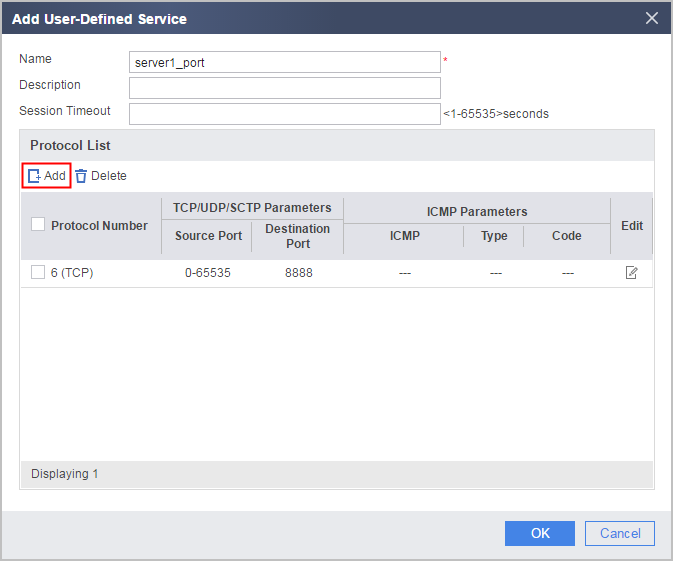
- Configure user-defined service sets server1_port and server2_port for Server1 and Server2, respectively and add the ephemeral ports of the servers to the service sets.
- Choose .
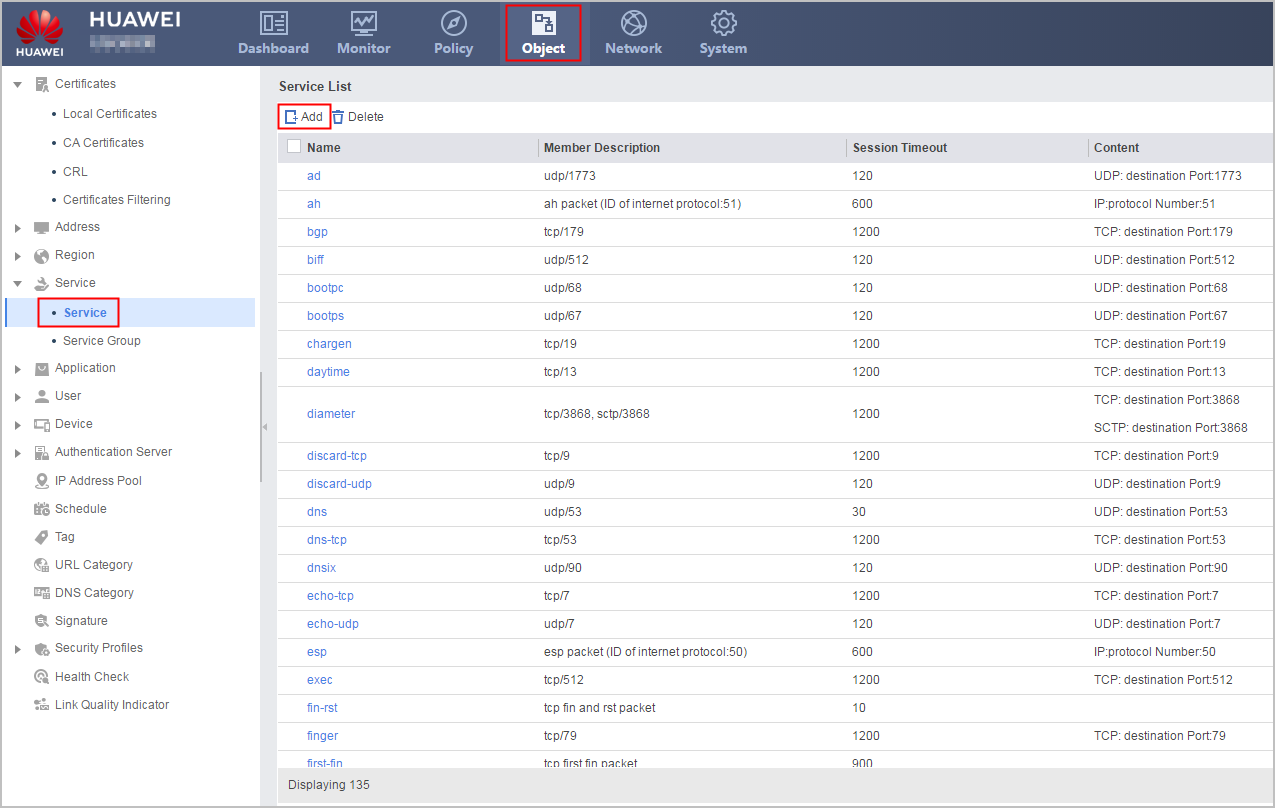
- Click Add, enter a service name, and add the service.
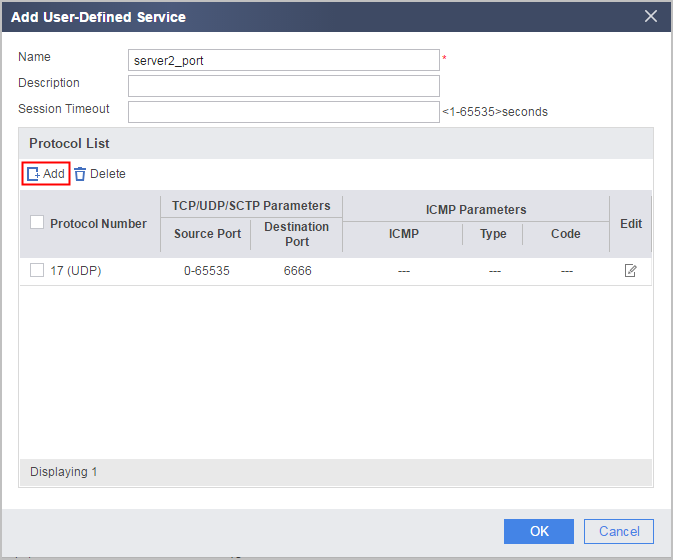
- Repeat previous steps to configure user-defined service set server2_port for Server2.
- Choose .
- Configure security policies and reference the configured address sets, time ranges, and service sets.
- Choose .
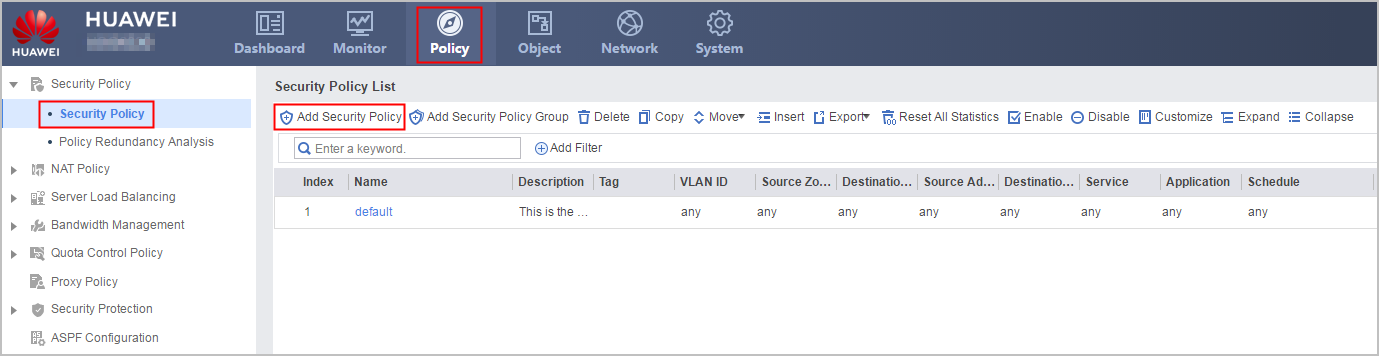
- Click Add Security Policy to configure four security policies for the trust-dmz interzone.
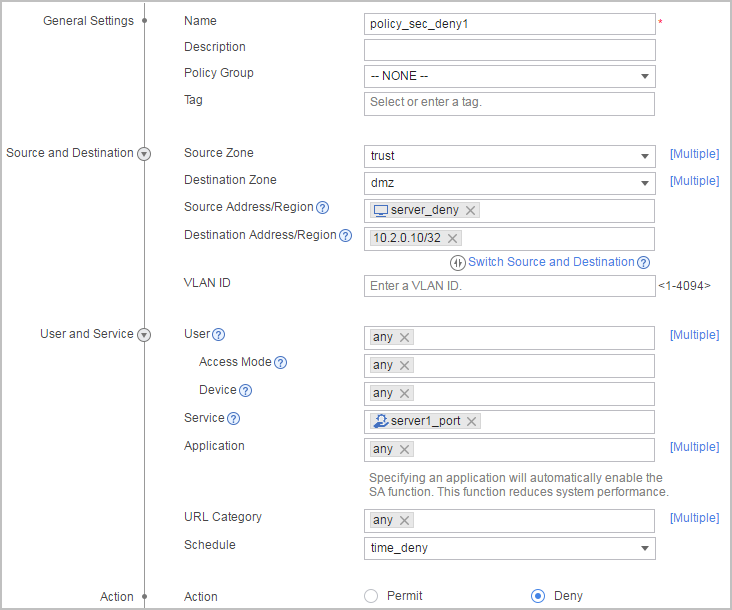
Security policy that restricts the access of PCs to Server1:
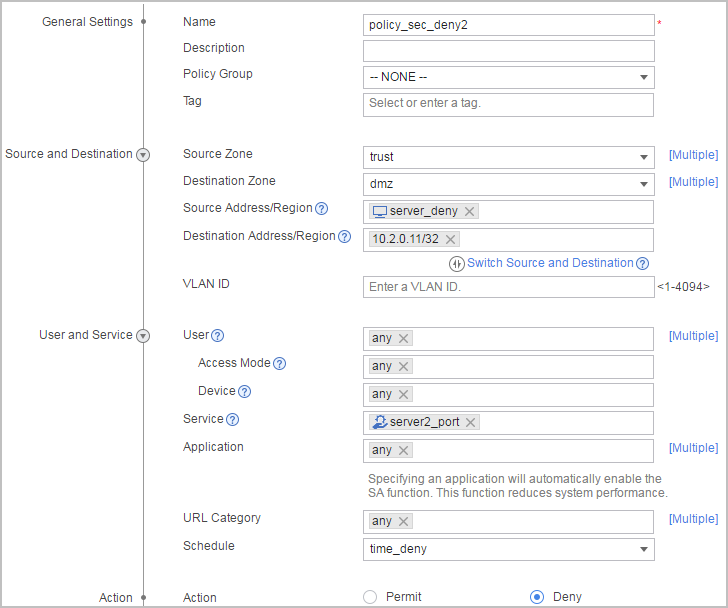
Security policy that restricts the access of PCs to Server2:
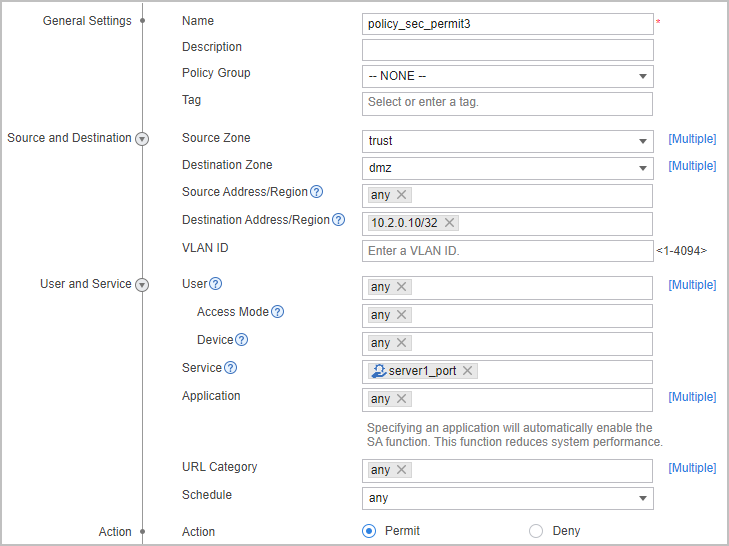
Security policy that allows the access of PCs to Server1:
Security policy that allows the access of PCs to Server2:
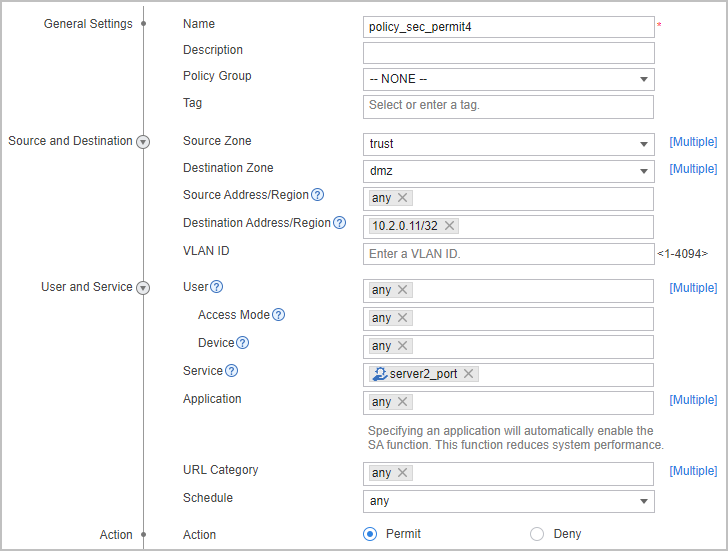
- Choose .
Verification
During 8:00-17:00, PCs at 10.1.1.2 and 10.2.1.2 cannot access the services provided by the two servers. The PCs can access the services at other times. Other PCs can access these two servers at any time.
Configuration Scripts
The following lists only the scripts of this configuration example.
#
ip address-set server_deny type object
 address 0 10.1.1.2 mask 32
 address 1 10.2.1.2 mask 32
#
ip service-set server1_port type object
 service 0 protocol tcp source-port 0 to 65535 destination-port 8888
#
ip service-set server2_port type object
 service 0 protocol udp source-port 0 to 65535 destination-port 6666
#
 time-range time_deny
  period-range 08:00:00 to 17:00:00 daily
#
interface GigabitEthernet 0/0/1
 undo shutdown
 ip address 10.2.0.1 255.255.255.0
#
interface GigabitEthernet 0/0/2
 undo shutdown
 ip address 10.1.1.1 255.255.255.0
#
interface GigabitEthernet 0/0/3
 undo shutdown
 ip address 10.2.1.1 255.255.255.0
#
firewall zone trust
 set priority 85
 add interface GigabitEthernet 0/0/2
 add interface GigabitEthernet 0/0/3
#
firewall zone dmz
 set priority 50
 add interface GigabitEthernet 0/0/1
#
security-policy
 rule name policy_sec_deny1
  source-zone trust
  destination-zone dmz
  source-address address-set server_deny
  destination-address 10.2.0.10 32
  service server1_port
  time-range time_deny
  action deny
 rule name policy_sec_deny2
  source-zone trust
  destination-zone dmz
  source-address address-set server_deny
  destination-address 10.2.0.11 32
  service server2_port
  time-range time_deny
  action deny
 rule name policy_sec_permit3
  source-zone trust
  destination-zone dmz
  destination-address 10.2.0.10 32
  service server1_port
  action permit
 rule name policy_sec_permit4
  source-zone trust
  destination-zone dmz
  destination-address 10.2.0.11 32
  service server2_port
  action permit
#
return