CLI: Example for Configuring Security Policies for Bypass Detection
This section provides an example for configuring security policies when the FW functions as a bypass detection device.
Networking Requirements
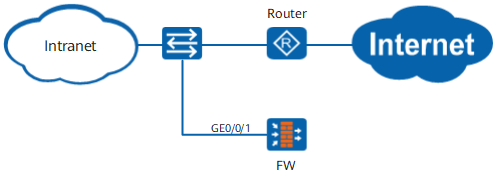
As shown in Figure 1, a router connects an intranet and the Internet. The FW functions as a bypass detection device to implement content security checks on the traffic that passes through the router.
Configuration Roadmap
- When the FW functions as a bypass detection device, set detection interface GE0/0/1 to a Layer-2 interface and connect this interface to a switch. The switch mirrors traffic to the FW for detection.
- Configure bypass detection on the detection interface so that the FW only detects traffic.
- Configure a security policy and reference an applicable security profile to implement content security checks on the traffic.
When the FW has only one interface to receive mirroring traffic or has multiple interfaces to receive mirroring traffic but applies the same security policy to the traffic, you can add the interface or interfaces to any security zone and set the source and destination security zones to any.
When the FW has multiple interfaces to receive mirroring traffic and applies different security policies to the interfaces, you must add the interfaces to different security zones and set the source and destination security zones of each security policy to the security zone where the corresponding interface resides.
Procedure
- Configure the interface and assign the interfaces to security zones.

For the traffic that carries a VLAN tag, you need to run the port trunk allow-pass vlan command on the Layer-2 interface and also create the corresponding VLAN on the FW.
<FW> system-view
[FW] vlan 10
[FW-vlan10] quit
[FW] interface GigabitEthernet 0/0/1
[FW-GigabitEthernet0/0/1] portswitch
[FW-GigabitEthernet0/0/1] port link-type trunk
[FW-GigabitEthernet0/0/1] port trunk allow-pass vlan 10
[FW-GigabitEthernet0/0/1] detect-mode tap
[FW-GigabitEthernet0/0/1] quit
[FW] firewall zone untrust
[FW-zone-untrust] add interface GigabitEthernet 0/0/1
[FW-zone-untrust] quit
- Configure a security policy for bypass detection.
[FW] security-policy
[FW-policy-security] rule name policy_sec_bypass_detection
[FW-policy-security-rule-policy_sec_bypass_detection] source-zone untrust
[FW-policy-security-rule-policy_sec_bypass_detection] destination-zone untrust
[FW-policy-security-rule-policy_sec_bypass_detection] action permit
[FW-policy-security-rule-policy_sec_bypass_detection] profile av default
[FW-policy-security-rule-policy_sec_bypass_detection] profile ips default
[FW-policy-security-rule-policy_sec_bypass_detection] policy logging
The antivirus and intrusion prevention profiles are used as examples. You can select other types of profiles as required.
Configuration Scripts
#
vlan batch 10
#
interface GigabitEthernet0/0/1
 portswitch
 undo shutdown
 port link-type trunk
 port trunk allow-pass vlan 10
 detect-mode tap
#
firewall zone untrust
 set priority 5
 add interface GigabitEthernet0/0/1
#
security-policy
 rule name policy_sec_bypass_detection
  policy logging
  source-zone untrust
  destination-zone untrust
  profile av default
  profile ips default
  action permit