CLI: Client Protection
You can configure SSL-encrypted traffic detection policies so that the FW decrypts SSL-encrypted traffic generated by a user to access the extranet, and configure security policies to enable the FW to check content security of decrypted traffic.
Networking Requirements
As shown in Figure 1, the FW is deployed on the network boundary as an enterprise gateway, and checks content security of traffic generated by users to access extranet HTTPS servers and SMTPS servers (mail servers).
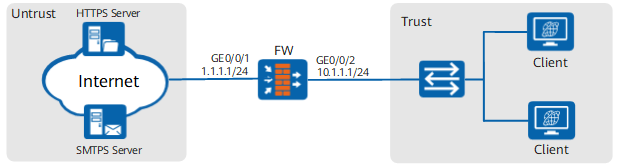
Configuration Roadmap
Configure the SSL decryption certificate.
The SSL decryption certificate can be imported to the FW or generated on the FW.
- If the enterprise has a CA server that can issue CA certificates, import the CA certificate issued by the CA server to the FW.
- If the enterprise does not have a CA server, manually generate an SSL decryption certificate on the FW.
This section uses a manually generated SSL decryption certificate on the FW as an example.
- Optional: Import the CA certificate issued by the
trusted certificate issue organization on the FW, so that the FW can verify certificates
of the HTTPS server and SMTPS server.
Note that over 100 common server CA certificates have been preset on the FW by default, which can be used to verify most server certificates. Generally, these default CA certificates are enough and you do not need to import other CA certificates. In some cases, however, if the preset CA certificates cannot verify the peer server certificates, you need to import other CA certificates. This section describes how to import a CA certificate as a configuration step.
Configure SSL-encrypted traffic detection policies.
Specify a detection profile in the detection policies, and set the file type of the detection profile to Outbound. According to actual requirements, you can configure refined policies, so that the FW decrypts only traffic that really requires content security check. You must avoid proxy policies with wide configuration conditions, because traffic encryption or decryption affects the forwarding performance of the device to a certain extent.
-
After the SSL-encrypted traffic detection policy is configured, you still need to configure correct security policies and reference the content security profile to check the content security of traffic.
Procedure
- Set interface IP addresses and assign
the interfaces to security zones.
- Configure the SSL decryption certificate and import the
trusted certificate on the intranet PC.
- Export the trusted certificate and the corresponding
key pair.
[FW] pki export built-in-ca rsa-key-pair ssl-decryption-certificate and-certificate ssl-decryption-certificate.cer pem ssl-decryption-certificate.pem password Mypassword@123 The password is used to protect the key file in the certificate. When you install the certificate, the system requires this password.
- Export the trusted certificate and the corresponding
key pair.
- Optional: Import the CA certificate issued
by a trusted organization.
- Configure SSL-encrypted traffic detection policies.
- Configure a security policy to enable the system checks
the content security of decrypted SSL traffic.
- Create a mail content filtering profile.
In this example, a mail content filtering profile needs to be configured to filter traffic of a user who accesses the mail server.
[FW] profile type mail-filter name mail_filter
[FW-profile-mail-filter-mail_filter] send-mail anonymity action allow
[FW-profile-mail-filter-mail_filter] recv-mail anonymity action allow
[FW-profile-mail-filter-mail_filter] send-mail attachment max-amount enable
[FW-profile-mail-filter-mail_filter] recv-mail attachment max-amount enable
[FW-profile-mail-filter-mail_filter] send-mail attachment max-size enable
[FW-profile-mail-filter-mail_filter] recv-mail attachment max-size enable
[FW-profile-mail-filter-mail_filter] send-mail sender filter-mode block
[FW-profile-mail-filter-mail_filter] send-mail receiver filter-mode block
[FW-profile-mail-filter-mail_filter] recv-mail sender filter-mode block
[FW-profile-mail-filter-mail_filter] recv-mail receiver filter-mode block
- Configure a security policy.
[FW] security-policy
[FW-policy-security] rule name policy1
[FW-policy-security-rule-policy1] source-zone trust
[FW-policy-security-rule-policy1] destination-zone untrust
[FW-policy-security-rule-policy1] source-address 10.1.1.0 24
[FW-policy-security-rule-policy1] service https smtps
[FW-policy-security-rule-policy1] profile av default
[FW-policy-security-rule-policy1] profile ips default
[FW-policy-security-rule-policy1] profile mail-filter mail_filter
[FW-policy-security-rule-policy1] action permit
[FW-policy-security-rule-policy1] quit
[FW-policy-security] quit
In this example, antivirus, IPS, and mail filtering items are selected for content security check. Default security profiles of antivirus and IPS are used. You can configure or select multiple security profiles based on actual situations.
- Create a mail content filtering profile.
Verification
- When an intranet user accesses the extranet HTTPS server or SMTPS server, the traffic matches the SSL-encrypted traffic detection policy. If the decrypted traffic passes the content security check, the traffic is released. If the decrypted traffic does not pass the content security check, the traffic is blocked.
On the FW, view the SSL proxy session table. The SSL connection used by the intranet user to access the extranet server is processed by the proxy.
<FW> display app-proxy session table
 Vsys: 0 10.1.1.1:3449--->2.2.2.2:443 Left:00:00:05 Type:Outbound Age:1
      down:0000  -->bytes: 314 <--bytes: 1016

 Vsys: 0 10.1.1.1:3450--->2.2.2.2:443 Left:00:00:05 Type:Outbound Age:1
      down:0000  -->bytes: 124 <--bytes: 0

 Vsys: 0 10.1.1.1:3448--->2.2.2.2:443 Left:00:00:05 Type:Outbound Age:1
      down:0000  -->bytes: 628 <--bytes: 1067
Configuration Scripts
#
 pki rsa built-in-ca ssl-server-ca create exportable
 pki entity ssl-server-ca
  common-name ssl-server-ca
  fqdn www.example.com
  locality trust-Network
  country CN
#
 pki generate built-in-ca certificate rsa-key-pair built-in-ca ssl-server-ca entity built-in-ca ssl-server-ca
 pki import-certificate built-in-ca filename built-in-ca ssl-server-ca.cer
 app-proxy built-in-ca trust filename built-in-ca ssl-server-ca.cer
#
 pki export built-in-ca rsa-key-pair built-in-ca ssl-server-ca and-certificate built-in-ca ssl-server-ca.cer pem built-in-ca ssl-server-ca.pem password Mypassword@123
#
 app-proxy ca trust filename https_server_ca.crt
 app-proxy ca trust filename smtps_server_ca.crt
#
interface GigabitEthernet 0/0/1
 undo shutdown
 ip address 1.1.1.1 255.255.255.0
#
interface GigabitEthernet 0/0/2
 undo shutdown
 ip address 10.1.1.1 255.255.255.0
#
firewall zone trust
 add interface GigabitEthernet 0/0/2
#
firewall zone untrust
 add interface GigabitEthernet 0/0/1
#
 profile type decryption name profile
  detect type outbound
  undo unsupport ssl-version block
  undo unsupport ssl-cipher block
  ssl-cipher client-side high medium low
  ssl-version client-side ssl3.0 tls1.0 tls1.1 tls1.2 tls1.3
  ssl-cipher server-side high medium low
  ssl-version server-side ssl3.0 tls1.0 tls1.1 tls1.2 tls1.3
#
  decryption-policy
   rule name 1
    source-zone trust
    destination-zone untrust
    source-address 10.1.1.0 24
    service https smtps
    action decrypt profile profile
#
 profile type mail-filter name mail-filter
  rbl-filter enable
  profile type mail-filter name mail_filter
  send-mail anonymity action allow
  recv-mail anonymity action allow
  send-mail attachment max-amount enable
  recv-mail attachment max-amount enable
  send-mail attachment max-size enable
  recv-mail attachment max-size enable
  send-mail sender filter-mode block
  send-mail receiver filter-mode block
  recv-mail sender filter-mode block
  recv-mail receiver filter-mode block
#
 security-policy
  rule name policy1
   source-zone trust
   destination-zone untrust
   source-address 10.1.1.0 24
   service https
   service smtps
   profile av default
   profile ips default
   profile mail-filter mail_filter
   action permit