CLI: Example for Enabling Remote Users to Access the Headquarters through SSL VPN (LDAP Authentication + Local Authorization)
Networking Requirements
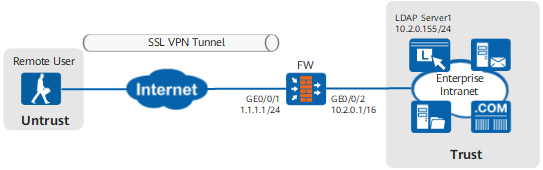
Figure 1 shows the network topology. Mobile users can access resources at the headquarters using SSL VPNs. An LDAP server is used to authenticate access users.

The FW supports MS Active Directory (AD LDAP), Sun ONE LDAP, and Open LDAP servers. This section uses the Sun ONE LDAP server as an example.
Requirements are as follows:
- Top executives on the move or working at home can obtain IP addresses and access the intranet smoothly and securely. They can also access the Webmail and ERP systems using a browser.
- Employees on the move or working at home can access the Webmail and ERP systems using a browser.
Procedure
- Set an IP address for each interface and assign the interfaces to security zones.
# Set interface IP addresses.
<FW> system-view
[FW] interface GigabitEthernet 0/0/1
[FW-GigabitEthernet0/0/1] ip address 1.1.1.1 24
[FW-GigabitEthernet0/0/1] quit
[FW] interface GigabitEthernet 0/0/2
[FW-GigabitEthernet0/0/2] ip address 10.2.0.1 16
[FW-GigabitEthernet0/0/2] quit
# Assign interfaces to security zones.
[FW] firewall zone untrust
[FW-zone-untrust] add interface GigabitEthernet 0/0/1
[FW-zone-untrust] quit
[FW] firewall zone trust
[FW-zone-trust] add interface GigabitEthernet 0/0/2
[FW-zone-trust] quit
- Configure security policies.
# Configure a security policy to allow users to set up SSL VPN tunnels with the FW.
[FW] security-policy
[FW-policy-security] rule name policy_sslvpn_1
[FW-policy-security-policy_sslvpn_1] source-zone untrust
[FW-policy-security-policy_sslvpn_1] destination-zone local
[FW-policy-security-policy_sslvpn_1] destination-address 1.1.1.1 32
[FW-policy-security-policy_sslvpn_1] service https
[FW-policy-security-policy_sslvpn_1] action permit
[FW-policy-security-policy_sslvpn_1] quit
# Configure a security policy to allow the FW to interact with the Webmail and ERP systems.
[FW-policy-security] rule name policy_sslvpn_2
[FW-policy-security-policy_sslvpn_2] source-zone local
[FW-policy-security-policy_sslvpn_2] destination-zone trust
[FW-policy-security-policy_sslvpn_2] destination-address 10.2.0.10 32
[FW-policy-security-policy_sslvpn_2] destination-address 10.2.0.11 32
[FW-policy-security-policy_sslvpn_2] action permit
[FW-policy-security-policy_sslvpn_2] quit
# Configure a security policy to allow network extension users to access intranet resources.
[FW-policy-security] rule name policy_sslvpn_3
[FW-policy-security-policy_sslvpn_3] source-zone untrust
[FW-policy-security-policy_sslvpn_3] destination-zone trust
[FW-policy-security-policy_sslvpn_3] source-address range 172.16.1.1 172.16.1.100
[FW-policy-security-policy_sslvpn_3] destination-address 10.2.0.0 16
[FW-policy-security-policy_sslvpn_3] action permit
[FW-policy-security-policy_sslvpn_3] quit
# Configure a security policy to allow the FW to communicate with the LDAP server.
[FW-policy-security] rule name policy_ldap_server
[FW-policy-security-policy_ldap_server] source-zone local
[FW-policy-security-policy_ldap_server] destination-zone trust
[FW-policy-security-policy_ldap_server] destination-address 10.2.0.155 32
[FW-policy-security-policy_ldap_server] action permit
[FW-policy-security-policy_ldap_server] quit
- Set parameters for interconnection between the FW and LDAP server.
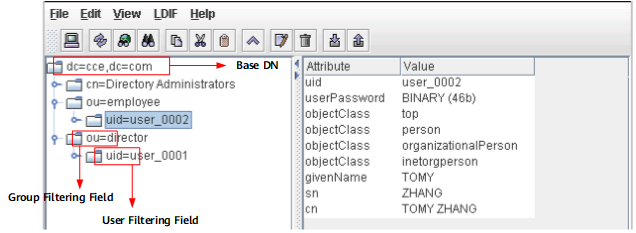
The parameter settings on the NGFW must be consistent with those on the LDAP server.
[FW] ldap-server template ldap_server
[FW-ldap-ldap_server] ldap-server authentication 10.2.0.155 389 no-ssl
[FW-ldap-ldap_server] ldap-server authentication base-dn dc=cce,dc=com
[FW-ldap-ldap_server] ldap-server authentication manager uid=manager_user Admin@123 Admin@123
[FW-ldap-ldap_server] ldap-server group-filter ou
[FW-ldap-ldap_server] ldap-server authentication-filter (objectclass=*)
[FW-ldap-ldap_server] ldap-server user-filter uid
[FW-ldap-ldap_server] ldap-server server-type sun-one
[FW-ldap-ldap_server] undo ldap-server authentication manager-with-base-dn enable
If you are unfamiliar with the LDAP server and cannot provide the server name, Base DN, or filter field values, you can use the LDAP Explorer or LDAP Browser/Editor software to connect to the LDAP server to query the attribute values. The LDAP Browser/Editor is used as an example. The LDAP server attributes and mappings between the server attributes and parameters on the FW are as follows.
# Test the connectivity between the FW and LDAP server.
[FW-ldap-ldap_server] ldap-server test user user_0001 Admin@123
 Info: Server detection succeeded.
[FW-ldap-ldap_server] quit
The user name and password used for the test must be the same as those on the LDAP server.
- Configure an authentication domain.
[FW] aaa
[FW-aaa] authentication-scheme ldap
[FW-aaa-authen-ldap] authentication-mode ldap
[FW-aaa-authen-ldap] quit
[FW-aaa] domain cce.com
[FW-aaa-domain-cce.com] service-type ssl-vpn
[FW-aaa-domain-cce.com] authentication-scheme ldap
[FW-aaa-domain-cce.com] ldap-server ldap_server
[FW-aaa-domain-cce.com] reference user current-domain
[FW-aaa-domain-cce.com] quit
[FW-aaa] quit
- Configure a policy to import user information from the LDAP server to the FW.
[FW] user-manage import-policy ldap_server from ldap
[FW-import-ldap_server] server template ldap_server
[FW-import-ldap_server] server basedn dc=cce,dc=com
[FW-import-ldap_server] server searchdn dc=cce,dc=com
[FW-import-ldap_server] destination-group /cce.com
[FW-import-ldap_server] user-attribute uid
[FW-import-ldap_server] import-type user-group
[FW-import-ldap_server] import-override enable
[FW-import-ldap_server] sync-mode incremental schedule interval 120
[FW-import-ldap_server] sync-mode full schedule daily 01:00
[FW-import-ldap_server] quit
The user and user group filtering conditions in this example use the default values (&(|(objectclass=person)(objectclass=organizationalPerson))(uid=*)) and (|(objectclass=organizationalUnit)(ou=*)). To change them, run the user-filter and group-filter commands.
- Execute the import policy to import users to the FW.
[FW] execute user-manage import-policy ldap_server
 Now importing user, security group and user-group information from remote server...successfully.
After the import succeeds, you can run the display user-manage user verbose command to view information about the imported users.
- Set the new user option for the authentication domain on the FW.
[FW] aaa
[FW-aaa] domain cce.com
[FW-aaa-domain-cce.com] new-user add-temporary group /cce.com auto-import ldap_server
[FW-aaa-domain-cce.com] quit
[FW-aaa] quit
- Configure an SSL VPN virtual gateway.
# Create an SSL VPN virtual gateway.
[FW] v-gateway example interface GigabitEthernet 0/0/1 private example.huawei.com
[FW-example] quit
# Configure the maximum number of users and maximum number of concurrent users allowed by the virtual gateway.
[FW] v-gateway example max-user 150
[FW] v-gateway example cur-max-user 100
# Bind the virtual gateway to the authentication domain.
[FW] v-gateway example authentication-domain cce.com If the virtual gateway is bound to an authentication domain, the user name entered for a login should not carry the authentication domain information. If the user name carries an authentication domain name, the gateway considers the string following the at sign (@) as a part of the user name, not an authentication domain name. For example, if the virtual gateway has been bound to the authentication domain cce.com, you should enter user_0001, not user_0001@cce.com, as the user name.
- Configure the web proxy function.
# Enable the web proxy function.
[FW] v-gateway example
[FW-example] service
[FW-example-service] web-proxy enable
# Add web proxy resources Webmail and ERP.
[FW-example-service] web-proxy proxy-resource Webmail http://10.2.0.10 show-link
[FW-example-service] web-proxy proxy-resource ERP http://10.2.0.11 show-link
- Configure the network extension function.
# Enable the network extension function.
[FW-example-service] network-extension enable# Configure the network extension address pool.
[FW-example-service] network-extension netpool 172.16.1.1 172.16.1.100 255.255.255.0# Set the network extension routing mode to manual.
[FW-example-service] network-extension mode manual# Configure the intranet subnet accessible to network extension users.
[FW-example-service] network-extension manual-route 10.2.0.0 255.255.0.0
[FW-example-service] quit
- Configure SSL VPN role authorization/users.
# Add user groups director and employee to the virtual gateway.
[FW-example] vpndb
[FW-example-vpndb] group /cce.com/director
[FW-example-vpndb] group /cce.com/employee
[FW-example-vpndb] quit
# Create roles director and employee.
[FW-example] role
[FW-example-role] role director
[FW-example-role] role employee
# Bind the roles to corresponding user groups.
[FW-example-role] role director group /cce.com/director
[FW-example-role] role employee group /cce.com/employee
# Configure functions for the roles. Enable web proxy and network extension for role director and web proxy for role employee.
[FW-example-role] role director web-proxy network-extension enable
[FW-example-role] role employee web-proxy enable
# Associate the roles with web proxy resources.
[FW-example-role] role director web-proxy resource Webmail
[FW-example-role] role director web-proxy resource ERP
[FW-example-role] role employee web-proxy resource Webmail
[FW-example-role] role employee web-proxy resource ERP
[FW-example-role] quit
[FW-example] quit
Verifying the Configuration
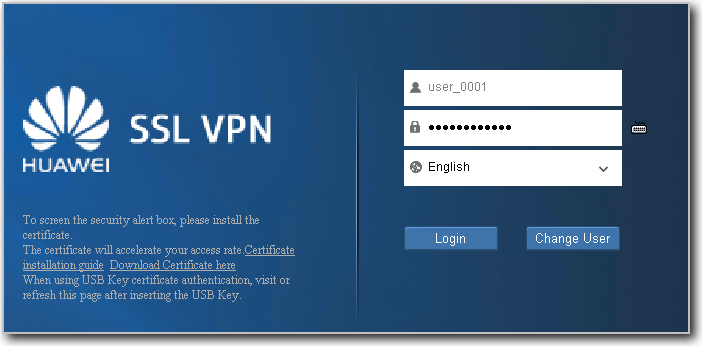
- Enter example.huawei.com or https://1.1.1.1 in the address box of the browser to access the SSL VPN login page using the teleworker account. Upon initial login, install the controls as instructed by the browser.
Virtual gateways of different versions require Active controls of different versions to be installed on the client. When a client is used to access virtual gateways of different versions. Delete the old Active control and install a new one for accessing a new virtual gateway. Otherwise, the browser will be stuck at the control loading page.
If the client is on a PC, run the following command to delete a control:
PC> regsvr32 SVNIEAgt.ocx -u -s
PC> del %systemroot%\SVNIEAgt.ocx /q
PC> del %systemroot%\"Downloaded Program Files"\SVNIEAgt.inf /q
PC> cd %appdata%
PC> rmdir svnclient /q /s
- Enter the user name and password on the login page to log in to the SSL VPN gateway.
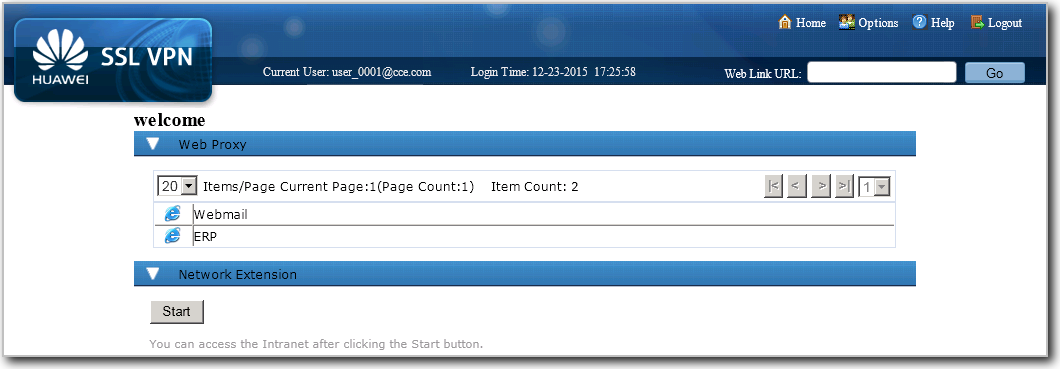
- After logging in to the SSL VPN gateway using the top executive account user_0001, you can use the web proxy and network extension service. You can click Webmail and ERP to use corresponding services. Click Start to automatically install the virtual network adapter to obtain a virtual IP address. After that, you can use various services just as you are on a LAN.
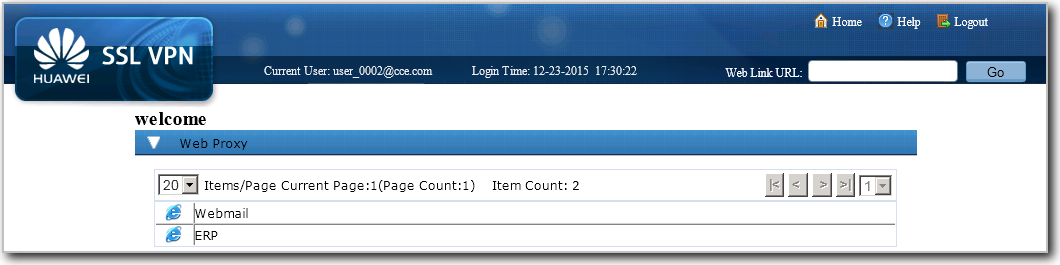
- Use common employee account user_0002 to log in to the SSL VPN gateway. You can use only the web proxy service. You can click Webmail and ERP to use corresponding services.
Configuration Scripts
#
ldap-server template ldap_server
 ldap-server authentication 10.2.0.155 389 no-ssl
 ldap-server authentication base-dn dc=cce,dc=com
 ldap-server authentication manager uid=manager_user %$%$M#._~J4QrR[kJu7PUMtHUqh_%$%$
 ldap-server group-filter ou
 ldap-server authentication-filter (objectclass=*)
 ldap-server user-filter uid
 ldap-server server-type sun-one
 undo ldap-server authentication manager-with-base-dn enable
#
interface GigabitEthernet0/0/1
 ip address 1.1.1.1 255.255.255.0
#
interface GigabitEthernet0/0/2
 ip address 10.2.0.1 255.255.0.0
#
firewall zone trust
 set priority 85
 add interface GigabitEthernet0/0/2
#
firewall zone untrust
 set priority 5
 add interface GigabitEthernet0/0/1
#
 user-manage import-policy ldap_server from ldap
 server template ldap_server
 server basedn dc=cce,dc=com
 server searchdn dc=cce,dc=com
 destination-group /cce.com
 user-attribute uid
 user-filter (&(|(objectclass=person)(objectclass=organizationalPerson))(uid=*))
 group-filter (|(objectclass=organizationalUnit)(ou=*))
 import-type user-group
 import-override enable
 sync-mode incremental schedule interval 120
 sync-mode full schedule daily 01:00
#
aaa
 authentication-scheme ldap
  authentication-mode ldap
 #
 domain cce.com
  authentication-scheme ldap
  ldap-server ldap_server
  service-type ssl-vpn
  reference user current-domain
  new-user add-temporary group /cce.com auto-import ldap_server
#
v-gateway example interface GigabitEthernet0/0/1 private example.huawei.com
v-gateway example authentication-domain cce.com
v-gateway example max-user 150
v-gateway example cur-max-user 100
#
v-gateway example
 service
  web-proxy enable
  web-proxy web-link enable
  web-proxy proxy-resource Webmail http://10.2.0.10 show-link
  web-proxy proxy-resource ERP http://10.2.0.11 show-link
  network-extension enable
  network-extension keep-alive enable
  network-extension netpool 172.16.1.1 172.16.1.100 255.255.255.0
  network-extension mode manual
  network-extension manual-route 10.2.0.0 255.255.0.0
 role
  role director condition all
  role director network-extension enable
  role director web-proxy enable
  role director web-proxy resource ERP
  role director web-proxy resource Webmail
  role employee condition all
  role employee web-proxy enable
  role employee web-proxy resource ERP
  role employee web-proxy resource Webmail
#
security-policy
 rule name policy_sslvpn_1
  source-zone untrust
  destination-zone local
  destination-address 1.1.1.1 32
  service https
  action permit
 rule name policy_sslvpn_2
  source-zone local
  destination-zone trust
  destination-address 10.2.0.10 32
  destination-address 10.2.0.11 32
  action permit
 rule name policy_sslvpn_3
  source-zone untrust
  destination-zone trust
  source-address range 172.16.1.1 172.16.1.100
  destination-address 10.2.0.0 16
  action permit
 rule name policy_ldap_server
  source-zone local
  destination-zone trust
  destination-address 10.2.0.155 32
  action permit

# The following configuration is used to perform a one-time operation and not stored in the configuration profile.
 execute user-manage import-policy ldap_server
# The following configuration is stored in the database, but not in the configuration profile.
 v-gateway example
  vpndb
   group /cce.com/director
   group /cce.com/employee
  role
   role director group /cce.com/director
   role director group /cce.com/employee