CLI: Example for Configuring Policy-based Routes for Internet Access from Multiple ISPs
This section provides an example for configuring NAT and policy-based routes to enable campus network users to access an education network and the Internet through different links.
Networking Requirements
A college deploys a FW as a security gateway on the campus network shown in Figure 1. The campus network consists of a student network and a teacher network, and is connected to the Internet through an education network. The college also purchases broadband services from an ISP and accesses the Internet through the ISP network.
The networking requirements are as follows:
- PCs on the student network access the Internet through the education network.
- PCs on the teacher network access the Internet through the ISP network.
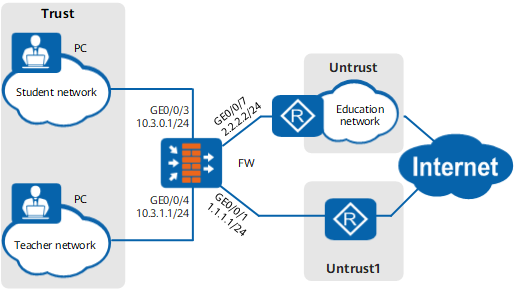

This example focuses on the configuration related to PBR. Configure other data such as NAT based on the actual networking.
Configuration Roadmap
The configuration roadmap is as follows:
- Assign IP addresses to interfaces and add the interfaces to security zones.
- Configure policy-based routes, which specify that the student network connects to the education network through GigabitEthernet 0/0/7 and accesses the Internet through the education network, and that the teacher network directly accesses the Internet through GigabitEthernet 0/0/1.
- Configure security policies to allow all campus network PCs to access the Internet.
- Configure NAT policies for translating source addresses.
Procedure
- Set an IP address for each interface, assign interfaces to security zones, and complete basic parameter settings.
[FW] interface GigabitEthernet 0/0/1
[FW-GigabitEthernet0/0/1] ip address 1.1.1.1 255.255.255.0
[FW-GigabitEthernet0/0/1] quit
[FW] interface GigabitEthernet 0/0/3
[FW-GigabitEthernet0/0/3] ip address 10.3.0.1 255.255.255.0
[FW-GigabitEthernet0/0/3] quit
[FW] interface GigabitEthernet 0/0/4
[FW-GigabitEthernet0/0/4] ip address 10.3.1.1 255.255.255.0
[FW-GigabitEthernet0/0/4] quit
[FW] interface GigabitEthernet 0/0/7
[FW-GigabitEthernet0/0/7] ip address 2.2.2.2 255.255.255.0
[FW-GigabitEthernet0/0/7] quit
[FW] firewall zone trust
[FW-zone-trust] add interface GigabitEthernet 0/0/3
[FW-zone-trust] add interface GigabitEthernet 0/0/4
[FW-zone-trust] quit
[FW] firewall zone untrust
[FW-zone-untrust] add interface GigabitEthernet 0/0/7
[FW-zone-untrust] quit
[FW] firewall zone name untrust1
[FW-zone-untrust1] set priority 10
[FW-zone-untrust1] add interface GigabitEthernet 0/0/1
[FW-zone-untrust1] quit
- Configure PBR.
# Configure PBR to allow PCs on the student network to access the Internet through GigabitEthernet 0/0/7 by means of the education network.
[FW] policy-based-route
[FW-policy-pbr] rule name policy_route_1
[FW-policy-pbr-rule-policy_route_1] ingress-interface GigabitEthernet 0/0/3
[FW-policy-pbr-rule-policy_route_1] source-address 10.3.0.0 24
[FW-policy-pbr-rule-policy_route_1] action pbr egress-interface GigabitEthernet 0/0/7 next-hop 2.2.2.254
[FW-policy-pbr-rule-policy_route_1] quit
# Configure PBR to allow PCs on the teacher network to access the Internet through GigabitEthernet 0/0/1 over the education network.
[FW-policy-pbr] rule name policy_route_2
[FW-policy-pbr-rule-policy_route_2] ingress-interface GigabitEthernet 0/0/4
[FW-policy-pbr-rule-policy_route_2] source-address 10.3.1.0 24
[FW-policy-pbr-rule-policy_route_2] action pbr egress-interface GigabitEthernet 0/0/1 next-hop 1.1.1.254
[FW-policy-pbr-rule-policy_route_2] quit
[FW-policy-pbr] quit
- Configure security policies.
# Configure a security policy to allow PCs on the student network to access the Internet.
[FW] security-policy
[FW-policy-security] rule name policy_sec_1
[FW-policy-security-rule-policy_sec_1] source-zone trust
[FW-policy-security-rule-policy_sec_1] destination-zone untrust
[FW-policy-security-rule-policy_sec_1] source-address 10.3.0.0 24
[FW-policy-security-rule-policy_sec_1] action permit
[FW-policy-security-rule-policy_sec_1] quit
# Configure a security policy to allow PCs on the teacher network to access the Internet.
[FW-policy-security] rule name policy_sec_2
[FW-policy-security-rule-policy_sec_2] source-zone trust
[FW-policy-security-rule-policy_sec_2] destination-zone untrust1
[FW-policy-security-rule-policy_sec_2] source-address 10.3.1.0 24
[FW-policy-security-rule-policy_sec_2] action permit
[FW-policy-security-rule-policy_sec_2] quit
[FW-policy-security] quit
- Configure a NAT policy to perform NAT for traffic sent from PCs on the student network to access the Internet.
# Configure an IP address pool.
[FW] nat address-group address_1
[FW-address-group-address_1] section 0 2.2.2.10 2.2.2.15
[FW-address-group-address_1] quit
# Configure a NAT policy.
[FW] nat-policy
[FW-policy-nat] rule name policy_nat_1
[FW-policy-nat-rule-policy_nat_1] source-zone trust
[FW-policy-nat-rule-policy_nat_1] destination-zone untrust
[FW-policy-nat-rule-policy_nat_1] source-address 10.3.0.0 24
[FW-policy-nat-rule-policy_nat_1] action source-nat address-group address_1
[FW-policy-nat-rule-policy_nat_1] quit
[FW-policy-nat] quit
- Configure a NAT policy to perform NAT for traffic sent from PCs on the teacher network to access the Internet.
# Configure an IP address pool.
[FW] nat address-group address_2
[FW-address-group-address_2] section 0 1.1.1.10 1.1.1.15
[FW-address-group-address_2] quit
# Configure a NAT policy.
[FW] nat-policy
[FW-policy-nat] rule name policy_nat_2
[FW-policy-nat-rule-policy_nat_2] source-zone trust
[FW-policy-nat-rule-policy_nat_2] destination-zone untrust1
[FW-policy-nat-rule-policy_nat_2] source-address 10.3.1.0 24
[FW-policy-nat-rule-policy_nat_2] action source-nat address-group address_2
[FW-policy-nat-rule-policy_nat_2] quit
[FW-policy-nat] quit
Configuration Script
#
interface GigabitEthernet0/0/1
 ip address 1.1.1.1 255.255.255.0
#
interface GigabitEthernet0/0/3
 ip address 10.3.0.1 255.255.255.0
#
interface GigabitEthernet0/0/4
 ip address 10.3.1.1 255.255.255.0
#
interface GigabitEthernet0/0/7
 ip address 2.2.2.2 255.255.255.0
#
firewall zone trust
 set priority 85
 add interface GigabitEthernet0/0/3
 add interface GigabitEthernet0/0/4
#
firewall zone untrust
 set priority 5
 add interface GigabitEthernet0/0/7
#
firewall zone name untrust1
 set priority 10
 add interface GigabitEthernet0/0/1
#
 nat address-group address_1
  section 0 2.2.2.10 2.2.2.15
 nat address-group address_2
  section 0 1.1.1.10 1.1.1.15
#
security-policy
  rule name policy_sec_1
    source-zone trust
    destination-zone untrust
    source-address 10.3.0.0 24
    action permit
  rule name policy_sec_2
    source-zone trust
    destination-zone untrust1
    source-address 10.3.1.0 24
    action permit
#
policy-based-route
  rule name policy_route_1
    ingress-interface GigabitEthernet0/0/3
    source-address 10.3.0.0 24
    action pbr egress-interface GigabitEthernet0/0/7 next-hop 2.2.2.254
  rule name policy_route_2
    ingress-interface GigabitEthernet0/0/4
    source-address 10.3.1.0 24
    action pbr egress-interface GigabitEthernet0/0/1 next-hop 1.1.1.254
#
nat-policy
  rule name policy_nat_1
    source-zone trust
    destination-zone untrust
    source-address 10.3.0.0 24
    action source-nat address-group address_1
  rule name policy_nat_2
    source-zone trust
    destination-zone untrust1
    source-address 10.3.1.0 24
    action source-nat address-group address_2
#
return