Web: Example for Configuring ISP Link Selection to Forward Traffic by ISPs
This section provides an example for configuring ISP link selection to forward traffic by ISPs.
Networking Requirements
As shown in Figure 1, the FW is deployed at the network egress as the security gateway. The enterprise has two links connected separately to ISP1 and ISP2.
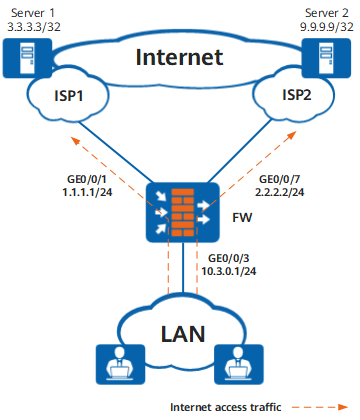
Configuration Roadmap
Configure the health check function. Configure health check tasks for ISP1 and ISP2.
Set interface IP addresses, security zones, and gateway addresses. Apply health check on the interfaces.
Make two ISP address files, isp1.csv and isp2.csv, write Server 1 IP address 3.3.3.3 into isp1.csv and Server 2 IP address 9.9.9.9 into isp2.csv, and upload the two ISP address files to the FW.
Configure ISP link selection to forward packets destined for Server 1 from ISP1 link and packets destined for Server 2 link from ISP2 link.
Configure a basic security policy to allow intranet users to access the Internet.

This example focuses on the configuration related to ISP link selection. Configure other data such as NAT based on the actual networking.
Procedure
- Enable the health check function and create health check tasks for ISP1 and ISP2 links.
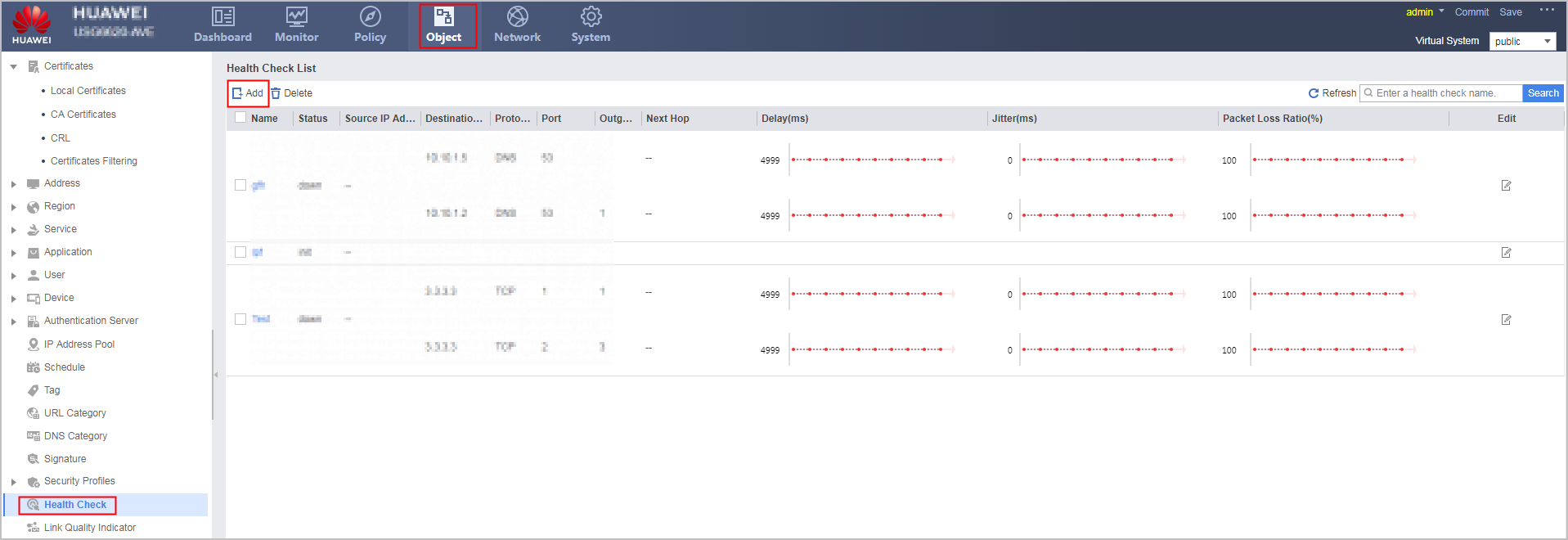
Choose . Click Add in the Health Check List area to create a health check task for ISP1 link.
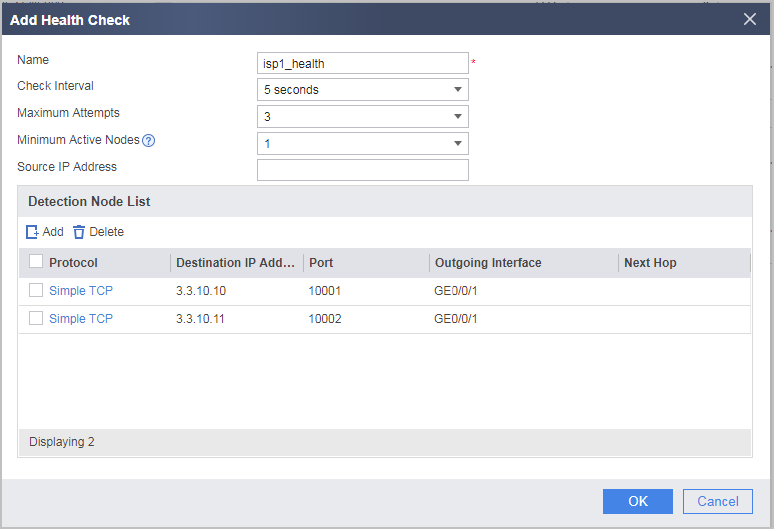
Click Add to create a health check task for ISP2 link.
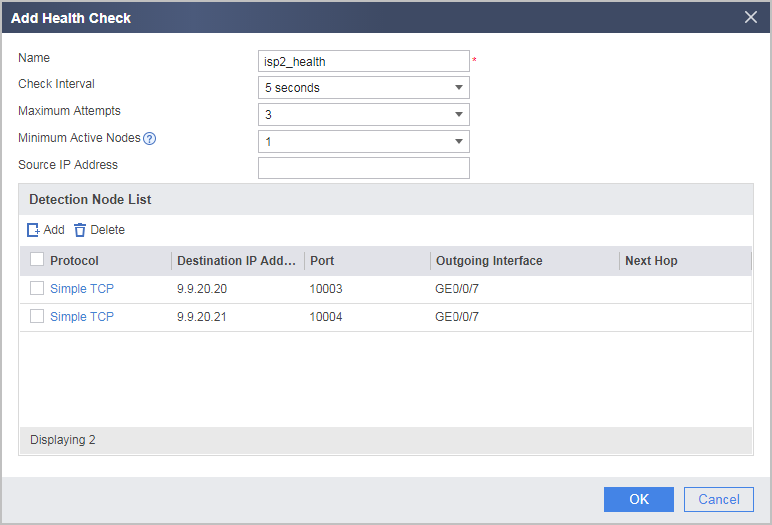
Assume that 3.3.10.10 and 3.3.10.11 are known device addresses on the ISP1 network and that 9.9.20.20 and 9.9.20.21 are known device addresses on the ISP2 network.
If the state remains down after the health check configuration is complete, check the health check configuration.
- Make two ISP address files, isp1.csv and isp2.csv, write Server 1 IP address 3.3.3.3 into isp1.csv and Server 2 IP address 9.9.9.9 into isp2.csv, and upload the two ISP address files to the FW.
Choose , click the Carrier Address Library tab, and click Import.
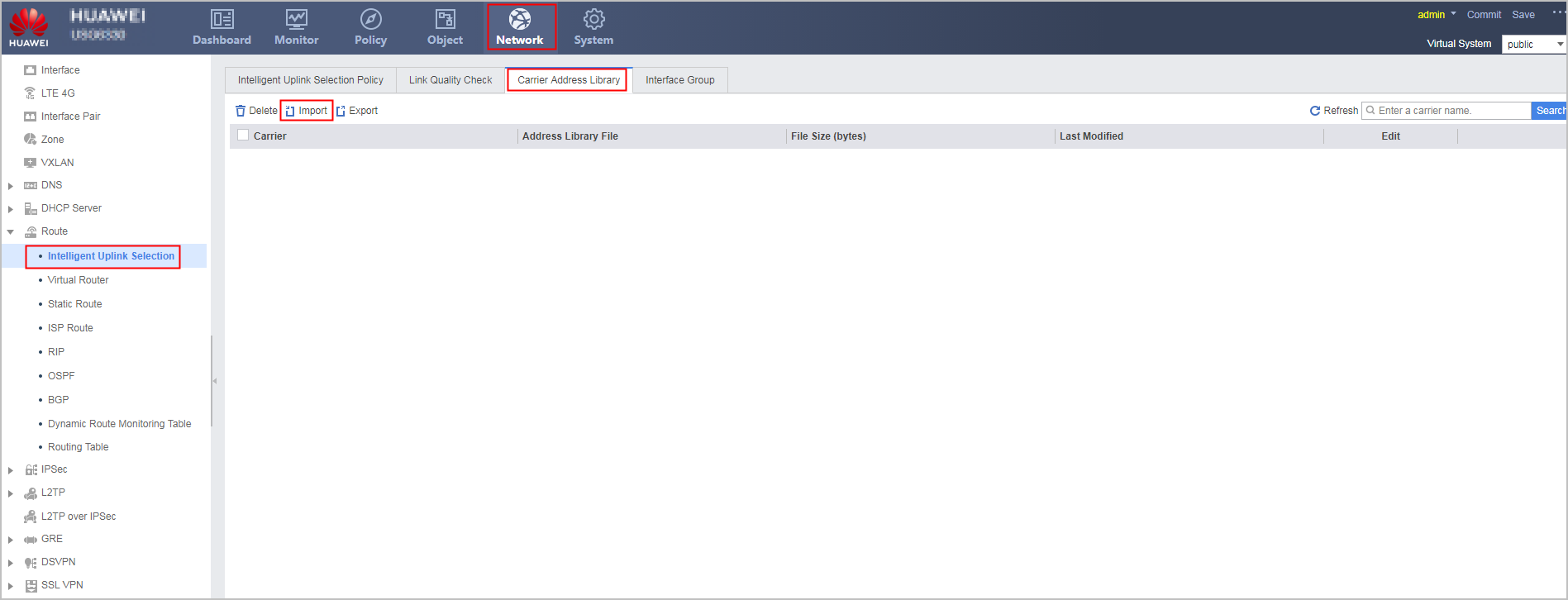
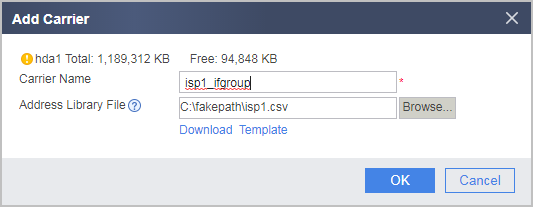
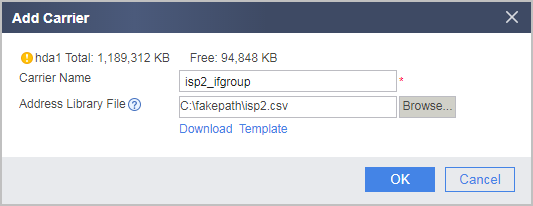
Create carrier names isp1_ifgroup and isp2_ifgroup for ISP 1 and ISP 2, respectively, and import the ISP address files.
- Configure IP and gateway addresses for GigabitEthernet 0/0/1 and GigabitEthernet 0/0/7, assign the interfaces to the Untrust zone, select carriers, enable ISP routes, and apply health check tasks.
Choose and click
 on the line of the interface to be configured.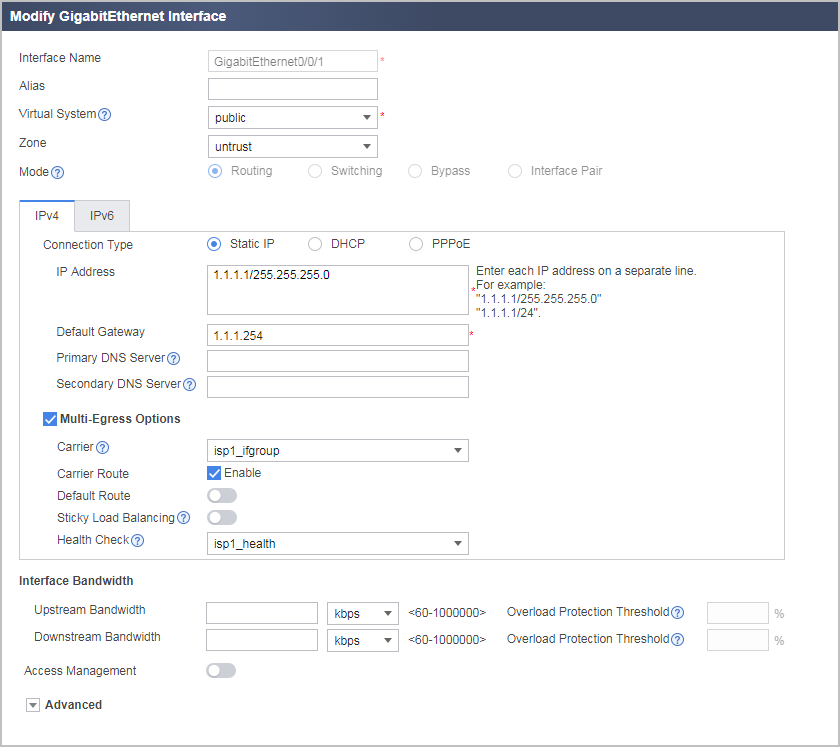
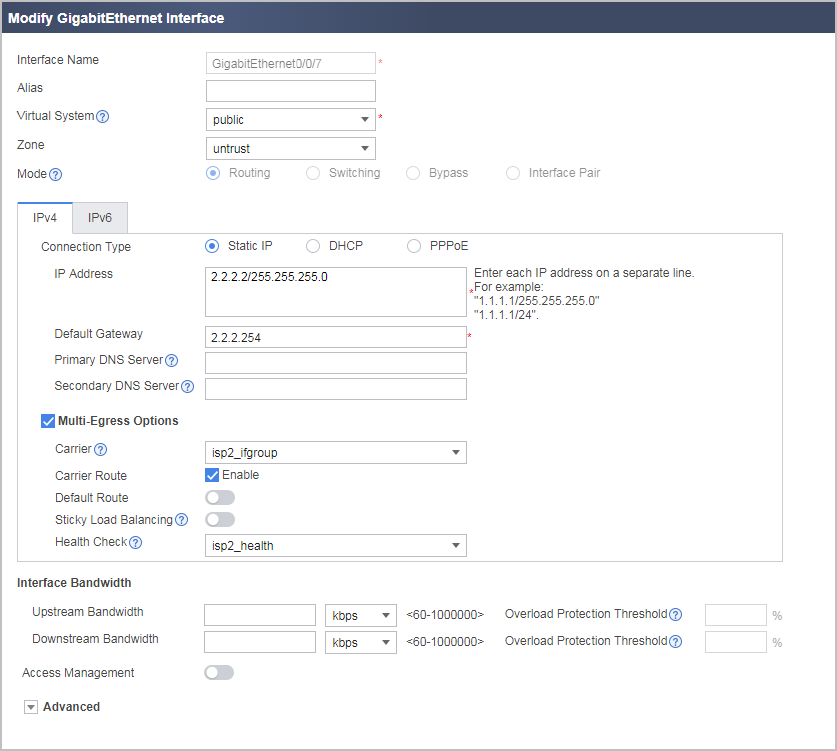
- Configure an IP address for GigabitEthernet 0/0/3 and assign the interface to the Trust zone.
Choose and click
on the line of the interface to be configured.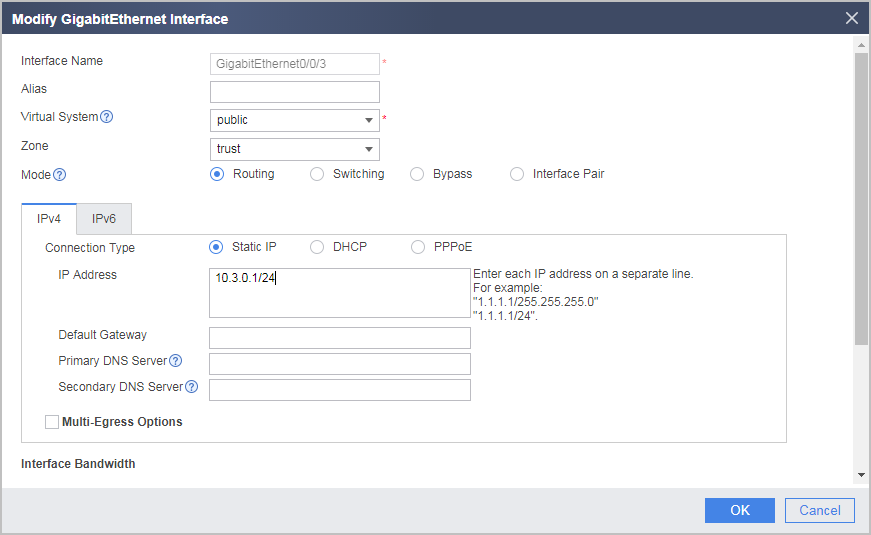
- Configure a Trust-to-Untrust interzone security policy to allow enterprise network users to access Internet resources. Assume that enterprise network users reside on 10.3.0.0/24.
Choose and click Add Security Policy to create a security policy.
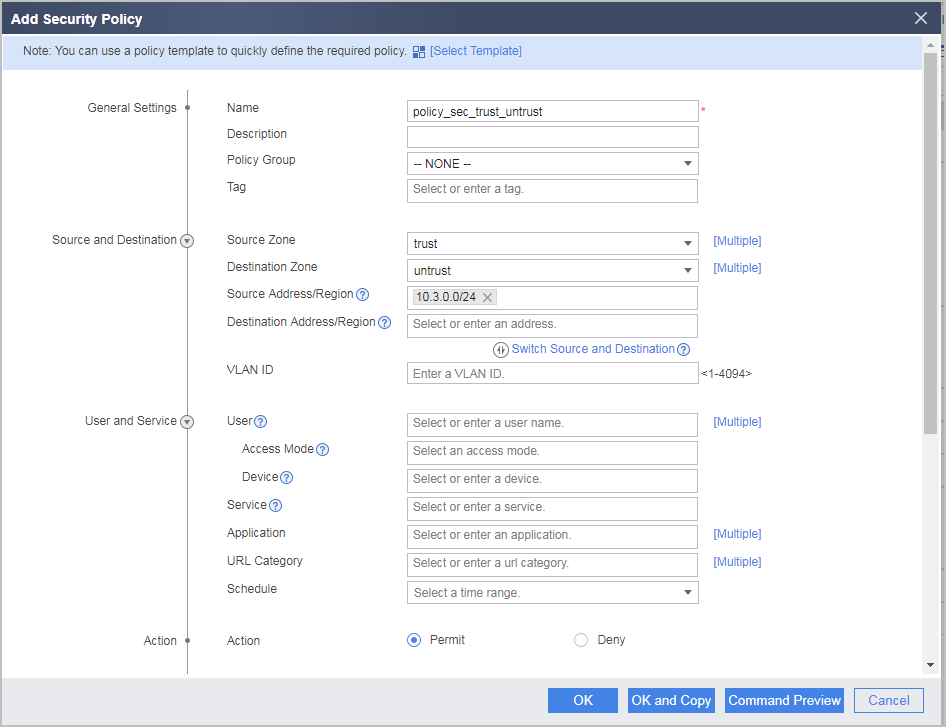
Configuration Scripts
#
 isp name isp1_ifgroup set filename isp1.csv
 isp name isp2_ifgroup set filename isp2.csv
#
healthcheck enable
healthcheck name isp1_health
 destination 3.3.10.10 interface GigabitEthernet0/0/1 protocol tcp-simple destination-port 10001
 destination 3.3.10.11 interface GigabitEthernet0/0/1 protocol tcp-simple destination-port 10002
healthcheck name isp2_health
 destination 9.9.20.20 interface GigabitEthernet0/0/7 protocol tcp-simple destination-port 10003
 destination 9.9.20.21 interface GigabitEthernet0/0/7 protocol tcp-simple destination-port 10004
#
interface GigabitEthernet0/0/1
 ip address 1.1.1.1 255.255.255.0
 healthcheck isp1_health
 gateway 1.1.1.254
#
interface GigabitEthernet0/0/3
 ip address 10.3.0.1 255.255.255.0
#
interface GigabitEthernet0/0/7
 ip address 2.2.2.2 255.255.255.0
 healthcheck isp2_health
 gateway 2.2.2.254
#
 firewall zone trust
  set priority 85
  add interface GigabitEthernet0/0/3
#
firewall zone untrust
 set priority 5
 add interface GigabitEthernet0/0/1
 add interface GigabitEthernet0/0/7
#
security-policy
 rule name policy_sec_trust_untrust
  source-zone trust
  destination-zone untrust
  source-address 10.3.0.0 mask 255.255.255.0
  action permit
#
interface-group 1 isp isp1_ifgroup
 add interface GigabitEthernet0/0/1
#
interface-group 2 isp isp2_ifgroup
 add interface GigabitEthernet0/0/7
#
return