Web: Example for Online Querying and Referencing the Specified Users/User Groups on the AD Server Using Security Policies
Networking Requirements
An enterprise has deployed a FW as the egress gateway to connect the intranet to the Internet, as shown in Figure 1.
- The AD identity authentication mechanism is enabled on the intranet, and information about users and user group is saved on an AD server.
- Internet access users on the intranet include R&D employees and marketing employees.
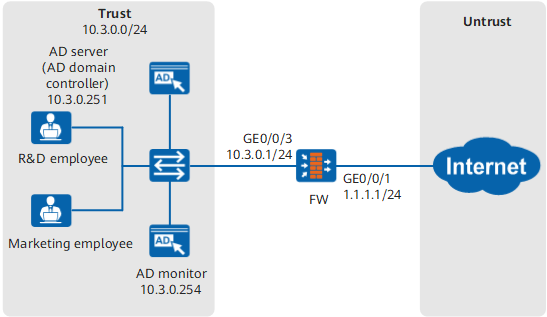
The user management and authentication mechanisms of the FW must identify IP addresses on the intranet as users to implement user-specific behavior control and permission assignment. Requirements are as follows:
- R&D and marketing employees can log in to the AD domain using their domain accounts and passwords and access permitted resources without further authentication. R&D and marketing employees are identified by the user names that they use to log in to the AD domain.
- The AD server has a great number of users and user groups, and only some of them need to be imported to the FW for policies to reference.
- Security policies are configured to allow only marketing employees (user group: marketing) and some R&D employees (such as users rd_1 and rd_2) to access the Internet.
Configuration Roadmap

This section describes only the operations for online querying, importing, and referencing users from an AD server and configuring authentication domains and server import policies. For the AD server authentication, AD LDAP server authentication, and AD SSO configuration operations, see the corresponding configuration description or configuration examples.
- On a FW, set the parameters for communication with an AD server.
- Configure an authentication domain on the FW. The domain name must be the same as that on the AD server.
- Configure a server import policy on the FW.
Configure new user options of the authentication domain and associate the authentication domain with the configured server import policy. Otherwise, the user cannot be queried online using the policy.
Configure a security policy on the FW, online query and import user group marketing and users rd_1 and rd_2 from the AD server, and reference them in the security policy to allow the specified users on the intranet to access the Internet.
Only the AD and AD LDAP servers support remote query and import of users, user groups, or security groups.
This section describes how to online query, import, and reference users in security policies. You can also online query, import, and reference users, user groups, or security groups in other policies that use user as a matching condition.
Data Planning
Item |
Data |
Description |
|---|---|---|
AD server |
On a FW, set the parameters for communication with an AD server. The parameter settings on the FW must be consistent with those on the AD server. |
|
User information import policy |
Import users from the AD server to the FW. |
|
Security Policy |
|
Allow only marketing employees (user group: marketing) and some R&D employees (such as users rd_1 and rd_2) to access the Internet. |
Procedure
- On a FW, set the parameters for communication with an AD server.
- Choose .
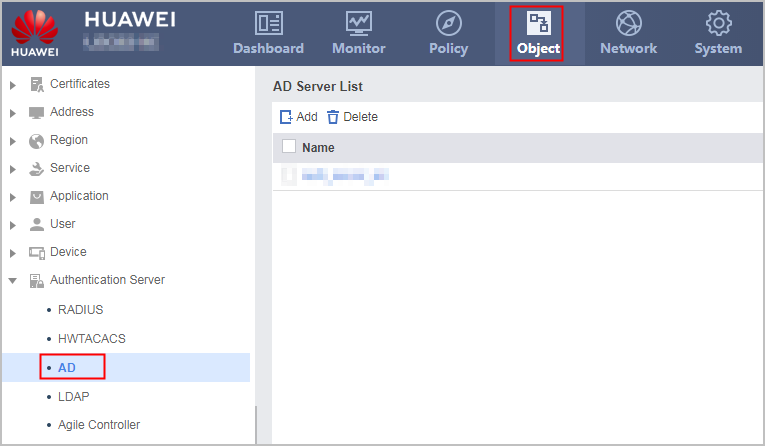
- Click Add and set the following parameters.
The parameter settings on the FW must be consistent with those on the AD server.
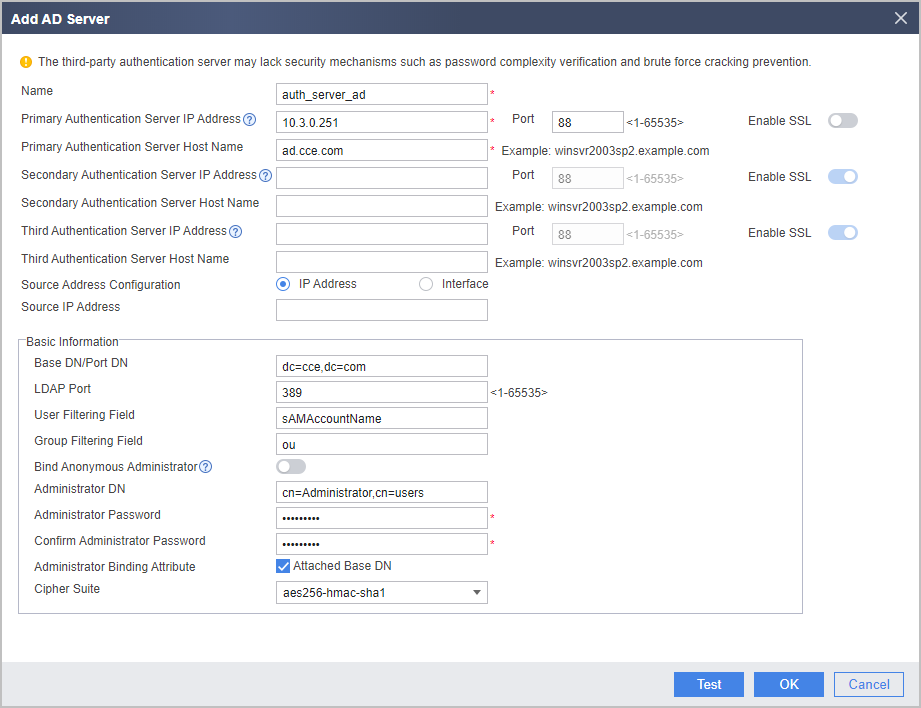
For the V600R007C20 version, whether to enable SSL for AD authentication cannot be configured on the web UI. When you configure the AD server on the web UI, SSL (ldap-over-ssl) is enabled by default. In this mode, LDAP over SSL must also be enabled on the AD server. For details, see the operating system guide of the AD server. To disable SSL (no-ssl), click CLI Console in the lower right corner of the web page. On the CLI configuration page that is displayed, run the ad-server authentication 10.3.0.251 88 no-ssl command in the corresponding AD server template view. The following uses no-ssl as an example.
- Choose .
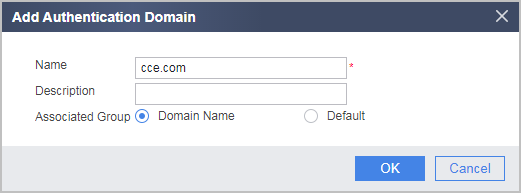
- Configure an authentication domain.
- Choose .
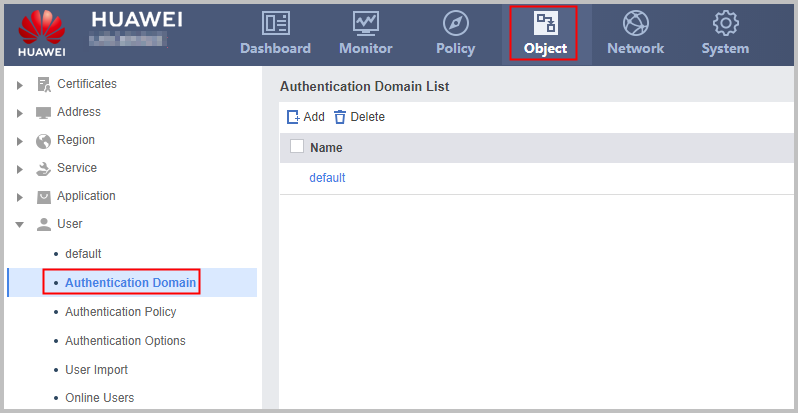
- Click Add and set the following parameters.
Associated User Group must be set to Same as the Domain Name. Otherwise, the function of importing users, user groups, or security groups in policies cannot be used.
- Choose .
- Configure a policy to import user information from the AD server to the FW.
- Choose .
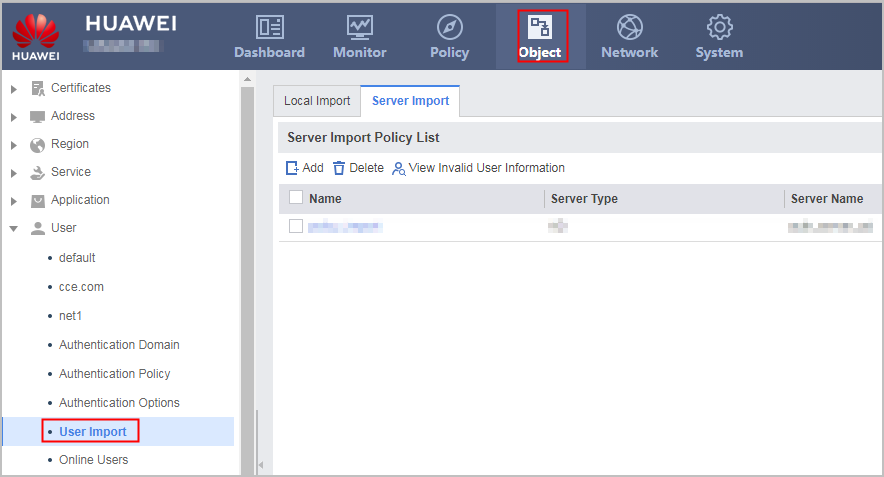
- Click Add and set the following parameters.
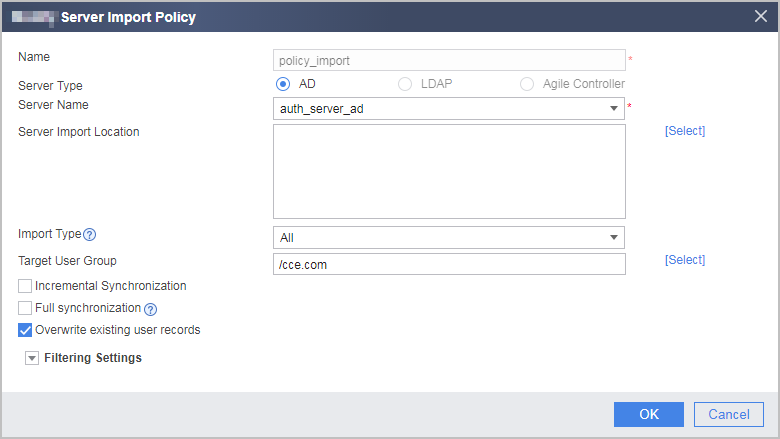
The import type and filtering parameter configured in the server import policy do not take effect in this scenario.
In this scenario, only the specified user, user group, or security group needs to be imported. Therefore, do not select Incremental Synchronization or Full Synchronization.
- Choose .
- Configure the cce.com authentication domain on the FW.
- Choose .
- Set the following parameters.
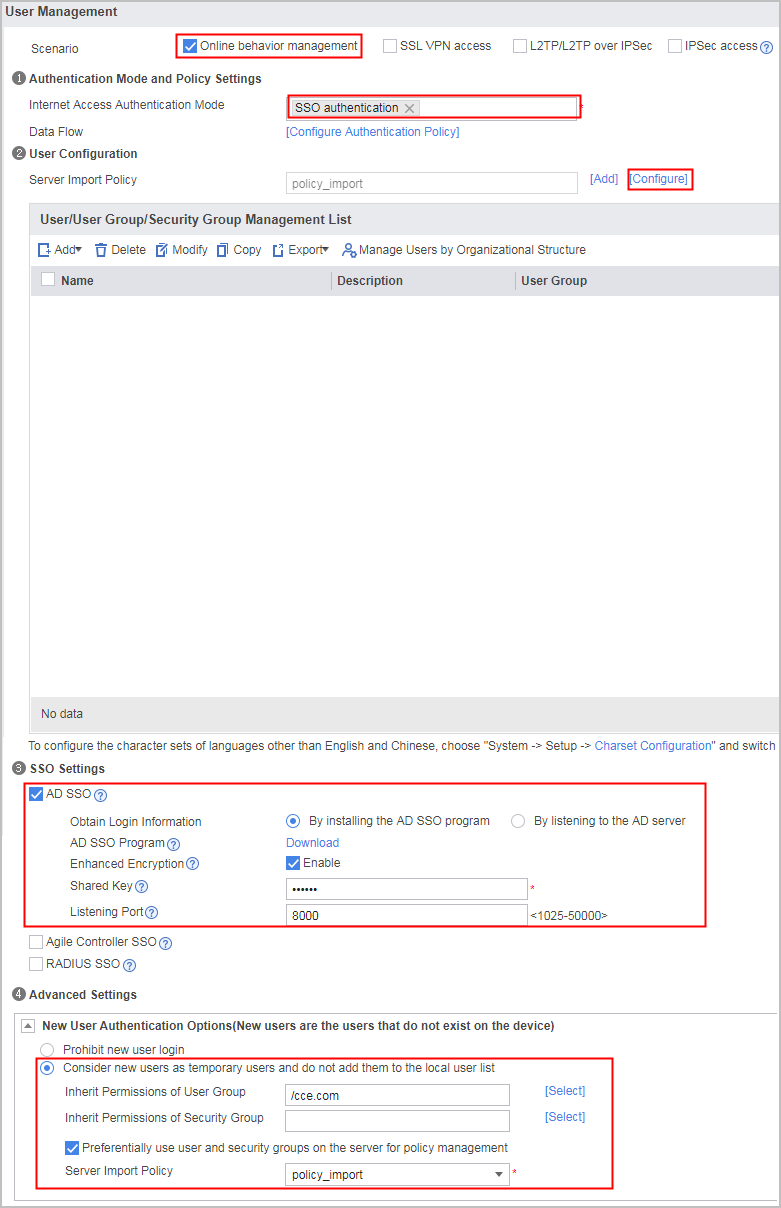
The authentication domain must be associated with the configured server import policy. Otherwise, the users, user groups, or security groups on the server cannot be online queried using the policy.
- Configure a security policy on the FW, online query and import user group marketing and users rd_1 and rd_2 from the AD server, and reference them in the security policy to allow the specified users on the intranet to access the Internet.
- Separately select user group marketing and users rd_1 and rd_2, click
 , and click OK to import the selected users or user group. Then reference the users or user group in the security policy.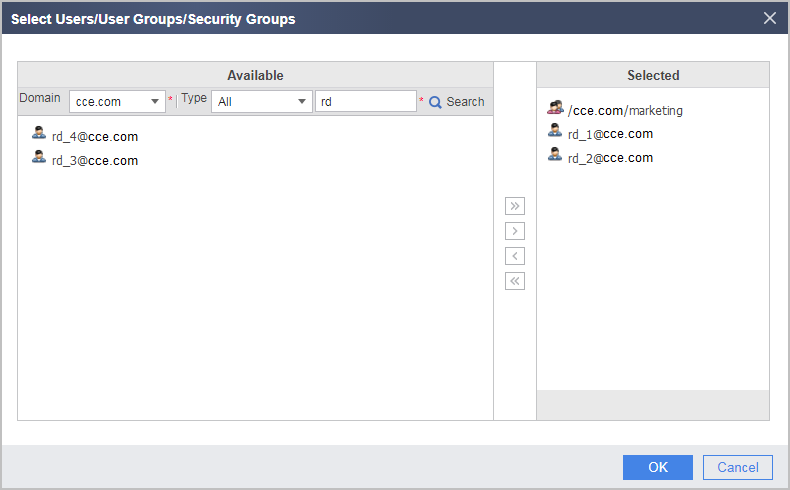
When querying users, user groups, or security groups online, you can select the object type in Type to obtain specific query results.
The destination group to which a user or user group is imported is determined by the configuration of the server import policy. In this example, the user or user group is imported to user group cce.com.
- Separately select user group marketing and users rd_1 and rd_2, click
Verification
- After R&D employees rd_1 and rd_2 use their domain accounts and passwords to log in to the AD domain, they can access the Internet, while other R&D employees cannot access the Internet.
- After marketing employees use their domain accounts and passwords to log in to the AD domain, they can access the Internet.
Configuration Script
#
 sysname FW
#
ad-server template auth_server_ad
 ad-server authentication 10.3.0.251 88 no-ssl
 ad-server authentication base-dn dc=cce,dc=com
 ad-server authentication manager cn=administrator,cn=users %$%$M#._~J4QrR[kJu7PUMtHUqh_%$%$
 ad-server authentication host-name cce.com
 ad-server authentication ldap-port 389
 ad-server user-filter sAMAccountName
 ad-server group-filter ou
#
security-policy
 rule name policy_sec
  source-zone trust
  destination-zone untrust
  source-address 10.3.0.0 24
  user /cce.com/markting
  user rd_1@cce.com
  user rd_2@cce.com
  action permit
#
 user-manage import-policy policy_import from ad
 server template auth_server_ad
 server basedn dc=cce,dc=com
 destination-group /cce.com
 user-attribute sAMAccountName
 user-filter (&(|(objectclass=person)(objectclass=organizationalPerson))(cn=*)(!(objectclass=computer)))
 group-filter (|(objectclass=organizationalUnit)(ou=*))
 import-type user-group
 import-override enable
#
aaa
 domain cce.com
 service-type internetaccess
 internet-access mode single-sign-on
 new-user add-temporary group /cce.com auto-import policy_import