< Home

Web: Example for Configuring Virtual Systems to Isolate Enterprise Departments (Layer-2 Access)

A firewall accesses an enterprise network at Layer 2. You can configure virtual systems with separate administrators to isolate departments of the enterprise.

Networking Requirements

Medium-sized enterprise A deploys a firewall as the network gateway. The network of this enterprise is divided into three subnets respectively for the R&D, financial, and administrative department. The security policies for the three departments are different and must meet the following requirements:

  • The FW connects to an existing intranet through Layer-2 access, without changing the intranet's network topology.
  • Internet access is granted to all employees of the administrative department, some employees of the R&D department, but none of the employees of the financial department.
  • The three departments have similar traffic volumes and therefore are assigned the same amount of virtual system resources.

Configure virtual systems to meet the preceding requirements. Figure 1 shows the networking diagram.
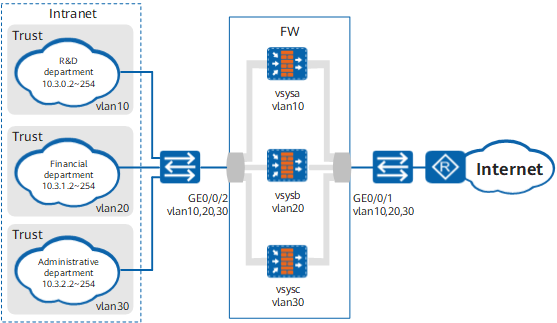
Figure 1 Networking diagram of network isolation (Layer-2 access)

Data Planning

Item

Data

Description

vsysa

  • Virtual system name: vsysa
  • Outside interface: GE0/0/1
  • Security zone to which the outside interface belongs: Untrust
  • Inside interface: GE0/0/2
  • Security zone to which the inside interface belongs: Trust
  • VLAN assigned: VLAN10
  • Administrator: admin@@vsysa
  • IP addresses allowed to access the Internet: 10.3.0.2 to 10.3.0.10

Both the outside interface GE0/0/1 and inside interface GE0/0/2 are trunk interfaces and can be assigned to multiple virtual systems based on VLAN assignment.

vsysb

  • Virtual system name: vsysb
  • Outside interface: GE0/0/1
  • Security zone to which the outside interface belongs: Untrust
  • Inside interface: GE0/0/2
  • Security zone to which the inside interface belongs: Trust
  • VLAN assigned: VLAN20
  • Administrator: admin@@vsysb

-

vsysc

  • Virtual system name: vsysc
  • Outside interface: GE0/0/1
  • Security zone to which the outside interface belongs: Untrust
  • Inside interface: GE0/0/2
  • Security zone to which the inside interface belongs: Trust
  • VLAN assigned: VLAN30
  • Administrator: admin@@vsysc

-

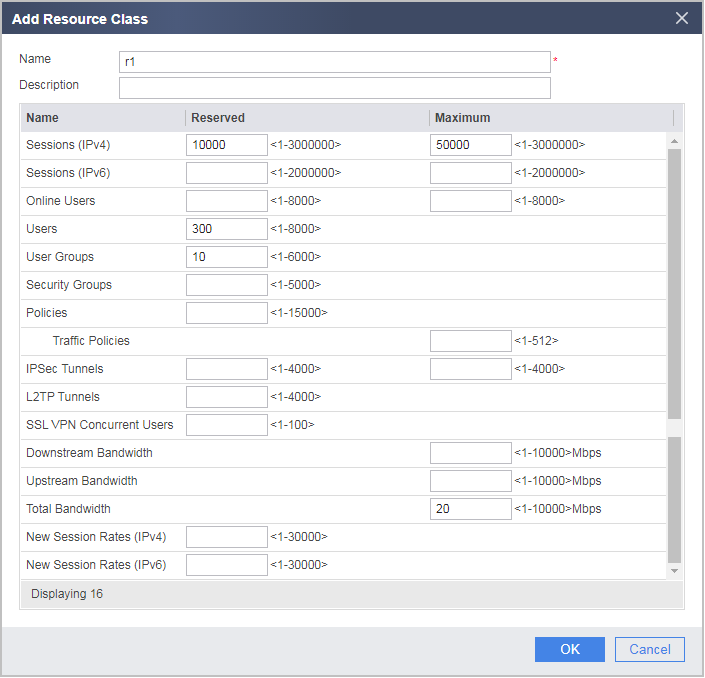
Resource class

  • Name: r1
  • Reserved Number for session: 10000
  • Maximum Number for session: 50000
  • User: 300
  • User Group: 10
  • Policy: 300

The three departments have similar traffic volumes and therefore are assigned the same resource class.

Configuration Roadmap

  1. Configure GE0/0/1 and GE0/0/2 as trunk interfaces and add them to VLANs.
  2. The public system administrator creates three virtual systems vsysa, vsysb, and vsysc, assigns VLANs and resources, and configures an administrator for each virtual system.
  3. The administrator of the R&D department logs in to the FW to configure security policies for vsysa.
  4. The administrator of the financial department logs in to the FW to configure security policies for vsysb.
  5. The administrator of the administrative department logs in to the FW to configure security policies for vsysc.

Procedure

  1. Configure GE0/0/1 and GE0/0/2 as trunk interfaces and add them to VLANs.
    1. Choose Network > Interface.
    2. Click the interface name and set the following parameters for the interface.

      Interface Name

      GE0/0/1

      GE0/0/2

      Zone

      untrust

      trust

      Mode

      Switching

      Switching

      Trunk VLAN ID

      10, 20, 30

      10, 20, 30

      Default VLAN ID

      1

      1

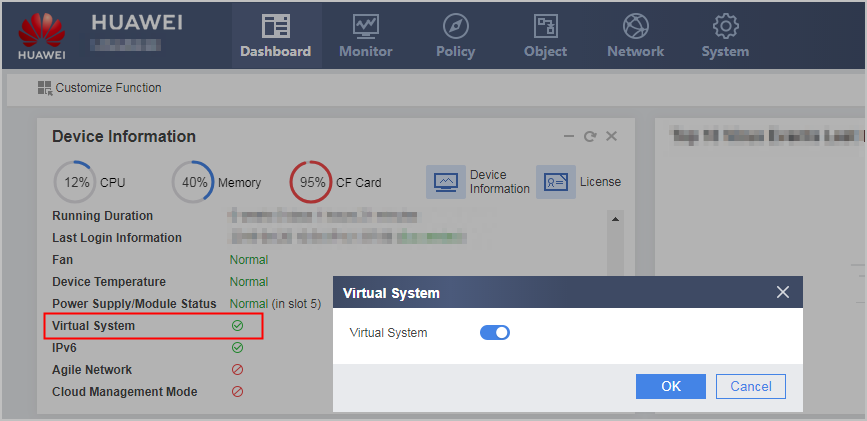
  2. Click Dashboard on the main menu. In the Device Information area, click Configure on the line of Virtual System to enable the virtual system function.
  3. Configure a resource class.
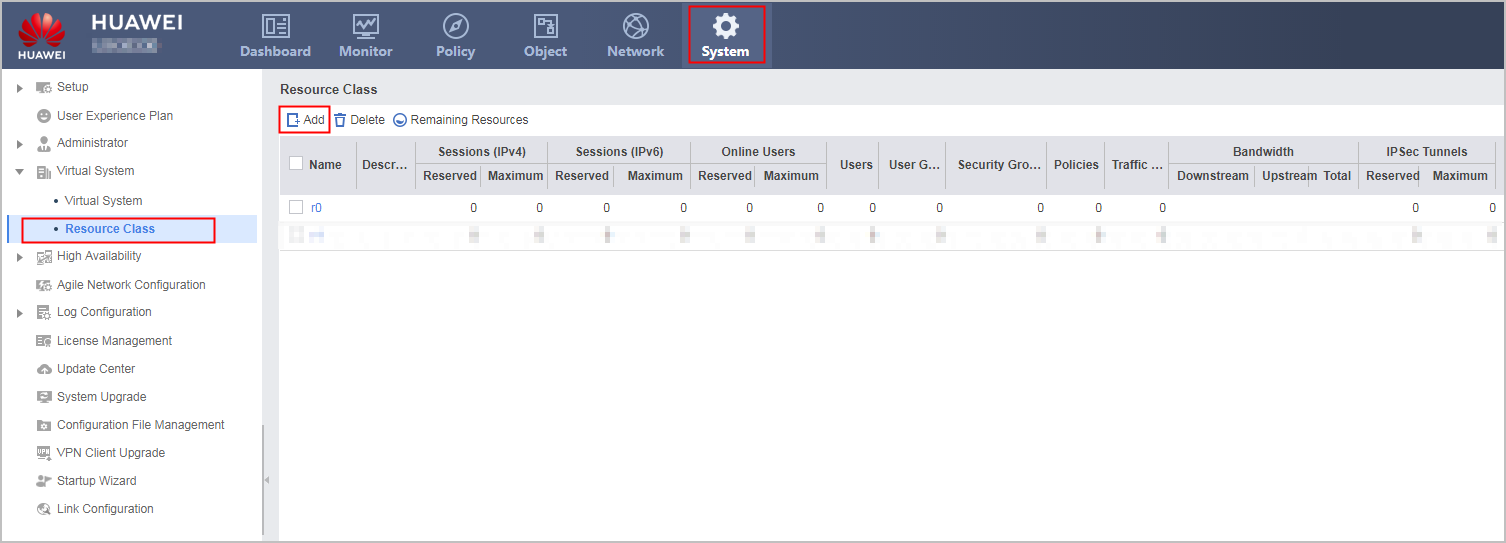
    1. Choose System > Virtual System > Resource Class.

    2. Click Add and set the following parameters.
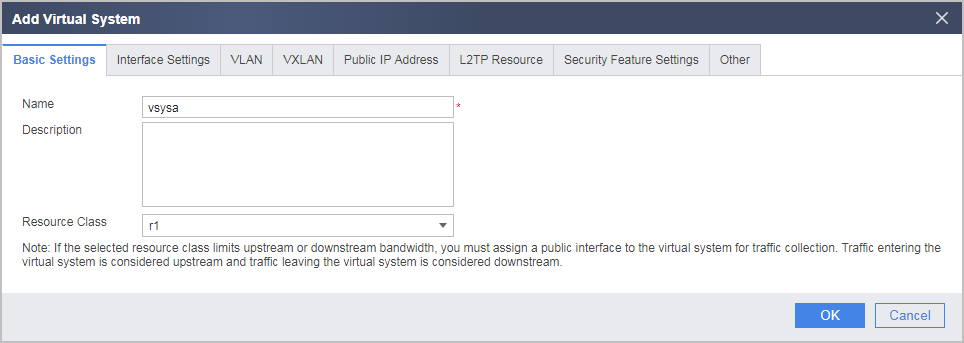
  4. In the root system, create virtual systems vsysa and vsysb and add them to VLANs.
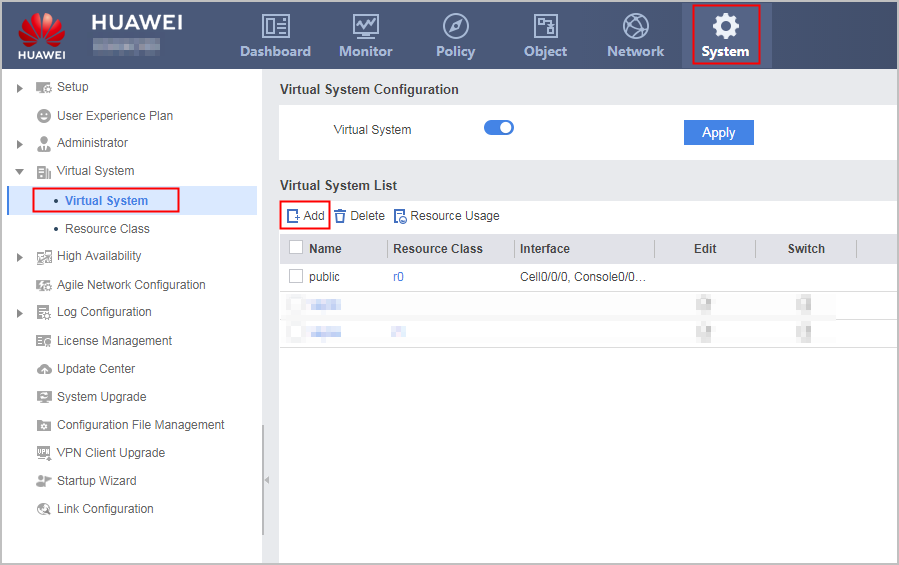
    1. Choose System > Virtual System > Virtual System.

    2. Click Add and then the Basic Settings tab and set the following parameters.
    3. Click the VLAN tab and set the following parameters.
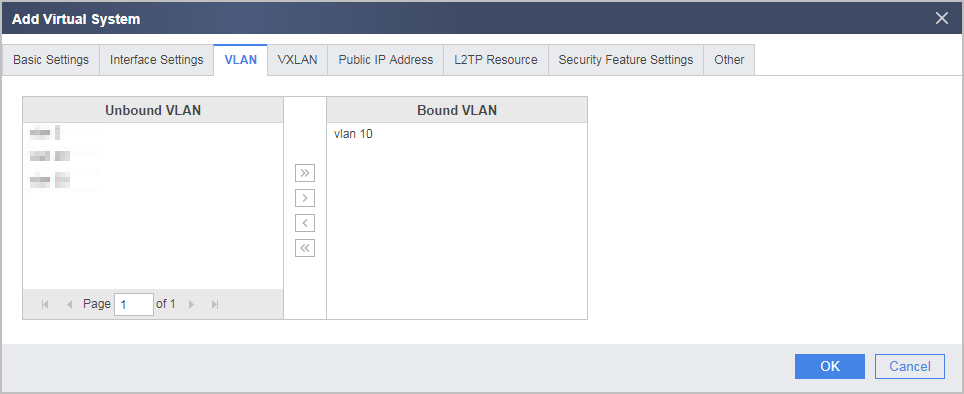
    4. Create vsysb and vsysc and add them to VLANs.
  5. Create administrators for the virtual systems in the root system.
    1. Select vsysa from the Virtual System drop-down list in the upper right corner to access vsysa.
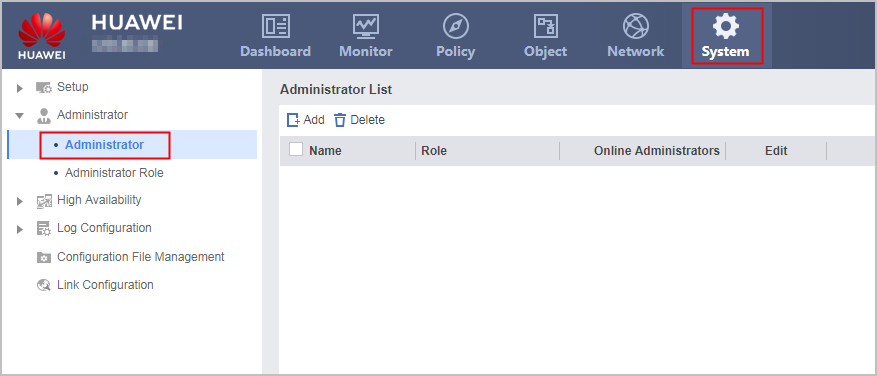
    2. Choose System > Administrator > Administrator.

    3. Click Add and set the following parameters.

      Name

      admin@@vsysa

      Authentication

      Local authentication

      Password

      Vsysadmin@123

      Confirm Password

      Vsysadmin@123

      Role

      System administrator

      Service Type

      web telnet ssh

    4. Repeat these steps to create administrators admin@vsysb for vsysb and admin@vsysc for vsysc.
  6. The R&D department administrator enters vsysa and configures security zones and policies for interfaces.
    1. Use the vsysa administrator account admin@@vsysa to log in to the firewall. Change the login password before performing the following operations.
    2. Choose Network > Interface.
    3. Click the interface name and set the following parameters for the interface.

      Interface Name

      GigabitEthernet 0/0/2

      GigabitEthernet 0/0/1

      zone

      trust

      untrust

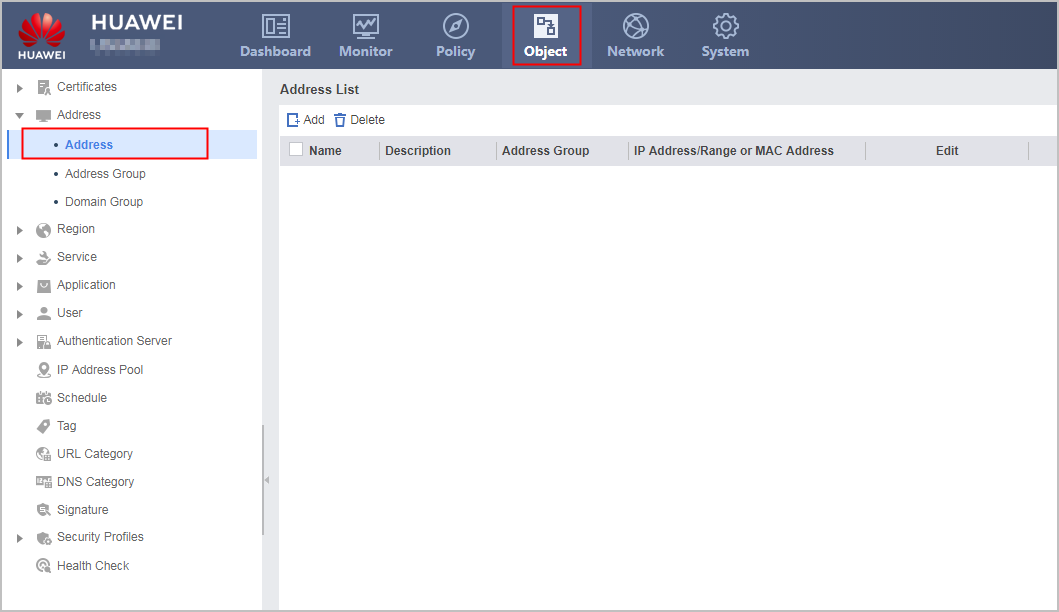
    4. Choose Object > Address > Address.

    5. Click Add and set the following IP address range.

      Name

      ipaddress1

      IP Address/Range or MAC Address

      10.3.0.2-10.3.0.10

    6. Choose Policy > Security Policy > Security Policy.
    7. Choose Add Security Policy and configure the following security policy to allow employees on a specific network segment to access the Internet.

      Name

      to_internet

      Source zone

      trust

      Destination zone

      untrust

      Source Address/Region

      ipaddress1

      Action

      Permit

    8. Choose Add Security Policy and configure a security policy to prohibit all employees from accessing the Internet. The priority of this policy is lower than that of the previous policy, and therefore no address range needs to be specified.

      Name

      to_internet2

      Source zone

      trust

      destination zone

      untrust

      Action

      Deny

  7. The financial department administrator admin@@vsysb and administrative department administrator admin@@vsysc log in to the FW and configure IP addresses, security zones, and security policies for vsysb and vsysc, respectively.

    The configuration is similar to that of the R&D department except the following:

    • You only need to configure a security policy to prevent the IP address segment 10.3.1.2-10.3.1.254 from accessing the Internet.
    • You only need to configure a security policy to allow the IP address segment 10.3.2.2-10.3.2.254 to access the Internet.

Verification

  • Use a PC that is allowed to access the Internet and a PC that is not allowed to access the Internet from the R&D department to access the Internet. If the results are as expected, the security policies of vsysa are correctly configured.
  • Access the Internet from the financial department. If the access fails, the security policies of vsysb are correctly configured.
  • Access the Internet from the administrative department. If the access succeeds, the security policies of vsysc are correctly configured.

Configuration Scripts

Configuration script of the public system

#
 sysname FW
#                                                                               
vlan batch 10 20 30
#                                                                               
 vsys enable 
#                                                                               
resource-class r1                                                               
 resource-item-limit session reserved-number 10000 maximum 50000                
 resource-item-limit policy reserved-number 300                                 
 resource-item-limit user reserved-number 300                                   
 resource-item-limit user-group reserved-number 10     
#                                                                               
vsys name vsysa 1                                                               
 assign vlan 10                                                                 
 assign resource-class r1                                                       
#                                                                               
vsys name vsysb 2                                                               
 assign vlan 20                                                                 
 assign resource-class r1                                                       
#                                                                               
vsys name vsysc 3                                                               
 assign vlan 30                                                                 
 assign resource-class r1 
#                                                                               
interface GigabitEthernet0/0/1                                                 
 portswitch                                                                     
 undo shutdown                                                                  
 port link-type trunk 
 undo port trunk allow-pass vlan 1                                                          
 port trunk allow-pass vlan 10 20 30                                            
#                                                                               
interface GigabitEthernet0/0/2                                                 
 portswitch                                                                     
 undo shutdown                                                                  
 port link-type trunk  
 undo port trunk allow-pass vlan 1                                                         
 port trunk allow-pass vlan 10 20 30                                            
#                                                                                 
return 

Configuration script of vsysa

#                                                                               
firewall zone trust                                                             
 set priority 85                                                                
 add interface GigabitEthernet0/0/2  
#                                                                               
firewall zone untrust                                                           
 set priority 5                                                                 
 add interface GigabitEthernet0/0/1      
#                                                                               
aaa                                                                             
 manager-user admin@@vsysa                                                       
  password cipher %@%@@~QEN4"Db/xmvR'5@=5)^`WN]~h`Mwn-{BNPy#ZYE>`6`f]X%@%@      
  service-type web telnet ssh                                                   
  level 15                                                                      

 bind manager-user admin@@vsysa role system-admin 
#                                                                               
ip address-set ipaddress1 type object                                           
 address 0 range 10.3.0.2 10.3.0.10   
#                                                                               
security-policy                                                                 
 rule name to_internet                                                          
  source-zone trust                                                             
  destination-zone untrust                                                      
  source-address address-set ipaddress1                                         
  action permit                                                                 
 rule name to_internet2                                                         
  source-zone trust                                                             
  destination-zone untrust                                                      
  action deny 
#                                                                               
return 

Configuration script of vsysb

#                                                                               
firewall zone trust                                                             
 set priority 85                                                                
 add interface GigabitEthernet0/0/2  
#                                                                               
firewall zone untrust                                                           
 set priority 5                                                                 
 add interface GigabitEthernet0/0/1      
#                                                                               
aaa                                                                             
 manager-user admin@@vsysb                                                       
  password cipher %@%@zG{;O|!gEN4"Db/xmvR'5@=5)^`WN]~h`Mwn-{BNPy#ZYE>`6`f]      
  service-type web telnet ssh                                                   
  level 15                                                                      

 bind manager-user admin@@vsysb role system-admin 
#
ip address-set ipaddress1 type object                                           
 address 0 range 10.3.1.2 10.3.1.254
#                                                                               
security-policy                                                                 
 rule name to_internet                                                          
  source-zone trust                                                             
  destination-zone untrust 
  source-address address-set ipaddress1                                                      
  action deny   
#                                                                               
return 

Configuration script of vsysc

#                                                                               
firewall zone trust                                                             
 set priority 85                                                                
 add interface GigabitEthernet0/0/2  
#                                                                               
firewall zone untrust                                                           
 set priority 5                                                                 
 add interface GigabitEthernet0/0/1      
#                                                                               
aaa                                                                             
 manager-user admin@@vsysc                                                       
  password cipher %@%@zG{;x|!gEN5"Db/6dvR'5@=5)^`WN]~h`Mwn-{BNPy#ZYE>`6`f]      
  service-type web telnet ssh                                                   
  level 15                                                                      
 bind manager-user admin@@vsysc role system-admin 
#
ip address-set ipaddress1 type object                                           
 address 0 range 10.3.2.2 10.3.2.254
#                                                                               
security-policy                                                                 
 rule name to_internet                                                          
  source-zone trust                                                             
  destination-zone untrust                                                        
  source-address address-set ipaddress1                                                  
  action permit 
#                                                                               
return 
Copyright © Huawei Technologies Co., Ltd.
< Previous topic Next topic >