Example for Configuring NetStream on a Vlanif Interface
Two interfaces of the FW are added to the same VLAN, and the FW collects statistics on the data flows passing the Vlanif interface.
Networking Requirements
As shown in Figure 1, add GigabitEthernet 0/0/1 and GigabitEthernet 0/0/2 to the same VLAN and configure the collection of the statistics on the traffic passing interface GigabitEthernet 0/0/1.
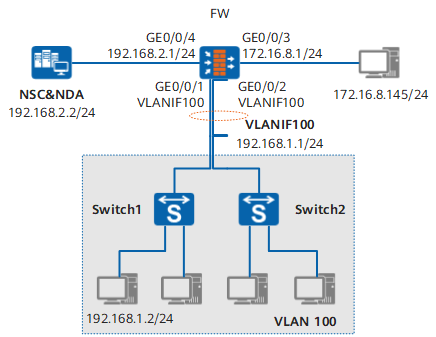
Item |
Data |
|---|---|
Destination address |
192.168.2.2 |
Destination port |
6000 |
Source address |
192.168.2.1 |
Configuration Roadmap
The configuration roadmap is as follows:
Configure a VLAN and a Vlanif interface.
Set an IP address for each interface.
Enable NetStream for collecting statistics on inbound traffic.
Procedure
- Create a VLAN and a Vlanif interface and set an IP address for each of them.
# Create VLAN 100.
<FW> system-view
[FW] vlan 100
[FW-vlan100] quit
# Add GigabitEthernet 0/0/1 and GigabitEthernet 0/0/2 to VLAN 100.
[FW] interface GigabitEthernet 0/0/1
[FW-GigabitEthernet0/0/1] undo shutdown
[FW-GigabitEthernet0/0/1] portswitch
[FW-GigabitEthernet0/0/1] port link-type access
[FW-GigabitEthernet0/0/1] port default vlan 100
[FW-GigabitEthernet0/0/1] quit
[FW] interface GigabitEthernet 0/0/2
[FW-GigabitEthernet0/0/2] undo shutdown
[FW-GigabitEthernet0/0/2] portswitch
[FW-GigabitEthernet0/0/2] port link-type access
[FW-GigabitEthernet0/0/2] port default vlan 100
[FW-GigabitEthernet0/0/2] quit
# Create a Vlanif interface and set an IP address for it.
[FW] interface vlanif 100
[FW-Vlanif100] ip address 192.168.1.1 255.255.255.0
[FW-Vlanif100] quit
# Set IP addresses for GigabitEthernet 0/0/4 and GigabitEthernet 0/0/3.
[FW] interface GigabitEthernet 0/0/4
[FW-GigabitEthernet0/0/4] ip address 192.168.2.1 255.255.255.0
[FW-GigabitEthernet0/0/4] undo shutdown
[FW-GigabitEthernet0/0/4] quit
[FW] interface GigabitEthernet 0/0/3
[FW-GigabitEthernet0/0/3] ip address 172.16.8.1 255.255.255.0
[FW-GigabitEthernet0/0/3] undo shutdown
[FW-GigabitEthernet0/0/3] quit
- Add interfaces to corresponding security zones and configure security policy between security zones to ensure normal network communication. Details are omitted.
- Enable NetStream on a Vlanif member interface.
# Enable NetStream for collecting the statistics on the inbound traffic passing the Vlanif member interface GigabitEthernet 0/0/1.
[FW] interface vlanif 100
[FW-Vlanif100] ip netstream inbound
# Configure NetStream sampling.
[FW-Vlanif100] ip netstream sampler fix-packets 20 inbound# Set the destination address, destination port, and source address.
[FW] ip netstream export host 192.168.2.2  6000
[FW] ip netstream export source 192.168.2.1
[FW] quit
Result
After the configuration is complete, run the display ip netstream cache command in the user view to display the statistics on the cached traffic flows.
<FW> display ip netstream  cache
The total records in cache is 3.
 Show information of cache is starting.
 get show cache user data success
 DstIf             DstIP          SrcIP          Pro  Tos  FlgsPkts
 SrcIf             DstPMsk  AS   SrcP          Msk AS   NextHop
 BGP: BGP NextHop
 --------------------------------------------------------------------------
 GigabitEthernet 0/0/3   172.16.8.1      192.168.1.2      0    0    0    95040
 0.0.0.0
After the configuration is complete, run the display ip netstream export command in the user view to display the information about the output of the traffic.
<FW> display ip netstream export
Version 8 AS aggregation information
  Exported stream number: 395
  Exported UDP datagram number: 93   failed number:0