Example for Collecting the Statistics on IPv6 Unicast Traffic Flows
This section provides an example for collecting statistics on the IPv6 unicast flow in the inbound direction of the interface.
Networking Requirements
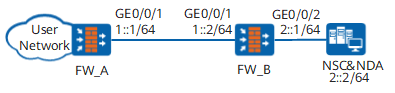
As shown in Figure 1, an enterprise network is connected to FW_B on the carrier network through FW_A. NetStream is enabled on FW_B. In such a scenario, the carrier can collect the statistics on the inbound traffic flows passing GigabitEthernet 0/0/1 of FW_B. The collected statistics provides a reference for network accounting. The interface traffic is of a large volume, and 1: 1 sampling may severely affect the device performance. The GigabitEthernet 0/0/2 is connected to the accounting server.
Item |
Data |
|---|---|
Destination IP address of the NetStream traffic |
2::2 |
Destination port of the NetStream traffic |
6000 |
Source IP address of the NetStream traffic |
2::1 (IP address of the interface that outputs NetStream information on FW_B) |
NetStream sampling ratio |
100 |
Configuration Roadmap
The configuration roadmap is as follows:
Set IP addresses for the interfaces on the FWs.
Enable NetStream for collecting statistics on inbound traffic flows on FW_B.
Add FW interfaces to security zones. Configure security policies based on the service planning, which is not described here. No security policies need to be configured for outputting NetStream statistics.
Procedure
- Set IP addresses for the interfaces on FW_A and FW_B.
# Set IP addresses for FW_A.
<FW_A> system-view
[FW_A] ipv6
[FW_A] interface GigabitEthernet 0/0/1
[FW_A-GigabitEthernet0/0/1] ipv6 enable
[FW_A-GigabitEthernet0/0/1] ipv6 address 1::1/64
[FW_A-GigabitEthernet0/0/1] quit
# Set IP addresses for FW_B.
<FW_B> system-view
[FW_B] ipv6
[FW_B] interface GigabitEthernet 0/0/1
[FW_B-GigabitEthernet0/0/1] ipv6 enable
[FW_B-GigabitEthernet0/0/1] ipv6 address 1::2/64
[FW_B-GigabitEthernet0/0/1] quit
[FW_B] interface GigabitEthernet 0/0/2
[FW_B-GigabitEthernet0/0/2] ipv6 enable
[FW_B-GigabitEthernet0/0/2] ipv6 address 2::1/64
[FW_B-GigabitEthernet0/0/2] quit
- Enable the NetStream function for collecting inbound statistics on FW_B.
# Enable the NetStream function for collecting inbound statistics on FW_B and set the sampling ratio.
[FW_B] interface GigabitEthernet 0/0/1
[FW_B-GigabitEthernet0/0/1] ipv6 netstream inbound
[FW_B-GigabitEthernet0/0/1] ipv6 netstream sampler fix-packets 100 inbound
# Configure the FW_B to send the collected statistics to the NSCs and NDA.
[FW_B] ipv6 netstream export host ipv6 2::2 6000# Set the source address for the FW_B to send the collected statistics.
[FW_B] ipv6 netstream export source ipv6 2::1
Result
After the configuration is complete, run the display ipv6 netstream cache command in the user view to display the statistics on the cached NetStream traffic flows.
<FW_B> display ipv6 netstream cache
IPV6 netstream cache information
  Stream active timeout(minute)  : 30
  Stream inactive timeout(second): 1
  Stream entry been created      : 0
  Last clearing of statistics    : never

 IPV6 packet number of different size
 1-80        81-552      553-576     577-612     613-1480    1481-1500   1501-
 0           0           0           0           0           0           0


 Protocol           Total  Packets   Stream   Packets Active(sec)   Idle(sec)
                  Streams     /Sec     /Sec   /stream     /stream     /stream
 ----------------------------------------------------------------------------
 Total                  0        0         0        0           0           0


 DstIf            DstIP           SrcIP           Pro Tos Flgs Pkts
 SrcIf            DstP  Msk AS    SrcP  Msk AS    NextHop
 BGP: BGP NextHop
 --------------------------------------------------------------------------
After the configuration is complete, run the display ipv6 netstream export command in the user view to display the information about the output of NetStream traffic statistics.
<FW_B> display ipv6 netstream export
Version 9 export information
  Exported stream number: 120
  Exported UDP datagram number: 120     failed number:0
Configuration Scripts
Configuration script of FW_A
#
sysname FW_A
#
ipv6
#
interface GigabitEthernet 0/0/1
 undo shutdown
 ipv6 enable
 ipv6 address 1::1/64
Configuration script of FW_B
#
sysname FW_B
#
ipv6
#
interface GigabitEthernet 0/0/1
 undo shutdown
 ipv6 enable
 ipv6 address 1::2/64
 ipv6 netstream inbound
 ipv6 netstream sampler fix-packets 100 inbound
#
interface GigabitEthernet 0/0/2
 undo shutdown
 ipv6 enable
 ipv6 address 2::1/64
#
ipv6 netstream export host ipv6 2::2 6000
ipv6 netstream export source ipv6 2::1