prefix-characters
Function
The prefix-characters command sets a prefix for each field of a session log in syslog format.
The undo prefix-characters command restores the default settings.
Format
{ ip-version | protocol | source-ip | destination-ip | source-port | destination-port | source-nat-ip | source-nat-port | destination-nat-ip | destination-nat-port | begin-time | end-time | send-packets | send-bytes | receive-packets | receive-bytes | source-vpn-id | destination-vpn-id | security-policy | user | user-group | source-zone | destination-zone | vsys | close-reason | application } prefix-characters { prefix-name | none }
undo { ip-version | protocol | source-ip | destination-ip | source-port | destination-port | source-nat-ip | source-nat-port | destination-nat-ip | destination-nat-port | begin-time | end-time | send-packets | send-bytes | receive-packets | receive-bytes | source-vpn-id | destination-vpn-id | security-policy | user | user-group | source-zone | destination-zone | vsys | close-reason | application } prefix-characters
Parameters
| Parameter | Description | Value |
|---|---|---|
| ip-version | Indicates the IP version of a session. |
- |
| protocol | Indicates the protocol type of a session. |
- |
| source-ip | Indicates the source IP address of a session. |
- |
| destination-ip | Indicates the destination IP address of a session. |
- |
| source-port | Indicates the source port of a session. |
- |
| destination-port | Indicates the destination port of a session. |
- |
| source-nat-ip | Indicates the source NAT IP address of a session. |
- |
| source-nat-port | Indicates the source NAT port of a session. |
- |
| destination-nat-ip | Indicates the destination NAT IP address of a session. |
- |
| destination-nat-port | Indicates the destination NAT port of a session. |
- |
| begin-time | Indicates the session creation time. |
- |
| end-time | Indicates the session completion time. |
- |
| send-packets | Indicates the number of sent packets during the session. |
- |
| send-bytes | Indicates the number of sent bytes during the session. |
- |
| receive-packets | Indicates the number of received packets during the session. |
- |
| receive-bytes | Indicates the number of received bytes during the session. |
- |
| source-vpn-id | Indicates the source VPN ID of a session. |
- |
| destination-vpn-id | Indicates the destination VPN ID of a session. |
- |
| security-policy | Indicates the name of the policy that a session matches. NOTE:
Only the logs on session aging in the syslog format supports this parameter. |
- |
| user | Indicates the user to which the session belongs. |
- |
| user-group | Indicates the user group to which the session belongs. |
- |
| source-zone | Indicates the source security zone of the session. |
- |
| destination-zone | Indicates the destination security zone of the session. |
- |
| vsys | Indicates the virtual system to which the session belongs. |
- |
| close-reason | Session termination cause |
- |
| application | Indicates the application name (configured in a security policy) that the session matches. |
- |
| prefix-name | Specifies the prefix name of each field in a session log in syslog format. |
The value is a string of 1 to 32 case-sensitive characters. If the name contains spaces, the length ranges from 3 to 34 characters, and you must use double quotation marks ("") to enclose it. |
| none | Indicates that the prefix of a field is empty. During log output, the field has only its content but no prefix. |
- |
Usage Guidelines
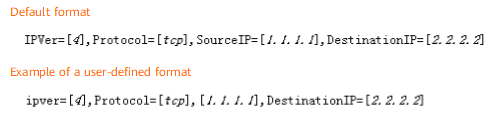
By default, the prefix name of each field in a syslog uses the default format. For example, ip-version defaults to IPVer=, and the corresponding syslog is SECLOG/6/SESSION_TEARDOWN(l):IPVer=4.
You can use the prefix-characters command to set a prefix name for each field in a syslog. If the ip-version prefix-characters ipver= command is run, the ip-version prefix of the syslog is ipver= . If the source-ip prefix-characters none command is run, the source-ip prefix is empty. If no prefix name is set for the protocol field, the protocol field uses the default prefix name format, namely, Protocol=. The following figure shows the differences before and after field name settings.
If the FW and log server communicate through an intermediate device (such as a switch), the size of the session log in syslog format cannot exceed 1024 bytes. Otherwise, the intermediate device will discard the corresponding packet, and the log cannot be queried on the log server.