DHCP Client Renewal of Its IP Address Lease
IP addresses that are dynamically allocated by a DHCP server have leases. A DHCP Discover message from a DHCP client can carry an expected lease. When allocating network parameters, the DHCP server compares the expected lease with the specified lease in the address pool and allocates the IP address with the smaller of the two leases to the DHCP client. When the lease expires, the DHCP server reclaims the IP address, which can then be allocated to other clients. This mechanism improves IP address utilization. To continue to use this IP address, the DHCP client must renew its IP address lease.
Leases and Timers
A lease is the period beginning when a DHCP client obtains an IP address assigned by a DHCP server and ending when the DHCP client stops using the IP address. The DHCP client uses the Lease renewal timer, Rebinding timer, and Lease expiration timer to control leases.
The DHCP server can define a specific lease for each address pool, and addresses in the same DHCP address pool have the same lease.
Table 1 lists timers and their values.
Timer |
Value |
|---|---|
Lease renewal |
50% of the total lease |
Rebinding |
87.5% of the total lease |
Lease expiration |
Total lease. It is configured on a DHCP server and the default value is one day. |
When a DHCP client obtains an IP address and enters the binding status, the three timers take effect as follows:
After the Lease renewal timer expires, the DHCP client must renew its IP address. The DHCP client automatically sends DHCP Request messages to the DHCP server which has ever allocated IP addresses to it and enters the renewing status. If the IP address is valid, the DHCP server replies with a DHCP ACK message to the client to renew the lease. The DHCP client then re-enters the binding status. If the DHCP client receives a DHCP NAK message, it enters the initializing status.
After the DHCP client sends a DHCP Request message to renew the lease, it keeps in the renewing status and waits for the response. After the Rebinding timer expires and the client receives no response, the client considers the original DHCP server to be unavailable and broadcasts a DHCP Request message.
Any DHCP server on the network can respond to the request of the client and send a DHCP ACK or DHCP NAK message to the client.
If the client receives a DHCP ACK message, it enters the binding state and resets the Lease renewal and Rebinding timers.
If the client receives a DHCP NAK message, it enters the initializing state, stops using the existing IP address, and requests a new IP address.
After the Lease expiration timer expires and the client receives no response, it stops using the existing IP address immediately, returns to the initializing state, and requests a new IP address.
IP Address Lease Renewal Without a DHCP Relay Agent
Figure 1 shows how a DHCP client renews its IP address lease.
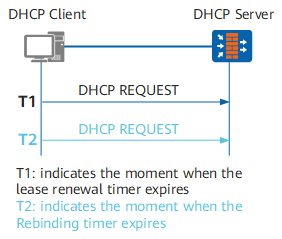
- When the lease reaches 50% (T1), the DHCP client unicasts a DHCP Request message to the DHCP server to request lease renewal. If the DHCP client receives a DHCP ACK message, the IP address lease is successfully renewed (counted from 0). If the DHCP client receives a DHCP NAK message, the DHCP client must send a DHCP Discover message to apply for a new IP address.
- If no response is received from the DHCP server when the lease reaches 87.5% (T2), the DHCP client broadcasts a DHCP Request message to request lease renewal. If the DHCP client receives a DHCP ACK message, the IP address lease is successfully renewed (counted from 0). If the DHCP client receives a DHCP NAK message, the DHCP client needs to send a DHCP Discover message to apply for a new IP address.
If no response is received when the lease expires, the DHCP client stops using the IP address and sends a DHCP Discover message to apply for a new IP address.

When a DHCP client no longer needs to use the allocated IP address and the lease has not expired, the DHCP client sends a DHCP Release message to the DHCP server to request IP address release. The DHCP server saves the configuration of this DHCP client and records the IP address in the allocated IP address list. The IP address can then be allocated to this DHCP client or other clients.
To request a configuration update, a DHCP client can send a DHCP Inform message to the DHCP server.
IP Address Lease Renewal with DHCP Relay Agents
Figure 2 shows how a DHCP client renews its IP address lease with a DHCP relay agent deployed.
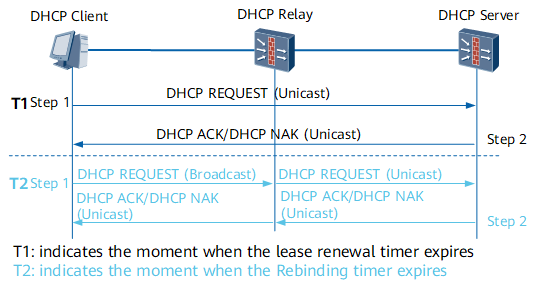
- When the Lease renewal timer of a DHCP client expires, the DHCP client can prolong the lease by performing the following steps and messages do not need to pass through the DHCP relay agent:
- The DHCP client unicasts a DHCP Request message to the DHCP server that has assigned an IP address to it.
- The DHCP server directly unicasts a DHCP ACK or DHCP NAK message to the DHCP client. If the DHCP client receives a DHCP ACK message, the IP address lease is successfully renewed. If the DHCP client receives a DHCP NAK message, the DHCP client needs to apply for a new IP address.
- If no response is received when the Rebinding timer of the DHCP client expires, the DHCP client can prolong the lease by performing the following steps and messages need to pass through the DHCP relay agent:
- The DHCP client broadcasts a DHCP Request message. The DHCP relay agent processes the messages and then forwards it to the DHCP server in unicast mode.
- The DHCP server sends a DHCP ACK or DHCP NAK message to the DHCP client through the DHCP relay agent. After the DHCP relay agent receives the message, it processes and forwards it to the DHCP client. If the DHCP client receives a DHCP ACK message, the IP address lease is successfully renewed. If the DHCP client receives a DHCP NAK message, the DHCP client needs to send a DHCP Discover message to apply for a new IP address.
If no response is received when the lease expires, the DHCP client stops using the IP address and sends a DHCP Discover message to apply for a new IP address.