DDNS Client-Server Exchange
DDNS can dynamically update the mapping on a DNS server, which ensures that the resolved IP address is correct.
DDNS Overview
DNS resolves domain names into IP addresses so that you can access network nodes using domain names. DNS provides static mappings between domain names and IP addresses. When IP addresses of nodes change, DNS cannot dynamically update mappings. If a user uses the original domain name to access the node, the user will fail to access the node because the IP address mapping the domain name is incorrect. The Dynamic Domain Name System (DDNS) updates mappings between domain names and the IP addresses on the DNS server to ensure that the IP address can be resolved correctly.
DDNS Working Mode
- DDNS update mode (defined by the RFC2136): The device functioning as a DDNS client dynamically updates the mapping between domain names and IP addresses on the DNS server.
- Update mode implemented through the DDNS server: The device functioning as a DDNS client sends the mapping between domain names and IP addresses to the DDNS server with a specified URL. The DDNS server then informs the DNS server to dynamically update the mapping between domain names and IP addresses.

- Deploying the DDNS service needs the support from the DDNS service providers, namely DDNS servers.
- The DDNS Server is usually deployed in the Internet, so you need to guarantee that the FW functioning as the DDNS client can access to the Internet normally when applying the DDNS service.
Implementation of Updating Through the DDNS Server
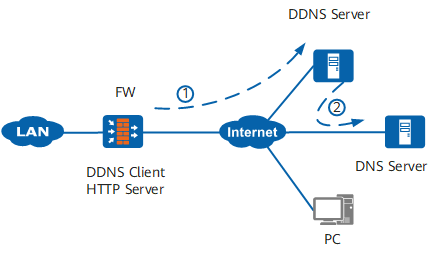
DDNS client: updates the mapping between the domain name and IP address when an IP address changes.
To make users can access to the FW by domain name when the IP address of the FW changes, configure the FW to function as a DDNS client and sends a request for updating the mapping between the domain name and the IP address to the DDNS server.
DDNS server: is responsible to instruct the DNS server to dynamically update the mapping between the domain name and the IP address on the DNS server.
After receiving the DDNS update request, the DDNS server instructs the DNS server to reestablish the mapping between the domain name and the IP address on the DNS server to ensure that Internet users can access the DDNS client using the same domain name when the IP address changes.