CLI:Example for Configuring the Device as a DNS Client
Networking Requirements
As shown in Figure 1, the FW functioning as a gateway on an intranet to the Internet. The interface IP addresses, a security zone, a security policy, and a NAT policy are configured on the FW. The DNS function needs to be configured on the FW. Upon receipt, the DNS server translates the domain names into IP addresses to allow the FW to access the Internet. The IP address of a DNS server on the Internet is 2.2.2.2.
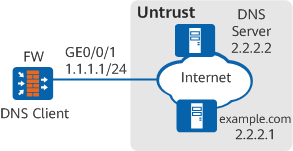
Configuration Roadmap
- Configure the FW to function as a DNS Client to realize dynamic domain resolution and communicate with the specific DNS server.
- Configure the domain name suffix on the FW to support a domain name suffix list.
Procedure
- Configure IP addresses for interfaces and assign them to security zones.
# Configure the IP address for GigabitEthernet 0/0/1 and assign it to the Untrust zone.
[FW] interface GigabitEthernet 0/0/1
[FW-GigabitEthernet0/0/1] ip address 1.1.1.1 24
[FW-GigabitEthernet0/0/1] quit
[FW] firewall zone untrust
[FW-zone-untrust] add interface GigabitEthernet 0/0/1
[FW-zone-untrust] quit
- Configure the function of dynamic domain resolution on the FW.
# Enable the function of dynamic domain resolution.
[FW] dns resolve# Specify the DNS server.
[FW] dns server 2.2.2.2# Configure the DNS domain suffix.
[FW] dns domain net
[FW] dns domain com
Configuration Verification
Run the command display dns server on the FW to check the configuration information of the DNS server.
[FW] display dns server
Type:
D:Dynamic     S:Static

IPv4 DNS server :
NO. Type Status IP Address
0   S    -      2.2.2.2
Run the command display dns dynamic-host on the FW to check the information of dynamic DNS entries in the cache of domain names.
[FW] display dns dynamic-host
 mng-plane:
Host                                     TTL        Type   Address
example.com                              114        IP     2.2.2.1

Total  :  1

 ctrl-plane:
Host                                     TTL        Type   Address

Total  :  0