CLI:Configuring the Device as a DDNS Client (Using the Update Mode Implemented Through the DDNS Server)
Networking Requirements
As shown in Figure 1, the Web Server is deployed at the border of the enterprise intranet. The FW functions as the gateway to connect the intranet to the Internet. The Internet users can access to the intranet Web server through the function of NAT server of the FW. The domain name of the Web Server is www.example.com, which is mapped to the IP address of the interface of the FW. However, the interface of the FW that connects to the Internet obtain the public address through dialer-up, which can result in frequent changes of the IP address.
Configure the FW as a DDNS Client using the update mode of http or vendor-specific, which is implemented through the DDNS server. In this way, when the IP address of the FW changes, it send the request of updating domain to the DDNS server. The DDNS server notifies the DNS server to update the mapping between the interface IP address of the FW and the domain name of the internal Web server. The Internet user can access to the Web server in the enterprise intranet normally.
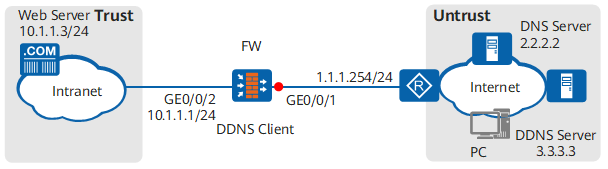
Configuration Roadmap
- Configure the FW to function as a DDNS client that uses the vendor-specific update mode. The DDNS client communicates with the TCP-based DDNS server of the www.oray.cn type to update the internal Web server's domain name and mapping with the FW interface IP address.
- Set the gateway address of the internal Web server to 10.1.1.1. This example describes only the FW configuration process. The Web server configuration process is not mentioned here.
Procedure
- Configure the IP address of the interface and assign it to the security zone.
<sysname> system-view
[sysname] sysname FW
[FW] interface GigabitEthernet 0/0/2
[FW-GigabitEthernet0/0/2] ip address 10.1.1.1 24
[FW-GigabitEthernet0/0/2] quit
[FW] firewall zone trust
[FW-zone-trust] add interface GigabitEthernet 0/0/2
[FW-zone-trust] quit
- Configure a security policy to allow users of external networks to access the internal Web server.
[FW] security-policy
[FW-policy-security] rule name policy1
[FW-policy-security-rule-policy1] source-zone untrust
[FW-policy-security-rule-policy1] destination-zone trust
[FW-policy-security-rule-policy1] destination-address 10.1.1.3 24
[FW-policy-security-rule-policy1] action permit
[FW-policy-security-rule-policy1] quit
[FW-policy-security] quit
- Configure a static mapping based on interface to map the public IP address of GigabitEthernet 0/0/1 to the private IP address of the Web server 10.1.1.3, with the public port of 80 and the private port of 8080.
[FW] nat server policy_web protocol tcp global interface GigabitEthernet 0/0/1 80 inside 10.1.1.3 8080
- Configure a DDNS policy.
# Create a DDNS policy.
[FW] ddns policy mypolicy
[FW-ddns-policy-mypolicy] method vendor-specific
[FW-ddns-policy-mypolicy] url oray://<username>:<password>@phddnsdev.oray.net username huawei password huawei123
[FW-ddns-policy-mypolicy] interval 300
[FW-ddns-policy-mypolicy] quit

By default, the update mode of the DDNS client is vendor-specific. If the default update mode is not modified by running the method command, do not run the method vendor-specific command.
# Enable the function of DNS and specify the DNS server.
[FW] dns resolve
[FW] dns server 2.2.2.2
# Apply the DDNS policy to GigabitEthernet 0/0/1.
[FW] interface GigabitEthernet 0/0/1
[FW-GigabitEthernet0/0/1] ddns apply policy mypolicy fqdn www.example.com
[FW-GigabitEthernet0/0/1] quit
After the configuration is completed, when the IP address of GigabitEthernet 0/0/1 changes, theFW notifies the DNS server to update the mapping between the domain name www.example.com and the new IP address. In this way, users on the Internet can access the new IP address by the domain name www.example.com.
- Configure the default route on the FW to the DNS server. Assume the IP address of the peer of the FW is 1.1.1.254/24.
[FW] ip route-static 0.0.0.0 0.0.0.0 1.1.1.254
Configuration Verification
Run the command display ddns policy mypolicy on the FW to display the information of the DDNS policy named mypolicy.
[FW] display ddns policy mypolicy
 Policy name          : mypolicy
 Server               : oray://<username>:<password>@phddnsdev.oray.net
 User name            : huawei
 Password             : ******
 Update method        : vendor-specific
 Update interval      : 300 seconds
 Apply interface      : GigabitEthernet0/0/1
# Run the command display ddns interface GigabitEthernet 0/0/1 on the FW, you can check the information of GigabitEthernet 0/0/1 related to the DDNS policy. Presume that the public IP address obtained by GigabitEthernet 0/0/1 is 1.1.10.10.
[FW] display ddns interface GigabitEthernet 0/0/1
 Policies applied on interface GigabitEthernet0/0/1 :
 ------------------------------------------------------------------------------
 Policy name          : mypolicy
 Server               : oray://<username>:<password>@phddnsdev.oray.net
 User name            : huawei
 Password             : ******
 Update method        : vendor-specific
 Update interval      : 300 seconds
 Current status       : INIT
 Client IP            : 1.1.10.10
 Client IP            : 10.136.6.232
 Server IP            : 3.3.3.3
 Last upate time      : 2015-10-28 11:34:51
 Last upate result    : success
Configuration Script
The configuration script of FW.
#
 dns resolve
 dns server 2.2.2.2
#
ddns policy mypolicy
 interval 300
 url oray://<username>:<password>@phddnsdev.oray.net username huawei password %^%#%5uGFAHQH.,;`n(xY1)Ca[KuAMlW.*5k|/HF5IzE%^%#
#
interface GigabitEthernet0/0/1
 ddns apply policy mypolicy fqdn www.example.com
#
firewall zone trust
 add interface GigabitEthernet0/0/2
#
firewall zone untrust
 add interface GigabitEthernet0/0/1
#
 ip route-static 0.0.0.0 0.0.0.0 1.1.1.254
#
 nat server policy_web 0 protocol tcp global interface GigabitEthernet0/0/1 www inside 10.1.1.3 8080
#
security-policy
 rule name policy1
  source-zone unrust
  destination-zone trust
  destination-address 10.1.1.3 24
  action permit
#
return