CLI: Example for Establishing an IPSec Tunnel Between the Enterprise Headquarters and Branch Through PPPoE
Networking Requirements
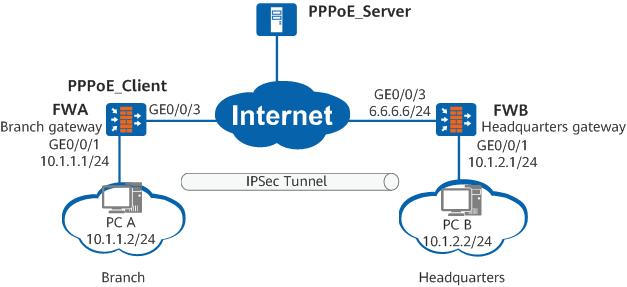
As shown in Figure 1, FWA (branch gateway) and FWB (headquarters gateway) communicate through the Internet. The branch gateway connects to the Internet using PPPoE, and obtains an IP address from the PPPoE server.
The enterprise wants to protect data flows between the branch and the headquarters. An IPSec tunnel can be set up between the branch gateway and headquarters gateway because they communicate over the Internet. The branch gateway functions as the PPPoE client to obtain an IP address, so the headquarters gateway cannot obtain the branch gateway's IP address and can only respond to IPSec negotiation requests initiated by the branch gateway.

If both the branch gateway and headquarters gateway connect to the public network through PPPoE, the remote-address host-name host-name command must be run on them to specify the domain name for IPSec negotiation. Otherwise, the IPSec tunnel cannot be established.
Configuration Roadmap
The configuration roadmap is as follows:
- Configure the PPPoE client on FWA so that FWA can obtain an IP address from the PPPoE server.
Configure the IKE negotiation mode in which an IPSec tunnel is set up. FWB functions as the responder to receive IPSec negotiation requests initiated by FWA.
Procedure
- Configure FWA
- Configure interzone security policies.
# Configure the security policies between the Trust and Untrust zones.
[FWA] security-policy
[FWA-policy-security] rule name policy1
[FWA-policy-security-rule-policy1] source-zone trust
[FWA-policy-security-rule-policy1] destination-zone untrust
[FWA-policy-security-rule-policy1] source-address 10.1.1.0 24
[FWA-policy-security-rule-policy1] destination-address 10.1.2.0 24
[FWA-policy-security-rule-policy1] action permit
[FWA-policy-security-rule-policy1] quit
[FWA-policy-security] rule name policy2
[FWA-policy-security-rule-policy2] source-zone untrust
[FWA-policy-security-rule-policy2] destination-zone trust
[FWA-policy-security-rule-policy2] source-address 10.1.2.0 24
[FWA-policy-security-rule-policy2] destination-address 10.1.1.0 24
[FWA-policy-security-rule-policy2] action permit
[FWA-policy-security-rule-policy2] quit
# Configure the security policies between the Local and Untrust zones.
The Local-Untrust interzone policy controls whether IKE negotiation packets can pass through the FW. This policy can use the source and destination addresses, protocol, or port as the matching condition. In this example, the source and destination addresses are used as the matching condition. To use the protocol or port as the matching condition, you need to enable ESP and port 500 for UDP (port 4500 also in NAT traversal scenarios).
Configure the security policies between the Local and Untrust zones to permit the interzone traffic for the negotiation between the tunnel endpoints.
[FWA-policy-security] rule name policy3
[FWA-policy-security-rule-policy3] source-zone local
[FWA-policy-security-rule-policy3] destination-zone untrust
[FWA-policy-security-rule-policy3] destination-address 6.6.6.6 24
[FWA-policy-security-rule-policy3] action permit
[FWA-policy-security-rule-policy3] quit
[FWA-policy-security] rule name policy4
[FWA-policy-security-rule-policy4] source-zone untrust
[FWA-policy-security-rule-policy4] destination-zone local
[FWA-policy-security-rule-policy4] source-address 6.6.6.6 24
[FWA-policy-security-rule-policy4] action permit
[FWA-policy-security-rule-policy4] quit
[FWA-policy-security] quit
- Configure interzone security policies.
- Configure FWB
- Configure interzone security policies.
# Configure the security policies between the Trust and Untrust zones.
[FWB] security-policy
[FWB-policy-security] rule name policy1
[FWB-policy-security-rule-policy1] source-zone trust
[FWB-policy-security-rule-policy1] destination-zone untrust
[FWB-policy-security-rule-policy1] source-address 10.1.2.0 24
[FWB-policy-security-rule-policy1] destination-address 10.1.1.0 24
[FWB-policy-security-rule-policy1] action permit
[FWB-policy-security-rule-policy1] quit
[FWB-policy-security] rule name policy2
[FWB-policy-security-rule-policy2] source-zone untrust
[FWB-policy-security-rule-policy2] destination-zone trust
[FWB-policy-security-rule-policy2] source-address 10.1.1.0 24
[FWB-policy-security-rule-policy2] destination-address 10.1.2.0 24
[FWB-policy-security-rule-policy2] action permit
[FWB-policy-security-rule-policy2] quit
# Configure the security policies between the Local and Untrust zones.
The Local-Untrust interzone policy controls whether IKE negotiation packets can pass through the FW. This policy can use the source and destination addresses, protocol, or port as the matching condition. In this example, the source and destination addresses are used as the matching condition. To use the protocol or port as the matching condition, you need to enable ESP and port 500 for UDP (port 4500 also in NAT traversal scenarios).
Configure the security policies between the Local and Untrust zones to permit the interzone traffic for the negotiation between the tunnel endpoints.
[FWB-policy-security] rule name policy3
[FWB-policy-security-rule-policy3] source-zone local
[FWB-policy-security-rule-policy3] destination-zone untrust
[FWB-policy-security-rule-policy3] source-address 6.6.6.6 24
[FWB-policy-security-rule-policy3] action permit
[FWB-policy-security-rule-policy3] quit
[FWB-policy-security] rule name policy4
[FWB-policy-security-rule-policy4] source-zone untrust
[FWB-policy-security-rule-policy4] destination-zone local
[FWB-policy-security-rule-policy4] destination-address 6.6.6.6 24
[FWB-policy-security-rule-policy4] action permit
[FWB-policy-security-rule-policy4] quit
[FWB-policy-security] quit
- Configure interzone security policies.
- Verify the configuration.
# After the configurations are complete, PC A can ping PC B successfully. Data exchanged between PC A and PC B is encrypted. You can run the display ipsec statistics command to view packet statistics.
# Run the display ike sa command on FWA. The following information is displayed:
[FWA] display ike sa
IKE SA information :
    Conn-ID     Peer            VPN   Flag(s)  Phase  RemoteType  RemoteID
  -----------------------------------------------------------------------------
    246        6.6.6.6:500           RD|ST     v1:2   IP          6.6.6.6
    245        6.6.6.6:500           RD|ST     v1:1   IP          6.6.6.6

  Number of IKE SA : 2
  -------------------------------------------------------------------------------

  Flag Description:
  RD--READY   ST--STAYALIVE   RL--REPLACED   FD--FADING   TO--TIMEOUT
  HRT--HEARTBEAT   LKG--LAST KNOWN GOOD SEQ NO.   BCK--BACKED UP
  M--ACTIVE   S--STANDBY   A--ALONE  NEG--NEGOTIATING
Configuration Files
Configuration file of FWA
#
 sysname FWA
#
 dialer-rule 1 ip permit
#
acl number 3003
 rule 5 permit ip destination 10.1.2.0 0.0.0.255
#
ipsec proposal prop1
 esp authentication-algorithm sha2-256
 esp encryption-algorithm aes-128
#
ike proposal 5
 encryption-algorithm aes-128
 dh group14
 authentication-algorithm sha2-256
 authentication-method pre-share
 integrity-algorithm hmac-sha2-256
 prf hmac-sha2-256
#
ike peer rut1
 undo version 2
 pre-shared-key cipher %^%#)@]Y-q'8>AJek}H&Xn[D5mXSPoPlP8jF+H@z>./@%^%#
 ike-proposal 5
 remote-address 6.6.6.6
#
ipsec policy policy1 10 isakmp
 security acl 3003
 ike-peer rut1
 proposal prop1
#
interface Dialer1
 link-protocol ppp
 ppp chap user user@huawei.com
 ppp chap password cipher %@%@^_PfANXK0(,Jr-(3p]"R,eOL%@%@
 ip address ppp-negotiate
 dialer user huawei
 dialer bundle 1
 dialer-group 1
 ipsec policy policy1
#
interface GigabitEthernet0/0/3
 pppoe-client dial-bundle-number 1
#
interface GigabitEthernet0/0/1
 ip address 10.1.1.1 255.255.255.0
#
firewall zone trust
 set priority 85
 add interface GigabitEthernet0/0/1
#
firewall zone untrust
 set priority 5
 add interface Dialer1
 add interface GigabitEthernet0/0/3
#
ip route-static 6.6.6.0 255.255.255.0 dialer1
ip route-static 10.1.2.0 255.255.255.0 Dialer1
#
security-policy
 rule name policy1
  source-zone trust
  destination-zone untrust
  source-address 10.1.1.0 mask 255.255.255.0
  destination-address 10.1.2.0 mask 255.255.255.0
  action permit
 rule name policy2
  source-zone untrust
  destination-zone trust
  source-address 10.1.2.0 mask 255.255.255.0
  destination-address 10.1.1.0 mask 255.255.255.0
  action permit
 rule name policy3
  source-zone local
  destination-zone untrust
  destination-address 6.6.6.0 mask 255.255.255.0
  action permit
 rule name policy4
  source-zone untrust
  destination-zone local
  source-address 6.6.6.0 mask 255.255.255.0
  action permit
#
return
Configuration file of FWB
#
 sysname FWB
#
ipsec proposal prop1
 esp authentication-algorithm sha2-256
 esp encryption-algorithm aes-128
#
ike proposal 5
 encryption-algorithm aes-128
 dh group14
 authentication-algorithm sha2-256
 authentication-method pre-share
 integrity-algorithm hmac-sha2-256
 prf hmac-sha2-256
#
ike peer rut1
 undo version 2
 pre-shared-key  %^%#)@]Y-q'8>AJek}H&Xn[D5mXSPoPlP8jF+H@z>./@%^%#
 ike-proposal 5
#
ipsec policy-template temp1
 ike-peer rut1
 proposal prop1
#
ipsec policy policy1 10 isakmp template temp1
#
interface GigabitEthernet0/0/3
 ip address 6.6.6.6 255.255.255.0
 ipsec policy policy1
#
interface GigabitEthernet0/0/1 ip address 10.1.2.1 255.255.255.0
#
firewall zone trust
 set priority 85
 add interface GigabitEthernet0/0/1
#
firewall zone untrust
 set priority 5
 add interface GigabitEthernet0/0/3
#
ip route-static 0.0.0.0 0.0.0.0 6.6.6.254
#
security-policy
 rule name policy1
  source-zone trust
  destination-zone untrust
  source-address 10.1.2.0 mask 255.255.255.0
  destination-address 10.1.1.0 mask 255.255.255.0
  action permit
 rule name policy2
  source-zone untrust
  destination-zone trust
  source-address 10.1.1.0 mask 255.255.255.0
  destination-address 10.1.2.0 mask 255.255.255.0
  action permit
 rule name policy3
  source-zone local
  destination-zone untrust
  source-address 6.6.6.0 mask 255.255.255.0
  action permit
 rule name policy4
  source-zone untrust
  destination-zone local
  destination-address 6.6.6.0 mask 255.255.255.0
  action permit
#
return