CLI: Example for Configuring IPSec Tunnels Between the Headquarters and Different Branches Through Certificate Authentication and PSK Authentication
Networking Requirements
A large enterprise has the headquarters and multiple branches. For security purposes, the headquarters and branches establish IPSec tunnels to secure communication between them. Some branches want to use pre-shared key authentication to establish IPSec tunnels with the headquarters, while some branches want to use certificate authentication.
In Figure 1, FW_B in one branch uses pre-shared key authentication to establish an IPSec tunnel with FW_A at the headquarters, and FW_C in another branch uses certificate authentication to establish an IPSec tunnel with FW_A.
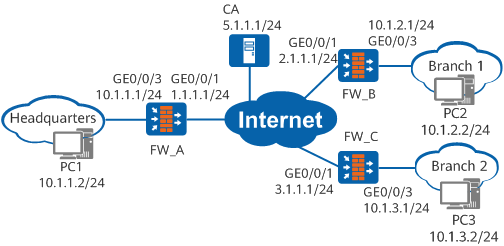
Configuration Roadmap
The configuration roadmap is as follows:
- Configure IP addresses for interfaces and add the interfaces to security zones.
- Configure security policies to allow devices on specified network segments of private networks to exchange packets.
- Configure static routes to ensure reachable routes between networks.
- Configure PKI on FW_A and FW_C to apply for local and CA certificates using SCFP.
- Configure IPSec policies on FW_A and FW_C for certificate authentication, and configure IPSec policies on FW_A and FW_B for pre-shared key authentication.
Data Preparation
Obtain the fingerprint information of a CA certificate from a CA server. This example uses Windows Server 2008 as the CA server. Assume that the CA server uses a challenge password to process the certificate application and the challenge password is 6AE73F21E6D3571D. The challenge password and fingerprint can be obtained at this URL: http://5.1.1.1:8080/certsrv/mscep_admin. It is assumed that the fingerprint information of the CA certificate is 6330974fb2fe3c52d16bdac40140918b4bcd3ec7 in SHA1 mode and the URL at which the certificate is obtained is http://5.1.1.1:8080/certsrv/mscep/mscep.dll.
Procedure
- Configure FW_A.
- Configure inter-zone security policies.
# Configure inter-zone security policies between the trust zone and untrust zone.
[FW_A] security-policy
[FW_A-policy-security] rule name policy1
[FW_A-policy-security-rule-policy1] source-zone trust
[FW_A-policy-security-rule-policy1] destination-zone untrust
[FW_A-policy-security-rule-policy1] source-address 10.1.1.0 24
[FW_A-policy-security-rule-policy1] destination-address 10.1.0.0 16
[FW_A-policy-security-rule-policy1] action permit
[FW_A-policy-security-rule-policy1] quit
[FW_A-policy-security] rule name policy2
[FW_A-policy-security-rule-policy2] source-zone untrust
[FW_A-policy-security-rule-policy2] destination-zone trust
[FW_A-policy-security-rule-policy2] source-address 10.1.0.0 16
[FW_A-policy-security-rule-policy2] destination-address 10.1.1.0 24
[FW_A-policy-security-rule-policy2] action permit
[FW_A-policy-security-rule-policy2] quit
# Configure inter-zone security policies between the local zone and untrust zone.

The Local-Untrust interzone policy controls whether IKE negotiation packets can pass through the FW. This policy can use the source and destination addresses, protocol, or port as the matching condition. In this example, the source and destination addresses are used as the matching condition. To use the protocol or port as the matching condition, you need to enable ESP and port 500 for UDP (port 4500 also in NAT traversal scenarios).
[FW_A-policy-security] rule name policy3
[FW_A-policy-security-rule-policy3] source-zone local
[FW_A-policy-security-rule-policy3] destination-zone untrust
[FW_A-policy-security-rule-policy3] source-address 1.1.1.1 32
[FW_A-policy-security-rule-policy3] destination-address 2.1.1.1 32
[FW_A-policy-security-rule-policy3] destination-address 3.1.1.1 32
[FW_A-policy-security-rule-policy3] action permit
[FW_A-policy-security-rule-policy3] quit
[FW_A-policy-security] rule name policy4
[FW_A-policy-security-rule-policy4] source-zone untrust
[FW_A-policy-security-rule-policy4] destination-zone local
[FW_A-policy-security-rule-policy4] source-address 2.1.1.1 32
[FW_A-policy-security-rule-policy4] source-address 3.1.1.1 32
[FW_A-policy-security-rule-policy4] destination-address 1.1.1.1 32
[FW_A-policy-security-rule-policy4] action permit
[FW_A-policy-security-rule-policy4] quit
[FW_A-policy-security] quit
- Configure an IPSec policy and apply it to an interface.
# Configure an IPSec proposal.
[FW_A] ipsec proposal tran1
[FW_A-ipsec-proposal-tran1] esp authentication-algorithm sha2-256
[FW_A-ipsec-proposal-tran1] esp encryption-algorithm aes-256
[FW_A-ipsec-proposal-tran1] quit
# Configure an IKE proposal.
[FW_A] ike proposal 10
[FW_A-ike-proposal-10] authentication-method rsa-signature
[FW_A-ike-proposal-10] encryption-algorithm aes-256
[FW_A-ike-proposal-10] dh group14
[FW_A-ike-proposal-10] quit
[FW_A] ike proposal 11
[FW_A-ike-proposal-11] authentication-method pre-share
[FW_A-ike-proposal-11] encryption-algorithm aes-256
[FW_A-ike-proposal-11] dh group14
[FW_A-ike-proposal-11] quit
# Configure an IKE peer.
The parameter adaptive mode cannot be configured on an IKE peer.
The headquarters uses IPSec policies configured using an IPSec policy template. Therefore, only one IKE peer can be configured, and the IKE peer cannot reference any IKE proposal. Based on the IKE proposals of branches, the headquarters starts with the highest-priority IKE proposal and matches the peer in the order of priority until it finds a matching IKE proposal to use.
However, when IKEv2 is used, the IKE proposals sent by branches to the headquarters do not carry the authentication mode. If the algorithms in the IKE proposals of different branches are the same, the headquarters cannot identify the authentication modes used by the branches and match an incorrect IKE proposal. As a result, IKE negotiation fails on both ends. To prevent this problem, ensure that IKE proposals of different branches are different when IKEv2 is used.
[FW_A] ike peer b
[FW_A-ike-peer-b] undo version 2
[FW_A-ike-peer-b] pre-shared-key Huawei@123
[FW_A-ike-peer-b] pki realm abc
[FW_A-ike-peer-b] quit
# Configure an IPSec policy.
[FW_A] ipsec policy-template use1 10
[FW_A-ipsec-policy-templet-use1-10] proposal tran1
[FW_A-ipsec-policy-templet-use1-10] ike-peer b
[FW_A-ipsec-policy-templet-use1-10] quit
[FW_A] ipsec policy map1 10 isakmp template use1
# Apply the IPSec policy to an interface.
[FW_A] interface GigabitEthernet 0/0/1
[FW_A-GigabitEthernet0/0/1] ipsec policy map1
[FW_A-GigabitEthernet0/0/1] quit
- Configure inter-zone security policies.
- Configure FW_B.
- Configure inter-zone security policies.
# Configure inter-zone security policies between the trust zone and untrust zone.
[FW_B] security-policy
[FW_B-policy-security] rule name policy1
[FW_B-policy-security-rule-policy1] source-zone trust
[FW_B-policy-security-rule-policy1] destination-zone untrust
[FW_B-policy-security-rule-policy1] source-address 10.1.2.0 24
[FW_B-policy-security-rule-policy1] destination-address 10.1.1.0 24
[FW_B-policy-security-rule-policy1] action permit
[FW_B-policy-security-rule-policy1] quit
[FW_B-policy-security] rule name policy2
[FW_B-policy-security-rule-policy2] source-zone untrust
[FW_B-policy-security-rule-policy2] destination-zone trust
[FW_B-policy-security-rule-policy2] source-address 10.1.1.0 24
[FW_B-policy-security-rule-policy2] destination-address 10.1.2.0 24
[FW_B-policy-security-rule-policy2] action permit
[FW_B-policy-security-rule-policy2] quit
# Configure inter-zone security policies between the local zone and untrust zone.
The Local-Untrust interzone policy controls whether IKE negotiation packets can pass through the FW. This policy can use the source and destination addresses, protocol, or port as the matching condition. In this example, the source and destination addresses are used as the matching condition. To use the protocol or port as the matching condition, you need to enable ESP and port 500 for UDP (port 4500 also in NAT traversal scenarios).
[FW_B-policy-security] rule name policy3
[FW_B-policy-security-rule-policy3] source-zone local
[FW_B-policy-security-rule-policy3] destination-zone untrust
[FW_B-policy-security-rule-policy3] source-address 2.1.1.1 32
[FW_B-policy-security-rule-policy3] destination-address 1.1.1.1 32
[FW_B-policy-security-rule-policy3] action permit
[FW_B-policy-security-rule-policy3] quit
[FW_B-policy-security] rule name policy4
[FW_B-policy-security-rule-policy4] source-zone untrust
[FW_B-policy-security-rule-policy4] destination-zone local
[FW_B-policy-security-rule-policy4] source-address 1.1.1.1 32
[FW_B-policy-security-rule-policy4] destination-address 2.1.1.1 32
[FW_B-policy-security-rule-policy4] action permit
[FW_B-policy-security-rule-policy4] quit
[FW_B-policy-security] quit
- Configure inter-zone security policies.
- Configure FW_C.
- Configure inter-zone security policies.
# Configure inter-zone security policies between the trust zone and untrust zone.
[FW_C] security-policy
[FW_C-policy-security] rule name policy1
[FW_C-policy-security-rule-policy1] source-zone trust
[FW_C-policy-security-rule-policy1] destination-zone untrust
[FW_C-policy-security-rule-policy1] source-address 10.1.3.0 24
[FW_C-policy-security-rule-policy1] destination-address 10.1.1.0 24
[FW_C-policy-security-rule-policy1] action permit
[FW_C-policy-security-rule-policy1] quit
[FW_C-policy-security] rule name policy2
[FW_C-policy-security-rule-policy2] source-zone untrust
[FW_C-policy-security-rule-policy2] destination-zone trust
[FW_C-policy-security-rule-policy2] source-address 10.1.1.0 24
[FW_C-policy-security-rule-policy2] destination-address 10.1.3.0 24
[FW_C-policy-security-rule-policy2] action permit
[FW_C-policy-security-rule-policy2] quit
# Configure inter-zone security policies between the local zone and untrust zone.
The Local-Untrust interzone policy controls whether IKE negotiation packets can pass through the FW. This policy can use the source and destination addresses, protocol, or port as the matching condition. In this example, the source and destination addresses are used as the matching condition. To use the protocol or port as the matching condition, you need to enable ESP and port 500 for UDP (port 4500 also in NAT traversal scenarios).
[FW_C-policy-security] rule name policy3
[FW_C-policy-security-rule-policy3] source-zone local
[FW_C-policy-security-rule-policy3] destination-zone untrust
[FW_C-policy-security-rule-policy3] source-address 3.1.1.1 32
[FW_C-policy-security-rule-policy3] destination-address 1.1.1.1 32
[FW_C-policy-security-rule-policy3] action permit
[FW_C-policy-security-rule-policy3] quit
[FW_C-policy-security] rule name policy4
[FW_C-policy-security-rule-policy4] source-zone untrust
[FW_C-policy-security-rule-policy4] destination-zone local
[FW_C-policy-security-rule-policy4] source-address 1.1.1.1 32
[FW_C-policy-security-rule-policy4] destination-address 3.1.1.1 32
[FW_C-policy-security-rule-policy4] action permit
[FW_C-policy-security-rule-policy4] quit
[FW_C-policy-security] quit
- Configure inter-zone security policies.
Verification
After the preceding configurations are complete, PC2 and PC3 can ping PC1 successfully.
Run the display ike sa command on FW_A, finding that an IKE SA and an IPSec SA have been set up with the branches.
<FW_A> display ike sa
IE SA information :
    Conn-ID     Peer            VPN   Flag(s)  Phase  RemoteType  RemoteID
  -----------------------------------------------------------------------------
    16777223    2.1.1.1:500           RD|A     v1:2   IP          2.1.1.1
    16777221    2.1.1.1:500           RD|A     v1:1   IP          2.1.1.1
    16777239    3.1.1.1:500           RD|A     v1:2   IP          3.1.1.1
    16777232    3.1.1.1:500           RD|A     v1:1   IP          3.1.1.1

  Number of IKE SA : 2
  -------------------------------------------------------------------------------

  Flag Description:
  RD--READY   ST--STAYALIVE   RL--REPLACED   FD--FADING   TO--TIMEOUT
  HRT--HEARTBEAT   LKG--LAST KNOWN GOOD SEQ NO.   BCK--BACKED UP
  M--ACTIVE   S--STANDBY   A--ALONE  NEG--NEGOTIATING
Configuration Files
FW_A configuration file
#
 sysname FW_A
#
pki entity user01
 country CN
 state beijing
 organization huawei
 organization-unit dev
 common-name CN-Cer-FWA
 ip-address 1.1.1.1
#
ipsec proposal tran1
 esp authentication-algorithm sha2-256
 esp encryption-algorithm aes-256
#
ike proposal 10
 encryption-algorithm aes-256
 dh group14
 authentication-algorithm sha2-256
 authentication-method rsa-signature
ike proposal 11
 encryption-algorithm aes-256
 dh group14
 authentication-algorithm sha2-256
 authentication-method pre-share
#
ike peer b
 undo version 2
 pre-shared-key %^%#5)V/1<<'H)e.h%DJ^:s=zcmlE8fGu4;^lS3Rr|U(%^%#
 pki realm abc
#
ipsec policy-template use1 10
 ike-peer b
 proposal tran1
#
ipsec policy map1 10 isakmp template use1
#
interface GigabitEthernet0/0/1
 undo shutdown
 ip address 1.1.1.1 255.255.255.0
 ipsec policy map1
#
interface GigabitEthernet0/0/3
 undo shutdown
 ip address 10.1.1.1 255.255.255.0
#
firewall zone trust
 set priority 85
 add interface GigabitEthernet0/0/3
#
firewall zone untrust
 set priority 5
 add interface GigabitEthernet0/0/1
#
ip route-static 0.0.0.0 0.0.0.0 1.1.1.2
#
pki realm abc
 ca id ca_root
 enrollment-url http://5.1.1.1:8080/certsrv/mscep/mscep.dll ra
 entity user01
 fingerprint sha1 6330974fb2fe3c52d16bdac40140918b4bcd3ec7
 rsa local-key-pair rsa_scep
 password cipher %^%#D=}""x(9%D~E<v0tx4S'WBY!#o9D[,"mnO*s<0xR%^%#
 auto-enroll 60 regenerate
#
security-policy
  rule name policy1
    source-zone trust
    destination-zone untrust
    source-address 10.1.1.0 mask 255.255.255.0
    destination-address 10.1.0.0 mask 255.255.0.0
    action permit
  rule name policy2
    source-zone untrust
    destination-zone trust
    source-address 10.1.0.0 mask 255.255.0.0
    destination-address 10.1.1.0 mask 255.255.255.0
    action permit
  rule name policy3
    source-zone local
    destination-zone untrust
    source-address 1.1.1.1 mask 255.255.255.255
    destination-address 2.1.1.1 mask 255.255.255.255
    destination-address 3.1.1.1 mask 255.255.255.255
    action permit
  rule name policy4
    source-zone untrust
    destination-zone local
    source-address 2.1.1.1 mask 255.255.255.255
    source-address 3.1.1.1 mask 255.255.255.255
    destination-address 1.1.1.1 mask 255.255.255.255
    action permit
#
return
FW_B configuration file
#
 sysname FW_B
#
acl number 3000
 rule 5 permit ip source 10.1.2.0 0.0.0.255 destination 10.1.1.0 0.0.0.255
#
ipsec proposal tran1
 esp authentication-algorithm sha2-256
 esp encryption-algorithm aes-256
#
ike proposal 10
  encryption-algorithm aes-256
  dh group14
  authentication-algorithm sha2-256
  authentication-method pre-share
#
ike peer a
 undo version 2
 ike-proposal 10
 pre-shared-key %^%#5)V/1<<'H)e.h%DJ^:s=zcmlE8fGu4;^lS3Rr|U(%^%#
 remote-address 1.1.1.1
#
ipsec policy map1 10 isakmp
 security acl 3000
 ike-peer a
 proposal tran1
#
interface GigabitEthernet0/0/1
 undo shutdown
 ip address 2.1.1.1 255.255.255.0
 ipsec policy map1
#
interface GigabitEthernet0/0/3
 undo shutdown
 ip address 10.1.2.1 255.255.255.0
#
firewall zone trust
 set priority 85
 add interface GigabitEthernet0/0/3
#
firewall zone untrust
 set priority 5
 add interface GigabitEthernet0/0/1
#
ip route-static 0.0.0.0 0.0.0.0 2.1.1.2
#
security-policy
  rule name policy1
    source-zone trust
    destination-zone untrust
    source-address 10.1.2.0 mask 255.255.255.0
    destination-address 10.1.1.0 mask 255.255.255.0
    action permit
  rule name policy2
    source-zone untrust
    destination-zone trust
    source-address 10.1.1.0 mask 255.255.255.0
    destination-address 10.1.2.0 mask 255.255.255.0
    action permit
  rule name policy3
    source-zone local
    destination-zone untrust
    source-address 2.1.1.1 mask 255.255.255.255
    destination-address 1.1.1.1 mask 255.255.255.255
    action permit
  rule name policy4
    source-zone untrust
    destination-zone local
    source-address 1.1.1.1 mask 255.255.255.255
    destination-address 2.1.1.1 mask 255.255.255.255
    action permit
#
return
FW_C configuration file
#
 sysname FW_C
#
pki entity user02
 country CN
 state beijing
 organization huawei
 organization-unit dev
 common-name CN-Cer-FWC
 ip-address 3.1.1.1
#
acl number 3000
 rule 5 permit ip source 10.1.3.0 0.0.0.255 destination 10.1.1.0 0.0.0.255
#
ipsec proposal tran1
 esp authentication-algorithm sha2-256
 esp encryption-algorithm aes-256
#
ike proposal 10
  encryption-algorithm aes-256
  dh group14
  authentication-algorithm sha2-256
  authentication-method rsa-signature
#
ike peer a
 undo version 2
 ike-proposal 10
 remote-address 1.1.1.1
 pki realm b
#
ipsec policy map1 10 isakmp
 security acl 3000
 ike-peer a
 proposal tran1
#
interface GigabitEthernet0/0/1
 undo shutdown
 ip address 3.1.1.1 255.255.255.0
 ipsec policy map1
#
interface GigabitEthernet0/0/3
 undo shutdown
 ip address 10.1.3.1 255.255.255.0
#
firewall zone trust
 set priority 85
 add interface GigabitEthernet0/0/3
#
firewall zone untrust
 set priority 5
 add interface GigabitEthernet0/0/1
#
ip route-static 0.0.0.0 0.0.0.0 3.1.1.2
#
pki realm b
 ca id ca_root
 enrollment-url http://5.1.1.1:8080/certsrv/mscep/mscep.dll ra
 entity user02
 fingerprint sha1 6330974fb2fe3c52d16bdac40140918b4bcd3ec7
 rsa local-key-pair rsa_scep_b
 password cipher %^%#D=}""x(9%D~E<v0tx4S'WBY!#o9D[,"mnO*s<0xR%^%#
 auto-enroll 60 regenerate
 #
security-policy
  rule name policy1
    source-zone trust
    destination-zone untrust
    source-address 10.1.3.0 mask 255.255.255.0
    destination-address 10.1.1.0 mask 255.255.255.0
    action permit
  rule name policy2
    source-zone untrust
    destination-zone trust
    source-address 10.1.1.0 mask 255.255.255.0
    destination-address 10.1.3.0 mask 255.255.255.0
    action permit
  rule name policy3
    source-zone local
    destination-zone untrust
    source-address 3.1.1.1 mask 255.255.255.255
    destination-address 1.1.1.1 mask 255.255.255.255
    action permit
  rule name policy4
    source-zone untrust
    destination-zone local
    source-address 1.1.1.1 mask 255.255.255.255
    destination-address 3.1.1.1 mask 255.255.255.255
    action permit
#
return