< Home

CLI: Configuring IPSec Tunnels Between the Headquarters and Branches (One Tunnel Interface Corresponds to One Branch)

Networking Requirements

As shown in Figure 1, FW_B and FW_C are the gateways of enterprise branches, and FW_A is the gateway of the headquarters. The headquarters and branches communicate through the public network.

The enterprise requires IPSec protection for the traffic between the headquarters and branches. Multiple tunnel interfaces of the headquarters borrow the same physical interface IP address, and one tunnel interface corresponds to one branch.
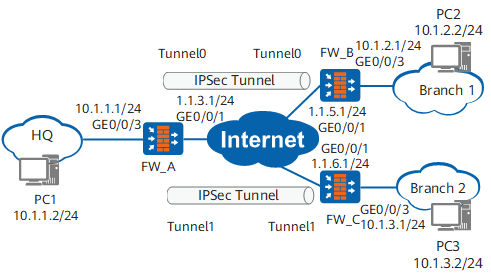
Figure 1 Networking diagram

Configuration Roadmap

  1. Configure basic settings, including interface IP addresses, route configurations, and security policies, to implement communication between interfaces.
  2. Configure security policies in ISAKMP mode, including the data flows to be protected and proposal parameters.

    Multiple tunnel interfaces of the headquarters borrow the same physical interface IP address to establish an IPSec tunnel with a branch. Therefore, the headquarters uses the peer IP address of the IKE peer to identify the tunnel interface connected to the branch. In this instance, multiple IKE peers need to be configured and multiple IPSec policies created at the headquarters. In addition, different IPSec policies are applied to the tunnel interfaces.

When multiple branches connect to the headquarters, multiple tunnel interfaces in the headquarters borrow the same physical interface IP address. In this scenario, the headquarters can identify the tunnel interface connected to a branch through the peer IP address or peer ID of the IKE peer (Only IKEv1 in aggressive mode supports the peer ID mode.).

Procedure

  1. Configure FW_A.
    1. Configure basic settings, including interface IP addresses, security zones to which the interfaces are added, inter-zone security policies, and static routes.

      1. Configure interface IP addresses.

        <sysname> system-view
        [sysname] sysname FW_A
        [FW_A] interface GigabitEthernet 0/0/3
        [FW_A-GigabitEthernet0/0/3] ip address 10.1.1.1 24
        [FW_A-GigabitEthernet0/0/3] quit
        [FW_A] interface GigabitEthernet 0/0/1
        [FW_A-GigabitEthernet0/0/1] ip address 1.1.3.1 24
        [FW_A-GigabitEthernet0/0/1] quit
        [FW_A] interface tunnel 0
        [FW_A-Tunnel0] tunnel-protocol ipsec
        [FW_A-Tunnel0] ip address unnumbered interface GigabitEthernet 0/0/1
        [FW_A-Tunnel0] quit
        [FW_A] interface tunnel 1
        [FW_A-Tunnel1] tunnel-protocol ipsec
        [FW_A-Tunnel1] ip address unnumbered interface GigabitEthernet 0/0/1
        [FW_A-Tunnel1] quit
      2. Assign interfaces to security zones.

        [FW_A] firewall zone trust
        [FW_A-zone-trust] add interface GigabitEthernet 0/0/3
        [FW_A-zone-trust] quit
        [FW_A] firewall zone untrust
        [FW_A-zone-untrust] add interface GigabitEthernet 0/0/1
        [FW_A-zone-untrust] add interface tunnel 0
        [FW_A-zone-untrust] add interface tunnel 1
        [FW_A-zone-untrust] quit
      3. Configure inter-zone security policies between the trust zone and untrust zone.

        [FW_A] security-policy
        [FW_A-policy-security] rule name policy1
        [FW_A-policy-security-rule-policy1] source-zone trust
        [FW_A-policy-security-rule-policy1] destination-zone untrust
        [FW_A-policy-security-rule-policy1] source-address 10.1.1.0 24
        [FW_A-policy-security-rule-policy1] destination-address 10.1.2.0 24
        [FW_A-policy-security-rule-policy1] destination-address 10.1.3.0 24
        [FW_A-policy-security-rule-policy1] action permit
        [FW_A-policy-security-rule-policy1] quit
        [FW_A-policy-security] rule name policy2
        [FW_A-policy-security-rule-policy2] source-zone untrust
        [FW_A-policy-security-rule-policy2] destination-zone trust
        [FW_A-policy-security-rule-policy2] source-address 10.1.2.0 24
        [FW_A-policy-security-rule-policy2] source-address 10.1.3.0 24
        [FW_A-policy-security-rule-policy2] destination-address 10.1.1.0 24
        [FW_A-policy-security-rule-policy2] action permit
        [FW_A-policy-security-rule-policy2] quit
      4. Configure inter-zone security policies between the local zone and untrust zone.

        [FW_A-policy-security] rule name policy3
        [FW_A-policy-security-rule-policy3] source-zone local
        [FW_A-policy-security-rule-policy3] destination-zone untrust
        [FW_A-policy-security-rule-policy3] source-address 1.1.3.1 32
        [FW_A-policy-security-rule-policy3] action permit
        [FW_A-policy-security-rule-policy3] quit
        [FW_A-policy-security] rule name policy4
        [FW_A-policy-security-rule-policy4] source-zone untrust
        [FW_A-policy-security-rule-policy4] destination-zone local
        [FW_A-policy-security-rule-policy4] destination-address 1.1.3.1 32
        [FW_A-policy-security-rule-policy4] action permit
        [FW_A-policy-security-rule-policy4] quit
        [FW_A-policy-security] quit
      5. Configure static routes to the branches. Assume that the next hop of the static routes is 1.1.3.2.

        [FW_A] ip route-static 0.0.0.0 0.0.0.0 1.1.3.2
        [FW_A] ip route-static 10.1.2.0 255.255.255.0 tunnel 0
        [FW_A] ip route-static 10.1.3.0 255.255.255.0 tunnel 1

    2. Configure IPSec policies.

      1. Define data flows to be protected.

        [FW_A] acl 3000
        [FW_A-acl-adv-3000] rule 5 permit ip source 10.1.1.0 0.0.0.255 destination 10.1.2.0 0.0.0.255
        [FW_A-acl-adv-3000] quit
        [FW_A] acl 3001
        [FW_A-acl-adv-3001] rule 10 permit ip source 10.1.1.0 0.0.0.255 destination 10.1.3.0 0.0.0.255
        [FW_A-acl-adv-3001] quit
      2. Configure an IPSec proposal.

        [FW_A] ipsec proposal tran1
        [FW_A-ipsec-proposal-tran1] esp authentication-algorithm sha2-256
        [FW_A-ipsec-proposal-tran1] esp encryption-algorithm aes-256
        [FW_A-ipsec-proposal-tran1] quit
      3. Configure an IKE proposal.

        [FW_A] ike proposal 10
        [FW_A-ike-proposal-10] authentication-method pre-share
        [FW_A-ike-proposal-10] prf hmac-sha2-256
        [FW_A-ike-proposal-10] encryption-algorithm aes-256
        [FW_A-ike-proposal-10] dh group14
        [FW_A-ike-proposal-10] integrity-algorithm hmac-sha2-256
        [FW_A-ike-proposal-10] quit
      4. Configure IKE peers.

        [FW_A] ike peer b
        [FW_A-ike-peer-b] ike-proposal 10
        [FW_A-ike-peer-b] remote-address 1.1.5.1
        [FW_A-ike-peer-b] pre-shared-key Test!123
        [FW_A-ike-peer-b] quit
        [FW_A] ike peer c
        [FW_A-ike-peer-c] ike-proposal 10
        [FW_A-ike-peer-c] remote-address 1.1.6.1
        [FW_A-ike-peer-c] pre-shared-key Test!123
        [FW_A-ike-peer-c] quit
      5. Create security policies.

        [FW_A] ipsec policy map1 10 isakmp
        [FW_A-ipsec-policy-isakmp-map1-10] proposal tran1
        [FW_A-ipsec-policy-isakmp-map1-10] ike-peer b
        [FW_A-ipsec-policy-isakmp-map1-10] security acl 3000
        [FW_A-ipsec-policy-isakmp-map1-10] quit
        [FW_A] ipsec policy map2 10 isakmp
        [FW_A-ipsec-policy-isakmp-map2-10] proposal tran1
        [FW_A-ipsec-policy-isakmp-map2-10] ike-peer c
        [FW_A-ipsec-policy-isakmp-map2-10] security acl 3001
        [FW_A-ipsec-policy-isakmp-map2-10] quit
      6. Apply the security policies to the corresponding interface.

        [FW_A] interface tunnel 0
        [FW_A-Tunnel0] ipsec policy map1
        [FW_A-Tunnel0] quit
        [FW_A] interface tunnel 1
        [FW_A-Tunnel1] ipsec policy map2
        [FW_A-Tunnel1] quit

  2. Configure FW_B. The configuration of FW_C is similar and will not be mentioned here.
    1. Configure basic settings, including interface IP addresses, security zones to which the interfaces are added, inter-zone security policies, and static routes.

      1. Configure interface IP addresses.

        <sysname> system-view
        [sysname] sysname FW_B
        [FW_B] interface GigabitEthernet 0/0/3
        [FW_B-GigabitEthernet0/0/3] ip address 10.1.2.1 24
        [FW_B-GigabitEthernet0/0/3] quit
        [FW_B] interface GigabitEthernet 0/0/1
        [FW_B-GigabitEthernet0/0/1] ip address 1.1.5.1 24
        [FW_B-GigabitEthernet0/0/1] quit
        [FW_B] interface tunnel 0
        [FW_B-Tunnel0] tunnel-protocol ipsec
        [FW_B-Tunnel0] ip address unnumbered interface GigabitEthernet 0/0/1
        [FW_B-Tunnel0] quit
      2. Assign interfaces to security zones.

        [FW_B] firewall zone trust
        [FW_B-zone-trust] add interface GigabitEthernet 0/0/3
        [FW_B-zone-trust] quit
        [FW_B] firewall zone untrust
        [FW_B-zone-untrust] add interface GigabitEthernet 0/0/1
        [FW_B-zone-untrust] add interface tunnel 0
        [FW_B-zone-untrust] quit
      3. Configure inter-zone security policies between the trust zone and untrust zone.

        [FW_B] security-policy
        [FW_B-policy-security] rule name policy1
        [FW_B-policy-security-rule-policy1] source-zone trust
        [FW_B-policy-security-rule-policy1] destination-zone untrust
        [FW_B-policy-security-rule-policy1] source-address 10.1.2.0 24
        [FW_B-policy-security-rule-policy1] destination-address 10.1.1.0 24
        [FW_B-policy-security-rule-policy1] action permit
        [FW_B-policy-security-rule-policy1] quit
        [FW_B-policy-security] rule name policy2
        [FW_B-policy-security-rule-policy2] source-zone untrust
        [FW_B-policy-security-rule-policy2] destination-zone trust
        [FW_B-policy-security-rule-policy2] source-address 10.1.1.0 24
        [FW_B-policy-security-rule-policy2] destination-address 10.1.2.0 24
        [FW_B-policy-security-rule-policy2] action permit
        [FW_B-policy-security-rule-policy2] quit
      4. Configure inter-zone security policies between the local zone and untrust zone.

        [FW_B-policy-security] rule name policy3
        [FW_B-policy-security-rule-policy3] source-zone local
        [FW_B-policy-security-rule-policy3] destination-zone untrust
        [FW_B-policy-security-rule-policy3] source-address 1.1.5.1 32
        [FW_B-policy-security-rule-policy3] action permit
        [FW_B-policy-security-rule-policy3] quit
        [FW_B-policy-security] rule name policy4
        [FW_B-policy-security-rule-policy4] source-zone untrust
        [FW_B-policy-security-rule-policy4] destination-zone local
        [FW_B-policy-security-rule-policy4] destination-address 1.1.5.1 32
        [FW_B-policy-security-rule-policy4] action permit
        [FW_B-policy-security-rule-policy4] quit
        [FW_B-policy-security] quit
      5. Configure static routes to the headquarters. Assume that the next hop of the static route is 1.1.5.2.

        [FW_B] ip route-static 0.0.0.0 0.0.0.0 1.1.5.2
        [FW_B] ip route-static 10.1.1.0 255.255.255.0 tunnel 0

    2. Configure IPSec policies.

      1. Define data flows to be protected.

        [FW_B] acl 3000
        [FW_B-acl-adv-3000] rule 5 permit ip source 10.1.2.0 0.0.0.255 destination 10.1.1.0 0.0.0.255
        [FW_B-acl-adv-3000] quit
      2. Configure an IPSec proposal.

        [FW_B] ipsec proposal tran1
        [FW_B-ipsec-proposal-tran1] esp authentication-algorithm sha2-256
        [FW_B-ipsec-proposal-tran1] esp encryption-algorithm aes-256
        [FW_B-ipsec-proposal-tran1] quit
      3. Configure an IKE proposal.

        [FW_B] ike proposal 10
        [FW_B-ike-proposal-10] authentication-method pre-share
        [FW_B-ike-proposal-10] prf hmac-sha2-256
        [FW_B-ike-proposal-10] encryption-algorithm aes-256
        [FW_B-ike-proposal-10] dh group14
        [FW_B-ike-proposal-10] integrity-algorithm hmac-sha2-256
        [FW_B-ike-proposal-10] quit
      4. Configure an IKE peer.

        [FW_B] ike peer a
        [FW_B-ike-peer-a] ike-proposal 10
        [FW_B-ike-peer-a] remote-address 1.1.3.1
        [FW_B-ike-peer-a] pre-shared-key Test!1234
        [FW_B-ike-peer-a] quit
      5. Create an IPSec policy.

        [FW_B] ipsec policy map1 10 isakmp
        [FW_B-ipsec-policy-isakmp-map1-10] security acl 3000
        [FW_B-ipsec-policy-isakmp-map1-10] proposal tran1
        [FW_B-ipsec-policy-isakmp-map1-10] ike-peer a
        [FW_B-ipsec-policy-isakmp-map1-10] quit
      6. Apply the IPSec policy to the corresponding interface.

        [FW_B] interface tunnel 0
        [FW_B-Tunnel0] ipsec policy map1
        [FW_B-Tunnel0] quit

  3. Verify the configuration.

    To use the ping command for link detection, run the service-manage ping permit command in the interface view to set the ping service of all firewall interfaces on the link to permit.

    # Run the ping -a source-ip-address host command to ping the private network addresses. If the headquarters and branches can ping each other, services between them are reachable. The following uses FW_A as an example:

    [FW_A] ping -a 10.1.1.1 10.1.2.2
      PING 10.1.2.2: 56  data bytes, press CTRL_C to break
        Reply from 10.1.2.2: bytes=56 Sequence=1 ttl=255 time=89 ms
        Reply from 10.1.2.2: bytes=56 Sequence=2 ttl=255 time=1 ms
        Reply from 10.1.2.2: bytes=56 Sequence=3 ttl=255 time=1 ms
        Reply from 10.1.2.2: bytes=56 Sequence=4 ttl=255 time=1 ms
        Reply from 10.1.2.2: bytes=56 Sequence=5 ttl=255 time=1 ms
    
      --- 10.1.2.2 ping statistics ---
        5 packet(s) transmitted
        5 packet(s) received
        0.00% packet loss
        round-trip min/avg/max = 1/18/89 ms
    [FW_A] ping -a 10.1.1.1 10.1.3.2
      PING 10.1.3.2: 56  data bytes, press CTRL_C to break
        Reply from 10.1.3.2: bytes=56 Sequence=1 ttl=255 time=89 ms
        Reply from 10.1.3.2: bytes=56 Sequence=2 ttl=255 time=1 ms
        Reply from 10.1.3.2: bytes=56 Sequence=3 ttl=255 time=1 ms
        Reply from 10.1.3.2: bytes=56 Sequence=4 ttl=255 time=1 ms
        Reply from 10.1.3.2: bytes=56 Sequence=5 ttl=255 time=1 ms
    
      --- 10.1.3.2 ping statistics ---
        5 packet(s) transmitted
        5 packet(s) received
        0.00% packet loss
        round-trip min/avg/max = 1/18/89 ms

    # Run the display ike sa command. If information about the IKE SA and IPSec SA is displayed, the IPSec tunnel is established successfully. The following uses FW_A as an example:

    [FW_A] display ike sa       
                                                                                    
    IKE SA information :                                                            
        Conn-ID       Peer        VPN      Flag(s)       Phase    RemoteType  RemoteID
      ------------------------------------------------------------------------------
        50336907      1.1.5.1:500          RD|ST|A       v2:2     IP          1.1.5.1
        50336906      1.1.5.1:500          RD|ST|A       v2:1     IP          1.1.5.1
        33554436      1.1.6.1:500          RD|ST|A       v2:2     IP          1.1.6.1
        33554435      1.1.6.1:500          RD|ST|A       v2:1     IP          1.1.6.1
                                       
      Number of IKE SA : 4     
      ------------------------------------------------------------------------------
    
      Flag Description:           
      RD--READY   ST--STAYALIVE   RL--REPLACED   FD--FADING   TO--TIMEOUT
      HRT--HEARTBEAT   LKG--LAST KNOWN GOOD SEQ NO.   BCK--BACKED UP
      M--ACTIVE   S--STANDBY   A--ALONE  NEG--NEGOTIATING 

Configuration Files

  • FW_A configuration file

    #
     sysname FW_A
    #
    acl number 3000
     rule 5 permit ip source 10.1.1.0 0.0.0.255 destination 10.1.2.0 0.0.0.255
    acl number 3001
     rule 10 permit ip source 10.1.1.0 0.0.0.255 destination 10.1.3.0 0.0.0.255
    #
    ipsec proposal tran1   
     esp authentication-algorithm sha2-256
     esp encryption-algorithm aes-256
    #
    ike proposal 10
      encryption-algorithm aes-256    
      dh group14        
      authentication-algorithm sha2-256        
      authentication-method pre-share    
      integrity-algorithm hmac-sha2-256     
      prf hmac-sha2-256 
    #
    ike peer b
     pre-shared-key %^%#W)04NhZ:bP=~"=KQu\CN6KcK#NE5:(Os2L57]r5I%^%#
     ike-proposal 10
     remote-address 1.1.5.1
    ike peer c
     pre-shared-key %^%#W)04NhZ:bP=~"=KQu\CN6KcK#NE5:(Os2L57]r5I%^%#
     ike-proposal 10
     remote-address 1.1.6.1
    #
    ipsec policy map1 10 isakmp
     security acl 3000
     ike-peer b
     proposal tran1
    ipsec policy map2 10 isakmp
     security acl 3001
     ike-peer c
     proposal tran1
    #
    interface GigabitEthernet0/0/1
     undo shutdown
     ip address 1.1.3.1 255.255.255.0
    #
    interface GigabitEthernet0/0/3
     undo shutdown
     ip address 10.1.1.1 255.255.255.0
    #
    interface Tunnel0
     ip address unnumbered interface GigabitEthernet0/0/1
     tunnel-protocol ipsec
     ipsec policy map1
    # 
    interface Tunnel1
     ip address unnumbered interface GigabitEthernet0/0/1
     tunnel-protocol ipsec
     ipsec policy map2
    # 
    firewall zone trust
     set priority 85
     add interface GigabitEthernet0/0/3
    #
    firewall zone untrust 
     set priority 5 
     add interface GigabitEthernet0/0/1
     add interface Tunnel0
     add interface Tunnel1
    #
    ip route-static 0.0.0.0 0.0.0.0 1.1.3.2
    ip route-static 10.1.2.0 255.255.255.0 Tunnel0 
    ip route-static 10.1.3.0 255.255.255.0 Tunnel1
    #
    security-policy
      rule name policy1
        source-zone trust
        destination-zone untrust
        source-address 10.1.1.0 mask 255.255.255.0
        destination-address 10.1.2.0 mask 255.255.255.0
        destination-address 10.1.3.0 mask 255.255.255.0
        action permit
      rule name policy2
        source-zone untrust
        destination-zone trust
        source-address 10.1.2.0 mask 255.255.255.0
        source-address 10.1.3.0 mask 255.255.255.0
        destination-address 10.1.1.0 mask 255.255.255.0
        action permit
      rule name policy3
        source-zone local
        destination-zone untrust
        source-address 1.1.3.1 mask 255.255.255.255
        action permit
      rule name policy4
        source-zone untrust
        destination-zone local
        destination-address 1.1.3.1 mask 255.255.255.255
        action permit
    #
    return
  • FW_B configuration file

    #
     sysname FW_B
    #
    acl number 3000
     rule 5 permit ip source 10.1.2.0 0.0.0.255 destination 10.1.1.0 0.0.0.255
    #              
    ipsec proposal tran1   
     esp authentication-algorithm sha2-256
     esp encryption-algorithm aes-256
    #
    ike proposal 10
      encryption-algorithm aes-256    
      dh group14        
      authentication-algorithm sha2-256        
      authentication-method pre-share    
      integrity-algorithm hmac-sha2-256     
      prf hmac-sha2-256 
    #
    ike peer a
     pre-shared-key %^%#W)04NhZ:bP=~"=KQu\CN6KcK#NE5:(Os2L57]r5I%^%#
     ike-proposal 10
     remote-address 1.1.3.1
    #
    ipsec policy map1 10 isakmp
     security acl 3000
     ike-peer a
     proposal tran1
    #
    interface GigabitEthernet0/0/1
     undo shutdown
     ip address 1.1.5.1 255.255.255.0
    #
    interface GigabitEthernet0/0/3
     undo shutdown
     ip address 10.1.2.1 255.255.255.0
    #
    interface Tunnel0
     ip address unnumbered interface GigabitEthernet0/0/1
     tunnel-protocol ipsec
     ipsec policy map1
    # 
    firewall zone trust
     set priority 85
     add interface GigabitEthernet0/0/3
    #
    firewall zone untrust 
     set priority 5 
     add interface GigabitEthernet0/0/1
     add interface Tunnel0
    #
    ip route-static 0.0.0.0 0.0.0.0 1.1.5.2
    ip route-static 10.1.1.0 255.255.255.0 Tunnel0 
    #
    security-policy
      rule name policy1
        source-zone trust
        destination-zone untrust
        source-address 10.1.2.0 mask 255.255.255.0
        destination-address 10.1.1.0 mask 255.255.255.0
        action permit
      rule name policy2
        source-zone untrust
        destination-zone trust
        source-address 10.1.1.0 mask 255.255.255.0
        destination-address 10.1.2.0 mask 255.255.255.0
        action permit
      rule name policy3
        source-zone local
        destination-zone untrust
        source-address 1.1.5.1 mask 255.255.255.255
        action permit
      rule name policy4
        source-zone untrust
        destination-zone local
        destination-address 1.1.5.1 mask 255.255.255.255
        action permit
    #
    return
  • Configuration file of FW_C

    #
     sysname FW_C
    #
    acl number 3000
     rule 5 permit ip source 10.1.3.0 0.0.0.255 destination 10.1.1.0 0.0.0.255
    #              
    ipsec proposal tran1   
     esp authentication-algorithm sha2-256
     esp encryption-algorithm aes-256
    #
    ike proposal 10
      encryption-algorithm aes-256    
      dh group14        
      authentication-algorithm sha2-256        
      authentication-method pre-share    
      integrity-algorithm hmac-sha2-256     
      prf hmac-sha2-256 
    #
    ike peer a
     pre-shared-key %^%#W)04NhZ:bP=~"=KQu\CN6KcK#NE5:(Os2L57]r5I%^%#
     ike-proposal 10
     remote-address 1.1.3.1
    #
    ipsec policy map1 10 isakmp
     security acl 3000
     ike-peer a
     proposal tran1
    #
    interface GigabitEthernet0/0/1
     undo shutdown
     ip address 1.1.6.1 255.255.255.0
    #
    interface GigabitEthernet0/0/3
     undo shutdown
     ip address 10.1.3.1 255.255.255.0
    #
    interface Tunnel1
     ip address unnumbered interface GigabitEthernet0/0/1
     tunnel-protocol ipsec
     ipsec policy map1
    # 
    firewall zone trust
     set priority 85
     add interface GigabitEthernet0/0/3
    #
    firewall zone untrust 
     set priority 5 
     add interface GigabitEthernet0/0/1
     add interface Tunnel1
    #
    ip route-static 0.0.0.0 0.0.0.0 1.1.6.2
    ip route-static 10.1.1.0 255.255.255.0 Tunnel1 
    #
    security-policy
      rule name policy1
        source-zone trust
        destination-zone untrust
        source-address 10.1.3.0 mask 255.255.255.0
        destination-address 10.1.1.0 mask 255.255.255.0
        action permit
      rule name policy2
        source-zone untrust
        destination-zone trust
        source-address 10.1.1.0 mask 255.255.255.0
        destination-address 10.1.3.0 mask 255.255.255.0
        action permit
      rule name policy3
        source-zone local
        destination-zone untrust
        source-address 1.1.6.1 mask 255.255.255.255
        action permit
      rule name policy4
        source-zone untrust
        destination-zone local
        destination-address 1.1.6.1 mask 255.255.255.255
        action permit
    #
    return
Copyright © Huawei Technologies Co., Ltd.
< Previous topic Next topic >