CLI: Example for Configuring the Headquarters to Establish an IPSec Tunnel with a Branch in Link Redundancy Mode
Networking Requirements
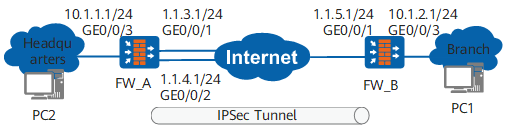
In Figure 1, the branch communicates with the headquarters over the Internet. To improve reliability, the headquarters uses link redundancy: The active link is the link for GigabitEthernet 0/0/1, and the standby link is the link for GigabitEthernet 0/0/2. If the active link fails, traffic is switched to the standby link.
The networking must meet the following requirements: Establish an IKE IPSec tunnel between FW_A and FW_B so that users on networks A and B can communicate with each other through the IPSec tunnel.
The enterprise requires that IPSec secure traffic transmitted between the branch and headquarters to prevent IPSec traffic interruptions during an active/standby link switchover. In addition, the enterprise wants decrypted packets to be checked. That is, if the packets should not be encrypted but have been encrypted, the packets are discarded.
Configuration Roadmap
The configuration roadmap is as follows:
- Perform basic configurations, including configuring interface IP addresses, routes, and security policies, to ensure that the headquarters and branch are routable.
Configure IPSec policies, including data flows to be encrypted and IPSec proposal negotiation parameters.
- Configure the headquarters to use the IPSec policy configured using an IPSec policy template to respond to authentication requests from the branch.
- Configure the branch to use the IPSec policy in ISAKMP mode to initiate authentication requests.
Configure the post-IPSec check function to check decrypted packets. If the packets should not be encrypted but have been encrypted, the packets are discarded. In addition, the system checks whether the interface that receives encrypted traffic is the interface that establishes an IPSec SA. If the two interfaces are different, the system discards the encrypted traffic.
However, if a link switchover occurs at the headquarters, and the interface that receives encrypted traffic is not the interface that establishes an IPSec SA, the headquarters discards the encrypted traffic. Therefore, both DPD detection and the function that checks whether the interface that receives encrypted traffic is the interface that establishes an IPSec SA must be configured at the headquarters. If the two interfaces are different, DPD packets are discarded and DPD detection becomes abnormal. This causes the IPSec SA to be deleted and triggers IKE re-negotiation.
Procedure
- Configure FW_A.
- Perform basic configurations, including configuring IP addresses for interfaces, adding interfaces to security zones, configuring inter-zone security policies, and configuring static routes.
# Configure IP addresses for interfaces.
<sysname> system-view
[sysname] sysname FW_A
[FW_A] interface GigabitEthernet 0/0/1
[FW_A-GigabitEthernet0/0/1] ip address 1.1.3.1 24
[FW_A-GigabitEthernet0/0/1] quit
[FW_A] interface GigabitEthernet 0/0/2
[FW_A-GigabitEthernet0/0/2] ip address 1.1.4.1 24
[FW_A-GigabitEthernet0/0/2] quit
[FW_A] interface GigabitEthernet 0/0/3
[FW_A-GigabitEthernet0/0/3] ip address 10.1.1.1 24
[FW_A-GigabitEthernet0/0/3] quit
[FW_A] interface Loopback 0
[FW_A-LoopBack0] ip address 2.2.2.2 24
[FW_A-LoopBack0] quit
# Add interfaces to trust zones.
[FW_A] firewall zone trust
[FW_A-zone-trust] add interface GigabitEthernet 0/0/3
[FW_A-zone-trust] quit
[FW_A] firewall zone untrust
[FW_A-zone-untrust] add interface GigabitEthernet 0/0/1
[FW_A-zone-untrust] add interface GigabitEthernet 0/0/2
[FW_A-zone-untrust] quit
# Configure inter-zone security policies between the trust zone and untrust zone.
[FW_A] security-policy
[FW_A-policy-security] rule name policy1
[FW_A-policy-security-rule-policy1] source-zone trust
[FW_A-policy-security-rule-policy1] destination-zone untrust
[FW_A-policy-security-rule-policy1] source-address 10.1.1.0 24
[FW_A-policy-security-rule-policy1] destination-address 10.1.2.0 24
[FW_A-policy-security-rule-policy1] action permit
[FW_A-policy-security-rule-policy1] quit
[FW_A-policy-security] rule name policy2
[FW_A-policy-security-rule-policy2] source-zone untrust
[FW_A-policy-security-rule-policy2] destination-zone trust
[FW_A-policy-security-rule-policy2] source-address 10.1.2.0 24
[FW_A-policy-security-rule-policy2] destination-address 10.1.1.0 24
[FW_A-policy-security-rule-policy2] action permit
[FW_A-policy-security-rule-policy2] quit
# Configure inter-zone security policies between the local zone and untrust zone.

The Local-Untrust interzone policy controls whether IKE negotiation packets can pass through the FW. This policy can use the source and destination addresses, protocol, or port as the matching condition. In this example, the source and destination addresses are used as the matching condition. To use the protocol or port as the matching condition, you need to enable ESP and port 500 for UDP (port 4500 also in NAT traversal scenarios).
[FW_A-policy-security] rule name policy3
[FW_A-policy-security-rule-policy3] source-zone local
[FW_A-policy-security-rule-policy3] destination-zone untrust
[FW_A-policy-security-rule-policy3] source-address 1.1.3.1 32
[FW_A-policy-security-rule-policy3] source-address 1.1.4.1 32
[FW_A-policy-security-rule-policy3] destination-address 1.1.5.1 32
[FW_A-policy-security-rule-policy3] action permit
[FW_A-policy-security-rule-policy3] quit
[FW_A-policy-security] rule name policy4
[FW_A-policy-security-rule-policy4] source-zone untrust
[FW_A-policy-security-rule-policy4] destination-zone local
[FW_A-policy-security-rule-policy4] source-address 1.1.5.1 32
[FW_A-policy-security-rule-policy4] destination-address 1.1.3.1 32
[FW_A-policy-security-rule-policy4] destination-address 1.1.4.1 32
[FW_A-policy-security-rule-policy4] action permit
[FW_A-policy-security-rule-policy4] quit
[FW_A-policy-security] quit
# Configure two static routes to the destination network B. Assume that the next-hop addresses of the two static routes are 1.1.3.2 and 1.1.4.2 respectively.
[FW_A] ip route-static 10.1.2.0 255.255.255.0 1.1.3.2 preference 40
[FW_A] ip route-static 10.1.2.0 255.255.255.0 1.1.4.2 preference 80
[FW_A] ip route-static 1.1.5.0 255.255.255.0 1.1.3.2 preference 40
[FW_A] ip route-static 1.1.5.0 255.255.255.0 1.1.4.2 preference 80
- Perform basic configurations, including configuring IP addresses for interfaces, adding interfaces to security zones, configuring inter-zone security policies, and configuring static routes.
- Configure FW_B.
- Verify the configuration.
After the preceding configurations are complete, run the ping command on PC1 to trigger IKE negotiation.
If IKE negotiation is successful, an IPSec tunnel can be established and PC1 can ping PC2 successfully. If IKE negotiation fails, no IPSec tunnel can be established and PC1 cannot ping PC2.
Run the display ike sa command to view SA establishment information. The following example is the command output of FW_A. Command output similar to the following indicates that an IKE SA and an IPSec SA have been established.
<FW_A> display ike sa IKE SA information : Conn-ID Peer VPN Flag(s) Phase RemoteType RemoteID ----------------------------------------------------------------------------- 16777239 1.1.5.1:500 RD|ST|A v2:2 IP 1.1.5.1 16777232 1.1.5.1:500 RD|ST|A v2:1 IP 1.1.5.1 Number of IKE SA : 2 ------------------------------------------------------------------------------- Flag Description: RD--READY ST--STAYALIVE RL--REPLACED FD--FADING TO--TIMEOUT HRT--HEARTBEAT LKG--LAST KNOWN GOOD SEQ NO. BCK--BACKED UP M--ACTIVE S--STANDBY A--ALONE NEG--NEGOTIATING- Shut down GigabitEthernet 0/0/1 of FW_A. Traffic is forwarded through GigabitEthernet 0/0/2, and PC1 and PC2 can ping each other successfully.
Configuration Files
FW_A configuration file
#
 sysname FW_A
#
ike dpd type periodic
ike dpd packet receive if-related enable
ike dpd msg seq-notify-hash
#
ipsec proposal tran1
 esp authentication-algorithm sha2-256
 esp encryption-algorithm aes-256
#
ike proposal 10
  encryption-algorithm aes-256
  dh group14
  authentication-algorithm sha2-256
  authentication-method pre-share
  integrity-algorithm hmac-sha2-256
  prf hmac-sha2-256
#
ike peer b
  pre-shared-key %@%@'OMi3SPl%@TJdx5uDE(44*I^%@%@
  ike-proposal 10
#
ipsec policy-template use1 10
 ike-peer b
 proposal tran1
#
ipsec policy map1 10 isakmp template use1
ipsec policy map2 10 isakmp template use1
#
interface GigabitEthernet0/0/1
 undo shutdown
 ip address 1.1.3.1 255.255.255.0
 ipsec policy map1
#
interface GigabitEthernet0/0/2
 undo shutdown
 ip address 1.1.4.1 255.255.255.0
 ipsec policy map2
#
interface GigabitEthernet0/0/3
 undo shutdown
 ip address 10.1.1.1 255.255.255.0
#
interface LoopBack0
 ip address 2.2.2.2 255.255.255.0
#
firewall zone trust
 set priority 85
 add interface GigabitEthernet0/0/3
#
firewall zone untrust
 set priority 5
 add interface GigabitEthernet0/0/1
 add interface GigabitEthernet0/0/2
#
ip route-static 1.1.5.0 255.255.255.0 1.1.3.2 preference 40
ip route-static 1.1.5.0 255.255.255.0 1.1.4.2 preference 80
ip route-static 10.1.2.0 255.255.255.0 1.1.3.2 preference 40
ip route-static 10.1.2.0 255.255.255.0 1.1.4.2 preference 80
#
security-policy
 rule name policy1
  source-zone trust
  destination-zone untrust
  source-address 10.1.1.0 mask 255.255.255.0
  destination-address 10.1.2.0 mask 255.255.255.0
  action permit
 rule name policy2
  source-zone untrust
  destination-zone trust
  source-address 10.1.2.0 mask 255.255.255.0
  destination-address 10.1.1.0 mask 255.255.255.0
  action permit
 rule name policy3
  source-zone local
  destination-zone untrust
  source-address 1.1.3.1 mask 255.255.255.255
  source-address 1.1.4.1 mask 255.255.255.255
  destination-address 1.1.5.1 mask 255.255.255.255
  action permit
 rule name policy4
  source-zone untrust
  destination-zone local
  source-address 1.1.5.1 mask 255.255.255.255
  destination-address 1.1.3.1 mask 255.255.255.255
  destination-address 1.1.4.1 mask 255.255.255.255
  action permit
#
return
FW_B configuration file
#
 sysname FW_B
#
ike dpd type periodic
ike dpd msg seq-notify-hash
#
acl number 3000
 rule 5 permit ip source 10.1.2.0 0.0.0.255 destination 10.1.1.0 0.0.0.255
#
ipsec proposal tran1
 esp authentication-algorithm sha2-256
 esp encryption-algorithm aes-256
#
ike proposal 10
  encryption-algorithm aes-256
  dh group14
  authentication-algorithm sha2-256
  authentication-method pre-share
  integrity-algorithm hmac-sha2-256
  prf hmac-sha2-256
#
ike peer a
 pre-shared-key %@%@W[QD:1tV\'f"!1W&yrX6v$B>%@%@
 ike-proposal 10
 remote-address 2.2.2.2
#
ipsec policy map1 10 isakmp
 security acl 3000
 ike-peer a
 proposal tran1
#
interface GigabitEthernet0/0/1
 undo shutdown
 ip address 1.1.5.1 255.255.255.0
 ipsec policy map1
#
interface GigabitEthernet0/0/3
 undo shutdown
 ip address 10.1.2.1 255.255.255.0
#
firewall zone trust
 set priority 85
 add interface GigabitEthernet0/0/3
#
firewall zone untrust
 set priority 5
 add interface GigabitEthernet0/0/1
#
ip route-static 0.0.0.0.0 0.0.0.0 1.1.5.2
#
security-policy
 rule name policy1
  source-zone trust
  destination-zone untrust
  source-address 10.1.2.0 mask 255.255.255.0
  destination-address 10.1.1.0 mask 255.255.255.0
  action permit
 rule name policy2
  source-zone untrust
  destination-zone trust
  source-address 10.1.1.0 mask 255.255.255.0
  destination-address 10.1.2.0 mask 255.255.255.0
  action permit
 rule name policy3
  source-zone local
  destination-zone untrust
  source-address 1.1.5.1 mask 255.255.255.255
  destination-address 1.1.3.1 mask 255.255.255.255
  destination-address 1.1.4.1 mask 255.255.255.255
  action permit
 rule name policy4
  source-zone untrust
  destination-zone local
  source-address 1.1.3.1 mask 255.255.255.255
  source-address 1.1.4.1 mask 255.255.255.255
  destination-address 1.1.5.1 mask 255.255.255.255
  action permit
#
return