CLI: Example for Configuring Local Certificate Application Using SCEP
Network Requirements
On an enterprise network shown in Figure 1, a firewall is located at the edge to function as the egress gateway. The FW uses SCEP to apply for a local certificate from the CA server located on the public network. The local certificate will be automatically downloaded to the device storage.
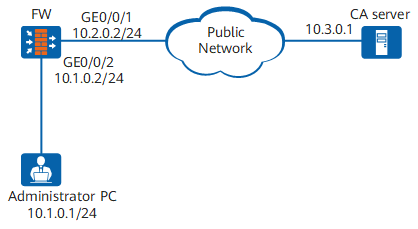

This example provides only the configurations on FW. For the configurations on the CA server, see the CA server product manual. In this example, the CA server runs Windows Server 2008 with the built-in Certification Services and with the SCEP plug-in installed.
Configuration Roadmap
The configuration roadmap is as follows:
- Assign IP addresses to interfaces and static routes to the CA server so that the FW and CA server can communicate with each other.
- Add interfaces to security zones and configure the inter-zone security policy.
- Create an RSA key pair so that the local certificate application request contains the public key.
- Configure the PKI entity and related information to identify the PKI entity.
- Configure certificate application and automatic update using SCEP so that the device automatically downloads CA and local certificates.
- Install the CA and local certificates to make the certificates effective. That is, the device can use the certificates to protect communication data.
Data Preparation
Obtain the fingerprint and challenge password from the CA server in offline mode.
For example, from a CA server running Windows Server 2008, you can obtain the digital fingerprint at http://host:port/certsrv/mscep_admin/, in which host indicates the server's IP address and port indicates the port number.
Procedure
- Assign IP addresses to interfaces and configure static routes to the CA server.
<sysname> system-view
[sysname] sysname FW
[FW] interface GigabitEthernet 0/0/1
[FW-GigabitEthernet0/0/1] ip address 10.2.0.2 255.255.255.0
[FW-GigabitEthernet0/0/1] quit
[FW] interface GigabitEthernet 0/0/2
[FW-GigabitEthernet0/0/2] ip address 10.1.0.2 255.255.255.0
[FW-GigabitEthernet0/0/2] quit
[FW] ip route-static 10.3.0.0 255.255.255.0 10.2.0.1
- Add interfaces to security zones and configure the inter-zone security policy.
[FW] firewall zone trust
[FW-zone-trust] set priority 85
[FW-zone-trust] add interface GigabitEthernet 0/0/2
[FW-zone-trust] quit
[FW] firewall zone untrust
[FW-zone-untrust] set priority 5
[FW-zone-untrust] add interface GigabitEthernet 0/0/1
[FW-zone-untrust] quit
- Create an RSA key pair.
# Create a 2048-bit RSA key pair named rsa_scep and allow it to be exported.
[FW] pki rsa local-key-pair create rsa_scep exportable
 Info: The name of the new key-pair will be: rsa_scep
 The size of the public key ranges from 2048 to 4096.
 Input the bits in the modules:2048
 Generating key-pairs...
...........+++
...........+++
- Configure a PKI entity to identify the certificate applicant.
# Configure the PKI entity user01.
[FW] pki entity user01
[FW-pki-entity-user01] common-name hello
[FW-pki-entity-user01] country cn
[FW-pki-entity-user01] email user@test.abc.com
[FW-pki-entity-user01] fqdn test.abc.com
[FW-pki-entity-user01] ip-address 10.2.0.2
[FW-pki-entity-user01] state jiangsu
[FW-pki-entity-user01] organization huawei
[FW-pki-entity-user01] organization-unit info
[FW-pki-entity-user01] quit
- Apply for and update the certificate using SCEP.
[FW] pki realm abc
[FW-pki-realm-abc] ca id ca_root
[FW-pki-realm-abc] entity user01
# Configure the fingerprint of the CA certificate, for example, D5A13C2C686628B273652E88A85EFDAF1BED600D.
[FW-pki-realm-abc] fingerprint sha1 D5A13C2C686628B273652E88A85EFDAF1BED600D
# Configure the URL for certificate enrollment and configure the PKI entity to apply for a certificate from the CA.
[FW-pki-realm-abc] enrollment-url http://10.3.0.1:80/certsrv/mscep/mscep.dll ra
# Specify the RSA key pair used to apply for certificate.
[FW-pki-realm-abc] rsa local-key-pair rsa_scep
# Configure the digest algorithm used in signature certificate registration request messages.
[FW-pki-realm-abc] enrollment-request signature message-digest-method sha1
# Set the challenge password, for example, 6AE73F21E6D3571D.
[FW-pki-realm-abc] password cipher 6AE73F21E6D3571D
[FW-pki-realm-abc] quit
# Obtain the CA certificate.
[FW] pki get-certificate ca realm abc
The CA certificates are named abc_ca.cer and stored in the CF card.
# Import the CA certificate to memory.
[FW] pki import-certificate ca realm abc pem filename abc_ca.cer
 The CA's Subject is /CN=ca_root
 The CA's fingerprint is:
   MD5  fingerprint:6DF2 CC66 6E6A 09A0 F590 F63B 80BA 017B
   SHA1 fingerprint:D5A1 3C2C 6866 28B2 7365 2E88 A85E FDAF 1BED 600D
 Is the fingerprint correct?(Y/N):y
 Info: Succeeded in importing file.
# Configures manual certificate enrollment.
[FW] pki enroll-certificate realm abcThe local certificates are named abc_local.cer and stored in the CF card.
# Import the local certificate to memory.
[FW] pki import-certificate local realm abc pem filename abc_local.cer
 Info: Succeeded in importing file.
# Enable automatic certificate enrollment and update: the PKI entity updates the certificate and RSA key pair when 60% of the certificate validity period has passed.
[FW] pki realm abc
[FW-pki-realm-abc] auto-enroll 60 regenerate 2048
[FW-pki-realm-abc] quit
- Verify the configuration.
Configuration Files
#
sysname FW
#
pki entity user01
 country CN
 state jiangsu
 organization huawei
 organization-unit info
 common-name hello
 fqdn test.abc.com
 ip-address 10.2.0.2
 email user@test.abc.com
#
pki realm abc
 ca id ca_root
 enrollment-url http://10.3.0.1:80/certsrv/mscep/mscep.dll ra
 entity user01
 fingerprint sha1 D5A13C2C686628B273652E88A85EFDAF1BED600D
 rsa local-key-pair rsa_scep
 password cipher %$%$\1HN-bn(k;^|O85OAtYF3(M4%$%$
 auto-enroll 60 regenerate
 enrollment-request signature message-digest-method sha1
#
interface GigabitEthernet0/0/1
 ip address 10.2.0.2 255.255.255.0
interface GigabitEthernet0/0/2
 ip address 10.1.0.2 255.255.255.0
#
firewall zone trust
 set priority 85
 add interface GigabitEthernet0/0/2
firewall zone untrust
 set priority 5
 add interface GigabitEthernet0/0/1
#
ip route-static 10.3.0.0 255.255.255.0 10.2.0.1
#
return