Implementation
DSVPN establishes tunnels based on mGRE and NHRP to implement direct communication between Spokes. Unlike GRE, mGRE does not need to define the destination tunnel address during tunnel setup. Instead, mGRE obtains the destination tunnel address through NHRP, making it possible to set up tunnels between Spokes with dynamic addresses.
When the device forwards an IP packet, it sends the IP packet to the mGRE tunnel interface based on the routing table. mGRE queries and obtains the remote public address mapping the next-hop address in the NHRP mapping table. mGRE adds a new IP header to the IP packet in which the destination address is the remote public address. Then the IP packet can be sent to the remote end over the tunnel.
The NHRP mapping table and routing table are the basis for tunnel setup when mGRE and NHRP are deployed. If a Spoke has a route to the remote Spoke and the NHRP mapping entry between the tunnel address or subnet address of the remote Spoke and public address, an mGRE tunnel can be set up between Spokes. At the beginning, a Spoke has only the route to the Hub and one static NHRP mapping entry between the tunnel address of the Hub and public address. Spokes cannot establish tunnels directly. They have to learn routes to each other through the Hub and generate NHRP mapping entries between tunnel addresses or subnet addresses and public addresses. There are three processes:
Establishing mGRE Tunnels Between Spokes and the Hub
After mGRE tunnels are set up between Spokes and the Hub, packets of one Spoke can be forwarded to the remote Spoke through the Hub.
DSVPN establishes a static mGRE tunnel between a Spoke and the Hub. This tunnel always exists regardless of whether there is traffic between the Spoke and Hub.
Learning Routes Between Spokes
The route from one Spoke to the remote Spoke is generated.
Establishing mGRE Tunnels Between Spokes
mGRE tunnels are set up so that Spokes can communicate directly. When one Spoke forwards data packets to the other Spoke and the source Spoke cannot find the public address of the destination Spoke, DSVPN establishes an mGRE tunnel between Spokes.
The mGRE tunnel between Spokes is a dynamic tunnel. When there is traffic between Spokes, the tunnel keeps connected automatically. When there is no traffic between Spokes during a period of time, the tunnel is terminated automatically.
When an mGRE tunnel is established between Spokes, data packets between Spokes are directly forwarded over this mGRE tunnel and do not pass through the Hub.
Establishing mGRE Tunnels Between Spokes and the Hub
At the beginning, the Hub has no NHRP mapping entry, and the Spoke has the route to the Spoke and a static mapping entry between the tunnel address of the Hub and public address. To establish mGRE tunnels between Spokes and the Hub, the Hub needs to generate NHRP mapping entries between tunnel addresses of the Spokes and public addresses. The Spokes initiate NHRP registration to the Hub so that entries can be generated. Figure 1 shows the process.
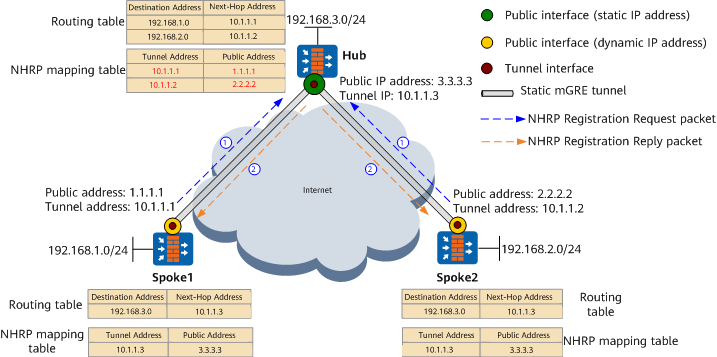
Spokes send NHRP Registration Request packets to the Hub.
After the administrator manually configures the Hub's tunnel address and public address on the Spokes, the Spokes periodically send NHRP Registration Request packets to the Hub. The packets carry the Spokes' tunnel addresses and public addresses.
The Hub responds to NHRP Registration Request packets of the Spokes.
The Hub obtains the Spokes' tunnel addresses and public addresses from NHRP Registration Request packets (fonts in red in Figure 1), generates NHRP mapping entries, and establishes mGRE tunnels.
The Spokes periodically send NHRP Registration Request packets to the Hub. When receiving a registration packet from a Spoke, the Hub resets the aging timer of the matching NHRP mapping entry to maintain the tunnel with the Spoke.
Learning Routes Between Spokes
Route learning between Spokes (non-shortcut mode)
The next-hop address of the route from the source Spoke to the destination Spoke is the tunnel address of the destination Spoke (see the routing table in Figure 2), and each Spoke needs to learn the route to the remote end. This consumes many CPU and memory resources and requires large routing tables and high performance on Spokes. In practice, the Spokes have low performance and store a limited number of routes. The route learning solution applies to small- and medium-sized networks where there are fewer network nodes and a small number of routes.
Spoke routes summarized to the Hub (shortcut mode)
The next-hop address of the route from the source Spoke to the destination Spoke is the tunnel address of the Hub (see the routing table in Figure 3). In this way, all traffic destined for the destination Spoke is directed to the Hub. Spokes do not need to learn routes from each other. The Hub aggregates Spoke's routes and advertises the aggregated routes. This route learning solution applies to large-sized networks with many Spokes.
Establishing mGRE Tunnels Between Spokes
- Non-shortcut: The source Spoke can learn the tunnel address of the destination Spoke. The source Spoke can query the destination Spoke's public address based on destination Spoke's tunnel address and generate the NHRP mapping entry between the destination Spoke's tunnel address and public address.
- Shortcut: Next-hop addresses of all Spokes are the Hub's tunnel address, and the source Spoke cannot learn the tunnel address of the destination Spoke. The source Spoke can query the destination Spoke's public address based on destination address of packets and generate the NHRP mapping entry between the destination Spoke's subnet address and public address.
Figure 2 and Figure 3 describe the processes.
Establishing an mGRE tunnel between Spokes in non-shortcut mode
Figure 2 shows the mGRE tunnel setup between Spokes in non-shortcut mode.
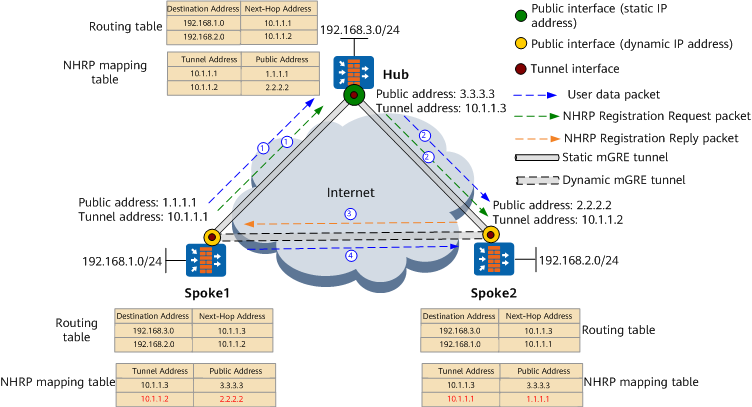
When a user on Spoke1 first accesses a user on Spoke2, the setup of a dynamic mGRE tunnel between Spoke1 and Spoke2 is triggered. The tunnel setup process is as follows.
- After Spoke1 receives a data packet destined for Spoke2:
- Spoke1 finds next-hop address 10.1.1.2 (tunnel address of Spoke2) based on destination address 192.168.2.0 of the data packet, but no NHRP mapping entry defines the public address mapping 10.1.1.2. Spoke1 directly forwards the data packet to the Hub by default.
- Spoke1 constructs and sends an NHRP Resolution Request packet to the Hub, requesting for the public address mapping 10.1.1.2.
After the Hub receives the data packet and NHRP Resolution Request packet from Spoke1, it forwards the packets to Spoke2 through the mGRE tunnel between them.
After Spoke2 receives the NHRP Resolution Request packet:
- Spoke2 obtains the tunnel address and public address of Spoke1 from the NHRP Resolution Request packet, and updates such information in its NHRP mapping table (see fonts in red in Figure 2).
- Spoke2 constructs and sends an NHRP Resolution Reply packet that carries tunnel address 10.1.1.2 and public address 2.2.2.2 of Spoke2.
After Spoke1 receives the NHRP Resolution Reply packet, it obtains the tunnel address and public address of Spoke2 from the NHRP Resolution Reply packet, and updates its NHRP mapping table (see fonts in red in Figure 2). A dynamic mGRE tunnel between Spoke1 and Spoke2 is set up.
When Spoke1 receives a data packet destined for Spoke2 again, it finds next-hop address 10.1.1.2 in the routing table based on destination address 192.168.2.0 of the data packet and public address 2.2.2.2 mapping 10.1.1.2 in the NHRP mapping table. Then Spoke1 adds an mGRE header to the data packet based on public address 2.2.2.2 and directly forwards it to Spoke2.
Establishing an mGRE tunnel between Spokes in shortcut mode
Figure 3 shows the mGRE tunnel setup between Spokes in shortcut mode.
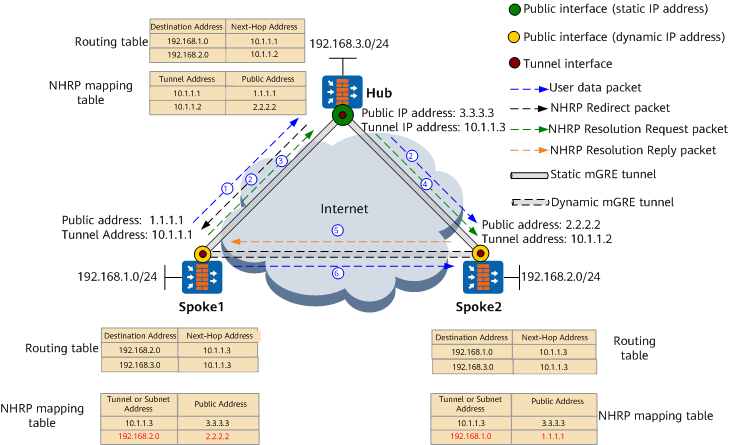
When a user on Spoke1 first accesses a user on Spoke2, the setup of a dynamic mGRE tunnel between Spoke1 and Spoke2 is triggered. The tunnel setup process is as follows.
When Spoke1 receives a data packet destined for Spoke2, it finds next-hop address 10.1.1.3 (tunnel address of the Hub) based on destination address 192.168.2.0 of the data packet and public address 3.3.3.3 mapping 10.1.1.3 (public address of the Hub) in the NHRP mapping table. Then Spoke1 forwards the data packet to the Hub.
- After the Hub receives the data packet forwarded by Spoke1:
- The Hub forwards the data packet to Spoke2 over the mGRE tunnel between the Hub and Spoke2.
- The Hub finds that the tunnel interfaces receiving and sending the data packet belong to the same NHRP domain (see nhrp network-id). It constructs and sends an NHRP Redirect packet to Spoke1. The packet carries the tunnel address and public address of the Hub, and destination address 192.168.2.0 of the data packet to be resolved.
After Spoke1 receives the NHRP Redirect packet, it constructs and sends an NHRP Resolution Request packet to the Hub. The packet carries tunnel address 10.1.1.1 and public address 1.1.1.1 of Spoke1, and destination address 192.168.2.0 of the data packet to be resolved.
The Hub forwards the received NHRP Resolution Request packet to Spoke2.
- After Spoke2 receives the NHRP Resolution Request packet:
- Spoke2 obtains the subnet address and public address of Spoke1 from the NHRP Resolution Request packet, and updates its NHRP mapping table (see fonts in red in Figure 3).
- Spoke2 constructs and sends an NHRP Resolution Reply packet that carries the subnet address 192.168.2.0, tunnel address 10.1.1.2, and public address 2.2.2.2 of Spoke2.
After Spoke1 receives the NHRP Resolution Reply packet, it obtains the subnet address and public address of Spoke2 from the NHRP Resolution Reply packet, and updates its NHRP mapping table (see fonts in red in Figure 3). A dynamic mGRE tunnel between Spoke1 and Spoke2 is set up.
When Spoke1 receives a data packet destined for Spoke2 again, it searches the NHRP mapping table for Spoke2's public address 2.2.2.2 based on destination address 192.168.2.0 of the data packet. Then Spoke1 adds an mGRE header to the data packet based on public address 2.2.2.2 and directly forwards it to Spoke2.
When a user on Spoke2 first accesses a user on Spoke1, the setup of a dynamic mGRE tunnel between Spoke2 and Spoke1 is also triggered. The tunnel setup process is similar to that when a user on Spoke1 first accesses a user on Spoke2.