DHCP over IPSec
In an LTE scenario, an eNodeB on an insecure access network needs to obtain a private IP address from the DHCP server on the aggregation network. The eNodeB uses this IP address to connect to the M2000, establish a temporary OM channel, and obtain OM configurations. The eNodeB and the DHCP server are not on the same network, so the gateway of the aggregation network needs to have the DHCP relay function enabled. To prevent DHCP messages from being eavesdropped, modified, or forged on the insecure access network, you can use IPSec to authenticate and encrypt DHCP messages.
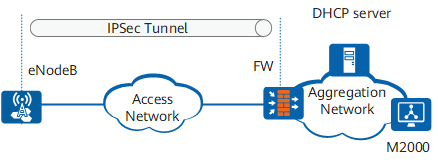
Figure 1 shows a typical DHCP over IPSec network. The FW serves as the gateway on the aggregation network. DHCP over IPSec is deployed on the eNodeB and FW, and an IPSec tunnel is set up between them. Then the FW serves as a DHCP relay agent to forward DHCP messages between the DHCP client (eNodeB) and the DHCP server.
The eNodeB and FW negotiate an IKE SA in main or aggressive mode.
The eNodeB and FW negotiate IPSec SAs in phase 2 in quick mode. The IPSec SAs are used only to protect DHCP messages between the eNodeB and FW.
The eNodeB sends a DHCP Discover message to request for an IP address from the DHCP server. The FW forwards the DHCP Discover message to the DHCP server. The DHCP Discover message is encrypted and transmitted along the IPSec tunnel.
The DHCP server responds with a DHCP Offer message, which is forwarded by the FW. The DHCP server is located on the secure aggregation network, so the DHCP Offer message transmitted between the DHCP server and FW is not encrypted.
After DHCP interaction is complete, the eNodeB obtains a dynamic IP address. Then the eNodeB and FW negotiate new IPSec SAs to protect service traffic on the eNodeB.

In Figure 1, the DHCP server can assign only a private IP address to the eNodeB and cannot assign a public IP address.