IKEv2 + EAP Authentication
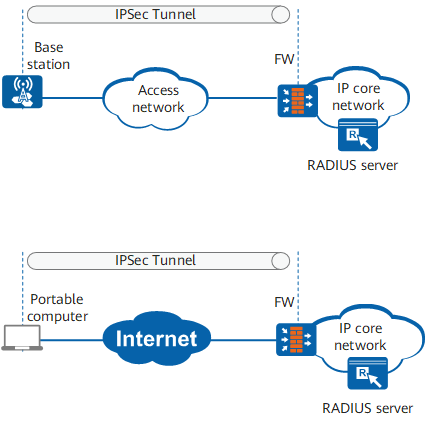
As shown in Figure 1, a wireless device remotely connects to the IP core network through a base station or a portable computer remotely connects to the IP core network through the Internet. The base station or portable computer establishes an IPSec tunnel with the gateway FW of the IP core network to securely transmit data. The base station uses Extensible Authentication Protocol (EAP) to connect to the headquarters gateway, and the EAP authentication server (RADIUS server in this example) is deployed on the IP core network. EAP authentication packets are encapsulated into IKE packets.
IKEv2 and EAP authentication can be used together. IKEv2 provides identity authentication on the negotiation initiator in EAP mode. IKEv2 does not set authentication data in IKE_AUTH exchange message (3) to indicate that EAP authentication is required. During the IKE_AUTH exchange, EAP authentication packets are transmitted to the FW as the authentication payload in IKEv2 packets. The FW extracts the EAP payload from the IKEv2 packets and forwards the EAP authentication packets to the RADIUS server. The RADIUS server performs EAP authentication. After EAP authentication is successful, IKEv2 allows the base station and FW to set up an IPSec tunnel.
Compared to L2TP over IPSec, this mode is easier to configure and faster in negotiation.

EAP is an authentication framework supporting more than 20 authentication mechanisms. The device currently supports EAP-MD5. When the remote access terminal is a PC, EAP-MD5 is used for EAP authentication.