PKI Application in SSL VPN
On the network shown in Figure 1, travelling employees access the company's internal network through SSL VPN. They can enter user names and passwords to access the internal network, but this method has a low security. If the user name and password of an employee are eavesdropped by malicious attackers, the attackers can access the internal network and access internal resources. To improve internal network security, the firewall authenticates users using PKI certificates.
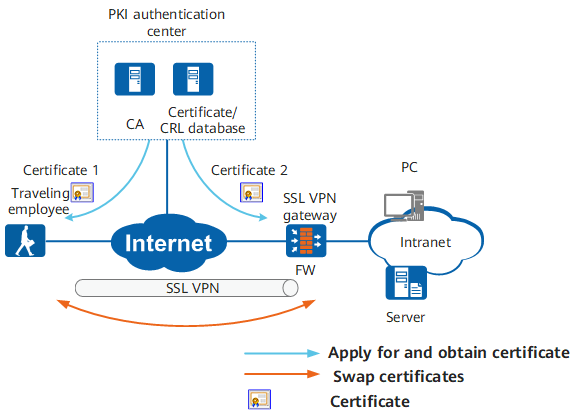
The process of using PKI certificates in SSL VPN is as follows:
- The client and server apply for local certificates from the PKI authentication center.
- The PKI authentication center issues local certificates to the client and server.
- The client requests to set up an SSL connection with the SSL VPN gateway.
- The client authenticates the local certificate of the SSL VPN gateway. After verification is successful, the client sets up an SSL connection with the gateway.
- The SSL VPN gateway authenticates the client in anonymous or challenge mode. In anonymous authentication, the device verifies only the client certificate. In challenge mode, the device verifies the client certificate, user name, and password.
- The client logs in successfully and accesses the internal network.
Using the certificates, the SSL VPN client can authenticate the SSL VPN gateway, and the SSL VPN gateway can also authenticate the client.