malicious url-filter enable
Function
The malicious url-filter enable command enables malicious URL detection.
The undo malicious url-filter enable command disables malicious URL detection.
Usage Guidelines
The malicious URL detection function is disabled by default.
After this function is enabled, the URL filtering function inspects the following traffic based on these malicious URLs, enhancing detection capabilities.
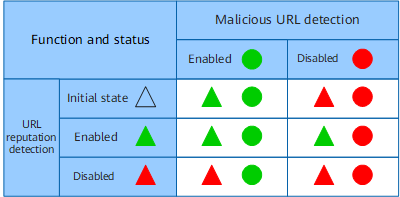
In addition, when URL reputation detection is in the initial state, whether URL reputation detection can be enabled depends on malicious URL detection. Figure 1 describes the status of URL reputation detection and malicious URL detection when URL reputation detection is not in the initial state.