Configuring the Flow Probe Using the Web UI
This section describes how to use the web UI to configure the flow probe.
Procedure
- Choose .
- Configure the parameters for interconnecting the flow probe with the HiSec Insight server as follows.
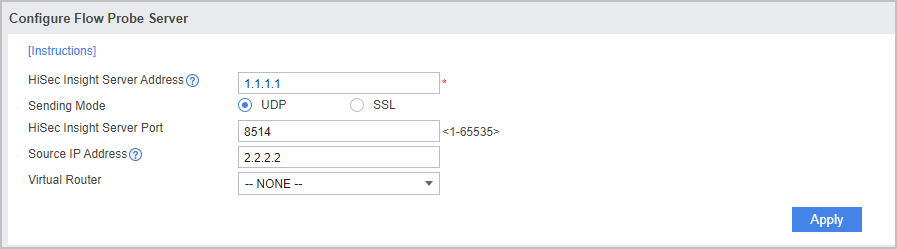
Parameter
Description
HiSec Insight Server Address
Indicates the IP address of the HiSec Insight server.
- HiSec Insight of the standard edition: This IP address is the data dispatcher management plane IP address of the HiSec Insight system. Multiple such addresses may exist. You can select any one of them.
- HiSec Insight of the small-scale edition: The IP address is the Big Data cluster server management plane IP address of the HiSec Insight system. Multiple such addresses may exist. You can select any one of them.
Sending Mode
Indicates the mode in which the flow probe sends collected data to the HiSec Insight server. In UDP mode, the data transmission efficiency is high, but the data is transmitted in plain text. In SSL mode, the data transmission efficiency is lower than that in UDP mode, but the data is transmitted in cipher text, delivering high security.
If you select SSL, you must set the certificate. This certificate verifies the server certificate of the HiSec Insight system and can be obtained from the HiSec Insight system.
HiSec Insight Server Port
Indicates the port through which the HiSec Insight server receives collected data.
The default port is 8514 for UDP and 8443 for SSL.
Source IP Address
Indicates the source IP address for the flow probe to send collected data to the HiSec Insight server. This IP address corresponds to the device interface IP address. Ensure that this IP address is reachable to the HiSec Insight server.
Virtual Router
Indicates the bound virtual router, which can be the VPN instance name.
- Click Apply.
- Click Add in Flow Probe Policy List to add a flow probe policy.
A default flow probe policy with the action being No Detection exists.
Parameter
Description
Name
Indicates the name of a flow probe policy.
Description
Indicates the description on the usage of a flow probe policy.
Tag
Indicates the tag that identifies and categorizes a policy. You can query policies according to tags and perform batch operations such as deleting, moving, enabling, and disabling. For the tag description and configuration, see Tag.
Source Zone
Indicates the security zone from which traffic originates.
Destination Zone
Indicates the security zone to which traffic is destined.
Source Address
Indicates the source IP address of traffic.
You can manually enter IP addresses or select an existing address object from the dropdown list.
The drop-down list includes the following types of address objects:
 stands for an independent IP address or IP address range.
 stands for an address group. You can specify an IP address range that cannot be represented by a single mask. For details, see Address Object and Address Group.
NOTE:- The policy supports the configuration of the exception source address/address group (that is, traffic matching the policy source address/address group skips and is not controlled by this policy). The exception source address/address group is usually used to exclude certain addresses from a wide network segment.
Select addresses or address groups from the available address area, select them in the selected address area and click Invert, and then click OK.
- The addresses or address groups cannot contain IPv6 addresses.
Destination Address
Indicates the destination IP address of traffic. Destination addresses define the hosts and servers that can be accessed.
You can manually enter IP addresses or select an existing address object from the dropdown list.
The drop-down list includes the following types of address objects: stands for an independent IP address or IP address range.
 stands for an address group. You can specify an IP address range that cannot be represented by a single mask. For details, see Address Object and Address Group.
NOTE:- The policy supports the configuration of the exception destination address/address group (that is, traffic matching the policy destination address/address group skips and is not controlled by this policy). The exception destination address/address group is usually used to exclude certain addresses from a wide network segment.
Select addresses or address groups from the available address area, select them in the selected address area and click Invert, and then click OK.
- The addresses or address groups cannot contain IPv6 addresses.
Service
A service indicates the protocol type of the traffic. Services can be predefined or user-defined.
Predefined services exist in the system by default and can be selected directly. Predefined services are well-known services, such as HTTP, FTP, and Telnet.
You can also define services as needed. User-defined services are configured by specifying information such as port number. User-defined services fall into three types and the configuration methods are described as follows:
- For TCP/UDP packets, you must specify the source and destination ports.
- For ICMP packets, you must specify the ICMP message type and code.
- For IP packets, you must specify the protocol number in the IP header.
You can also create a service group and add predefined and user-defined services to the group.
For service and service group configurations, see Service and Service Group.
NOTE:The policy supports the configuration of the exception service or service group (that is, traffic matching the service or service group skips and is not controlled by this policy).
Select services or service groups from the available service area, select them in the selected service area and click Invert, and then click OK.
Action
Indicates the information collection item of the flow probe.
- Network Layer Detection: indicates that the flow probe collects only network-layer and transport-layer data of traffic.
- Application Layer Detection: indicates that the flow probe collects only application-layer data of traffic. For encrypted traffic, you usually need to collect the application-layer information of the traffic.
Network Layer and Application Layer Detection (Including Encrypted Communication Analytics): indicates that the flow probe collects network-layer, transport-layer, and application-layer data of traffic.
This action applies to both non-encrypted traffic and encrypted traffic. For the collection of encrypted traffic information, the Encrypted Communication Analytics (ECA) function can be used. This function does not need to decrypt traffic. Instead, it collects SSL protocol negotiation information, packet statistics information, and DNS and HTTP protocol information of the traffic. Then it sends the information to the HiSec Insight in metadata format. The HiSec Insight analyzes and assesses the information to identify malicious encrypted traffic.
If you do not want to collect encrypted traffic information, you can configure a flow probe policy to exclude encrypted traffic by specifying match conditions.
- No Detection: indicates that the flow probe does not collect any information about traffic.